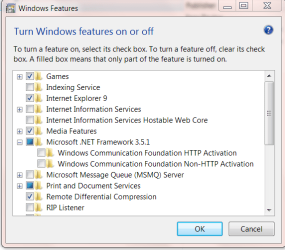
Here is a tool to check what .NET versions are installed and can be verified they are OK. It will only list the versions that are installed.
.NET Framework Setup Verification Tool User's Guide - Aaron Stebner's WebLog - Site Home - MSDN Blogs
View attachment 149899
Jim

I ran that, just out of curiosity, here is the log;
======================================================================
[04/18/11,19:04:14] Beginning of new SetupVerifier activity logging session
[04/18/11,19:04:14] Activity log file location: C:\Users\mike\AppData\Local\Temp\setupverifier_main_04-18-11_19.04.14.txt
[04/18/11,19:04:14] Error log file location: C:\Users\mike\AppData\Local\Temp\setupverifier_errors_04-18-11_19.04.14.txt
[04/18/11,19:04:14] Build created on January 17, 2011
[04/18/11,19:04:14] Detected operating system: Windows 7 (x64)
[04/18/11,19:04:14] Install state for .NET Framework 1.0: not installed.
[04/18/11,19:04:14] Install state for .NET Framework 1.1: not installed.
[04/18/11,19:04:14] Install state for .NET Framework 2.0: installed with service pack 2.
[04/18/11,19:04:14] Install state for .NET Framework 3.0: installed with service pack 2.
[04/18/11,19:04:14] Install state for .NET Framework 3.5: installed with service pack 1.
[04/18/11,19:04:14] Install state for .NET Framework 4 Client: installed with no service packs.
[04/18/11,19:04:14] Install state for .NET Framework 4 Full: installed with no service packs.
[04/18/11,19:04:14] Not adding product '.NET Framework 1.0' because it is not currently installed
[04/18/11,19:04:14] Not adding product '.NET Framework 1.1' because it is not currently installed
[04/18/11,19:04:14] Not adding product '.NET Framework 1.1 SP1' because it is not currently installed
[04/18/11,19:04:14] Not adding product '.NET Framework 2.0' because it is not currently installed
[04/18/11,19:04:14] Not adding product '.NET Framework 2.0 SP1' because it is not currently installed
[04/18/11,19:04:14] Not adding product '.NET Framework 3.0' because it is not currently installed
[04/18/11,19:04:14] Not adding product '.NET Framework 3.0 SP1' because it is not currently installed
[04/18/11,19:04:14] Not adding product '.NET Framework 3.5' because it is not currently installed
[04/18/11,19:04:26] Starting verification for product .NET Framework 2.0 SP2
[04/18/11,19:04:26] Section [Files - .NET Framework 2.0 (Common)] - start parsing entries
[04/18/11,19:04:26] File C:\Windows\system32\mscoree.dll (version 4.0.40305.0) is installed on the system
[04/18/11,19:04:26] File C:\Windows\system32\dfshim.dll (version 4.0.40305.0) is installed on the system
[04/18/11,19:04:26] File C:\Windows\system32\mscorier.dll (version 2.0.50727.5420) is installed on the system
[04/18/11,19:04:26] File C:\Windows\system32\mscories.dll (version 2.0.50727.5420) is installed on the system
[04/18/11,19:04:26] File C:\Windows\system32\MUI\0409\mscorees.dll (version 4.0.40305.0) is installed on the system
[04/18/11,19:04:26] File C:\Windows\Assembly\GAC_32\CustomMarshalers\2.0.0.0__b03f5f7f11d50a3a\CustomMarshalers.dll (version 2.0.50727.5420) is installed on the system
[04/18/11,19:04:26] File C:\Windows\Assembly\GAC_32\ISymWrapper\2.0.0.0__b03f5f7f11d50a3a\ISymWrapper.dll (version 2.0.50727.5420) is installed on the system
[04/18/11,19:04:26] File C:\Windows\Assembly\GAC_32\mscorlib\2.0.0.0__b77a5c561934e089\big5.nlp (no version info) is installed on the system
[04/18/11,19:04:26] File C:\Windows\Assembly\GAC_32\mscorlib\2.0.0.0__b77a5c561934e089\bopomofo.nlp (no version info) is installed on the system
[04/18/11,19:04:26] File C:\Windows\Assembly\GAC_32\mscorlib\2.0.0.0__b77a5c561934e089\ksc.nlp (no version info) is installed on the system
[04/18/11,19:04:26] File C:\Windows\Assembly\GAC_32\mscorlib\2.0.0.0__b77a5c561934e089\mscorlib.dll (version 2.0.50727.5444) is installed on the system
[04/18/11,19:04:26] File C:\Windows\Assembly\GAC_32\mscorlib\2.0.0.0__b77a5c561934e089\normidna.nlp (no version info) is installed on the system
[04/18/11,19:04:26] File C:\Windows\Assembly\GAC_32\mscorlib\2.0.0.0__b77a5c561934e089\normnfc.nlp (no version info) is installed on the system
[04/18/11,19:04:26] File C:\Windows\Assembly\GAC_32\mscorlib\2.0.0.0__b77a5c561934e089\normnfd.nlp (no version info) is installed on the system
[04/18/11,19:04:26] File C:\Windows\Assembly\GAC_32\mscorlib\2.0.0.0__b77a5c561934e089\normnfkc.nlp (no version info) is installed on the system
[04/18/11,19:04:26] File C:\Windows\Assembly\GAC_32\mscorlib\2.0.0.0__b77a5c561934e089\normnfkd.nlp (no version info) is installed on the system
[04/18/11,19:04:26] File C:\Windows\Assembly\GAC_32\mscorlib\2.0.0.0__b77a5c561934e089\prc.nlp (no version info) is installed on the system
[04/18/11,19:04:26] File C:\Windows\Assembly\GAC_32\mscorlib\2.0.0.0__b77a5c561934e089\prcp.nlp (no version info) is installed on the system
[04/18/11,19:04:26] File C:\Windows\Assembly\GAC_32\mscorlib\2.0.0.0__b77a5c561934e089\sortkey.nlp (no version info) is installed on the system
[04/18/11,19:04:26] File C:\Windows\Assembly\GAC_32\mscorlib\2.0.0.0__b77a5c561934e089\sorttbls.nlp (no version info) is installed on the system
[04/18/11,19:04:26] File C:\Windows\Assembly\GAC_32\mscorlib\2.0.0.0__b77a5c561934e089\xjis.nlp (no version info) is installed on the system
[04/18/11,19:04:26] File C:\Windows\Assembly\GAC_32\System.Data.OracleClient\2.0.0.0__b77a5c561934e089\System.Data.OracleClient.dll (version 2.0.50727.5420) is installed on the system
[04/18/11,19:04:26] File C:\Windows\Assembly\GAC_32\System.Data\2.0.0.0__b77a5c561934e089\System.Data.dll (version 2.0.50727.5420) is installed on the system
[04/18/11,19:04:26] File C:\Windows\Assembly\GAC_32\System.EnterpriseServices\2.0.0.0__b03f5f7f11d50a3a\System.EnterpriseServices.dll (version 2.0.50727.5420) is installed on the system
[04/18/11,19:04:26] File C:\Windows\Assembly\GAC_32\System.EnterpriseServices\2.0.0.0__b03f5f7f11d50a3a\System.EnterpriseServices.Wrapper.dll (version 2.0.50727.5420) is installed on the system
[04/18/11,19:04:26] File C:\Windows\Assembly\GAC_32\System.Transactions\2.0.0.0__b77a5c561934e089\System.Transactions.dll (version 2.0.50727.4927) is installed on the system
[04/18/11,19:04:26] File C:\Windows\Assembly\GAC_32\System.Web\2.0.0.0__b03f5f7f11d50a3a\System.Web.dll (version 2.0.50727.5420) is installed on the system
[04/18/11,19:04:26] File C:\Windows\Assembly\GAC_MSIL\Accessibility\2.0.0.0__b03f5f7f11d50a3a\Accessibility.dll (version 2.0.50727.4927) is installed on the system
[04/18/11,19:04:26] File C:\Windows\Assembly\GAC_MSIL\cscompmgd\8.0.0.0__b03f5f7f11d50a3a\cscompmgd.dll (version 8.0.50727.4927) is installed on the system
[04/18/11,19:04:26] File C:\Windows\Assembly\GAC_MSIL\IEExecRemote\2.0.0.0__b03f5f7f11d50a3a\IEExecRemote.dll (version 2.0.50727.4927) is installed on the system
[04/18/11,19:04:26] File C:\Windows\Assembly\GAC_MSIL\IEHost\2.0.0.0__b03f5f7f11d50a3a\IEHost.dll (version 2.0.50727.4927) is installed on the system
[04/18/11,19:04:26] File C:\Windows\Assembly\GAC_MSIL\IIEHost\2.0.0.0__b03f5f7f11d50a3a\IIEHost.dll (version 2.0.50727.4927) is installed on the system
[04/18/11,19:04:27] File C:\Windows\Assembly\GAC_MSIL\Microsoft.Build.Engine\2.0.0.0__b03f5f7f11d50a3a\Microsoft.Build.Engine.dll (version 2.0.50727.5420) is installed on the system
[04/18/11,19:04:27] File C:\Windows\Assembly\GAC_MSIL\Microsoft.Build.Framework\2.0.0.0__b03f5f7f11d50a3a\Microsoft.Build.Framework.dll (version 2.0.50727.5420) is installed on the system
[04/18/11,19:04:27] File C:\Windows\Assembly\GAC_MSIL\Microsoft.Build.Tasks\2.0.0.0__b03f5f7f11d50a3a\Microsoft.Build.Tasks.dll (version 2.0.50727.5420) is installed on the system
[04/18/11,19:04:27] File C:\Windows\Assembly\GAC_MSIL\Microsoft.Build.Utilities\2.0.0.0__b03f5f7f11d50a3a\Microsoft.Build.Utilities.dll (version 2.0.50727.5420) is installed on the system
[04/18/11,19:04:27] File C:\Windows\Assembly\GAC_MSIL\Microsoft.JScript\8.0.0.0__b03f5f7f11d50a3a\Microsoft.JScript.dll (version 8.0.50727.4927) is installed on the system
[04/18/11,19:04:27] File C:\Windows\Assembly\GAC_MSIL\Microsoft.VisualBasic.Compatibility.Data\8.0.0.0__b03f5f7f11d50a3a\Microsoft.VisualBasic.Compatibility.Data.dll (version 8.0.50727.4927) is installed on the system
[04/18/11,19:04:27] File C:\Windows\Assembly\GAC_MSIL\Microsoft.VisualBasic.Compatibility\8.0.0.0__b03f5f7f11d50a3a\Microsoft.VisualBasic.Compatibility.dll (version 8.0.50727.5420) is installed on the system
[04/18/11,19:04:27] File C:\Windows\Assembly\GAC_MSIL\Microsoft.VisualBasic.Vsa\8.0.0.0__b03f5f7f11d50a3a\Microsoft.VisualBasic.Vsa.dll (version 8.0.50727.4927) is installed on the system
[04/18/11,19:04:27] File C:\Windows\Assembly\GAC_MSIL\Microsoft.VisualBasic\8.0.0.0__b03f5f7f11d50a3a\Microsoft.VisualBasic.dll (version 8.0.50727.5420) is installed on the system
[04/18/11,19:04:27] File C:\Windows\Assembly\GAC_MSIL\Microsoft.VisualC\8.0.0.0__b03f5f7f11d50a3a\Microsoft.VisualC.Dll (version 8.0.50727.4927) is installed on the system
[04/18/11,19:04:27] File C:\Windows\Assembly\GAC_MSIL\Microsoft.Vsa.Vb.CodeDOMProcessor\8.0.0.0__b03f5f7f11d50a3a\Microsoft.Vsa.Vb.CodeDOMProcessor.dll (version 8.0.50727.4927) is installed on the system
[04/18/11,19:04:27] File C:\Windows\Assembly\GAC_MSIL\Microsoft.Vsa\8.0.0.0__b03f5f7f11d50a3a\Microsoft.Vsa.dll (version 8.0.50727.4927) is installed on the system
[04/18/11,19:04:27] File C:\Windows\Assembly\GAC_MSIL\Microsoft_VsaVb\8.0.0.0__b03f5f7f11d50a3a\Microsoft_VsaVb.dll (version 8.0.50727.4927) is installed on the system
[04/18/11,19:04:27] File C:\Windows\Assembly\GAC_MSIL\sysglobl\2.0.0.0__b03f5f7f11d50a3a\sysglobl.dll (version 2.0.50727.4927) is installed on the system
[04/18/11,19:04:27] File C:\Windows\Assembly\GAC_MSIL\System.Configuration.Install\2.0.0.0__b03f5f7f11d50a3a\System.Configuration.Install.dll (version 2.0.50727.5420) is installed on the system
[04/18/11,19:04:27] File C:\Windows\Assembly\GAC_MSIL\System.Configuration\2.0.0.0__b03f5f7f11d50a3a\System.configuration.dll (version 2.0.50727.5420) is installed on the system
[04/18/11,19:04:27] File C:\Windows\Assembly\GAC_MSIL\System.Data.SqlXml\2.0.0.0__b77a5c561934e089\System.Data.SqlXml.dll (version 2.0.50727.5420) is installed on the system
[04/18/11,19:04:27] File C:\Windows\Assembly\GAC_MSIL\System.Deployment\2.0.0.0__b03f5f7f11d50a3a\System.Deployment.dll (version 2.0.50727.5420) is installed on the system
[04/18/11,19:04:27] File C:\Windows\Assembly\GAC_MSIL\System.Design\2.0.0.0__b03f5f7f11d50a3a\System.Design.dll (version 2.0.50727.5420) is installed on the system
[04/18/11,19:04:27] File C:\Windows\Assembly\GAC_MSIL\System.DirectoryServices.Protocols\2.0.0.0__b03f5f7f11d50a3a\System.DirectoryServices.Protocols.dll (version 2.0.50727.4927) is installed on the system
[04/18/11,19:04:27] File C:\Windows\Assembly\GAC_MSIL\System.DirectoryServices\2.0.0.0__b03f5f7f11d50a3a\System.DirectoryServices.dll (version 2.0.50727.5420) is installed on the system
[04/18/11,19:04:27] File C:\Windows\Assembly\GAC_MSIL\System.Drawing.Design\2.0.0.0__b03f5f7f11d50a3a\System.Drawing.Design.dll (version 2.0.50727.4927) is installed on the system
[04/18/11,19:04:27] File C:\Windows\Assembly\GAC_MSIL\System.Drawing\2.0.0.0__b03f5f7f11d50a3a\System.Drawing.dll (version 2.0.50727.5420) is installed on the system
[04/18/11,19:04:27] File C:\Windows\Assembly\GAC_MSIL\System.Management\2.0.0.0__b03f5f7f11d50a3a\System.Management.dll (version 2.0.50727.5420) is installed on the system
[04/18/11,19:04:27] File C:\Windows\Assembly\GAC_MSIL\System.Messaging\2.0.0.0__b03f5f7f11d50a3a\System.Messaging.dll (version 2.0.50727.5420) is installed on the system
[04/18/11,19:04:27] File C:\Windows\Assembly\GAC_MSIL\System.Runtime.Remoting\2.0.0.0__b77a5c561934e089\System.Runtime.Remoting.dll (version 2.0.50727.5420) is installed on the system
[04/18/11,19:04:27] File C:\Windows\Assembly\GAC_MSIL\System.Runtime.Serialization.Formatters.Soap\2.0.0.0__b03f5f7f11d50a3a\System.Runtime.Serialization.Formatters.Soap.dll (version 2.0.50727.4927) is installed on the system
[04/18/11,19:04:27] File C:\Windows\Assembly\GAC_MSIL\System.Security\2.0.0.0__b03f5f7f11d50a3a\System.Security.dll (version 2.0.50727.5420) is installed on the system
[04/18/11,19:04:27] File C:\Windows\Assembly\GAC_MSIL\System.ServiceProcess\2.0.0.0__b03f5f7f11d50a3a\System.ServiceProcess.dll (version 2.0.50727.5420) is installed on the system
[04/18/11,19:04:27] File C:\Windows\Assembly\GAC_MSIL\System.Web.Mobile\2.0.0.0__b03f5f7f11d50a3a\System.Web.Mobile.dll (version 2.0.50727.5420) is installed on the system
[04/18/11,19:04:27] File C:\Windows\Assembly\GAC_MSIL\System.Web.RegularExpressions\2.0.0.0__b03f5f7f11d50a3a\System.Web.RegularExpressions.dll (version 2.0.50727.4927) is installed on the system
[04/18/11,19:04:27] File C:\Windows\Assembly\GAC_MSIL\System.Web.Services\2.0.0.0__b03f5f7f11d50a3a\System.Web.Services.dll (version 2.0.50727.5420) is installed on the system
[04/18/11,19:04:27] File C:\Windows\Assembly\GAC_MSIL\System.Windows.Forms\2.0.0.0__b77a5c561934e089\System.Windows.Forms.dll (version 2.0.50727.5420) is installed on the system
[04/18/11,19:04:27] File C:\Windows\Assembly\GAC_MSIL\System.Xml\2.0.0.0__b77a5c561934e089\System.XML.dll (version 2.0.50727.5420) is installed on the system
[04/18/11,19:04:28] File C:\Windows\Assembly\GAC_MSIL\System\2.0.0.0__b77a5c561934e089\System.dll (version 2.0.50727.5420) is installed on the system
[04/18/11,19:04:28] File C:\Windows\Microsoft.NET\Framework\NETFXSBS10.exe (version 4.0.31106.0) is installed on the system
[04/18/11,19:04:28] File C:\Windows\Microsoft.NET\Framework\netfxsbs12.hkf (no version info) is installed on the system
[04/18/11,19:04:28] File C:\Windows\Microsoft.NET\Framework\sbs_diasymreader.dll (version 1.0.0.0) is installed on the system
[04/18/11,19:04:28] File C:\Windows\Microsoft.NET\Framework\sbs_iehost.dll (version 1.0.0.0) is installed on the system
[04/18/11,19:04:28] File C:\Windows\Microsoft.NET\Framework\sbs_microsoft.jscript.dll (version 1.0.0.0) is installed on the system
[04/18/11,19:04:28] File C:\Windows\Microsoft.NET\Framework\sbs_microsoft.vsa.vb.codedomprocessor.dll (version 1.0.0.0) is installed on the system
[04/18/11,19:04:28] File C:\Windows\Microsoft.NET\Framework\sbs_mscordbi.dll (version 1.0.0.0) is installed on the system
[04/18/11,19:04:28] File C:\Windows\Microsoft.NET\Framework\sbs_mscorrc.dll (version 1.0.0.0) is installed on the system
[04/18/11,19:04:28] File C:\Windows\Microsoft.NET\Framework\sbs_mscorsec.dll (version 1.0.0.0) is installed on the system
[04/18/11,19:04:28] File C:\Windows\Microsoft.NET\Framework\sbs_system.configuration.install.dll (version 1.0.0.0) is installed on the system
[04/18/11,19:04:28] File C:\Windows\Microsoft.NET\Framework\sbs_system.data.dll (version 1.0.0.0) is installed on the system
[04/18/11,19:04:28] File C:\Windows\Microsoft.NET\Framework\sbs_system.enterpriseservices.dll (version 1.0.0.0) is installed on the system
[04/18/11,19:04:28] File C:\Windows\Microsoft.NET\Framework\sbs_VsaVb7rt.dll (version 1.0.0.0) is installed on the system
[04/18/11,19:04:28] File C:\Windows\Microsoft.NET\Framework\sbs_wminet_utils.dll (version 1.0.0.0) is installed on the system
[04/18/11,19:04:28] File C:\Windows\Microsoft.NET\Framework\sbscmp10.dll (version 2.0.50727.4927) is installed on the system
[04/18/11,19:04:28] File C:\Windows\Microsoft.NET\Framework\sbscmp20_mscorwks.dll (version 2.0.50727.4927) is installed on the system
[04/18/11,19:04:28] File C:\Windows\Microsoft.NET\Framework\sbscmp20_perfcounter.dll (version 2.0.50727.4927) is installed on the system
[04/18/11,19:04:28] File C:\Windows\Microsoft.NET\Framework\SharedReg12.dll (version 2.0.50727.4927) is installed on the system
[04/18/11,19:04:28] File C:\Windows\Microsoft.NET\Framework\v2.0.50727\1033\alinkui.dll (version 8.0.50727.4927) is installed on the system
[04/18/11,19:04:28] File C:\Windows\Microsoft.NET\Framework\v2.0.50727\1033\cscompui.dll (version 8.0.50727.4927) is installed on the system
[04/18/11,19:04:28] File C:\Windows\Microsoft.NET\Framework\v2.0.50727\1033\CvtResUI.dll (version 8.0.50727.4927) is installed on the system
[04/18/11,19:04:28] File C:\Windows\Microsoft.NET\Framework\v2.0.50727\1033\vbc7ui.dll (version 8.0.50727.4927) is installed on the system
[04/18/11,19:04:28] File C:\Windows\Microsoft.NET\Framework\v2.0.50727\1033\Vsavb7rtUI.dll (version 8.0.50727.4927) is installed on the system
[04/18/11,19:04:28] File C:\Windows\Microsoft.NET\Framework\v2.0.50727\Accessibility.dll (version 2.0.50727.4927) is installed on the system
[04/18/11,19:04:28] File C:\Windows\Microsoft.NET\Framework\v2.0.50727\AdoNetDiag.dll (version 2.0.50727.4927) is installed on the system
[04/18/11,19:04:28] File C:\Windows\Microsoft.NET\Framework\v2.0.50727\adonetdiag.mof (no version info) is installed on the system
[04/18/11,19:04:28] File C:\Windows\Microsoft.NET\Framework\v2.0.50727\alink.dll (version 8.0.50727.5420) is installed on the system
[04/18/11,19:04:28] File C:\Windows\Microsoft.NET\Framework\v2.0.50727\AppLaunch.exe (version 2.0.50727.5420) is installed on the system
[04/18/11,19:04:28] File C:\Windows\Microsoft.NET\Framework\v2.0.50727\Aspnet.config (no version info) is installed on the system
[04/18/11,19:04:28] File C:\Windows\Microsoft.NET\Framework\v2.0.50727\aspnet.mof (no version info) is installed on the system
[04/18/11,19:04:28] File C:\Windows\Microsoft.NET\Framework\v2.0.50727\aspnet.mof.uninstall (no version info) is installed on the system
[04/18/11,19:04:28] File C:\Windows\Microsoft.NET\Framework\v2.0.50727\Aspnet_perf.dll (version 2.0.50727.5420) is installed on the system
[04/18/11,19:04:28] File C:\Windows\Microsoft.NET\Framework\v2.0.50727\aspnet_perf.h (no version info) is installed on the system
[04/18/11,19:04:28] File C:\Windows\Microsoft.NET\Framework\v2.0.50727\aspnet_perf.ini (no version info) is installed on the system
[04/18/11,19:04:28] File C:\Windows\Microsoft.NET\Framework\v2.0.50727\aspnet_perf2.ini (no version info) is installed on the system
[04/18/11,19:04:28] File C:\Windows\Microsoft.NET\Framework\v2.0.50727\Aspnet_regsql.exe.config (no version info) is installed on the system
[04/18/11,19:04:28] File C:\Windows\Microsoft.NET\Framework\v2.0.50727\aspnet_state_perf.h (no version info) is installed on the system
[04/18/11,19:04:28] File C:\Windows\Microsoft.NET\Framework\v2.0.50727\aspnet_state_perf.ini (no version info) is installed on the system
[04/18/11,19:04:28] File C:\Windows\Microsoft.NET\Framework\v2.0.50727\big5.nlp (no version info) is installed on the system
[04/18/11,19:04:28] File C:\Windows\Microsoft.NET\Framework\v2.0.50727\bopomofo.nlp (no version info) is installed on the system
[04/18/11,19:04:28] File C:\Windows\Microsoft.NET\Framework\v2.0.50727\CasPol.exe (version 2.0.50727.5420) is installed on the system
[04/18/11,19:04:28] File C:\Windows\Microsoft.NET\Framework\v2.0.50727\caspol.exe.config (no version info) is installed on the system
[04/18/11,19:04:28] File C:\Windows\Microsoft.NET\Framework\v2.0.50727\CLR.mof (no version info) is installed on the system
[04/18/11,19:04:28] File C:\Windows\Microsoft.NET\Framework\v2.0.50727\CLR.mof.uninstall (no version info) is installed on the system
[04/18/11,19:04:28] File C:\Windows\Microsoft.NET\Framework\v2.0.50727\CONFIG\Browsers\avantgo.browser (no version info) is installed on the system
[04/18/11,19:04:28] File C:\Windows\Microsoft.NET\Framework\v2.0.50727\CONFIG\Browsers\cassio.browser (no version info) is installed on the system
[04/18/11,19:04:28] File C:\Windows\Microsoft.NET\Framework\v2.0.50727\CONFIG\Browsers\Default.browser (no version info) is installed on the system
[04/18/11,19:04:28] File C:\Windows\Microsoft.NET\Framework\v2.0.50727\CONFIG\Browsers\docomo.browser (no version info) is installed on the system
[04/18/11,19:04:28] File C:\Windows\Microsoft.NET\Framework\v2.0.50727\CONFIG\Browsers\ericsson.browser (no version info) is installed on the system
[04/18/11,19:04:28] File C:\Windows\Microsoft.NET\Framework\v2.0.50727\CONFIG\Browsers\EZWap.browser (no version info) is installed on the system
[04/18/11,19:04:28] File C:\Windows\Microsoft.NET\Framework\v2.0.50727\CONFIG\Browsers\gateway.browser (no version info) is installed on the system
[04/18/11,19:04:28] File C:\Windows\Microsoft.NET\Framework\v2.0.50727\CONFIG\Browsers\generic.browser (no version info) is installed on the system
[04/18/11,19:04:28] File C:\Windows\Microsoft.NET\Framework\v2.0.50727\CONFIG\Browsers\goAmerica.browser (no version info) is installed on the system
[04/18/11,19:04:28] File C:\Windows\Microsoft.NET\Framework\v2.0.50727\CONFIG\Browsers\ie.browser (no version info) is installed on the system
[04/18/11,19:04:28] File C:\Windows\Microsoft.NET\Framework\v2.0.50727\CONFIG\Browsers\Jataayu.browser (no version info) is installed on the system
[04/18/11,19:04:28] File C:\Windows\Microsoft.NET\Framework\v2.0.50727\CONFIG\Browsers\jphone.browser (no version info) is installed on the system
[04/18/11,19:04:28] File C:\Windows\Microsoft.NET\Framework\v2.0.50727\CONFIG\Browsers\legend.browser (no version info) is installed on the system
[04/18/11,19:04:28] File C:\Windows\Microsoft.NET\Framework\v2.0.50727\CONFIG\Browsers\MME.browser (no version info) is installed on the system
[04/18/11,19:04:28] File C:\Windows\Microsoft.NET\Framework\v2.0.50727\CONFIG\Browsers\mozilla.browser (no version info) is installed on the system
[04/18/11,19:04:28] File C:\Windows\Microsoft.NET\Framework\v2.0.50727\CONFIG\Browsers\netscape.browser (no version info) is installed on the system
[04/18/11,19:04:28] File C:\Windows\Microsoft.NET\Framework\v2.0.50727\CONFIG\Browsers\nokia.browser (no version info) is installed on the system
[04/18/11,19:04:28] File C:\Windows\Microsoft.NET\Framework\v2.0.50727\CONFIG\Browsers\openwave.browser (no version info) is installed on the system
[04/18/11,19:04:28] File C:\Windows\Microsoft.NET\Framework\v2.0.50727\CONFIG\Browsers\opera.browser (no version info) is installed on the system
[04/18/11,19:04:28] File C:\Windows\Microsoft.NET\Framework\v2.0.50727\CONFIG\Browsers\palm.browser (no version info) is installed on the system
[04/18/11,19:04:28] File C:\Windows\Microsoft.NET\Framework\v2.0.50727\CONFIG\Browsers\panasonic.browser (no version info) is installed on the system
[04/18/11,19:04:28] File C:\Windows\Microsoft.NET\Framework\v2.0.50727\CONFIG\Browsers\pie.browser (no version info) is installed on the system
[04/18/11,19:04:28] File C:\Windows\Microsoft.NET\Framework\v2.0.50727\CONFIG\Browsers\webtv.browser (no version info) is installed on the system
[04/18/11,19:04:28] File C:\Windows\Microsoft.NET\Framework\v2.0.50727\CONFIG\Browsers\winwap.browser (no version info) is installed on the system
[04/18/11,19:04:28] File C:\Windows\Microsoft.NET\Framework\v2.0.50727\CONFIG\Browsers\xiino.browser (no version info) is installed on the system
[04/18/11,19:04:28] File C:\Windows\Microsoft.NET\Framework\v2.0.50727\CONFIG\DefaultWsdlHelpGenerator.aspx (no version info) is installed on the system
[04/18/11,19:04:28] File C:\Windows\Microsoft.NET\Framework\v2.0.50727\CONFIG\machine.config (no version info) is installed on the system
[04/18/11,19:04:28] File C:\Windows\Microsoft.NET\Framework\v2.0.50727\CONFIG\machine.config.comments (no version info) is installed on the system
[04/18/11,19:04:28] File C:\Windows\Microsoft.NET\Framework\v2.0.50727\CONFIG\machine.config.default (no version info) is installed on the system
[04/18/11,19:04:28] File C:\Windows\Microsoft.NET\Framework\v2.0.50727\CONFIG\web.config (no version info) is installed on the system
[04/18/11,19:04:28] File C:\Windows\Microsoft.NET\Framework\v2.0.50727\CONFIG\web.config.comments (no version info) is installed on the system
[04/18/11,19:04:28] File C:\Windows\Microsoft.NET\Framework\v2.0.50727\CONFIG\web.config.default (no version info) is installed on the system
[04/18/11,19:04:28] File C:\Windows\Microsoft.NET\Framework\v2.0.50727\CONFIG\web_hightrust.config (no version info) is installed on the system
[04/18/11,19:04:29] File C:\Windows\Microsoft.NET\Framework\v2.0.50727\CONFIG\web_hightrust.config.default (no version info) is installed on the system
[04/18/11,19:04:29] File C:\Windows\Microsoft.NET\Framework\v2.0.50727\CONFIG\web_lowtrust.config (no version info) is installed on the system
[04/18/11,19:04:29] File C:\Windows\Microsoft.NET\Framework\v2.0.50727\CONFIG\web_lowtrust.config.default (no version info) is installed on the system
[04/18/11,19:04:29] File C:\Windows\Microsoft.NET\Framework\v2.0.50727\CONFIG\web_mediumtrust.config (no version info) is installed on the system
[04/18/11,19:04:29] File C:\Windows\Microsoft.NET\Framework\v2.0.50727\CONFIG\web_mediumtrust.config.default (no version info) is installed on the system
[04/18/11,19:04:29] File C:\Windows\Microsoft.NET\Framework\v2.0.50727\CONFIG\web_minimaltrust.config (no version info) is installed on the system
[04/18/11,19:04:29] File C:\Windows\Microsoft.NET\Framework\v2.0.50727\CONFIG\web_minimaltrust.config.default (no version info) is installed on the system
[04/18/11,19:04:29] File C:\Windows\Microsoft.NET\Framework\v2.0.50727\CORPerfMonExt.dll (version 2.0.50727.5420) is installed on the system
[04/18/11,19:04:29] File C:\Windows\Microsoft.NET\Framework\v2.0.50727\csc.exe (version 8.0.50727.4927) is installed on the system
[04/18/11,19:04:29] File C:\Windows\Microsoft.NET\Framework\v2.0.50727\csc.exe.config (no version info) is installed on the system
[04/18/11,19:04:29] File C:\Windows\Microsoft.NET\Framework\v2.0.50727\csc.rsp (no version info) is installed on the system
[04/18/11,19:04:29] File C:\Windows\Microsoft.NET\Framework\v2.0.50727\cscomp.dll (version 8.0.50727.5420) is installed on the system
[04/18/11,19:04:29] File C:\Windows\Microsoft.NET\Framework\v2.0.50727\cscompmgd.dll (version 8.0.50727.4927) is installed on the system
[04/18/11,19:04:29] File C:\Windows\Microsoft.NET\Framework\v2.0.50727\Culture.dll (version 2.0.50727.4927) is installed on the system
[04/18/11,19:04:29] File C:\Windows\Microsoft.NET\Framework\v2.0.50727\CustomMarshalers.dll (version 2.0.50727.5420) is installed on the system
[04/18/11,19:04:29] File C:\Windows\Microsoft.NET\Framework\v2.0.50727\cvtres.exe (version 8.0.50727.4940) is installed on the system
[04/18/11,19:04:29] File C:\Windows\Microsoft.NET\Framework\v2.0.50727\dfdll.dll (version 2.0.50727.4927) is installed on the system
[04/18/11,19:04:29] File C:\Windows\Microsoft.NET\Framework\v2.0.50727\dfsvc.exe (version 2.0.50727.4927) is installed on the system
[04/18/11,19:04:29] File C:\Windows\Microsoft.NET\Framework\v2.0.50727\diasymreader.dll (version 8.0.50727.5420) is installed on the system
[04/18/11,19:04:29] File C:\Windows\Microsoft.NET\Framework\v2.0.50727\dv_aspnetmmc.chm (no version info) is installed on the system
[04/18/11,19:04:29] File C:\Windows\Microsoft.NET\Framework\v2.0.50727\EventLogMessages.dll (version 2.0.50727.4927) is installed on the system
[04/18/11,19:04:29] File C:\Windows\Microsoft.NET\Framework\v2.0.50727\fusion.dll (version 2.0.50727.4927) is installed on the system
[04/18/11,19:04:29] File C:\Windows\Microsoft.NET\Framework\v2.0.50727\IEExec.exe (version 2.0.50727.4927) is installed on the system
[04/18/11,19:04:29] File C:\Windows\Microsoft.NET\Framework\v2.0.50727\ieexec.exe.config (no version info) is installed on the system
[04/18/11,19:04:29] File C:\Windows\Microsoft.NET\Framework\v2.0.50727\IEExecRemote.dll (version 2.0.50727.4927) is installed on the system
[04/18/11,19:04:29] File C:\Windows\Microsoft.NET\Framework\v2.0.50727\IEHost.dll (version 2.0.50727.4927) is installed on the system
[04/18/11,19:04:29] File C:\Windows\Microsoft.NET\Framework\v2.0.50727\IIEHost.dll (version 2.0.50727.4927) is installed on the system
[04/18/11,19:04:29] File C:\Windows\Microsoft.NET\Framework\v2.0.50727\ilasm.exe (version 2.0.50727.5420) is installed on the system
[04/18/11,19:04:29] File C:\Windows\Microsoft.NET\Framework\v2.0.50727\ilasm.exe.config (no version info) is installed on the system
[04/18/11,19:04:29] File C:\Windows\Microsoft.NET\Framework\v2.0.50727\InstallCommon.sql (no version info) is installed on the system
[04/18/11,19:04:29] File C:\Windows\Microsoft.NET\Framework\v2.0.50727\InstallMembership.sql (no version info) is installed on the system
[04/18/11,19:04:29] File C:\Windows\Microsoft.NET\Framework\v2.0.50727\InstallPersistSqlState.sql (no version info) is installed on the system
[04/18/11,19:04:29] File C:\Windows\Microsoft.NET\Framework\v2.0.50727\InstallPersonalization.sql (no version info) is installed on the system
[04/18/11,19:04:29] File C:\Windows\Microsoft.NET\Framework\v2.0.50727\InstallProfile.SQL (no version info) is installed on the system
[04/18/11,19:04:29] File C:\Windows\Microsoft.NET\Framework\v2.0.50727\InstallSqlState.sql (no version info) is installed on the system
[04/18/11,19:04:29] File C:\Windows\Microsoft.NET\Framework\v2.0.50727\InstallSqlStateTemplate.sql (no version info) is installed on the system
[04/18/11,19:04:29] File C:\Windows\Microsoft.NET\Framework\v2.0.50727\InstallUtil.exe (version 2.0.50727.5420) is installed on the system
[04/18/11,19:04:29] File C:\Windows\Microsoft.NET\Framework\v2.0.50727\InstallUtilLib.dll (version 2.0.50727.4927) is installed on the system
[04/18/11,19:04:29] File C:\Windows\Microsoft.NET\Framework\v2.0.50727\InstallWebEventSqlProvider.sql (no version info) is installed on the system
[04/18/11,19:04:29] File C:\Windows\Microsoft.NET\Framework\v2.0.50727\ISymWrapper.dll (version 2.0.50727.5420) is installed on the system
[04/18/11,19:04:29] File C:\Windows\Microsoft.NET\Framework\v2.0.50727\jsc.exe (version 8.0.50727.4927) is installed on the system
[04/18/11,19:04:29] File C:\Windows\Microsoft.NET\Framework\v2.0.50727\jsc.exe.config (no version info) is installed on the system
[04/18/11,19:04:29] File C:\Windows\Microsoft.NET\Framework\v2.0.50727\ksc.nlp (no version info) is installed on the system
[04/18/11,19:04:29] File C:\Windows\Microsoft.NET\Framework\v2.0.50727\Microsoft.Build.Engine.dll (version 2.0.50727.5420) is installed on the system
[04/18/11,19:04:29] File C:\Windows\Microsoft.NET\Framework\v2.0.50727\Microsoft.Build.Framework.dll (version 2.0.50727.5420) is installed on the system
[04/18/11,19:04:29] File C:\Windows\Microsoft.NET\Framework\v2.0.50727\Microsoft.Build.Tasks.dll (version 2.0.50727.5420) is installed on the system
[04/18/11,19:04:29] File C:\Windows\Microsoft.NET\Framework\v2.0.50727\Microsoft.Build.Utilities.dll (version 2.0.50727.5420) is installed on the system
[04/18/11,19:04:29] File C:\Windows\Microsoft.NET\Framework\v2.0.50727\Microsoft.Build.xsd (no version info) is installed on the system
[04/18/11,19:04:29] File C:\Windows\Microsoft.NET\Framework\v2.0.50727\Microsoft.Common.targets (no version info) is installed on the system
[04/18/11,19:04:29] File C:\Windows\Microsoft.NET\Framework\v2.0.50727\Microsoft.Common.Tasks (no version info) is installed on the system
[04/18/11,19:04:29] File C:\Windows\Microsoft.NET\Framework\v2.0.50727\Microsoft.CSharp.targets (no version info) is installed on the system
[04/18/11,19:04:29] File C:\Windows\Microsoft.NET\Framework\v2.0.50727\Microsoft.JScript.dll (version 8.0.50727.4927) is installed on the system
[04/18/11,19:04:29] File C:\Windows\Microsoft.NET\Framework\v2.0.50727\Microsoft.JScript.tlb (version 8.0.50727.4927) is installed on the system
[04/18/11,19:04:29] File C:\Windows\Microsoft.NET\Framework\v2.0.50727\Microsoft.VisualBasic.Compatibility.Data.dll (version 8.0.50727.4927) is installed on the system
[04/18/11,19:04:29] File C:\Windows\Microsoft.NET\Framework\v2.0.50727\Microsoft.VisualBasic.Compatibility.dll (version 8.0.50727.5420) is installed on the system
[04/18/11,19:04:29] File C:\Windows\Microsoft.NET\Framework\v2.0.50727\Microsoft.VisualBasic.dll (version 8.0.50727.5420) is installed on the system
[04/18/11,19:04:29] File C:\Windows\Microsoft.NET\Framework\v2.0.50727\Microsoft.VisualBasic.targets (no version info) is installed on the system
[04/18/11,19:04:29] File C:\Windows\Microsoft.NET\Framework\v2.0.50727\Microsoft.VisualBasic.Vsa.dll (version 8.0.50727.4927) is installed on the system
[04/18/11,19:04:29] File C:\Windows\Microsoft.NET\Framework\v2.0.50727\Microsoft.VisualC.Dll (version 8.0.50727.4927) is installed on the system
[04/18/11,19:04:29] File C:\Windows\Microsoft.NET\Framework\v2.0.50727\Microsoft.Vsa.dll (version 8.0.50727.4927) is installed on the system
[04/18/11,19:04:29] File C:\Windows\Microsoft.NET\Framework\v2.0.50727\Microsoft.Vsa.tlb (version 8.0.50727.4927) is installed on the system
[04/18/11,19:04:29] File C:\Windows\Microsoft.NET\Framework\v2.0.50727\Microsoft.Vsa.Vb.CodeDOMProcessor.dll (version 8.0.50727.4927) is installed on the system
[04/18/11,19:04:29] File C:\Windows\Microsoft.NET\Framework\v2.0.50727\Microsoft.Vsa.Vb.CodeDOMProcessor.tlb (version 8.0.50727.4927) is installed on the system
[04/18/11,19:04:29] File C:\Windows\Microsoft.NET\Framework\v2.0.50727\Microsoft_VsaVb.dll (version 8.0.50727.4927) is installed on the system
[04/18/11,19:04:29] File C:\Windows\Microsoft.NET\Framework\v2.0.50727\MmcAspExt.dll (version 2.0.50727.5420) is installed on the system
[04/18/11,19:04:29] File C:\Windows\Microsoft.NET\Framework\v2.0.50727\MSBuild.exe (version 2.0.50727.5420) is installed on the system
[04/18/11,19:04:29] File C:\Windows\Microsoft.NET\Framework\v2.0.50727\msbuild.exe.config (no version info) is installed on the system
[04/18/11,19:04:29] File C:\Windows\Microsoft.NET\Framework\v2.0.50727\MSBuild.rsp (no version info) is installed on the system
[04/18/11,19:04:29] File C:\Windows\Microsoft.NET\Framework\v2.0.50727\MSBuild\Microsoft.Build.Commontypes.xsd (no version info) is installed on the system
[04/18/11,19:04:29] File C:\Windows\Microsoft.NET\Framework\v2.0.50727\MSBuild\Microsoft.Build.Core.xsd (no version info) is installed on the system
[04/18/11,19:04:29] File C:\Windows\Microsoft.NET\Framework\v2.0.50727\mscordacwks.dll (version 2.0.50727.5444) is installed on the system
[04/18/11,19:04:29] File C:\Windows\Microsoft.NET\Framework\v2.0.50727\mscordbc.dll (version 2.0.50727.5420) is installed on the system
[04/18/11,19:04:29] File C:\Windows\Microsoft.NET\Framework\v2.0.50727\mscordbi.dll (version 2.0.50727.5420) is installed on the system
[04/18/11,19:04:29] File C:\Windows\Microsoft.NET\Framework\v2.0.50727\mscoree.tlb (version 2.0.50727.4927) is installed on the system
[04/18/11,19:04:29] File C:\Windows\Microsoft.NET\Framework\v2.0.50727\mscorie.dll (version 2.0.50727.5420) is installed on the system
[04/18/11,19:04:29] File C:\Windows\Microsoft.NET\Framework\v2.0.50727\mscorjit.dll (version 2.0.50727.5444) is installed on the system
[04/18/11,19:04:29] File C:\Windows\Microsoft.NET\Framework\v2.0.50727\mscorld.dll (version 2.0.50727.5420) is installed on the system
[04/18/11,19:04:29] File C:\Windows\Microsoft.NET\Framework\v2.0.50727\mscorlib.dll (version 2.0.50727.5444) is installed on the system
[04/18/11,19:04:29] File C:\Windows\Microsoft.NET\Framework\v2.0.50727\mscorlib.tlb (version 2.0.50727.4927) is installed on the system
[04/18/11,19:04:29] File C:\Windows\Microsoft.NET\Framework\v2.0.50727\mscorpe.dll (version 2.0.50727.5420) is installed on the system
[04/18/11,19:04:29] File C:\Windows\Microsoft.NET\Framework\v2.0.50727\mscorrc.dll (version 2.0.50727.4927) is installed on the system
[04/18/11,19:04:29] File C:\Windows\Microsoft.NET\Framework\v2.0.50727\mscorsec.dll (version 2.0.50727.4927) is installed on the system
[04/18/11,19:04:29] File C:\Windows\Microsoft.NET\Framework\v2.0.50727\mscorsn.dll (version 2.0.50727.4927) is installed on the system
[04/18/11,19:04:30] File C:\Windows\Microsoft.NET\Framework\v2.0.50727\mscorsvc.dll (version 2.0.50727.5420) is installed on the system
[04/18/11,19:04:30] File C:\Windows\Microsoft.NET\Framework\v2.0.50727\mscorsvw.exe (version 2.0.50727.4927) is installed on the system
[04/18/11,19:04:30] File C:\Windows\Microsoft.NET\Framework\v2.0.50727\mscortim.dll (version 2.0.50727.4927) is installed on the system
[04/18/11,19:04:30] File C:\Windows\Microsoft.NET\Framework\v2.0.50727\mscorwks.dll (version 2.0.50727.5444) is installed on the system
[04/18/11,19:04:30] File C:\Windows\Microsoft.NET\Framework\v2.0.50727\MUI\0409\mscorsecr.dll (version 2.0.50727.4927) is installed on the system
[04/18/11,19:04:30] File C:\Windows\Microsoft.NET\Framework\v2.0.50727\ngen.exe (version 2.0.50727.5420) is installed on the system
[04/18/11,19:04:30] File C:\Windows\Microsoft.NET\Framework\v2.0.50727\normalization.dll (version 2.0.50727.4927) is installed on the system
[04/18/11,19:04:30] File C:\Windows\Microsoft.NET\Framework\v2.0.50727\normidna.nlp (no version info) is installed on the system
[04/18/11,19:04:30] File C:\Windows\Microsoft.NET\Framework\v2.0.50727\normnfc.nlp (no version info) is installed on the system
[04/18/11,19:04:30] File C:\Windows\Microsoft.NET\Framework\v2.0.50727\normnfd.nlp (no version info) is installed on the system
[04/18/11,19:04:30] File C:\Windows\Microsoft.NET\Framework\v2.0.50727\normnfkc.nlp (no version info) is installed on the system
[04/18/11,19:04:30] File C:\Windows\Microsoft.NET\Framework\v2.0.50727\normnfkd.nlp (no version info) is installed on the system
[04/18/11,19:04:30] File C:\Windows\Microsoft.NET\Framework\v2.0.50727\peverify.dll (version 2.0.50727.4927) is installed on the system
[04/18/11,19:04:30] File C:\Windows\Microsoft.NET\Framework\v2.0.50727\prc.nlp (no version info) is installed on the system
[04/18/11,19:04:30] File C:\Windows\Microsoft.NET\Framework\v2.0.50727\prcp.nlp (no version info) is installed on the system
[04/18/11,19:04:30] File C:\Windows\Microsoft.NET\Framework\v2.0.50727\RedistList\FrameworkList.xml (no version info) is installed on the system
[04/18/11,19:04:30] File C:\Windows\Microsoft.NET\Framework\v2.0.50727\RegAsm.exe (version 2.0.50727.5420) is installed on the system
[04/18/11,19:04:30] File C:\Windows\Microsoft.NET\Framework\v2.0.50727\regasm.exe.config (no version info) is installed on the system
[04/18/11,19:04:30] File C:\Windows\Microsoft.NET\Framework\v2.0.50727\RegSvcs.exe (version 2.0.50727.5420) is installed on the system
[04/18/11,19:04:30] File C:\Windows\Microsoft.NET\Framework\v2.0.50727\regsvcs.exe.config (no version info) is installed on the system
[04/18/11,19:04:30] File C:\Windows\Microsoft.NET\Framework\v2.0.50727\sbscmp20_mscorlib.dll (version 2.0.50727.4927) is installed on the system
[04/18/11,19:04:30] File C:\Windows\Microsoft.NET\Framework\v2.0.50727\shfusion.chm (no version info) is installed on the system
[04/18/11,19:04:30] File C:\Windows\Microsoft.NET\Framework\v2.0.50727\shfusion.dll (version 2.0.50727.5420) is installed on the system
[04/18/11,19:04:30] File C:\Windows\Microsoft.NET\Framework\v2.0.50727\ShFusRes.dll (version 2.0.50727.4927) is installed on the system
[04/18/11,19:04:30] File C:\Windows\Microsoft.NET\Framework\v2.0.50727\sortkey.nlp (no version info) is installed on the system
[04/18/11,19:04:30] File C:\Windows\Microsoft.NET\Framework\v2.0.50727\sorttbls.nlp (no version info) is installed on the system
[04/18/11,19:04:30] File C:\Windows\Microsoft.NET\Framework\v2.0.50727\SOS.dll (version 2.0.50727.5444) is installed on the system
[04/18/11,19:04:30] File C:\Windows\Microsoft.NET\Framework\v2.0.50727\sysglobl.dll (version 2.0.50727.4927) is installed on the system
[04/18/11,19:04:30] File C:\Windows\Microsoft.NET\Framework\v2.0.50727\System.configuration.dll (version 2.0.50727.5420) is installed on the system
[04/18/11,19:04:30] File C:\Windows\Microsoft.NET\Framework\v2.0.50727\System.Configuration.Install.dll (version 2.0.50727.5420) is installed on the system
[04/18/11,19:04:30] File C:\Windows\Microsoft.NET\Framework\v2.0.50727\System.Data.dll (version 2.0.50727.5420) is installed on the system
[04/18/11,19:04:30] File C:\Windows\Microsoft.NET\Framework\v2.0.50727\System.Data.OracleClient.dll (version 2.0.50727.5420) is installed on the system
[04/18/11,19:04:30] File C:\Windows\Microsoft.NET\Framework\v2.0.50727\System.Data.SqlXml.dll (version 2.0.50727.5420) is installed on the system
[04/18/11,19:04:30] File C:\Windows\Microsoft.NET\Framework\v2.0.50727\System.Deployment.dll (version 2.0.50727.5420) is installed on the system
[04/18/11,19:04:30] File C:\Windows\Microsoft.NET\Framework\v2.0.50727\System.Design.dll (version 2.0.50727.5420) is installed on the system
[04/18/11,19:04:30] File C:\Windows\Microsoft.NET\Framework\v2.0.50727\System.DirectoryServices.dll (version 2.0.50727.5420) is installed on the system
[04/18/11,19:04:30] File C:\Windows\Microsoft.NET\Framework\v2.0.50727\System.DirectoryServices.Protocols.dll (version 2.0.50727.4927) is installed on the system
[04/18/11,19:04:30] File C:\Windows\Microsoft.NET\Framework\v2.0.50727\System.dll (version 2.0.50727.5420) is installed on the system
[04/18/11,19:04:30] File C:\Windows\Microsoft.NET\Framework\v2.0.50727\System.Drawing.Design.dll (version 2.0.50727.4927) is installed on the system
[04/18/11,19:04:30] File C:\Windows\Microsoft.NET\Framework\v2.0.50727\System.Drawing.dll (version 2.0.50727.5420) is installed on the system
[04/18/11,19:04:30] File C:\Windows\Microsoft.NET\Framework\v2.0.50727\System.Drawing.tlb (version 2.0.50727.4927) is installed on the system
[04/18/11,19:04:30] File C:\Windows\Microsoft.NET\Framework\v2.0.50727\System.EnterpriseServices.dll (version 2.0.50727.5420) is installed on the system
[04/18/11,19:04:30] File C:\Windows\Microsoft.NET\Framework\v2.0.50727\System.EnterpriseServices.Thunk.dll (version 2.0.50727.4927) is installed on the system
[04/18/11,19:04:30] File C:\Windows\Microsoft.NET\Framework\v2.0.50727\System.EnterpriseServices.tlb (version 2.0.50727.4927) is installed on the system
[04/18/11,19:04:30] File C:\Windows\Microsoft.NET\Framework\v2.0.50727\System.EnterpriseServices.Wrapper.dll (version 2.0.50727.5420) is installed on the system
[04/18/11,19:04:30] File C:\Windows\Microsoft.NET\Framework\v2.0.50727\System.Management.dll (version 2.0.50727.5420) is installed on the system
[04/18/11,19:04:30] File C:\Windows\Microsoft.NET\Framework\v2.0.50727\System.Messaging.dll (version 2.0.50727.5420) is installed on the system
[04/18/11,19:04:30] File C:\Windows\Microsoft.NET\Framework\v2.0.50727\System.Runtime.Remoting.dll (version 2.0.50727.5420) is installed on the system
[04/18/11,19:04:30] File C:\Windows\Microsoft.NET\Framework\v2.0.50727\System.Runtime.Serialization.Formatters.Soap.dll (version 2.0.50727.4927) is installed on the system
[04/18/11,19:04:30] File C:\Windows\Microsoft.NET\Framework\v2.0.50727\System.Security.dll (version 2.0.50727.5420) is installed on the system
[04/18/11,19:04:30] File C:\Windows\Microsoft.NET\Framework\v2.0.50727\System.ServiceProcess.dll (version 2.0.50727.5420) is installed on the system
[04/18/11,19:04:30] File C:\Windows\Microsoft.NET\Framework\v2.0.50727\System.tlb (version 8.0.50727.4926) is installed on the system
[04/18/11,19:04:30] File C:\Windows\Microsoft.NET\Framework\v2.0.50727\System.Transactions.dll (version 2.0.50727.4927) is installed on the system
[04/18/11,19:04:30] File C:\Windows\Microsoft.NET\Framework\v2.0.50727\System.Web.dll (version 2.0.50727.5420) is installed on the system
[04/18/11,19:04:30] File C:\Windows\Microsoft.NET\Framework\v2.0.50727\System.Web.Mobile.dll (version 2.0.50727.5420) is installed on the system
[04/18/11,19:04:30] File C:\Windows\Microsoft.NET\Framework\v2.0.50727\System.Web.RegularExpressions.dll (version 2.0.50727.4927) is installed on the system
[04/18/11,19:04:30] File C:\Windows\Microsoft.NET\Framework\v2.0.50727\System.Web.Services.dll (version 2.0.50727.5420) is installed on the system
[04/18/11,19:04:30] File C:\Windows\Microsoft.NET\Framework\v2.0.50727\System.Web.tlb (version 2.0.50727.4927) is installed on the system
[04/18/11,19:04:30] File C:\Windows\Microsoft.NET\Framework\v2.0.50727\System.Windows.Forms.dll (version 2.0.50727.5420) is installed on the system
[04/18/11,19:04:30] File C:\Windows\Microsoft.NET\Framework\v2.0.50727\System.Windows.Forms.tlb (version 8.0.50727.4926) is installed on the system
[04/18/11,19:04:30] File C:\Windows\Microsoft.NET\Framework\v2.0.50727\System.XML.dll (version 2.0.50727.5420) is installed on the system
[04/18/11,19:04:30] File C:\Windows\Microsoft.NET\Framework\v2.0.50727\TLBREF.DLL (version 2.0.50727.4927) is installed on the system
[04/18/11,19:04:30] File C:\Windows\Microsoft.NET\Framework\v2.0.50727\UninstallCommon.sql (no version info) is installed on the system
[04/18/11,19:04:30] File C:\Windows\Microsoft.NET\Framework\v2.0.50727\UninstallMembership.sql (no version info) is installed on the system
[04/18/11,19:04:30] File C:\Windows\Microsoft.NET\Framework\v2.0.50727\UninstallPersistSqlState.sql (no version info) is installed on the system
[04/18/11,19:04:30] File C:\Windows\Microsoft.NET\Framework\v2.0.50727\UninstallPersonalization.sql (no version info) is installed on the system
[04/18/11,19:04:30] File C:\Windows\Microsoft.NET\Framework\v2.0.50727\UnInstallProfile.SQL (no version info) is installed on the system
[04/18/11,19:04:30] File C:\Windows\Microsoft.NET\Framework\v2.0.50727\UninstallSqlState.sql (no version info) is installed on the system
[04/18/11,19:04:30] File C:\Windows\Microsoft.NET\Framework\v2.0.50727\UninstallSqlStateTemplate.sql (no version info) is installed on the system
[04/18/11,19:04:30] File C:\Windows\Microsoft.NET\Framework\v2.0.50727\UninstallWebEventSqlProvider.sql (no version info) is installed on the system
[04/18/11,19:04:30] File C:\Windows\Microsoft.NET\Framework\v2.0.50727\vbc.exe (version 8.0.50727.5420) is installed on the system
[04/18/11,19:04:30] File C:\Windows\Microsoft.NET\Framework\v2.0.50727\vbc.exe.config (no version info) is installed on the system
[04/18/11,19:04:30] File C:\Windows\Microsoft.NET\Framework\v2.0.50727\vbc.rsp (no version info) is installed on the system
[04/18/11,19:04:30] File C:\Windows\Microsoft.NET\Framework\v2.0.50727\vsavb7.olb (version 8.0.50727.4927) is installed on the system
[04/18/11,19:04:30] File C:\Windows\Microsoft.NET\Framework\v2.0.50727\VsaVb7rt.dll (version 8.0.50727.5420) is installed on the system
[04/18/11,19:04:30] File C:\Windows\Microsoft.NET\Framework\v2.0.50727\WMINet_Utils.dll (version 2.0.50727.5420) is installed on the system
[04/18/11,19:04:30] File C:\Windows\Microsoft.NET\Framework\v2.0.50727\xjis.nlp (no version info) is installed on the system
[04/18/11,19:04:30] File C:\Windows\Microsoft.NET\Framework\v2.0.50727\XPThemes.manifest (no version info) is installed on the system
[04/18/11,19:04:30] Section [Files - .NET Framework 2.0 (Common)] - stop parsing entries
[04/18/11,19:04:30] Not running action 'Files - .NET Framework 2.0 (32-bit)' for product '.NET Framework 2.0 SP2' because the OS condition does not match
[04/18/11,19:04:30] Section [Files - .NET Framework 2.0 (64-bit)] - start parsing entries
[04/18/11,19:04:30] File C:\Windows\SysWow64\dfshim.dll (version 4.0.40305.0) is installed on the system
[04/18/11,19:04:30] File C:\Windows\SysWow64\mscorier.dll (version 2.0.50727.5420) is installed on the system
[04/18/11,19:04:30] File C:\Windows\SysWow64\mscories.dll (version 2.0.50727.5420) is installed on the system
[04/18/11,19:04:30] File C:\Windows\SysWow64\MUI\0409\mscorees.dll (version 4.0.40305.0) is installed on the system
[04/18/11,19:04:30] File C:\Windows\Assembly\GAC_64\CustomMarshalers\2.0.0.0__b03f5f7f11d50a3a\CustomMarshalers.dll (version 2.0.50727.5420) is installed on the system
[04/18/11,19:04:30] File C:\Windows\Assembly\GAC_64\ISymWrapper\2.0.0.0__b03f5f7f11d50a3a\ISymWrapper.dll (version 2.0.50727.5420) is installed on the system
[04/18/11,19:04:30] File C:\Windows\Assembly\GAC_64\mscorlib\2.0.0.0__b77a5c561934e089\big5.nlp (no version info) is installed on the system
[04/18/11,19:04:30] File C:\Windows\Assembly\GAC_64\mscorlib\2.0.0.0__b77a5c561934e089\bopomofo.nlp (no version info) is installed on the system
[04/18/11,19:04:30] File C:\Windows\Assembly\GAC_64\mscorlib\2.0.0.0__b77a5c561934e089\ksc.nlp (no version info) is installed on the system
[04/18/11,19:04:30] File C:\Windows\Assembly\GAC_64\mscorlib\2.0.0.0__b77a5c561934e089\mscorlib.dll (version 2.0.50727.5444) is installed on the system
[04/18/11,19:04:30] File C:\Windows\Assembly\GAC_64\mscorlib\2.0.0.0__b77a5c561934e089\normidna.nlp (no version info) is installed on the system
[04/18/11,19:04:30] File C:\Windows\Assembly\GAC_64\mscorlib\2.0.0.0__b77a5c561934e089\normnfc.nlp (no version info) is installed on the system
[04/18/11,19:04:30] File C:\Windows\Assembly\GAC_64\mscorlib\2.0.0.0__b77a5c561934e089\normnfd.nlp (no version info) is installed on the system
[04/18/11,19:04:30] File C:\Windows\Assembly\GAC_64\mscorlib\2.0.0.0__b77a5c561934e089\normnfkc.nlp (no version info) is installed on the system
[04/18/11,19:04:30] File C:\Windows\Assembly\GAC_64\mscorlib\2.0.0.0__b77a5c561934e089\normnfkd.nlp (no version info) is installed on the system
[04/18/11,19:04:30] File C:\Windows\Assembly\GAC_64\mscorlib\2.0.0.0__b77a5c561934e089\prc.nlp (no version info) is installed on the system
[04/18/11,19:04:30] File C:\Windows\Assembly\GAC_64\mscorlib\2.0.0.0__b77a5c561934e089\prcp.nlp (no version info) is installed on the system
[04/18/11,19:04:30] File C:\Windows\Assembly\GAC_64\mscorlib\2.0.0.0__b77a5c561934e089\sortkey.nlp (no version info) is installed on the system
[04/18/11,19:04:30] File C:\Windows\Assembly\GAC_64\mscorlib\2.0.0.0__b77a5c561934e089\sorttbls.nlp (no version info) is installed on the system
[04/18/11,19:04:31] File C:\Windows\Assembly\GAC_64\mscorlib\2.0.0.0__b77a5c561934e089\xjis.nlp (no version info) is installed on the system
[04/18/11,19:04:31] File C:\Windows\Assembly\GAC_64\System.Data.OracleClient\2.0.0.0__b77a5c561934e089\System.Data.OracleClient.dll (version 2.0.50727.5420) is installed on the system
[04/18/11,19:04:31] File C:\Windows\Assembly\GAC_64\System.Data\2.0.0.0__b77a5c561934e089\System.Data.dll (version 2.0.50727.5420) is installed on the system
[04/18/11,19:04:31] File C:\Windows\Assembly\GAC_64\System.EnterpriseServices\2.0.0.0__b03f5f7f11d50a3a\System.EnterpriseServices.dll (version 2.0.50727.5420) is installed on the system
[04/18/11,19:04:31] File C:\Windows\Assembly\GAC_64\System.EnterpriseServices\2.0.0.0__b03f5f7f11d50a3a\System.EnterpriseServices.Wrapper.dll (version 2.0.50727.5420) is installed on the system
[04/18/11,19:04:31] File C:\Windows\Assembly\GAC_64\System.Transactions\2.0.0.0__b77a5c561934e089\System.Transactions.dll (version 2.0.50727.4927) is installed on the system
[04/18/11,19:04:31] File C:\Windows\Assembly\GAC_64\System.Web\2.0.0.0__b03f5f7f11d50a3a\System.Web.dll (version 2.0.50727.5420) is installed on the system
[04/18/11,19:04:31] File C:\Windows\Microsoft.NET\Framework64\sbscmp10.dll (version 2.0.50727.4927) is installed on the system
[04/18/11,19:04:31] File C:\Windows\Microsoft.NET\Framework64\sbscmp20_mscorwks.dll (version 2.0.50727.4927) is installed on the system
[04/18/11,19:04:31] File C:\Windows\Microsoft.NET\Framework64\sbscmp20_perfcounter.dll (version 2.0.50727.4927) is installed on the system
[04/18/11,19:04:31] File C:\Windows\Microsoft.NET\Framework64\SharedReg12.dll (version 2.0.50727.4927) is installed on the system
[04/18/11,19:04:31] File C:\Windows\Microsoft.NET\Framework64\v2.0.50727\1033\alinkui.dll (version 8.0.50727.4927) is installed on the system
[04/18/11,19:04:31] File C:\Windows\Microsoft.NET\Framework64\v2.0.50727\1033\cscompui.dll (version 8.0.50727.4927) is installed on the system
[04/18/11,19:04:31] File C:\Windows\Microsoft.NET\Framework64\v2.0.50727\1033\CvtResUI.dll (version 8.0.50727.4927) is installed on the system
[04/18/11,19:04:31] File C:\Windows\Microsoft.NET\Framework64\v2.0.50727\1033\vbc7ui.dll (version 8.0.50727.4927) is installed on the system
[04/18/11,19:04:31] File C:\Windows\Microsoft.NET\Framework64\v2.0.50727\Accessibility.dll (version 2.0.50727.4927) is installed on the system
[04/18/11,19:04:31] File C:\Windows\Microsoft.NET\Framework64\v2.0.50727\AdoNetDiag.dll (version 2.0.50727.4927) is installed on the system
[04/18/11,19:04:31] File C:\Windows\Microsoft.NET\Framework64\v2.0.50727\adonetdiag.mof (no version info) is installed on the system
[04/18/11,19:04:31] File C:\Windows\Microsoft.NET\Framework64\v2.0.50727\alink.dll (version 8.0.50727.5420) is installed on the system
[04/18/11,19:04:31] File C:\Windows\Microsoft.NET\Framework64\v2.0.50727\AppLaunch.exe (version 2.0.50727.5420) is installed on the system
[04/18/11,19:04:31] File C:\Windows\Microsoft.NET\Framework64\v2.0.50727\ASP.NETWebAdminFiles\App_Code\ApplicationConfigurationPage.cs (no version info) is installed on the system
[04/18/11,19:04:31] File C:\Windows\Microsoft.NET\Framework64\v2.0.50727\ASP.NETWebAdminFiles\App_Code\NavigationBar.cs (no version info) is installed on the system
[04/18/11,19:04:31] File C:\Windows\Microsoft.NET\Framework64\v2.0.50727\ASP.NETWebAdminFiles\App_Code\PasswordValueTextBox.cs (no version info) is installed on the system
[04/18/11,19:04:31] File C:\Windows\Microsoft.NET\Framework64\v2.0.50727\ASP.NETWebAdminFiles\App_Code\ProvidersPage.cs (no version info) is installed on the system
[04/18/11,19:04:31] File C:\Windows\Microsoft.NET\Framework64\v2.0.50727\ASP.NETWebAdminFiles\App_Code\SecurityPage.cs (no version info) is installed on the system
[04/18/11,19:04:31] File C:\Windows\Microsoft.NET\Framework64\v2.0.50727\ASP.NETWebAdminFiles\App_Code\WebAdminPage.cs (no version info) is installed on the system
[04/18/11,19:04:31] File C:\Windows\Microsoft.NET\Framework64\v2.0.50727\ASP.NETWebAdminFiles\App_Code\WizardPage.cs (no version info) is installed on the system
[04/18/11,19:04:31] File C:\Windows\Microsoft.NET\Framework64\v2.0.50727\ASP.NETWebAdminFiles\App_Data\GroupedProviders.xml (no version info) is installed on the system
[04/18/11,19:04:31] File C:\Windows\Microsoft.NET\Framework64\v2.0.50727\ASP.NETWebAdminFiles\App_GlobalResources\AppConfigCommon.resx (no version info) is installed on the system
[04/18/11,19:04:31] File C:\Windows\Microsoft.NET\Framework64\v2.0.50727\ASP.NETWebAdminFiles\App_GlobalResources\GlobalResources.resx (no version info) is installed on the system
[04/18/11,19:04:31] File C:\Windows\Microsoft.NET\Framework64\v2.0.50727\ASP.NETWebAdminFiles\App_LocalResources\default.aspx.resx (no version info) is installed on the system
[04/18/11,19:04:31] File C:\Windows\Microsoft.NET\Framework64\v2.0.50727\ASP.NETWebAdminFiles\App_LocalResources\error.aspx.resx (no version info) is installed on the system
[04/18/11,19:04:31] File C:\Windows\Microsoft.NET\Framework64\v2.0.50727\ASP.NETWebAdminFiles\App_LocalResources\home0.aspx.resx (no version info) is installed on the system
[04/18/11,19:04:31] File C:\Windows\Microsoft.NET\Framework64\v2.0.50727\ASP.NETWebAdminFiles\App_LocalResources\home1.aspx.resx (no version info) is installed on the system
[04/18/11,19:04:31] File C:\Windows\Microsoft.NET\Framework64\v2.0.50727\ASP.NETWebAdminFiles\App_LocalResources\home2.aspx.resx (no version info) is installed on the system
[04/18/11,19:04:31] File C:\Windows\Microsoft.NET\Framework64\v2.0.50727\ASP.NETWebAdminFiles\App_LocalResources\navigationBar.ascx.resx (no version info) is installed on the system
[04/18/11,19:04:31] File C:\Windows\Microsoft.NET\Framework64\v2.0.50727\ASP.NETWebAdminFiles\App_LocalResources\WebAdminHelp.aspx.resx (no version info) is installed on the system
[04/18/11,19:04:31] File C:\Windows\Microsoft.NET\Framework64\v2.0.50727\ASP.NETWebAdminFiles\App_LocalResources\WebAdminHelp_Application.aspx.resx (no version info) is installed on the system
[04/18/11,19:04:31] File C:\Windows\Microsoft.NET\Framework64\v2.0.50727\ASP.NETWebAdminFiles\App_LocalResources\WebAdminHelp_Internals.aspx.resx (no version info) is installed on the system
[04/18/11,19:04:31] File C:\Windows\Microsoft.NET\Framework64\v2.0.50727\ASP.NETWebAdminFiles\App_LocalResources\WebAdminHelp_Provider.aspx.resx (no version info) is installed on the system
[04/18/11,19:04:31] File C:\Windows\Microsoft.NET\Framework64\v2.0.50727\ASP.NETWebAdminFiles\App_LocalResources\WebAdminHelp_Security.aspx.resx (no version info) is installed on the system
[04/18/11,19:04:31] File C:\Windows\Microsoft.NET\Framework64\v2.0.50727\ASP.NETWebAdminFiles\AppConfig\App_LocalResources\AppConfigHome.aspx.resx (no version info) is installed on the system
[04/18/11,19:04:31] File C:\Windows\Microsoft.NET\Framework64\v2.0.50727\ASP.NETWebAdminFiles\AppConfig\App_LocalResources\AppSetting.ascx.resx (no version info) is installed on the system
[04/18/11,19:04:31] File C:\Windows\Microsoft.NET\Framework64\v2.0.50727\ASP.NETWebAdminFiles\AppConfig\App_LocalResources\CreateAppSetting.aspx.resx (no version info) is installed on the system
[04/18/11,19:04:31] File C:\Windows\Microsoft.NET\Framework64\v2.0.50727\ASP.NETWebAdminFiles\AppConfig\App_LocalResources\DebugAndTrace.aspx.resx (no version info) is installed on the system
[04/18/11,19:04:32] File C:\Windows\Microsoft.NET\Framework64\v2.0.50727\ASP.NETWebAdminFiles\AppConfig\App_LocalResources\DefineErrorPage.aspx.resx (no version info) is installed on the system
[04/18/11,19:04:32] File C:\Windows\Microsoft.NET\Framework64\v2.0.50727\ASP.NETWebAdminFiles\AppConfig\App_LocalResources\EditAppSetting.aspx.resx (no version info) is installed on the system
[04/18/11,19:04:32] File C:\Windows\Microsoft.NET\Framework64\v2.0.50727\ASP.NETWebAdminFiles\AppConfig\App_LocalResources\ManageAppSettings.aspx.resx (no version info) is installed on the system
[04/18/11,19:04:32] File C:\Windows\Microsoft.NET\Framework64\v2.0.50727\ASP.NETWebAdminFiles\AppConfig\App_LocalResources\SmtpSettings.aspx.resx (no version info) is installed on the system
[04/18/11,19:04:32] File C:\Windows\Microsoft.NET\Framework64\v2.0.50727\ASP.NETWebAdminFiles\AppConfig\AppConfigHome.aspx (no version info) is installed on the system
[04/18/11,19:04:32] File C:\Windows\Microsoft.NET\Framework64\v2.0.50727\ASP.NETWebAdminFiles\AppConfig\AppSetting.ascx (no version info) is installed on the system
[04/18/11,19:04:32] File C:\Windows\Microsoft.NET\Framework64\v2.0.50727\ASP.NETWebAdminFiles\AppConfig\CreateAppSetting.aspx (no version info) is installed on the system
[04/18/11,19:04:32] File C:\Windows\Microsoft.NET\Framework64\v2.0.50727\ASP.NETWebAdminFiles\AppConfig\DebugAndTrace.aspx (no version info) is installed on the system
[04/18/11,19:04:32] File C:\Windows\Microsoft.NET\Framework64\v2.0.50727\ASP.NETWebAdminFiles\AppConfig\DefineErrorPage.aspx (no version info) is installed on the system
[04/18/11,19:04:32] File C:\Windows\Microsoft.NET\Framework64\v2.0.50727\ASP.NETWebAdminFiles\AppConfig\EditAppSetting.aspx (no version info) is installed on the system
[04/18/11,19:04:32] File C:\Windows\Microsoft.NET\Framework64\v2.0.50727\ASP.NETWebAdminFiles\AppConfig\ManageAppSettings.aspx (no version info) is installed on the system
[04/18/11,19:04:32] File C:\Windows\Microsoft.NET\Framework64\v2.0.50727\ASP.NETWebAdminFiles\AppConfig\SmtpSettings.aspx (no version info) is installed on the system
[04/18/11,19:04:32] File C:\Windows\Microsoft.NET\Framework64\v2.0.50727\ASP.NETWebAdminFiles\default.aspx (no version info) is installed on the system
[04/18/11,19:04:32] File C:\Windows\Microsoft.NET\Framework64\v2.0.50727\ASP.NETWebAdminFiles\error.aspx (no version info) is installed on the system
[04/18/11,19:04:32] File C:\Windows\Microsoft.NET\Framework64\v2.0.50727\ASP.NETWebAdminFiles\home0.aspx (no version info) is installed on the system
[04/18/11,19:04:32] File C:\Windows\Microsoft.NET\Framework64\v2.0.50727\ASP.NETWebAdminFiles\home1.aspx (no version info) is installed on the system
[04/18/11,19:04:32] File C:\Windows\Microsoft.NET\Framework64\v2.0.50727\ASP.NETWebAdminFiles\home2.aspx (no version info) is installed on the system
[04/18/11,19:04:32] File C:\Windows\Microsoft.NET\Framework64\v2.0.50727\ASP.NETWebAdminFiles\Images\alert_lrg.gif (no version info) is installed on the system
[04/18/11,19:04:32] File C:\Windows\Microsoft.NET\Framework64\v2.0.50727\ASP.NETWebAdminFiles\Images\ASPdotNET_logo.jpg (no version info) is installed on the system
[04/18/11,19:04:32] File C:\Windows\Microsoft.NET\Framework64\v2.0.50727\ASP.NETWebAdminFiles\Images\aspx_file.gif (no version info) is installed on the system
[04/18/11,19:04:32] File C:\Windows\Microsoft.NET\Framework64\v2.0.50727\ASP.NETWebAdminFiles\Images\branding_Full2.gif (no version info) is installed on the system
[04/18/11,19:04:32] File C:\Windows\Microsoft.NET\Framework64\v2.0.50727\ASP.NETWebAdminFiles\Images\darkBlue_GRAD.jpg (no version info) is installed on the system
[04/18/11,19:04:32] File C:\Windows\Microsoft.NET\Framework64\v2.0.50727\ASP.NETWebAdminFiles\Images\deselectedTab_1x1.gif (no version info) is installed on the system
[04/18/11,19:04:32] File C:\Windows\Microsoft.NET\Framework64\v2.0.50727\ASP.NETWebAdminFiles\Images\folder.gif (no version info) is installed on the system
[04/18/11,19:04:32] File C:\Windows\Microsoft.NET\Framework64\v2.0.50727\ASP.NETWebAdminFiles\Images\gradient_onBlue.gif (no version info) is installed on the system
[04/18/11,19:04:32] File C:\Windows\Microsoft.NET\Framework64\v2.0.50727\ASP.NETWebAdminFiles\Images\gradient_onWhite.gif (no version info) is installed on the system
[04/18/11,19:04:32] File C:\Windows\Microsoft.NET\Framework64\v2.0.50727\ASP.NETWebAdminFiles\Images\headerGRADIENT_Tall.gif (no version info) is installed on the system
[04/18/11,19:04:32] File C:\Windows\Microsoft.NET\Framework64\v2.0.50727\ASP.NETWebAdminFiles\Images\help.jpg (no version info) is installed on the system
[04/18/11,19:04:32] File C:\Windows\Microsoft.NET\Framework64\v2.0.50727\ASP.NETWebAdminFiles\Images\HelpIcon_solid.gif (no version info) is installed on the system
[04/18/11,19:04:32] File C:\Windows\Microsoft.NET\Framework64\v2.0.50727\ASP.NETWebAdminFiles\Images\image1.gif (no version info) is installed on the system
[04/18/11,19:04:32] File C:\Windows\Microsoft.NET\Framework64\v2.0.50727\ASP.NETWebAdminFiles\Images\image2.gif (no version info) is installed on the system
[04/18/11,19:04:32] File C:\Windows\Microsoft.NET\Framework64\v2.0.50727\ASP.NETWebAdminFiles\Images\requiredBang.gif (no version info) is installed on the system
[04/18/11,19:04:32] File C:\Windows\Microsoft.NET\Framework64\v2.0.50727\ASP.NETWebAdminFiles\Images\security_watermark.jpg (no version info) is installed on the system
[04/18/11,19:04:32] File C:\Windows\Microsoft.NET\Framework64\v2.0.50727\ASP.NETWebAdminFiles\Images\selectedTab_1x1.gif (no version info) is installed on the system
[04/18/11,19:04:32] File C:\Windows\Microsoft.NET\Framework64\v2.0.50727\ASP.NETWebAdminFiles\Images\selectedTab_leftCorner.gif (no version info) is installed on the system
[04/18/11,19:04:32] File C:\Windows\Microsoft.NET\Framework64\v2.0.50727\ASP.NETWebAdminFiles\Images\selectedTab_rightCorner.gif (no version info) is installed on the system
[04/18/11,19:04:32] File C:\Windows\Microsoft.NET\Framework64\v2.0.50727\ASP.NETWebAdminFiles\Images\topGradRepeat.jpg (no version info) is installed on the system
[04/18/11,19:04:32] File C:\Windows\Microsoft.NET\Framework64\v2.0.50727\ASP.NETWebAdminFiles\Images\unSelectedTab_leftCorner.gif (no version info) is installed on the system
[04/18/11,19:04:32] File C:\Windows\Microsoft.NET\Framework64\v2.0.50727\ASP.NETWebAdminFiles\Images\unSelectedTab_rightCorner.gif (no version info) is installed on the system
[04/18/11,19:04:32] File C:\Windows\Microsoft.NET\Framework64\v2.0.50727\ASP.NETWebAdminFiles\Images\yellowCORNER.gif (no version info) is installed on the system
[04/18/11,19:04:32] File C:\Windows\Microsoft.NET\Framework64\v2.0.50727\ASP.NETWebAdminFiles\navigationBar.ascx (no version info) is installed on the system
[04/18/11,19:04:32] File C:\Windows\Microsoft.NET\Framework64\v2.0.50727\ASP.NETWebAdminFiles\Providers\App_LocalResources\chooseProviderManagement.aspx.resx (no version info) is installed on the system
[04/18/11,19:04:32] File C:\Windows\Microsoft.NET\Framework64\v2.0.50727\ASP.NETWebAdminFiles\Providers\App_LocalResources\manageconsolidatedProviders.aspx.resx (no version info) is installed on the system
[04/18/11,19:04:32] File C:\Windows\Microsoft.NET\Framework64\v2.0.50727\ASP.NETWebAdminFiles\Providers\App_LocalResources\manageProviders.aspx.resx (no version info) is installed on the system
[04/18/11,19:04:32] File C:\Windows\Microsoft.NET\Framework64\v2.0.50727\ASP.NETWebAdminFiles\Providers\App_LocalResources\providerList.ascx.resx (no version info) is installed on the system
[04/18/11,19:04:32] File C:\Windows\Microsoft.NET\Framework64\v2.0.50727\ASP.NETWebAdminFiles\Providers\chooseProviderManagement.aspx (no version info) is installed on the system
[04/18/11,19:04:32] File C:\Windows\Microsoft.NET\Framework64\v2.0.50727\ASP.NETWebAdminFiles\Providers\ManageConsolidatedProviders.aspx (no version info) is installed on the system
[04/18/11,19:04:32] File C:\Windows\Microsoft.NET\Framework64\v2.0.50727\ASP.NETWebAdminFiles\Providers\ManageProviders.aspx (no version info) is installed on the system
[04/18/11,19:04:32] File C:\Windows\Microsoft.NET\Framework64\v2.0.50727\ASP.NETWebAdminFiles\Providers\ProviderList.ascx (no version info) is installed on the system
[04/18/11,19:04:32] File C:\Windows\Microsoft.NET\Framework64\v2.0.50727\ASP.NETWebAdminFiles\Security\App_LocalResources\security.aspx.resx (no version info) is installed on the system
[04/18/11,19:04:32] File C:\Windows\Microsoft.NET\Framework64\v2.0.50727\ASP.NETWebAdminFiles\Security\App_LocalResources\security0.aspx.resx (no version info) is installed on the system
[04/18/11,19:04:32] File C:\Windows\Microsoft.NET\Framework64\v2.0.50727\ASP.NETWebAdminFiles\Security\App_LocalResources\setUpAuthentication.aspx.resx (no version info) is installed on the system
[04/18/11,19:04:32] File C:\Windows\Microsoft.NET\Framework64\v2.0.50727\ASP.NETWebAdminFiles\Security\Permissions\App_LocalResources\createPermission.aspx.resx (no version info) is installed on the system
[04/18/11,19:04:32] File C:\Windows\Microsoft.NET\Framework64\v2.0.50727\ASP.NETWebAdminFiles\Security\Permissions\App_LocalResources\managePermissions.aspx.resx (no version info) is installed on the system
[04/18/11,19:04:32] File C:\Windows\Microsoft.NET\Framework64\v2.0.50727\ASP.NETWebAdminFiles\Security\Permissions\createPermission.aspx (no version info) is installed on the system
[04/18/11,19:04:32] File C:\Windows\Microsoft.NET\Framework64\v2.0.50727\ASP.NETWebAdminFiles\Security\Permissions\managePermissions.aspx (no version info) is installed on the system
[04/18/11,19:04:32] File C:\Windows\Microsoft.NET\Framework64\v2.0.50727\ASP.NETWebAdminFiles\Security\Roles\App_LocalResources\manageAllRoles.aspx.resx (no version info) is installed on the system
[04/18/11,19:04:32] File C:\Windows\Microsoft.NET\Framework64\v2.0.50727\ASP.NETWebAdminFiles\Security\Roles\App_LocalResources\manageSingleRole.aspx.resx (no version info) is installed on the system
[04/18/11,19:04:32] File C:\Windows\Microsoft.NET\Framework64\v2.0.50727\ASP.NETWebAdminFiles\Security\Roles\manageAllRoles.aspx (no version info) is installed on the system
[04/18/11,19:04:32] File C:\Windows\Microsoft.NET\Framework64\v2.0.50727\ASP.NETWebAdminFiles\Security\Roles\manageSingleRole.aspx (no version info) is installed on the system
[04/18/11,19:04:32] File C:\Windows\Microsoft.NET\Framework64\v2.0.50727\ASP.NETWebAdminFiles\Security\security.aspx (no version info) is installed on the system
[04/18/11,19:04:32] File C:\Windows\Microsoft.NET\Framework64\v2.0.50727\ASP.NETWebAdminFiles\Security\security0.aspx (no version info) is installed on the system
[04/18/11,19:04:32] File C:\Windows\Microsoft.NET\Framework64\v2.0.50727\ASP.NETWebAdminFiles\Security\setUpAuthentication.aspx (no version info) is installed on the system
[04/18/11,19:04:32] File C:\Windows\Microsoft.NET\Framework64\v2.0.50727\ASP.NETWebAdminFiles\Security\Users\addUser.aspx (no version info) is installed on the system
[04/18/11,19:04:32] File C:\Windows\Microsoft.NET\Framework64\v2.0.50727\ASP.NETWebAdminFiles\Security\Users\App_LocalResources\addUser.aspx.resx (no version info) is installed on the system
[04/18/11,19:04:32] File C:\Windows\Microsoft.NET\Framework64\v2.0.50727\ASP.NETWebAdminFiles\Security\Users\App_LocalResources\editUser.aspx.resx (no version info) is installed on the system
[04/18/11,19:04:32] File C:\Windows\Microsoft.NET\Framework64\v2.0.50727\ASP.NETWebAdminFiles\Security\Users\App_LocalResources\findUsers.aspx.resx (no version info) is installed on the system
[04/18/11,19:04:32] File C:\Windows\Microsoft.NET\Framework64\v2.0.50727\ASP.NETWebAdminFiles\Security\Users\App_LocalResources\manageUsers.aspx.resx (no version info) is installed on the system
[04/18/11,19:04:32] File C:\Windows\Microsoft.NET\Framework64\v2.0.50727\ASP.NETWebAdminFiles\Security\Users\editUser.aspx (no version info) is installed on the system
[04/18/11,19:04:32] File C:\Windows\Microsoft.NET\Framework64\v2.0.50727\ASP.NETWebAdminFiles\Security\Users\findUsers.aspx (no version info) is installed on the system
[04/18/11,19:04:32] File C:\Windows\Microsoft.NET\Framework64\v2.0.50727\ASP.NETWebAdminFiles\Security\Users\manageUsers.aspx (no version info) is installed on the system
[04/18/11,19:04:32] File C:\Windows\Microsoft.NET\Framework64\v2.0.50727\ASP.NETWebAdminFiles\Security\Wizard\App_LocalResources\confirmation.ascx.resx (no version info) is installed on the system
[04/18/11,19:04:32] File C:\Windows\Microsoft.NET\Framework64\v2.0.50727\ASP.NETWebAdminFiles\Security\Wizard\App_LocalResources\wizard.aspx.resx (no version info) is installed on the system
[04/18/11,19:04:32] File C:\Windows\Microsoft.NET\Framework64\v2.0.50727\ASP.NETWebAdminFiles\Security\Wizard\App_LocalResources\wizardAddUser.ascx.resx (no version info) is installed on the system
[04/18/11,19:04:32] File C:\Windows\Microsoft.NET\Framework64\v2.0.50727\ASP.NETWebAdminFiles\Security\Wizard\App_LocalResources\wizardAuthentication.ascx.resx (no version info) is installed on the system
[04/18/11,19:04:32] File C:\Windows\Microsoft.NET\Framework64\v2.0.50727\ASP.NETWebAdminFiles\Security\Wizard\App_LocalResources\wizardCreateRoles.ascx.resx (no version info) is installed on the system
[04/18/11,19:04:32] File C:\Windows\Microsoft.NET\Framework64\v2.0.50727\ASP.NETWebAdminFiles\Security\Wizard\App_LocalResources\wizardFinish.ascx.resx (no version info) is installed on the system
[04/18/11,19:04:32] File C:\Windows\Microsoft.NET\Framework64\v2.0.50727\ASP.NETWebAdminFiles\Security\Wizard\App_LocalResources\wizardInit.ascx.resx (no version info) is installed on the system
[04/18/11,19:04:32] File C:\Windows\Microsoft.NET\Framework64\v2.0.50727\ASP.NETWebAdminFiles\Security\Wizard\App_LocalResources\wizardPermission.ascx.resx (no version info) is installed on the system
[04/18/11,19:04:32] File C:\Windows\Microsoft.NET\Framework64\v2.0.50727\ASP.NETWebAdminFiles\Security\Wizard\App_LocalResources\wizardProviderInfo.ascx.resx (no version info) is installed on the system
[04/18/11,19:04:32] File C:\Windows\Microsoft.NET\Framework64\v2.0.50727\ASP.NETWebAdminFiles\Security\Wizard\confirmation.ascx (no version info) is installed on the system
[04/18/11,19:04:32] File C:\Windows\Microsoft.NET\Framework64\v2.0.50727\ASP.NETWebAdminFiles\Security\Wizard\wizard.aspx (no version info) is installed on the system
[04/18/11,19:04:32] File C:\Windows\Microsoft.NET\Framework64\v2.0.50727\ASP.NETWebAdminFiles\Security\Wizard\wizardAddUser.ascx (no version info) is installed on the system
[04/18/11,19:04:32] File C:\Windows\Microsoft.NET\Framework64\v2.0.50727\ASP.NETWebAdminFiles\Security\Wizard\wizardAuthentication.ascx (no version info) is installed on the system
[04/18/11,19:04:32] File C:\Windows\Microsoft.NET\Framework64\v2.0.50727\ASP.NETWebAdminFiles\Security\Wizard\wizardCreateRoles.ascx (no version info) is installed on the system
[04/18/11,19:04:32] File C:\Windows\Microsoft.NET\Framework64\v2.0.50727\ASP.NETWebAdminFiles\Security\Wizard\wizardFinish.ascx (no version info) is installed on the system
[04/18/11,19:04:32] File C:\Windows\Microsoft.NET\Framework64\v2.0.50727\ASP.NETWebAdminFiles\Security\Wizard\wizardInit.ascx (no version info) is installed on the system
[04/18/11,19:04:32] File C:\Windows\Microsoft.NET\Framework64\v2.0.50727\ASP.NETWebAdminFiles\Security\Wizard\wizardPermission.ascx (no version info) is installed on the system
[04/18/11,19:04:32] File C:\Windows\Microsoft.NET\Framework64\v2.0.50727\ASP.NETWebAdminFiles\Security\Wizard\wizardProviderInfo.ascx (no version info) is installed on the system
[04/18/11,19:04:32] File C:\Windows\Microsoft.NET\Framework64\v2.0.50727\ASP.NETWebAdminFiles\web.config (no version info) is installed on the system
[04/18/11,19:04:32] File C:\Windows\Microsoft.NET\Framework64\v2.0.50727\ASP.NETWebAdminFiles\webAdmin.master (no version info) is installed on the system
[04/18/11,19:04:32] File C:\Windows\Microsoft.NET\Framework64\v2.0.50727\ASP.NETWebAdminFiles\webAdminButtonRow.master (no version info) is installed on the system
[04/18/11,19:04:32] File C:\Windows\Microsoft.NET\Framework64\v2.0.50727\ASP.NETWebAdminFiles\WebAdminHelp.aspx (no version info) is installed on the system
[04/18/11,19:04:32] File C:\Windows\Microsoft.NET\Framework64\v2.0.50727\ASP.NETWebAdminFiles\WebAdminHelp_Application.aspx (no version info) is installed on the system
[04/18/11,19:04:32] File C:\Windows\Microsoft.NET\Framework64\v2.0.50727\ASP.NETWebAdminFiles\WebAdminHelp_Internals.aspx (no version info) is installed on the system
[04/18/11,19:04:32] File C:\Windows\Microsoft.NET\Framework64\v2.0.50727\ASP.NETWebAdminFiles\WebAdminHelp_Provider.aspx (no version info) is installed on the system
[04/18/11,19:04:32] File C:\Windows\Microsoft.NET\Framework64\v2.0.50727\ASP.NETWebAdminFiles\WebAdminHelp_Security.aspx (no version info) is installed on the system
[04/18/11,19:04:32] File C:\Windows\Microsoft.NET\Framework64\v2.0.50727\ASP.NETWebAdminFiles\webAdminNoButtonRow.master (no version info) is installed on the system
[04/18/11,19:04:32] File C:\Windows\Microsoft.NET\Framework64\v2.0.50727\ASP.NETWebAdminFiles\webAdminNoNavBar.master (no version info) is installed on the system
[04/18/11,19:04:32] File C:\Windows\Microsoft.NET\Framework64\v2.0.50727\ASP.NETWebAdminFiles\WebAdminStyles.css (no version info) is installed on the system
[04/18/11,19:04:33] File C:\Windows\Microsoft.NET\Framework64\v2.0.50727\ASP.NETWebAdminFiles\WebAdminWithConfirmation.master (no version info) is installed on the system
[04/18/11,19:04:33] File C:\Windows\Microsoft.NET\Framework64\v2.0.50727\ASP.NETWebAdminFiles\WebAdminWithConfirmationNoButtonRow.master (no version info) is installed on the system
[04/18/11,19:04:33] File C:\Windows\Microsoft.NET\Framework64\v2.0.50727\Aspnet.config (no version info) is installed on the system
[04/18/11,19:04:33] File C:\Windows\Microsoft.NET\Framework64\v2.0.50727\aspnet.mof (no version info) is installed on the system
[04/18/11,19:04:33] File C:\Windows\Microsoft.NET\Framework64\v2.0.50727\aspnet.mof.uninstall (no version info) is installed on the system
[04/18/11,19:04:33] File C:\Windows\Microsoft.NET\Framework64\v2.0.50727\aspnet_compiler.exe (version 2.0.50727.4927) is installed on the system
[04/18/11,19:04:33] File C:\Windows\Microsoft.NET\Framework64\v2.0.50727\aspnet_filter.dll (version 2.0.50727.4927) is installed on the system
[04/18/11,19:04:33] File C:\Windows\Microsoft.NET\Framework64\v2.0.50727\aspnet_isapi.dll (version 2.0.50727.4927) is installed on the system
[04/18/11,19:04:33] File C:\Windows\Microsoft.NET\Framework64\v2.0.50727\Aspnet_perf.dll (version 2.0.50727.5420) is installed on the system
[04/18/11,19:04:33] File C:\Windows\Microsoft.NET\Framework64\v2.0.50727\aspnet_perf.h (no version info) is installed on the system
[04/18/11,19:04:33] File C:\Windows\Microsoft.NET\Framework64\v2.0.50727\aspnet_perf.ini (no version info) is installed on the system
[04/18/11,19:04:33] File C:\Windows\Microsoft.NET\Framework64\v2.0.50727\aspnet_perf2.ini (no version info) is installed on the system
[04/18/11,19:04:33] File C:\Windows\Microsoft.NET\Framework64\v2.0.50727\aspnet_rc.dll (version 2.0.50727.4927) is installed on the system
[04/18/11,19:04:33] File C:\Windows\Microsoft.NET\Framework64\v2.0.50727\aspnet_regbrowsers.exe (version 2.0.50727.4927) is installed on the system
[04/18/11,19:04:33] File C:\Windows\Microsoft.NET\Framework64\v2.0.50727\aspnet_regiis.exe (version 2.0.50727.4927) is installed on the system
[04/18/11,19:04:33] File C:\Windows\Microsoft.NET\Framework64\v2.0.50727\aspnet_regsql.exe (version 2.0.50727.4927) is installed on the system
[04/18/11,19:04:33] File C:\Windows\Microsoft.NET\Framework64\v2.0.50727\Aspnet_regsql.exe.config (no version info) is installed on the system
[04/18/11,19:04:33] File C:\Windows\Microsoft.NET\Framework64\v2.0.50727\aspnet_state.exe (version 2.0.50727.4927) is installed on the system
[04/18/11,19:04:33] File C:\Windows\Microsoft.NET\Framework64\v2.0.50727\aspnet_state_perf.h (no version info) is installed on the system
[04/18/11,19:04:33] File C:\Windows\Microsoft.NET\Framework64\v2.0.50727\aspnet_state_perf.ini (no version info) is installed on the system
[04/18/11,19:04:33] File C:\Windows\Microsoft.NET\Framework64\v2.0.50727\aspnet_wp.exe (version 2.0.50727.5420) is installed on the system
[04/18/11,19:04:33] File C:\Windows\Microsoft.NET\Framework64\v2.0.50727\AspNetMMCExt.dll (version 2.0.50727.4927) is installed on the system
[04/18/11,19:04:33] File C:\Windows\Microsoft.NET\Framework64\v2.0.50727\big5.nlp (no version info) is installed on the system
[04/18/11,19:04:33] File C:\Windows\Microsoft.NET\Framework64\v2.0.50727\bopomofo.nlp (no version info) is installed on the system
[04/18/11,19:04:33] File C:\Windows\Microsoft.NET\Framework64\v2.0.50727\CasPol.exe (version 2.0.50727.5420) is installed on the system
[04/18/11,19:04:33] File C:\Windows\Microsoft.NET\Framework64\v2.0.50727\caspol.exe.config (no version info) is installed on the system
[04/18/11,19:04:33] File C:\Windows\Microsoft.NET\Framework64\v2.0.50727\CLR.mof (no version info) is installed on the system
[04/18/11,19:04:33] File C:\Windows\Microsoft.NET\Framework64\v2.0.50727\CLR.mof.uninstall (no version info) is installed on the system
[04/18/11,19:04:33] File C:\Windows\Microsoft.NET\Framework64\v2.0.50727\CONFIG\Browsers\avantgo.browser (no version info) is installed on the system
[04/18/11,19:04:33] File C:\Windows\Microsoft.NET\Framework64\v2.0.50727\CONFIG\Browsers\cassio.browser (no version info) is installed on the system
[04/18/11,19:04:33] File C:\Windows\Microsoft.NET\Framework64\v2.0.50727\CONFIG\Browsers\Default.browser (no version info) is installed on the system
[04/18/11,19:04:33] File C:\Windows\Microsoft.NET\Framework64\v2.0.50727\CONFIG\Browsers\docomo.browser (no version info) is installed on the system
[04/18/11,19:04:33] File C:\Windows\Microsoft.NET\Framework64\v2.0.50727\CONFIG\Browsers\ericsson.browser (no version info) is installed on the system
[04/18/11,19:04:33] File C:\Windows\Microsoft.NET\Framework64\v2.0.50727\CONFIG\Browsers\EZWap.browser (no version info) is installed on the system
[04/18/11,19:04:33] File C:\Windows\Microsoft.NET\Framework64\v2.0.50727\CONFIG\Browsers\gateway.browser (no version info) is installed on the system
[04/18/11,19:04:33] File C:\Windows\Microsoft.NET\Framework64\v2.0.50727\CONFIG\Browsers\generic.browser (no version info) is installed on the system
[04/18/11,19:04:33] File C:\Windows\Microsoft.NET\Framework64\v2.0.50727\CONFIG\Browsers\goAmerica.browser (no version info) is installed on the system
[04/18/11,19:04:33] File C:\Windows\Microsoft.NET\Framework64\v2.0.50727\CONFIG\Browsers\ie.browser (no version info) is installed on the system
[04/18/11,19:04:33] File C:\Windows\Microsoft.NET\Framework64\v2.0.50727\CONFIG\Browsers\Jataayu.browser (no version info) is installed on the system
[04/18/11,19:04:33] File C:\Windows\Microsoft.NET\Framework64\v2.0.50727\CONFIG\Browsers\jphone.browser (no version info) is installed on the system
[04/18/11,19:04:33] File C:\Windows\Microsoft.NET\Framework64\v2.0.50727\CONFIG\Browsers\legend.browser (no version info) is installed on the system
[04/18/11,19:04:33] File C:\Windows\Microsoft.NET\Framework64\v2.0.50727\CONFIG\Browsers\MME.browser (no version info) is installed on the system
[04/18/11,19:04:33] File C:\Windows\Microsoft.NET\Framework64\v2.0.50727\CONFIG\Browsers\mozilla.browser (no version info) is installed on the system
[04/18/11,19:04:33] File C:\Windows\Microsoft.NET\Framework64\v2.0.50727\CONFIG\Browsers\netscape.browser (no version info) is installed on the system
[04/18/11,19:04:33] File C:\Windows\Microsoft.NET\Framework64\v2.0.50727\CONFIG\Browsers\nokia.browser (no version info) is installed on the system
[04/18/11,19:04:33] File C:\Windows\Microsoft.NET\Framework64\v2.0.50727\CONFIG\Browsers\openwave.browser (no version info) is installed on the system
[04/18/11,19:04:33] File C:\Windows\Microsoft.NET\Framework64\v2.0.50727\CONFIG\Browsers\opera.browser (no version info) is installed on the system
[04/18/11,19:04:33] File C:\Windows\Microsoft.NET\Framework64\v2.0.50727\CONFIG\Browsers\palm.browser (no version info) is installed on the system
[04/18/11,19:04:33] File C:\Windows\Microsoft.NET\Framework64\v2.0.50727\CONFIG\Browsers\panasonic.browser (no version info) is installed on the system
[04/18/11,19:04:33] File C:\Windows\Microsoft.NET\Framework64\v2.0.50727\CONFIG\Browsers\pie.browser (no version info) is installed on the system
[04/18/11,19:04:33] File C:\Windows\Microsoft.NET\Framework64\v2.0.50727\CONFIG\Browsers\webtv.browser (no version info) is installed on the system
[04/18/11,19:04:33] File C:\Windows\Microsoft.NET\Framework64\v2.0.50727\CONFIG\Browsers\winwap.browser (no version info) is installed on the system
[04/18/11,19:04:33] File C:\Windows\Microsoft.NET\Framework64\v2.0.50727\CONFIG\Browsers\xiino.browser (no version info) is installed on the system
[04/18/11,19:04:33] File C:\Windows\Microsoft.NET\Framework64\v2.0.50727\CONFIG\DefaultWsdlHelpGenerator.aspx (no version info) is installed on the system
[04/18/11,19:04:33] File C:\Windows\Microsoft.NET\Framework64\v2.0.50727\CONFIG\machine.config (no version info) is installed on the system
[04/18/11,19:04:33] File C:\Windows\Microsoft.NET\Framework64\v2.0.50727\CONFIG\machine.config.comments (no version info) is installed on the system
[04/18/11,19:04:33] File C:\Windows\Microsoft.NET\Framework64\v2.0.50727\CONFIG\machine.config.default (no version info) is installed on the system
[04/18/11,19:04:33] File C:\Windows\Microsoft.NET\Framework64\v2.0.50727\CONFIG\web.config (no version info) is installed on the system
[04/18/11,19:04:33] File C:\Windows\Microsoft.NET\Framework64\v2.0.50727\CONFIG\web.config.comments (no version info) is installed on the system
[04/18/11,19:04:33] File C:\Windows\Microsoft.NET\Framework64\v2.0.50727\CONFIG\web.config.default (no version info) is installed on the system
[04/18/11,19:04:33] File C:\Windows\Microsoft.NET\Framework64\v2.0.50727\CONFIG\web_hightrust.config (no version info) is installed on the system
[04/18/11,19:04:33] File C:\Windows\Microsoft.NET\Framework64\v2.0.50727\CONFIG\web_hightrust.config.default (no version info) is installed on the system
[04/18/11,19:04:33] File C:\Windows\Microsoft.NET\Framework64\v2.0.50727\CONFIG\web_lowtrust.config (no version info) is installed on the system
[04/18/11,19:04:33] File C:\Windows\Microsoft.NET\Framework64\v2.0.50727\CONFIG\web_lowtrust.config.default (no version info) is installed on the system
[04/18/11,19:04:33] File C:\Windows\Microsoft.NET\Framework64\v2.0.50727\CONFIG\web_mediumtrust.config (no version info) is installed on the system
[04/18/11,19:04:33] File C:\Windows\Microsoft.NET\Framework64\v2.0.50727\CONFIG\web_mediumtrust.config.default (no version info) is installed on the system
[04/18/11,19:04:33] File C:\Windows\Microsoft.NET\Framework64\v2.0.50727\CONFIG\web_minimaltrust.config (no version info) is installed on the system
[04/18/11,19:04:33] File C:\Windows\Microsoft.NET\Framework64\v2.0.50727\CONFIG\web_minimaltrust.config.default (no version info) is installed on the system
[04/18/11,19:04:33] File C:\Windows\Microsoft.NET\Framework64\v2.0.50727\CORPerfMonExt.dll (version 2.0.50727.5420) is installed on the system
[04/18/11,19:04:33] File C:\Windows\Microsoft.NET\Framework64\v2.0.50727\csc.exe (version 8.0.50727.4927) is installed on the system
[04/18/11,19:04:33] File C:\Windows\Microsoft.NET\Framework64\v2.0.50727\csc.exe.config (no version info) is installed on the system
[04/18/11,19:04:33] File C:\Windows\Microsoft.NET\Framework64\v2.0.50727\csc.rsp (no version info) is installed on the system
[04/18/11,19:04:33] File C:\Windows\Microsoft.NET\Framework64\v2.0.50727\cscomp.dll (version 8.0.50727.5420) is installed on the system
[04/18/11,19:04:33] File C:\Windows\Microsoft.NET\Framework64\v2.0.50727\cscompmgd.dll (version 8.0.50727.4927) is installed on the system
[04/18/11,19:04:33] File C:\Windows\Microsoft.NET\Framework64\v2.0.50727\Culture.dll (version 2.0.50727.4927) is installed on the system
[04/18/11,19:04:33] File C:\Windows\Microsoft.NET\Framework64\v2.0.50727\CustomMarshalers.dll (version 2.0.50727.5420) is installed on the system
[04/18/11,19:04:33] File C:\Windows\Microsoft.NET\Framework64\v2.0.50727\cvtres.exe (version 8.0.50727.4940) is installed on the system
[04/18/11,19:04:34] File C:\Windows\Microsoft.NET\Framework64\v2.0.50727\dfdll.dll (version 2.0.50727.4927) is installed on the system
[04/18/11,19:04:34] File C:\Windows\Microsoft.NET\Framework64\v2.0.50727\dfsvc.exe (version 2.0.50727.4927) is installed on the system
[04/18/11,19:04:34] File C:\Windows\Microsoft.NET\Framework64\v2.0.50727\diasymreader.dll (version 8.0.50727.5420) is installed on the system
[04/18/11,19:04:34] File C:\Windows\Microsoft.NET\Framework64\v2.0.50727\dv_aspnetmmc.chm (no version info) is installed on the system
[04/18/11,19:04:34] File C:\Windows\Microsoft.NET\Framework64\v2.0.50727\EventLogMessages.dll (version 2.0.50727.4927) is installed on the system
[04/18/11,19:04:34] File C:\Windows\Microsoft.NET\Framework64\v2.0.50727\fusion.dll (version 2.0.50727.4927) is installed on the system
[04/18/11,19:04:34] File C:\Windows\Microsoft.NET\Framework64\v2.0.50727\IEExec.exe (version 2.0.50727.4927) is installed on the system
[04/18/11,19:04:34] File C:\Windows\Microsoft.NET\Framework64\v2.0.50727\ieexec.exe.config (no version info) is installed on the system
[04/18/11,19:04:34] File C:\Windows\Microsoft.NET\Framework64\v2.0.50727\IEExecRemote.dll (version 2.0.50727.4927) is installed on the system
[04/18/11,19:04:34] File C:\Windows\Microsoft.NET\Framework64\v2.0.50727\IEHost.dll (version 2.0.50727.4927) is installed on the system
[04/18/11,19:04:34] File C:\Windows\Microsoft.NET\Framework64\v2.0.50727\IIEHost.dll (version 2.0.50727.4927) is installed on the system
[04/18/11,19:04:34] File C:\Windows\Microsoft.NET\Framework64\v2.0.50727\ilasm.exe (version 2.0.50727.5420) is installed on the system
[04/18/11,19:04:34] File C:\Windows\Microsoft.NET\Framework64\v2.0.50727\ilasm.exe.config (no version info) is installed on the system
[04/18/11,19:04:34] File C:\Windows\Microsoft.NET\Framework64\v2.0.50727\InstallCommon.sql (no version info) is installed on the system
[04/18/11,19:04:34] File C:\Windows\Microsoft.NET\Framework64\v2.0.50727\InstallMembership.sql (no version info) is installed on the system
[04/18/11,19:04:34] File C:\Windows\Microsoft.NET\Framework64\v2.0.50727\InstallPersistSqlState.sql (no version info) is installed on the system
[04/18/11,19:04:34] File C:\Windows\Microsoft.NET\Framework64\v2.0.50727\InstallPersonalization.sql (no version info) is installed on the system
[04/18/11,19:04:34] File C:\Windows\Microsoft.NET\Framework64\v2.0.50727\InstallProfile.SQL (no version info) is installed on the system
[04/18/11,19:04:34] File C:\Windows\Microsoft.NET\Framework64\v2.0.50727\InstallRoles.sql (no version info) is installed on the system
[04/18/11,19:04:34] File C:\Windows\Microsoft.NET\Framework64\v2.0.50727\InstallSqlState.sql (no version info) is installed on the system
[04/18/11,19:04:34] File C:\Windows\Microsoft.NET\Framework64\v2.0.50727\InstallSqlStateTemplate.sql (no version info) is installed on the system
[04/18/11,19:04:34] File C:\Windows\Microsoft.NET\Framework64\v2.0.50727\InstallUtil.exe (version 2.0.50727.5420) is installed on the system
[04/18/11,19:04:34] File C:\Windows\Microsoft.NET\Framework64\v2.0.50727\InstallUtilLib.dll (version 2.0.50727.4927) is installed on the system
[04/18/11,19:04:34] File C:\Windows\Microsoft.NET\Framework64\v2.0.50727\InstallWebEventSqlProvider.sql (no version info) is installed on the system
[04/18/11,19:04:34] File C:\Windows\Microsoft.NET\Framework64\v2.0.50727\ISymWrapper.dll (version 2.0.50727.5420) is installed on the system
[04/18/11,19:04:34] File C:\Windows\Microsoft.NET\Framework64\v2.0.50727\jsc.exe (version 8.0.50727.4927) is installed on the system
[04/18/11,19:04:34] File C:\Windows\Microsoft.NET\Framework64\v2.0.50727\jsc.exe.config (no version info) is installed on the system
[04/18/11,19:04:34] File C:\Windows\Microsoft.NET\Framework64\v2.0.50727\ksc.nlp (no version info) is installed on the system
[04/18/11,19:04:34] File C:\Windows\Microsoft.NET\Framework64\v2.0.50727\Microsoft.Build.Engine.dll (version 2.0.50727.5420) is installed on the system
[04/18/11,19:04:34] File C:\Windows\Microsoft.NET\Framework64\v2.0.50727\Microsoft.Build.Framework.dll (version 2.0.50727.5420) is installed on the system
[04/18/11,19:04:34] File C:\Windows\Microsoft.NET\Framework64\v2.0.50727\Microsoft.Build.Tasks.dll (version 2.0.50727.5420) is installed on the system
[04/18/11,19:04:34] File C:\Windows\Microsoft.NET\Framework64\v2.0.50727\Microsoft.Build.Utilities.dll (version 2.0.50727.5420) is installed on the system
[04/18/11,19:04:34] File C:\Windows\Microsoft.NET\Framework64\v2.0.50727\Microsoft.Build.xsd (no version info) is installed on the system
[04/18/11,19:04:34] File C:\Windows\Microsoft.NET\Framework64\v2.0.50727\Microsoft.Common.targets (no version info) is installed on the system
[04/18/11,19:04:34] File C:\Windows\Microsoft.NET\Framework64\v2.0.50727\Microsoft.Common.Tasks (no version info) is installed on the system
[04/18/11,19:04:34] File C:\Windows\Microsoft.NET\Framework64\v2.0.50727\Microsoft.CSharp.targets (no version info) is installed on the system
[04/18/11,19:04:34] File C:\Windows\Microsoft.NET\Framework64\v2.0.50727\Microsoft.JScript.dll (version 8.0.50727.4927) is installed on the system
[04/18/11,19:04:34] File C:\Windows\Microsoft.NET\Framework64\v2.0.50727\Microsoft.JScript.tlb (version 8.0.50727.4927) is installed on the system
[04/18/11,19:04:34] File C:\Windows\Microsoft.NET\Framework64\v2.0.50727\Microsoft.VisualBasic.dll (version 8.0.50727.5420) is installed on the system
[04/18/11,19:04:34] File C:\Windows\Microsoft.NET\Framework64\v2.0.50727\Microsoft.VisualBasic.targets (no version info) is installed on the system
[04/18/11,19:04:34] File C:\Windows\Microsoft.NET\Framework64\v2.0.50727\Microsoft.VisualC.Dll (version 8.0.50727.4927) is installed on the system
[04/18/11,19:04:34] File C:\Windows\Microsoft.NET\Framework64\v2.0.50727\Microsoft.Vsa.dll (version 8.0.50727.4927) is installed on the system
[04/18/11,19:04:34] File C:\Windows\Microsoft.NET\Framework64\v2.0.50727\Microsoft.Vsa.tlb (version 8.0.50727.4927) is installed on the system
[04/18/11,19:04:34] File C:\Windows\Microsoft.NET\Framework64\v2.0.50727\MmcAspExt.dll (version 2.0.50727.5420) is installed on the system
[04/18/11,19:04:34] File C:\Windows\Microsoft.NET\Framework64\v2.0.50727\MSBuild.exe (version 2.0.50727.5420) is installed on the system
[04/18/11,19:04:34] File C:\Windows\Microsoft.NET\Framework64\v2.0.50727\msbuild.exe.config (no version info) is installed on the system
[04/18/11,19:04:34] File C:\Windows\Microsoft.NET\Framework64\v2.0.50727\MSBuild.rsp (no version info) is installed on the system
[04/18/11,19:04:34] File C:\Windows\Microsoft.NET\Framework64\v2.0.50727\MSBuild\Microsoft.Build.Commontypes.xsd (no version info) is installed on the system
[04/18/11,19:04:34] File C:\Windows\Microsoft.NET\Framework64\v2.0.50727\MSBuild\Microsoft.Build.Core.xsd (no version info) is installed on the system
[04/18/11,19:04:34] File C:\Windows\Microsoft.NET\Framework64\v2.0.50727\mscordacwks.dll (version 2.0.50727.5444) is installed on the system
[04/18/11,19:04:34] File C:\Windows\Microsoft.NET\Framework64\v2.0.50727\mscordbc.dll (version 2.0.50727.4927) is installed on the system
[04/18/11,19:04:34] File C:\Windows\Microsoft.NET\Framework64\v2.0.50727\mscordbi.dll (version 2.0.50727.5420) is installed on the system
[04/18/11,19:04:34] File C:\Windows\Microsoft.NET\Framework64\v2.0.50727\mscoree.tlb (version 2.0.50727.4927) is installed on the system
[04/18/11,19:04:34] File C:\Windows\Microsoft.NET\Framework64\v2.0.50727\mscorie.dll (version 2.0.50727.5420) is installed on the system
[04/18/11,19:04:34] File C:\Windows\Microsoft.NET\Framework64\v2.0.50727\mscorjit.dll (version 2.0.50727.5444) is installed on the system
[04/18/11,19:04:34] File C:\Windows\Microsoft.NET\Framework64\v2.0.50727\mscorld.dll (version 2.0.50727.5420) is installed on the system
[04/18/11,19:04:34] File C:\Windows\Microsoft.NET\Framework64\v2.0.50727\mscorlib.dll (version 2.0.50727.5444) is installed on the system
[04/18/11,19:04:34] File C:\Windows\Microsoft.NET\Framework64\v2.0.50727\mscorlib.tlb (no version info) is installed on the system
[04/18/11,19:04:34] File C:\Windows\Microsoft.NET\Framework64\v2.0.50727\mscorpe.dll (version 2.0.50727.5420) is installed on the system
[04/18/11,19:04:34] File C:\Windows\Microsoft.NET\Framework64\v2.0.50727\mscorrc.dll (version 2.0.50727.4927) is installed on the system
[04/18/11,19:04:34] File C:\Windows\Microsoft.NET\Framework64\v2.0.50727\mscorsec.dll (version 2.0.50727.4927) is installed on the system
[04/18/11,19:04:34] File C:\Windows\Microsoft.NET\Framework64\v2.0.50727\mscorsn.dll (version 2.0.50727.4927) is installed on the system
[04/18/11,19:04:34] File C:\Windows\Microsoft.NET\Framework64\v2.0.50727\mscorsvc.dll (version 2.0.50727.5420) is installed on the system
[04/18/11,19:04:35] File C:\Windows\Microsoft.NET\Framework64\v2.0.50727\mscorsvw.exe (version 2.0.50727.4927) is installed on the system
[04/18/11,19:04:35] File C:\Windows\Microsoft.NET\Framework64\v2.0.50727\mscortim.dll (version 2.0.50727.4927) is installed on the system
[04/18/11,19:04:35] File C:\Windows\Microsoft.NET\Framework64\v2.0.50727\mscorwks.dll (version 2.0.50727.5444) is installed on the system
[04/18/11,19:04:35] File C:\Windows\Microsoft.NET\Framework64\v2.0.50727\MUI\0409\mscorsecr.dll (version 2.0.50727.4927) is installed on the system
[04/18/11,19:04:35] File C:\Windows\Microsoft.NET\Framework64\v2.0.50727\ngen.exe (version 2.0.50727.5420) is installed on the system
[04/18/11,19:04:35] File C:\Windows\Microsoft.NET\Framework64\v2.0.50727\normalization.dll (version 2.0.50727.4927) is installed on the system
[04/18/11,19:04:35] File C:\Windows\Microsoft.NET\Framework64\v2.0.50727\normidna.nlp (no version info) is installed on the system
[04/18/11,19:04:35] File C:\Windows\Microsoft.NET\Framework64\v2.0.50727\normnfc.nlp (no version info) is installed on the system
[04/18/11,19:04:35] File C:\Windows\Microsoft.NET\Framework64\v2.0.50727\normnfd.nlp (no version info) is installed on the system
[04/18/11,19:04:35] File C:\Windows\Microsoft.NET\Framework64\v2.0.50727\normnfkc.nlp (no version info) is installed on the system
[04/18/11,19:04:35] File C:\Windows\Microsoft.NET\Framework64\v2.0.50727\normnfkd.nlp (no version info) is installed on the system
[04/18/11,19:04:35] File C:\Windows\Microsoft.NET\Framework64\v2.0.50727\PerfCounter.dll (version 2.0.50727.4927) is installed on the system
[04/18/11,19:04:35] File C:\Windows\Microsoft.NET\Framework64\v2.0.50727\peverify.dll (version 2.0.50727.4927) is installed on the system
[04/18/11,19:04:35] File C:\Windows\Microsoft.NET\Framework64\v2.0.50727\prc.nlp (no version info) is installed on the system
[04/18/11,19:04:35] File C:\Windows\Microsoft.NET\Framework64\v2.0.50727\prcp.nlp (no version info) is installed on the system
[04/18/11,19:04:35] File C:\Windows\Microsoft.NET\Framework64\v2.0.50727\RedistList\FrameworkList.xml (no version info) is installed on the system
[04/18/11,19:04:35] File C:\Windows\Microsoft.NET\Framework64\v2.0.50727\RegAsm.exe (version 2.0.50727.5420) is installed on the system
[04/18/11,19:04:35] File C:\Windows\Microsoft.NET\Framework64\v2.0.50727\regasm.exe.config (no version info) is installed on the system
[04/18/11,19:04:35] File C:\Windows\Microsoft.NET\Framework64\v2.0.50727\RegSvcs.exe (version 2.0.50727.5420) is installed on the system
[04/18/11,19:04:35] File C:\Windows\Microsoft.NET\Framework64\v2.0.50727\regsvcs.exe.config (no version info) is installed on the system
[04/18/11,19:04:35] File C:\Windows\Microsoft.NET\Framework64\v2.0.50727\shfusion.chm (no version info) is installed on the system
[04/18/11,19:04:35] File C:\Windows\Microsoft.NET\Framework64\v2.0.50727\shfusion.dll (version 2.0.50727.5420) is installed on the system
[04/18/11,19:04:35] File C:\Windows\Microsoft.NET\Framework64\v2.0.50727\ShFusRes.dll (version 2.0.50727.4927) is installed on the system
[04/18/11,19:04:35] File C:\Windows\Microsoft.NET\Framework64\v2.0.50727\sortkey.nlp (no version info) is installed on the system
[04/18/11,19:04:35] File C:\Windows\Microsoft.NET\Framework64\v2.0.50727\sorttbls.nlp (no version info) is installed on the system
[04/18/11,19:04:35] File C:\Windows\Microsoft.NET\Framework64\v2.0.50727\SOS.dll (version 2.0.50727.5444) is installed on the system
[04/18/11,19:04:35] File C:\Windows\Microsoft.NET\Framework64\v2.0.50727\sysglobl.dll (version 2.0.50727.4927) is installed on the system
[04/18/11,19:04:35] File C:\Windows\Microsoft.NET\Framework64\v2.0.50727\System.configuration.dll (version 2.0.50727.5420) is installed on the system
[04/18/11,19:04:35] File C:\Windows\Microsoft.NET\Framework64\v2.0.50727\System.Configuration.Install.dll (version 2.0.50727.5420) is installed on the system
[04/18/11,19:04:35] File C:\Windows\Microsoft.NET\Framework64\v2.0.50727\System.Data.dll (version 2.0.50727.5420) is installed on the system
[04/18/11,19:04:35] File C:\Windows\Microsoft.NET\Framework64\v2.0.50727\System.Data.OracleClient.dll (version 2.0.50727.5420) is installed on the system
[04/18/11,19:04:35] File C:\Windows\Microsoft.NET\Framework64\v2.0.50727\System.Data.SqlXml.dll (version 2.0.50727.5420) is installed on the system
[04/18/11,19:04:35] File C:\Windows\Microsoft.NET\Framework64\v2.0.50727\System.Deployment.dll (version 2.0.50727.5420) is installed on the system
[04/18/11,19:04:35] File C:\Windows\Microsoft.NET\Framework64\v2.0.50727\System.Design.dll (version 2.0.50727.5420) is installed on the system
[04/18/11,19:04:35] File C:\Windows\Microsoft.NET\Framework64\v2.0.50727\System.DirectoryServices.dll (version 2.0.50727.5420) is installed on the system
[04/18/11,19:04:35] File C:\Windows\Microsoft.NET\Framework64\v2.0.50727\System.DirectoryServices.Protocols.dll (version 2.0.50727.4927) is installed on the system
[04/18/11,19:04:35] File C:\Windows\Microsoft.NET\Framework64\v2.0.50727\System.dll (version 2.0.50727.5420) is installed on the system
[04/18/11,19:04:35] File C:\Windows\Microsoft.NET\Framework64\v2.0.50727\System.Drawing.Design.dll (version 2.0.50727.4927) is installed on the system
[04/18/11,19:04:35] File C:\Windows\Microsoft.NET\Framework64\v2.0.50727\System.Drawing.dll (version 2.0.50727.5420) is installed on the system
[04/18/11,19:04:35] File C:\Windows\Microsoft.NET\Framework64\v2.0.50727\System.Drawing.tlb (version 2.0.50727.4927) is installed on the system
[04/18/11,19:04:35] File C:\Windows\Microsoft.NET\Framework64\v2.0.50727\System.EnterpriseServices.dll (version 2.0.50727.5420) is installed on the system
[04/18/11,19:04:35] File C:\Windows\Microsoft.NET\Framework64\v2.0.50727\System.EnterpriseServices.Thunk.dll (version 2.0.50727.4927) is installed on the system
[04/18/11,19:04:35] File C:\Windows\Microsoft.NET\Framework64\v2.0.50727\System.EnterpriseServices.tlb (version 2.0.50727.4927) is installed on the system
[04/18/11,19:04:35] File C:\Windows\Microsoft.NET\Framework64\v2.0.50727\System.EnterpriseServices.Wrapper.dll (version 2.0.50727.5420) is installed on the system
[04/18/11,19:04:35] File C:\Windows\Microsoft.NET\Framework64\v2.0.50727\System.Management.dll (version 2.0.50727.5420) is installed on the system
[04/18/11,19:04:35] File C:\Windows\Microsoft.NET\Framework64\v2.0.50727\System.Messaging.dll (version 2.0.50727.5420) is installed on the system
[04/18/11,19:04:35] File C:\Windows\Microsoft.NET\Framework64\v2.0.50727\System.Runtime.Remoting.dll (version 2.0.50727.5420) is installed on the system
[04/18/11,19:04:35] File C:\Windows\Microsoft.NET\Framework64\v2.0.50727\System.Runtime.Serialization.Formatters.Soap.dll (version 2.0.50727.4927) is installed on the system
[04/18/11,19:04:35] File C:\Windows\Microsoft.NET\Framework64\v2.0.50727\System.Security.dll (version 2.0.50727.5420) is installed on the system
[04/18/11,19:04:35] File C:\Windows\Microsoft.NET\Framework64\v2.0.50727\System.ServiceProcess.dll (version 2.0.50727.5420) is installed on the system
[04/18/11,19:04:35] File C:\Windows\Microsoft.NET\Framework64\v2.0.50727\System.tlb (version 8.0.50727.4926) is installed on the system
[04/18/11,19:04:35] File C:\Windows\Microsoft.NET\Framework64\v2.0.50727\System.Transactions.dll (version 2.0.50727.4927) is installed on the system
[04/18/11,19:04:35] File C:\Windows\Microsoft.NET\Framework64\v2.0.50727\System.Web.dll (version 2.0.50727.5420) is installed on the system
[04/18/11,19:04:35] File C:\Windows\Microsoft.NET\Framework64\v2.0.50727\System.Web.Mobile.dll (version 2.0.50727.5420) is installed on the system
[04/18/11,19:04:35] File C:\Windows\Microsoft.NET\Framework64\v2.0.50727\System.Web.RegularExpressions.dll (version 2.0.50727.4927) is installed on the system
[04/18/11,19:04:36] File C:\Windows\Microsoft.NET\Framework64\v2.0.50727\System.Web.Services.dll (version 2.0.50727.5420) is installed on the system
[04/18/11,19:04:36] File C:\Windows\Microsoft.NET\Framework64\v2.0.50727\System.Web.tlb (version 2.0.50727.4927) is installed on the system
[04/18/11,19:04:36] File C:\Windows\Microsoft.NET\Framework64\v2.0.50727\System.Windows.Forms.dll (version 2.0.50727.5420) is installed on the system
[04/18/11,19:04:36] File C:\Windows\Microsoft.NET\Framework64\v2.0.50727\System.Windows.Forms.tlb (version 8.0.50727.4926) is installed on the system
[04/18/11,19:04:36] File C:\Windows\Microsoft.NET\Framework64\v2.0.50727\System.XML.dll (version 2.0.50727.5420) is installed on the system
[04/18/11,19:04:36] File C:\Windows\Microsoft.NET\Framework64\v2.0.50727\TLBREF.DLL (version 2.0.50727.4927) is installed on the system
[04/18/11,19:04:36] File C:\Windows\Microsoft.NET\Framework64\v2.0.50727\UninstallCommon.sql (no version info) is installed on the system
[04/18/11,19:04:36] File C:\Windows\Microsoft.NET\Framework64\v2.0.50727\UninstallMembership.sql (no version info) is installed on the system
[04/18/11,19:04:36] File C:\Windows\Microsoft.NET\Framework64\v2.0.50727\UninstallPersistSqlState.sql (no version info) is installed on the system
[04/18/11,19:04:36] File C:\Windows\Microsoft.NET\Framework64\v2.0.50727\UninstallPersonalization.sql (no version info) is installed on the system
[04/18/11,19:04:36] File C:\Windows\Microsoft.NET\Framework64\v2.0.50727\UnInstallProfile.SQL (no version info) is installed on the system
[04/18/11,19:04:36] File C:\Windows\Microsoft.NET\Framework64\v2.0.50727\UninstallRoles.sql (no version info) is installed on the system
[04/18/11,19:04:36] File C:\Windows\Microsoft.NET\Framework64\v2.0.50727\UninstallSqlState.sql (no version info) is installed on the system
[04/18/11,19:04:36] File C:\Windows\Microsoft.NET\Framework64\v2.0.50727\UninstallSqlStateTemplate.sql (no version info) is installed on the system
[04/18/11,19:04:36] File C:\Windows\Microsoft.NET\Framework64\v2.0.50727\UninstallWebEventSqlProvider.sql (no version info) is installed on the system
[04/18/11,19:04:36] File C:\Windows\Microsoft.NET\Framework64\v2.0.50727\vbc.exe (version 8.0.50727.5420) is installed on the system
[04/18/11,19:04:36] File C:\Windows\Microsoft.NET\Framework64\v2.0.50727\vbc.exe.config (no version info) is installed on the system
[04/18/11,19:04:36] File C:\Windows\Microsoft.NET\Framework64\v2.0.50727\vbc.rsp (no version info) is installed on the system
[04/18/11,19:04:36] File C:\Windows\Microsoft.NET\Framework64\v2.0.50727\webengine.dll (version 2.0.50727.5420) is installed on the system
[04/18/11,19:04:36] File C:\Windows\Microsoft.NET\Framework64\v2.0.50727\WMINet_Utils.dll (version 2.0.50727.5420) is installed on the system
[04/18/11,19:04:36] File C:\Windows\Microsoft.NET\Framework64\v2.0.50727\xjis.nlp (no version info) is installed on the system
[04/18/11,19:04:36] File C:\Windows\Microsoft.NET\Framework64\v2.0.50727\XPThemes.manifest (no version info) is installed on the system
[04/18/11,19:04:36] Section [Files - .NET Framework 2.0 (64-bit)] - stop parsing entries
[04/18/11,19:04:36] Section [Registry - .NET Framework 2.0 (Common)] - start parsing entries
[04/18/11,19:04:36] Key: HKLM\SOFTWARE\Microsoft\.NETFramework\policy\standards\v1.0.0
Value: v2.0.50727
Expected Data: 50727
Actual Data: 50727
[04/18/11,19:04:36] Key: HKLM\SOFTWARE\Microsoft\.NETFramework\policy\standards\Standard CLI 2002
Value: v2.0.50727
Expected Data: 4095
Actual Data: 4095
[04/18/11,19:04:36] Key: HKLM\SOFTWARE\Microsoft\.NETFramework\policy\standards\Standard CLI 2005
Value: v2.0.50727
Expected Data: 4095
Actual Data: 4095
[04/18/11,19:04:36] Key: HKLM\SOFTWARE\Microsoft\.NETFramework\policy\upgrades
Value: 2.0.50727
Expected Data: 1.0.0-2.0.50727
Actual Data: 1.0.0-2.0.50727
[04/18/11,19:04:36] Key: HKLM\SOFTWARE\Microsoft\.NETFramework\policy\v2.0
Value: 50727
Expected Data: 50727-50727
Actual Data: 50727-50727
[04/18/11,19:04:36] Key: HKLM\SOFTWARE\Microsoft\NET Framework Setup\NDP\v2.0.50727
Value: SP
Actual Data: REGISTRY VALUE FOUND
[04/18/11,19:04:36] Key: HKLM\SOFTWARE\Microsoft\NET Framework Setup\NDP\v2.0.50727
Value: Install
Expected Data: 1
Actual Data: 1
[04/18/11,19:04:36] Section [Registry - .NET Framework 2.0 (Common)] - stop parsing entries
[04/18/11,19:04:36] Not running action 'Registry - .NET Framework 2.0 (32-bit)' for product '.NET Framework 2.0 SP2' because the OS condition does not match
[04/18/11,19:04:36] Section [Registry - .NET Framework 2.0 (64-bit)] - start parsing entries
[04/18/11,19:04:36] Key: HKLM\SOFTWARE\Microsoft\.NETFramework
Value: InstallRoot
Expected Data: c:\windows\microsoft.net\framework64\
Actual Data: c:\windows\microsoft.net\framework64\
[04/18/11,19:04:36] Section [Registry - .NET Framework 2.0 (64-bit)] - stop parsing entries
[04/18/11,19:04:36] Section [Registry - .NET Framework 2.0 (Wow6432Node)] - start parsing entries
[04/18/11,19:04:36] Key: HKLM\SOFTWARE\Microsoft\.NETFramework
Value: InstallRoot
Expected Data: c:\windows\microsoft.net\framework\
Actual Data: c:\windows\microsoft.net\framework\
[04/18/11,19:04:36] Key: HKLM\SOFTWARE\Microsoft\.NETFramework\policy\standards\v1.0.0
Value: v2.0.50727
Expected Data: 50727
Actual Data: 50727
[04/18/11,19:04:36] Key: HKLM\SOFTWARE\Microsoft\.NETFramework\policy\standards\Standard CLI 2002
Value: v2.0.50727
Expected Data: 4095
Actual Data: 4095
[04/18/11,19:04:36] Key: HKLM\SOFTWARE\Microsoft\.NETFramework\policy\standards\Standard CLI 2005
Value: v2.0.50727
Expected Data: 4095
Actual Data: 4095
[04/18/11,19:04:36] Key: HKLM\SOFTWARE\Microsoft\.NETFramework\policy\upgrades
Value: 2.0.50727
Expected Data: 1.0.0-2.0.50727
Actual Data: 1.0.0-2.0.50727
[04/18/11,19:04:36] Key: HKLM\SOFTWARE\Microsoft\.NETFramework\policy\v2.0
Value: 50727
Expected Data: 50727-50727
Actual Data: 50727-50727
[04/18/11,19:04:36] Key: HKLM\SOFTWARE\Microsoft\NET Framework Setup\NDP\v2.0.50727
Value: SP
Actual Data: REGISTRY VALUE FOUND
[04/18/11,19:04:36] Key: HKLM\SOFTWARE\Microsoft\NET Framework Setup\NDP\v2.0.50727
Value: Install
Expected Data: 1
Actual Data: 1
[04/18/11,19:04:36] Section [Registry - .NET Framework 2.0 (Wow6432Node)] - stop parsing entries
[04/18/11,19:04:36] Section [Registry GE - .NET Framework 2.0 SP2 (Common)] - start parsing entries
[04/18/11,19:04:36] Key: HKLM\SOFTWARE\Microsoft\NET Framework Setup\NDP\v2.0.50727
Value: SP
Expected Data: 2
Actual Data: 2
[04/18/11,19:04:36] Section [Registry GE - .NET Framework 2.0 SP2 (Common)] - stop parsing entries
[04/18/11,19:04:36] Not running action 'Registry GE - .NET Framework 2.0 SP2 (32-bit)' for product '.NET Framework 2.0 SP2' because the OS condition does not match
[04/18/11,19:04:36] Section [Registry GE - .NET Framework 2.0 SP2 (64-bit)] - start parsing entries
[04/18/11,19:04:36] Key: HKLM\SOFTWARE\Microsoft\NET Framework Setup\NDP\v2.0.50727
Value: SP
Expected Data: 2
Actual Data: 2
[04/18/11,19:04:36] Section [Registry GE - .NET Framework 2.0 SP2 (64-bit)] - stop parsing entries
[04/18/11,19:04:36] Processing custom action 'Custom Action - .NET Framework 2.0 test application'
[04/18/11,19:04:36] ExecutablePath = 'Netfx20TestApplication.exe'
[04/18/11,19:04:36] FriendlyName = '.NET Framework 2.0 test application'
[04/18/11,19:04:36] TimeoutSeconds = '300'
[04/18/11,19:04:36] WaitOnExit = 'true'
[04/18/11,19:04:36] Silent = 'true'
[04/18/11,19:04:36] Launching process 'Netfx20TestApplication.exe' now
[04/18/11,19:04:36] Process successfully launched. Waiting 300 seconds for it to complete.
[04/18/11,19:04:36] Process 'Netfx20TestApplication.exe' exited with return code 0
[04/18/11,19:04:36] Not running action 'Files - .NET Framework netfxperf.dll' for product '.NET Framework 2.0 SP2' because the OS condition does not match
[04/18/11,19:04:36] Verification succeeded for product .NET Framework 2.0 SP2
[04/18/11,19:05:44] Starting verification for product .NET Framework 4 Full
[04/18/11,19:05:44] Section [Files - .NET Framework 4 Client (Common)] - start parsing entries
[04/18/11,19:05:44] File C:\Windows\Microsoft.NET\assembly\GAC_32\CustomMarshalers\v4.0_4.0.0.0__b03f5f7f11d50a3a\CustomMarshalers.dll (version 4.0.30319.1) is installed on the system
[04/18/11,19:05:44] File C:\Windows\Microsoft.NET\assembly\GAC_32\ISymWrapper\v4.0_4.0.0.0__b03f5f7f11d50a3a\ISymWrapper.dll (version 4.0.30319.1) is installed on the system
[04/18/11,19:05:44] File C:\Windows\Microsoft.NET\assembly\GAC_32\Microsoft.Transactions.Bridge.Dtc\v4.0_4.0.0.0__b03f5f7f11d50a3a\Microsoft.Transactions.Bridge.Dtc.dll (version 4.0.30319.1) is installed on the system
[04/18/11,19:05:44] File C:\Windows\Microsoft.NET\assembly\GAC_32\Microsoft.VisualBasic.Activities.Compiler\v4.0_10.0.0.0__b03f5f7f11d50a3a\Microsoft.VisualBasic.Activities.Compiler.dll (version 10.0.30319.1) is installed on the system
[04/18/11,19:05:44] File C:\Windows\Microsoft.NET\assembly\GAC_32\mscorlib\v4.0_4.0.0.0__b77a5c561934e089\mscorlib.dll (version 4.0.30319.225) is installed on the system
[04/18/11,19:05:44] File C:\Windows\Microsoft.NET\assembly\GAC_32\PresentationCore\v4.0_4.0.0.0__31bf3856ad364e35\PresentationCore.dll (version 4.0.30319.1) is installed on the system
[04/18/11,19:05:44] File C:\Windows\Microsoft.NET\assembly\GAC_32\System.Data\v4.0_4.0.0.0__b77a5c561934e089\System.Data.dll (version 4.0.30319.1) is installed on the system
[04/18/11,19:05:44] File C:\Windows\Microsoft.NET\assembly\GAC_32\System.EnterpriseServices\v4.0_4.0.0.0__b03f5f7f11d50a3a\System.EnterpriseServices.dll (version 4.0.30319.1) is installed on the system
[04/18/11,19:05:44] File C:\Windows\Microsoft.NET\assembly\GAC_32\System.EnterpriseServices\v4.0_4.0.0.0__b03f5f7f11d50a3a\System.EnterpriseServices.Wrapper.dll (version 4.0.30319.1) is installed on the system
[04/18/11,19:05:44] File C:\Windows\Microsoft.NET\assembly\GAC_32\System.Printing\v4.0_4.0.0.0__31bf3856ad364e35\System.Printing.dll (version 4.0.30319.1) is installed on the system
[04/18/11,19:05:44] File C:\Windows\Microsoft.NET\assembly\GAC_32\System.Transactions\v4.0_4.0.0.0__b77a5c561934e089\System.Transactions.dll (version 4.0.30319.1) is installed on the system
[04/18/11,19:05:44] File C:\Windows\Microsoft.NET\assembly\GAC_MSIL\Accessibility\v4.0_4.0.0.0__b03f5f7f11d50a3a\Accessibility.dll (version 4.0.30319.1) is installed on the system
[04/18/11,19:05:45] File C:\Windows\Microsoft.NET\assembly\GAC_MSIL\Microsoft.CSharp\v4.0_4.0.0.0__b03f5f7f11d50a3a\Microsoft.CSharp.dll (version 4.0.30319.1) is installed on the system
[04/18/11,19:05:45] File C:\Windows\Microsoft.NET\assembly\GAC_MSIL\Microsoft.JScript\v4.0_10.0.0.0__b03f5f7f11d50a3a\Microsoft.JScript.dll (version 10.0.30319.1) is installed on the system
[04/18/11,19:05:45] File C:\Windows\Microsoft.NET\assembly\GAC_MSIL\Microsoft.Transactions.Bridge\v4.0_4.0.0.0__b03f5f7f11d50a3a\Microsoft.Transactions.Bridge.dll (version 4.0.30319.1) is installed on the system
[04/18/11,19:05:45] File C:\Windows\Microsoft.NET\assembly\GAC_MSIL\Microsoft.VisualBasic\v4.0_10.0.0.0__b03f5f7f11d50a3a\Microsoft.VisualBasic.dll (version 10.0.30319.1) is installed on the system
[04/18/11,19:05:45] File C:\Windows\Microsoft.NET\assembly\GAC_MSIL\Microsoft.VisualBasic.Compatibility\v4.0_10.0.0.0__b03f5f7f11d50a3a\Microsoft.VisualBasic.Compatibility.dll (version 10.0.30319.1) is installed on the system
[04/18/11,19:05:45] File C:\Windows\Microsoft.NET\assembly\GAC_MSIL\Microsoft.VisualBasic.Compatibility.Data\v4.0_10.0.0.0__b03f5f7f11d50a3a\Microsoft.VisualBasic.Compatibility.Data.dll (version 10.0.30319.1) is installed on the system
[04/18/11,19:05:45] File C:\Windows\Microsoft.NET\assembly\GAC_MSIL\Microsoft.VisualC\v4.0_10.0.0.0__b03f5f7f11d50a3a\Microsoft.VisualC.Dll (version 10.0.30319.1) is installed on the system
[04/18/11,19:05:45] File C:\Windows\Microsoft.NET\assembly\GAC_MSIL\Microsoft.Windows.ApplicationServer.Applications\v4.0_4.0.0.0__31bf3856ad364e35\Microsoft.Windows.ApplicationServer.Applications.dll (version 4.0.30319.1) is installed on the system
[04/18/11,19:05:45] File C:\Windows\Microsoft.NET\assembly\GAC_MSIL\PresentationFramework\v4.0_4.0.0.0__31bf3856ad364e35\PresentationFramework.dll (version 4.0.30319.1) is installed on the system
[04/18/11,19:05:45] File C:\Windows\Microsoft.NET\assembly\GAC_MSIL\PresentationFramework.Aero\v4.0_4.0.0.0__31bf3856ad364e35\PresentationFramework.Aero.dll (version 4.0.30319.1) is installed on the system
[04/18/11,19:05:45] File C:\Windows\Microsoft.NET\assembly\GAC_MSIL\PresentationFramework.Classic\v4.0_4.0.0.0__31bf3856ad364e35\PresentationFramework.Classic.dll (version 4.0.30319.1) is installed on the system
[04/18/11,19:05:45] File C:\Windows\Microsoft.NET\assembly\GAC_MSIL\PresentationFramework.Luna\v4.0_4.0.0.0__31bf3856ad364e35\PresentationFramework.Luna.dll (version 4.0.30319.1) is installed on the system
[04/18/11,19:05:45] File C:\Windows\Microsoft.NET\assembly\GAC_MSIL\PresentationFramework.Royale\v4.0_4.0.0.0__31bf3856ad364e35\PresentationFramework.Royale.dll (version 4.0.30319.1) is installed on the system
[04/18/11,19:05:45] File C:\Windows\Microsoft.NET\assembly\GAC_MSIL\PresentationUI\v4.0_4.0.0.0__31bf3856ad364e35\PresentationUI.dll (version 4.0.30319.1) is installed on the system
[04/18/11,19:05:45] File C:\Windows\Microsoft.NET\assembly\GAC_MSIL\ReachFramework\v4.0_4.0.0.0__31bf3856ad364e35\ReachFramework.dll (version 4.0.30319.1) is installed on the system
[04/18/11,19:05:45] File C:\Windows\Microsoft.NET\assembly\GAC_MSIL\SMDiagnostics\v4.0_4.0.0.0__b77a5c561934e089\SMDiagnostics.dll (version 4.0.30319.1) is installed on the system
[04/18/11,19:05:45] File C:\Windows\Microsoft.NET\assembly\GAC_MSIL\sysglobl\v4.0_4.0.0.0__b03f5f7f11d50a3a\sysglobl.dll (version 4.0.30319.1) is installed on the system
[04/18/11,19:05:45] File C:\Windows\Microsoft.NET\assembly\GAC_MSIL\System\v4.0_4.0.0.0__b77a5c561934e089\System.dll (version 4.0.30319.1) is installed on the system
[04/18/11,19:05:45] File C:\Windows\Microsoft.NET\assembly\GAC_MSIL\System.Activities\v4.0_4.0.0.0__31bf3856ad364e35\System.Activities.dll (version 4.0.30319.1) is installed on the system
[04/18/11,19:05:45] File C:\Windows\Microsoft.NET\assembly\GAC_MSIL\System.Activities.Core.Presentation\v4.0_4.0.0.0__31bf3856ad364e35\System.Activities.Core.Presentation.dll (version 4.0.30319.1) is installed on the system
[04/18/11,19:05:45] File C:\Windows\Microsoft.NET\assembly\GAC_MSIL\System.Activities.DurableInstancing\v4.0_4.0.0.0__31bf3856ad364e35\System.Activities.DurableInstancing.dll (version 4.0.30319.1) is installed on the system
[04/18/11,19:05:45] File C:\Windows\Microsoft.NET\assembly\GAC_MSIL\System.Activities.Presentation\v4.0_4.0.0.0__31bf3856ad364e35\System.Activities.Presentation.dll (version 4.0.30319.1) is installed on the system
[04/18/11,19:05:45] File C:\Windows\Microsoft.NET\assembly\GAC_MSIL\System.AddIn\v4.0_4.0.0.0__b77a5c561934e089\System.AddIn.dll (version 4.0.30319.1) is installed on the system
[04/18/11,19:05:45] File C:\Windows\Microsoft.NET\assembly\GAC_MSIL\System.AddIn.Contract\v4.0_4.0.0.0__b03f5f7f11d50a3a\System.AddIn.Contract.dll (version 4.0.30319.1) is installed on the system
[04/18/11,19:05:45] File C:\Windows\Microsoft.NET\assembly\GAC_MSIL\System.ComponentModel.Composition\v4.0_4.0.0.0__b77a5c561934e089\System.ComponentModel.Composition.dll (version 4.0.30319.1) is installed on the system
[04/18/11,19:05:45] File C:\Windows\Microsoft.NET\assembly\GAC_MSIL\System.ComponentModel.DataAnnotations\v4.0_4.0.0.0__31bf3856ad364e35\System.ComponentModel.DataAnnotations.dll (version 4.0.30319.1) is installed on the system
[04/18/11,19:05:45] File C:\Windows\Microsoft.NET\assembly\GAC_MSIL\System.Configuration\v4.0_4.0.0.0__b03f5f7f11d50a3a\System.configuration.dll (version 4.0.30319.1) is installed on the system
[04/18/11,19:05:45] File C:\Windows\Microsoft.NET\assembly\GAC_MSIL\System.Configuration.Install\v4.0_4.0.0.0__b03f5f7f11d50a3a\System.Configuration.Install.dll (version 4.0.30319.1) is installed on the system
[04/18/11,19:05:45] File C:\Windows\Microsoft.NET\assembly\GAC_MSIL\System.Core\v4.0_4.0.0.0__b77a5c561934e089\System.Core.dll (version 4.0.30319.1) is installed on the system
[04/18/11,19:05:45] File C:\Windows\Microsoft.NET\assembly\GAC_MSIL\System.Data.DataSetExtensions\v4.0_4.0.0.0__b77a5c561934e089\System.Data.DataSetExtensions.dll (version 4.0.30319.1) is installed on the system
[04/18/11,19:05:45] File C:\Windows\Microsoft.NET\assembly\GAC_MSIL\System.Data.Entity\v4.0_4.0.0.0__b77a5c561934e089\System.Data.Entity.dll (version 4.0.30319.1) is installed on the system
[04/18/11,19:05:45] File C:\Windows\Microsoft.NET\assembly\GAC_MSIL\System.Data.Linq\v4.0_4.0.0.0__b77a5c561934e089\System.Data.Linq.dll (version 4.0.30319.1) is installed on the system
[04/18/11,19:05:45] File C:\Windows\Microsoft.NET\assembly\GAC_MSIL\System.Data.Services.Client\v4.0_4.0.0.0__b77a5c561934e089\System.Data.Services.Client.dll (version 4.0.30319.1) is installed on the system
[04/18/11,19:05:46] File C:\Windows\Microsoft.NET\assembly\GAC_MSIL\System.Data.SqlXml\v4.0_4.0.0.0__b77a5c561934e089\System.Data.SqlXml.dll (version 4.0.30319.1) is installed on the system
[04/18/11,19:05:46] File C:\Windows\Microsoft.NET\assembly\GAC_MSIL\System.Deployment\v4.0_4.0.0.0__b03f5f7f11d50a3a\System.Deployment.dll (version 4.0.30319.1) is installed on the system
[04/18/11,19:05:46] File C:\Windows\Microsoft.NET\assembly\GAC_MSIL\System.Device\v4.0_4.0.0.0__b77a5c561934e089\System.Device.dll (version 4.0.30319.1) is installed on the system
[04/18/11,19:05:46] File C:\Windows\Microsoft.NET\assembly\GAC_MSIL\System.DirectoryServices\v4.0_4.0.0.0__b03f5f7f11d50a3a\System.DirectoryServices.dll (version 4.0.30319.1) is installed on the system
[04/18/11,19:05:46] File C:\Windows\Microsoft.NET\assembly\GAC_MSIL\System.DirectoryServices.AccountManagement\v4.0_4.0.0.0__b77a5c561934e089\System.DirectoryServices.AccountManagement.dll (version 4.0.30319.1) is installed on the system
[04/18/11,19:05:46] File C:\Windows\Microsoft.NET\assembly\GAC_MSIL\System.DirectoryServices.Protocols\v4.0_4.0.0.0__b03f5f7f11d50a3a\System.DirectoryServices.Protocols.dll (version 4.0.30319.1) is installed on the system
[04/18/11,19:05:46] File C:\Windows\Microsoft.NET\assembly\GAC_MSIL\System.Drawing\v4.0_4.0.0.0__b03f5f7f11d50a3a\System.Drawing.dll (version 4.0.30319.1) is installed on the system
[04/18/11,19:05:46] File C:\Windows\Microsoft.NET\assembly\GAC_MSIL\System.Dynamic\v4.0_4.0.0.0__b03f5f7f11d50a3a\System.Dynamic.dll (version 4.0.30319.1) is installed on the system
[04/18/11,19:05:46] File C:\Windows\Microsoft.NET\assembly\GAC_MSIL\System.IdentityModel\v4.0_4.0.0.0__b77a5c561934e089\System.IdentityModel.dll (version 4.0.30319.1) is installed on the system
[04/18/11,19:05:46] File C:\Windows\Microsoft.NET\assembly\GAC_MSIL\System.IdentityModel.Selectors\v4.0_4.0.0.0__b77a5c561934e089\System.IdentityModel.Selectors.dll (version 4.0.30319.1) is installed on the system
[04/18/11,19:05:46] File C:\Windows\Microsoft.NET\assembly\GAC_MSIL\System.IO.Log\v4.0_4.0.0.0__b03f5f7f11d50a3a\System.IO.Log.dll (version 4.0.30319.1) is installed on the system
[04/18/11,19:05:46] File C:\Windows\Microsoft.NET\assembly\GAC_MSIL\System.Management\v4.0_4.0.0.0__b03f5f7f11d50a3a\System.Management.dll (version 4.0.30319.1) is installed on the system
[04/18/11,19:05:46] File C:\Windows\Microsoft.NET\assembly\GAC_MSIL\System.Management.Instrumentation\v4.0_4.0.0.0__b77a5c561934e089\System.Management.Instrumentation.dll (version 4.0.30319.1) is installed on the system
[04/18/11,19:05:46] File C:\Windows\Microsoft.NET\assembly\GAC_MSIL\System.Messaging\v4.0_4.0.0.0__b03f5f7f11d50a3a\System.Messaging.dll (version 4.0.30319.1) is installed on the system
[04/18/11,19:05:46] File C:\Windows\Microsoft.NET\assembly\GAC_MSIL\System.Net\v4.0_4.0.0.0__b03f5f7f11d50a3a\System.Net.dll (version 4.0.30319.1) is installed on the system
[04/18/11,19:05:46] File C:\Windows\Microsoft.NET\assembly\GAC_MSIL\System.Numerics\v4.0_4.0.0.0__b77a5c561934e089\System.Numerics.dll (version 4.0.30319.1) is installed on the system
[04/18/11,19:05:46] File C:\Windows\Microsoft.NET\assembly\GAC_MSIL\System.Runtime.DurableInstancing\v4.0_4.0.0.0__31bf3856ad364e35\System.Runtime.DurableInstancing.dll (version 4.0.30319.1) is installed on the system
[04/18/11,19:05:46] File C:\Windows\Microsoft.NET\assembly\GAC_MSIL\System.Runtime.Remoting\v4.0_4.0.0.0__b77a5c561934e089\System.Runtime.Remoting.dll (version 4.0.30319.1) is installed on the system
[04/18/11,19:05:46] File C:\Windows\Microsoft.NET\assembly\GAC_MSIL\System.Runtime.Serialization\v4.0_4.0.0.0__b77a5c561934e089\System.Runtime.Serialization.dll (version 4.0.30319.1) is installed on the system
[04/18/11,19:05:46] File C:\Windows\Microsoft.NET\assembly\GAC_MSIL\System.Runtime.Serialization.Formatters.Soap\v4.0_4.0.0.0__b03f5f7f11d50a3a\System.Runtime.Serialization.Formatters.Soap.dll (version 4.0.30319.1) is installed on the system
[04/18/11,19:05:46] File C:\Windows\Microsoft.NET\assembly\GAC_MSIL\System.Security\v4.0_4.0.0.0__b03f5f7f11d50a3a\System.Security.dll (version 4.0.30319.1) is installed on the system
[04/18/11,19:05:46] File C:\Windows\Microsoft.NET\assembly\GAC_MSIL\System.ServiceModel\v4.0_4.0.0.0__b77a5c561934e089\System.ServiceModel.dll (version 4.0.30319.1) is installed on the system
[04/18/11,19:05:46] File C:\Windows\Microsoft.NET\assembly\GAC_MSIL\System.ServiceModel.Activities\v4.0_4.0.0.0__31bf3856ad364e35\System.ServiceModel.Activities.dll (version 4.0.30319.1) is installed on the system
[04/18/11,19:05:46] File C:\Windows\Microsoft.NET\assembly\GAC_MSIL\System.ServiceModel.Channels\v4.0_4.0.0.0__31bf3856ad364e35\System.ServiceModel.Channels.dll (version 4.0.30319.1) is installed on the system
[04/18/11,19:05:46] File C:\Windows\Microsoft.NET\assembly\GAC_MSIL\System.ServiceModel.Discovery\v4.0_4.0.0.0__31bf3856ad364e35\System.ServiceModel.Discovery.dll (version 4.0.30319.1) is installed on the system
[04/18/11,19:05:46] File C:\Windows\Microsoft.NET\assembly\GAC_MSIL\System.ServiceModel.Routing\v4.0_4.0.0.0__31bf3856ad364e35\System.ServiceModel.Routing.dll (version 4.0.30319.1) is installed on the system
[04/18/11,19:05:46] File C:\Windows\Microsoft.NET\assembly\GAC_MSIL\System.ServiceProcess\v4.0_4.0.0.0__b03f5f7f11d50a3a\System.ServiceProcess.dll (version 4.0.30319.1) is installed on the system
[04/18/11,19:05:46] File C:\Windows\Microsoft.NET\assembly\GAC_MSIL\System.Speech\v4.0_4.0.0.0__31bf3856ad364e35\System.Speech.dll (version 4.0.30319.1) is installed on the system
[04/18/11,19:05:46] File C:\Windows\Microsoft.NET\assembly\GAC_MSIL\System.Web.ApplicationServices\v4.0_4.0.0.0__31bf3856ad364e35\System.Web.ApplicationServices.dll (version 4.0.30319.1) is installed on the system
[04/18/11,19:05:46] File C:\Windows\Microsoft.NET\assembly\GAC_MSIL\System.Web.Services\v4.0_4.0.0.0__b03f5f7f11d50a3a\System.Web.Services.dll (version 4.0.30319.1) is installed on the system
[04/18/11,19:05:46] File C:\Windows\Microsoft.NET\assembly\GAC_MSIL\System.Windows.Forms\v4.0_4.0.0.0__b77a5c561934e089\System.Windows.Forms.dll (version 4.0.30319.1) is installed on the system
[04/18/11,19:05:46] File C:\Windows\Microsoft.NET\assembly\GAC_MSIL\System.Windows.Forms.DataVisualization\v4.0_4.0.0.0__31bf3856ad364e35\System.Windows.Forms.DataVisualization.dll (version 4.0.30319.1) is installed on the system
[04/18/11,19:05:46] File C:\Windows\Microsoft.NET\assembly\GAC_MSIL\System.Windows.Input.Manipulations\v4.0_4.0.0.0__b77a5c561934e089\System.Windows.Input.Manipulations.dll (version 4.0.30319.1) is installed on the system
[04/18/11,19:05:46] File C:\Windows\Microsoft.NET\assembly\GAC_MSIL\System.Windows.Presentation\v4.0_4.0.0.0__b77a5c561934e089\System.Windows.Presentation.dll (version 4.0.30319.1) is installed on the system
[04/18/11,19:05:46] File C:\Windows\Microsoft.NET\assembly\GAC_MSIL\System.Xaml\v4.0_4.0.0.0__b77a5c561934e089\System.Xaml.dll (version 4.0.30319.1) is installed on the system
[04/18/11,19:05:46] File C:\Windows\Microsoft.NET\assembly\GAC_MSIL\System.Xml\v4.0_4.0.0.0__b77a5c561934e089\System.XML.dll (version 4.0.30319.1) is installed on the system
[04/18/11,19:05:46] File C:\Windows\Microsoft.NET\assembly\GAC_MSIL\System.Xml.Linq\v4.0_4.0.0.0__b77a5c561934e089\System.Xml.Linq.dll (version 4.0.30319.1) is installed on the system
[04/18/11,19:05:46] File C:\Windows\Microsoft.NET\assembly\GAC_MSIL\UIAutomationClient\v4.0_4.0.0.0__31bf3856ad364e35\UIAutomationClient.dll (version 4.0.30319.1) is installed on the system
[04/18/11,19:05:46] File C:\Windows\Microsoft.NET\assembly\GAC_MSIL\UIAutomationClientsideProviders\v4.0_4.0.0.0__31bf3856ad364e35\UIAutomationClientsideProviders.dll (version 4.0.30319.1) is installed on the system
[04/18/11,19:05:46] File C:\Windows\Microsoft.NET\assembly\GAC_MSIL\UIAutomationProvider\v4.0_4.0.0.0__31bf3856ad364e35\UIAutomationProvider.dll (version 4.0.30319.1) is installed on the system
[04/18/11,19:05:46] File C:\Windows\Microsoft.NET\assembly\GAC_MSIL\UIAutomationTypes\v4.0_4.0.0.0__31bf3856ad364e35\UIAutomationTypes.dll (version 4.0.30319.1) is installed on the system
[04/18/11,19:05:47] File C:\Windows\Microsoft.NET\assembly\GAC_MSIL\WindowsBase\v4.0_4.0.0.0__31bf3856ad364e35\WindowsBase.dll (version 4.0.30319.1) is installed on the system
[04/18/11,19:05:47] File C:\Windows\Microsoft.NET\assembly\GAC_MSIL\WindowsFormsIntegration\v4.0_4.0.0.0__31bf3856ad364e35\WindowsFormsIntegration.dll (version 4.0.30319.1) is installed on the system
[04/18/11,19:05:47] File C:\Windows\system32\dfshim.dll (version 4.0.40305.0) is installed on the system
[04/18/11,19:05:47] File C:\Windows\system32\dxva2.dll (version 6.1.7600.16385) is installed on the system
[04/18/11,19:05:47] File C:\Windows\system32\evr.dll (version 6.1.7601.17514) is installed on the system
[04/18/11,19:05:47] File C:\Windows\system32\mscoree.dll (version 4.0.40305.0) is installed on the system
[04/18/11,19:05:47] File C:\Windows\system32\mscorier.dll (version 2.0.50727.5420) is installed on the system
[04/18/11,19:05:47] File C:\Windows\system32\msvcr100_clr0400.dll (version 10.0.30319.1) is installed on the system
[04/18/11,19:05:47] File C:\Windows\system32\netfxperf.dll (version 4.0.40305.0) is installed on the system
[04/18/11,19:05:47] File C:\Windows\system32\PresentationHost.exe (version 4.0.40305.0) is installed on the system
[04/18/11,19:05:47] File C:\Windows\system32\PresentationHostProxy.dll (version 4.0.40305.0) is installed on the system
[04/18/11,19:05:47] File C:\Windows\system32\UIAutomationCore.dll (version 7.0.0.0) is installed on the system
[04/18/11,19:05:47] File C:\Windows\Microsoft.NET\NETFXRepair.1025.dll (version 10.0.30319.1) is installed on the system
[04/18/11,19:05:47] File C:\Windows\Microsoft.NET\NETFXRepair.1028.dll (version 10.0.30319.1) is installed on the system
[04/18/11,19:05:47] File C:\Windows\Microsoft.NET\NETFXRepair.1029.dll (version 10.0.30319.1) is installed on the system
[04/18/11,19:05:47] File C:\Windows\Microsoft.NET\NETFXRepair.1030.dll (version 10.0.30319.1) is installed on the system
[04/18/11,19:05:47] File C:\Windows\Microsoft.NET\NETFXRepair.1031.dll (version 10.0.30319.1) is installed on the system
[04/18/11,19:05:47] File C:\Windows\Microsoft.NET\NETFXRepair.1032.dll (version 10.0.30319.1) is installed on the system
[04/18/11,19:05:47] File C:\Windows\Microsoft.NET\NETFXRepair.1033.dll (version 10.0.30319.1) is installed on the system
[04/18/11,19:05:47] File C:\Windows\Microsoft.NET\NETFXRepair.1035.dll (version 10.0.30319.1) is installed on the system
[04/18/11,19:05:47] File C:\Windows\Microsoft.NET\NETFXRepair.1036.dll (version 10.0.30319.1) is installed on the system
[04/18/11,19:05:47] File C:\Windows\Microsoft.NET\NETFXRepair.1037.dll (version 10.0.30319.1) is installed on the system
[04/18/11,19:05:47] File C:\Windows\Microsoft.NET\NETFXRepair.1038.dll (version 10.0.30319.1) is installed on the system
[04/18/11,19:05:47] File C:\Windows\Microsoft.NET\NETFXRepair.1040.dll (version 10.0.30319.1) is installed on the system
[04/18/11,19:05:47] File C:\Windows\Microsoft.NET\NETFXRepair.1041.dll (version 10.0.30319.1) is installed on the system
[04/18/11,19:05:47] File C:\Windows\Microsoft.NET\NETFXRepair.1042.dll (version 10.0.30319.1) is installed on the system
[04/18/11,19:05:47] File C:\Windows\Microsoft.NET\NETFXRepair.1043.dll (version 10.0.30319.1) is installed on the system
[04/18/11,19:05:47] File C:\Windows\Microsoft.NET\NETFXRepair.1044.dll (version 10.0.30319.1) is installed on the system
[04/18/11,19:05:47] File C:\Windows\Microsoft.NET\NETFXRepair.1045.dll (version 10.0.30319.1) is installed on the system
[04/18/11,19:05:47] File C:\Windows\Microsoft.NET\NETFXRepair.1046.dll (version 10.0.30319.1) is installed on the system
[04/18/11,19:05:47] File C:\Windows\Microsoft.NET\NETFXRepair.1049.dll (version 10.0.30319.1) is installed on the system
[04/18/11,19:05:47] File C:\Windows\Microsoft.NET\NETFXRepair.1053.dll (version 10.0.30319.1) is installed on the system
[04/18/11,19:05:47] File C:\Windows\Microsoft.NET\NETFXRepair.1055.dll (version 10.0.30319.1) is installed on the system
[04/18/11,19:05:47] File C:\Windows\Microsoft.NET\NETFXRepair.2052.dll (version 10.0.30319.1) is installed on the system
[04/18/11,19:05:47] File C:\Windows\Microsoft.NET\NETFXRepair.2070.dll (version 10.0.30319.1) is installed on the system
[04/18/11,19:05:47] File C:\Windows\Microsoft.NET\NETFXRepair.3076.dll (version 10.0.30319.1) is installed on the system
[04/18/11,19:05:47] File C:\Windows\Microsoft.NET\NETFXRepair.3082.dll (version 10.0.30319.1) is installed on the system
[04/18/11,19:05:47] File C:\Windows\Microsoft.NET\NETFXRepair.exe (version 4.0.30319.1) is installed on the system
[04/18/11,19:05:47] File C:\Windows\Microsoft.NET\Framework\NETFXSBS10.exe (version 4.0.31106.0) is installed on the system
[04/18/11,19:05:47] File C:\Windows\Microsoft.NET\Framework\netfxsbs12.hkf (no version info) is installed on the system
[04/18/11,19:05:47] File C:\Windows\Microsoft.NET\Framework\sbscmp10.dll (version 2.0.50727.4927) is installed on the system
[04/18/11,19:05:47] ***WARNING*** File C:\Windows\Microsoft.NET\Framework\sbscmp20_mscorlib.dll is not installed on the system
[04/18/11,19:05:47] File C:\Windows\Microsoft.NET\Framework\sbscmp20_mscorwks.dll (version 2.0.50727.4927) is installed on the system
[04/18/11,19:05:47] File C:\Windows\Microsoft.NET\Framework\sbscmp20_perfcounter.dll (version 2.0.50727.4927) is installed on the system
[04/18/11,19:05:47] File C:\Windows\Microsoft.NET\Framework\sbs_diasymreader.dll (version 1.0.0.0) is installed on the system
[04/18/11,19:05:47] File C:\Windows\Microsoft.NET\Framework\sbs_microsoft.jscript.dll (version 1.0.0.0) is installed on the system
[04/18/11,19:05:47] File C:\Windows\Microsoft.NET\Framework\sbs_mscordbi.dll (version 1.0.0.0) is installed on the system
[04/18/11,19:05:47] File C:\Windows\Microsoft.NET\Framework\sbs_mscorrc.dll (version 1.0.0.0) is installed on the system
[04/18/11,19:05:47] File C:\Windows\Microsoft.NET\Framework\sbs_mscorsec.dll (version 1.0.0.0) is installed on the system
[04/18/11,19:05:47] File C:\Windows\Microsoft.NET\Framework\sbs_system.configuration.install.dll (version 1.0.0.0) is installed on the system
[04/18/11,19:05:47] File C:\Windows\Microsoft.NET\Framework\sbs_system.data.dll (version 1.0.0.0) is installed on the system
[04/18/11,19:05:47] File C:\Windows\Microsoft.NET\Framework\sbs_system.enterpriseservices.dll (version 1.0.0.0) is installed on the system
[04/18/11,19:05:47] File C:\Windows\Microsoft.NET\Framework\sbs_wminet_utils.dll (version 1.0.0.0) is installed on the system
[04/18/11,19:05:47] File C:\Windows\Microsoft.NET\Framework\v4.0.30319\Accessibility.dll (version 4.0.30319.1) is installed on the system
[04/18/11,19:05:47] File C:\Windows\Microsoft.NET\Framework\v4.0.30319\AddInProcess.exe (version 4.0.30319.1) is installed on the system
[04/18/11,19:05:47] File C:\Windows\Microsoft.NET\Framework\v4.0.30319\AddInProcess.exe.config (no version info) is installed on the system
[04/18/11,19:05:47] File C:\Windows\Microsoft.NET\Framework\v4.0.30319\AddInProcess32.exe (version 4.0.30319.1) is installed on the system
[04/18/11,19:05:47] File C:\Windows\Microsoft.NET\Framework\v4.0.30319\AddInProcess32.exe.config (no version info) is installed on the system
[04/18/11,19:05:47] File C:\Windows\Microsoft.NET\Framework\v4.0.30319\AddInUtil.exe (version 4.0.30319.1) is installed on the system
[04/18/11,19:05:47] File C:\Windows\Microsoft.NET\Framework\v4.0.30319\AddInUtil.exe.config (no version info) is installed on the system
[04/18/11,19:05:47] File C:\Windows\Microsoft.NET\Framework\v4.0.30319\AdoNetDiag.dll (version 4.0.30319.1) is installed on the system
[04/18/11,19:05:47] File C:\Windows\Microsoft.NET\Framework\v4.0.30319\adonetdiag.mof (no version info) is installed on the system
[04/18/11,19:05:47] File C:\Windows\Microsoft.NET\Framework\v4.0.30319\adonetdiag.mof.uninstall (no version info) is installed on the system
[04/18/11,19:05:47] File C:\Windows\Microsoft.NET\Framework\v4.0.30319\alink.dll (version 10.0.30319.1) is installed on the system
[04/18/11,19:05:47] File C:\Windows\Microsoft.NET\Framework\v4.0.30319\AppLaunch.exe (version 4.0.30319.1) is installed on the system
[04/18/11,19:05:47] File C:\Windows\Microsoft.NET\Framework\v4.0.30319\applaunch.exe.config (no version info) is installed on the system
[04/18/11,19:05:47] File C:\Windows\Microsoft.NET\Framework\v4.0.30319\CasPol.exe (version 4.0.30319.1) is installed on the system
[04/18/11,19:05:47] File C:\Windows\Microsoft.NET\Framework\v4.0.30319\caspol.exe.config (no version info) is installed on the system
[04/18/11,19:05:47] File C:\Windows\Microsoft.NET\Framework\v4.0.30319\clr.dll (version 4.0.30319.225) is installed on the system
[04/18/11,19:05:47] File C:\Windows\Microsoft.NET\Framework\v4.0.30319\clrjit.dll (version 4.0.30319.225) is installed on the system
[04/18/11,19:05:47] File C:\Windows\Microsoft.NET\Framework\v4.0.30319\Config (no version info) is installed on the system
[04/18/11,19:05:47] File C:\Windows\Microsoft.NET\Framework\v4.0.30319\CORPerfMonExt.dll (version 4.0.30319.1) is installed on the system
[04/18/11,19:05:47] File C:\Windows\Microsoft.NET\Framework\v4.0.30319\CORPerfMonSymbols.h (no version info) is installed on the system
[04/18/11,19:05:47] File C:\Windows\Microsoft.NET\Framework\v4.0.30319\corperfmonsymbols.ini (no version info) is installed on the system
[04/18/11,19:05:47] File C:\Windows\Microsoft.NET\Framework\v4.0.30319\csc.exe (version 4.0.30319.1) is installed on the system
[04/18/11,19:05:47] File C:\Windows\Microsoft.NET\Framework\v4.0.30319\csc.exe.config (no version info) is installed on the system
[04/18/11,19:05:47] File C:\Windows\Microsoft.NET\Framework\v4.0.30319\Culture.dll (version 4.0.30319.1) is installed on the system
[04/18/11,19:05:47] File C:\Windows\Microsoft.NET\Framework\v4.0.30319\CustomMarshalers.dll (version 4.0.30319.1) is installed on the system
[04/18/11,19:05:47] File C:\Windows\Microsoft.NET\Framework\v4.0.30319\cvtres.exe (version 10.0.30319.1) is installed on the system
[04/18/11,19:05:47] File C:\Windows\Microsoft.NET\Framework\v4.0.30319\cvtres.exe.config (no version info) is installed on the system
[04/18/11,19:05:47] File C:\Windows\Microsoft.NET\Framework\v4.0.30319\default.win32manifest (no version info) is installed on the system
[04/18/11,19:05:47] File C:\Windows\Microsoft.NET\Framework\v4.0.30319\dfdll.dll (version 4.0.30319.1) is installed on the system
[04/18/11,19:05:47] File C:\Windows\Microsoft.NET\Framework\v4.0.30319\dfsvc.exe (version 4.0.30319.1) is installed on the system
[04/18/11,19:05:47] File C:\Windows\Microsoft.NET\Framework\v4.0.30319\dfsvc.exe.config (no version info) is installed on the system
[04/18/11,19:05:47] File C:\Windows\Microsoft.NET\Framework\v4.0.30319\diasymreader.dll (version 10.0.30319.1) is installed on the system
[04/18/11,19:05:47] File C:\Windows\Microsoft.NET\Framework\v4.0.30319\EventLogMessages.dll (version 4.0.30319.1) is installed on the system
[04/18/11,19:05:47] File C:\Windows\Microsoft.NET\Framework\v4.0.30319\fusion.dll (version 4.0.30319.1) is installed on the system
[04/18/11,19:05:47] File C:\Windows\Microsoft.NET\Framework\v4.0.30319\InstallUtil.exe (version 4.0.30319.1) is installed on the system
[04/18/11,19:05:47] File C:\Windows\Microsoft.NET\Framework\v4.0.30319\InstallUtil.exe.config (no version info) is installed on the system
[04/18/11,19:05:47] File C:\Windows\Microsoft.NET\Framework\v4.0.30319\InstallUtilLib.dll (version 4.0.30319.1) is installed on the system
[04/18/11,19:05:47] File C:\Windows\Microsoft.NET\Framework\v4.0.30319\ISymWrapper.dll (version 4.0.30319.1) is installed on the system
[04/18/11,19:05:47] File C:\Windows\Microsoft.NET\Framework\v4.0.30319\jsc.exe (version 10.0.30319.1) is installed on the system
[04/18/11,19:05:47] File C:\Windows\Microsoft.NET\Framework\v4.0.30319\jsc.exe.config (no version info) is installed on the system
[04/18/11,19:05:47] File C:\Windows\Microsoft.NET\Framework\v4.0.30319\locale.nlp (no version info) is installed on the system
[04/18/11,19:05:47] File C:\Windows\Microsoft.NET\Framework\v4.0.30319\Microsoft.CSharp.dll (version 4.0.30319.1) is installed on the system
[04/18/11,19:05:47] File C:\Windows\Microsoft.NET\Framework\v4.0.30319\Microsoft.JScript.dll (version 10.0.30319.1) is installed on the system
[04/18/11,19:05:47] File C:\Windows\Microsoft.NET\Framework\v4.0.30319\Microsoft.JScript.tlb (version 10.0.30319.1) is installed on the system
[04/18/11,19:05:47] File C:\Windows\Microsoft.NET\Framework\v4.0.30319\Microsoft.Transactions.Bridge.dll (version 4.0.30319.1) is installed on the system
[04/18/11,19:05:48] File C:\Windows\Microsoft.NET\Framework\v4.0.30319\Microsoft.Transactions.Bridge.Dtc.dll (version 4.0.30319.1) is installed on the system
[04/18/11,19:05:48] File C:\Windows\Microsoft.NET\Framework\v4.0.30319\Microsoft.VisualBasic.Activities.Compiler.dll (version 10.0.30319.1) is installed on the system
[04/18/11,19:05:48] File C:\Windows\Microsoft.NET\Framework\v4.0.30319\Microsoft.VisualBasic.Compatibility.Data.dll (version 10.0.30319.1) is installed on the system
[04/18/11,19:05:48] File C:\Windows\Microsoft.NET\Framework\v4.0.30319\Microsoft.VisualBasic.Compatibility.dll (version 10.0.30319.1) is installed on the system
[04/18/11,19:05:48] File C:\Windows\Microsoft.NET\Framework\v4.0.30319\Microsoft.VisualBasic.dll (version 10.0.30319.1) is installed on the system
[04/18/11,19:05:48] File C:\Windows\Microsoft.NET\Framework\v4.0.30319\Microsoft.VisualC.Dll (version 10.0.30319.1) is installed on the system
[04/18/11,19:05:48] File C:\Windows\Microsoft.NET\Framework\v4.0.30319\Microsoft.Windows.ApplicationServer.Applications.dll (version 4.0.30319.1) is installed on the system
[04/18/11,19:05:48] File C:\Windows\Microsoft.NET\Framework\v4.0.30319\Microsoft.Windows.ApplicationServer.Applications.man (no version info) is installed on the system
[04/18/11,19:05:48] File C:\Windows\Microsoft.NET\Framework\v4.0.30319\mscordacwks.dll (version 4.0.30319.225) is installed on the system
[04/18/11,19:05:48] File C:\Windows\Microsoft.NET\Framework\v4.0.30319\mscordbi.dll (version 4.0.30319.225) is installed on the system
[04/18/11,19:05:48] File C:\Windows\Microsoft.NET\Framework\v4.0.30319\mscoree.tlb (version 4.0.30319.1) is installed on the system
[04/18/11,19:05:48] File C:\Windows\Microsoft.NET\Framework\v4.0.30319\mscoreei.dll (version 4.0.30319.1) is installed on the system
[04/18/11,19:05:48] File C:\Windows\Microsoft.NET\Framework\v4.0.30319\mscoreeis.dll (version 4.0.30319.1) is installed on the system
[04/18/11,19:05:48] File C:\Windows\Microsoft.NET\Framework\v4.0.30319\mscorlib.dll (version 4.0.30319.225) is installed on the system
[04/18/11,19:05:48] File C:\Windows\Microsoft.NET\Framework\v4.0.30319\mscorlib.tlb (version 4.0.21111.0) is installed on the system
[04/18/11,19:05:48] File C:\Windows\Microsoft.NET\Framework\v4.0.30319\mscorpe.dll (version 4.0.30319.1) is installed on the system
[04/18/11,19:05:48] File C:\Windows\Microsoft.NET\Framework\v4.0.30319\mscorpehost.dll (version 4.0.30319.1) is installed on the system
[04/18/11,19:05:48] File C:\Windows\Microsoft.NET\Framework\v4.0.30319\mscorrc.dll (version 4.0.30319.1) is installed on the system
[04/18/11,19:05:48] File C:\Windows\Microsoft.NET\Framework\v4.0.30319\mscorsecimpl.dll (version 4.0.30319.1) is installed on the system
[04/18/11,19:05:48] File C:\Windows\Microsoft.NET\Framework\v4.0.30319\mscorsvc.dll (version 4.0.30319.1) is installed on the system
[04/18/11,19:05:48] File C:\Windows\Microsoft.NET\Framework\v4.0.30319\mscorsvw.exe (version 4.0.30319.1) is installed on the system
[04/18/11,19:05:48] File C:\Windows\Microsoft.NET\Framework\v4.0.30319\ngen.exe (version 4.0.30319.1) is installed on the system
[04/18/11,19:05:48] File C:\Windows\Microsoft.NET\Framework\v4.0.30319\nlssorting.dll (version 4.0.30319.225) is installed on the system
[04/18/11,19:05:48] File C:\Windows\Microsoft.NET\Framework\v4.0.30319\normalization.dll (version 4.0.30319.1) is installed on the system
[04/18/11,19:05:48] File C:\Windows\Microsoft.NET\Framework\v4.0.30319\normidna.nlp (no version info) is installed on the system
[04/18/11,19:05:48] File C:\Windows\Microsoft.NET\Framework\v4.0.30319\normnfc.nlp (no version info) is installed on the system
[04/18/11,19:05:48] File C:\Windows\Microsoft.NET\Framework\v4.0.30319\normnfd.nlp (no version info) is installed on the system
[04/18/11,19:05:48] File C:\Windows\Microsoft.NET\Framework\v4.0.30319\normnfkc.nlp (no version info) is installed on the system
[04/18/11,19:05:48] File C:\Windows\Microsoft.NET\Framework\v4.0.30319\normnfkd.nlp (no version info) is installed on the system
[04/18/11,19:05:48] File C:\Windows\Microsoft.NET\Framework\v4.0.30319\PerfCounter.dll (version 4.0.30319.1) is installed on the system
[04/18/11,19:05:48] File C:\Windows\Microsoft.NET\Framework\v4.0.30319\RegAsm.exe (version 4.0.30319.1) is installed on the system
[04/18/11,19:05:48] File C:\Windows\Microsoft.NET\Framework\v4.0.30319\regasm.exe.config (no version info) is installed on the system
[04/18/11,19:05:48] File C:\Windows\Microsoft.NET\Framework\v4.0.30319\RegSvcs.exe (version 4.0.30319.1) is installed on the system
[04/18/11,19:05:48] File C:\Windows\Microsoft.NET\Framework\v4.0.30319\regsvcs.exe.config (no version info) is installed on the system
[04/18/11,19:05:48] File C:\Windows\Microsoft.NET\Framework\v4.0.30319\regtlibv12.exe (version 10.0.30319.1) is installed on the system
[04/18/11,19:05:48] File C:\Windows\Microsoft.NET\Framework\v4.0.30319\SbsNclPerf.dll (version 4.0.31106.0) is installed on the system
[04/18/11,19:05:48] File C:\Windows\Microsoft.NET\Framework\v4.0.30319\ServiceModelEvents.dll (version 4.0.30319.1) is installed on the system
[04/18/11,19:05:48] File C:\Windows\Microsoft.NET\Framework\v4.0.30319\ServiceModelInstallRC.dll (version 4.0.30319.1) is installed on the system
[04/18/11,19:05:48] File C:\Windows\Microsoft.NET\Framework\v4.0.30319\ServiceModelPerformanceCounters.dll (version 4.0.30319.1) is installed on the system
[04/18/11,19:05:48] File C:\Windows\Microsoft.NET\Framework\v4.0.30319\ServiceModelPerformanceCounters.man (no version info) is installed on the system
[04/18/11,19:05:48] File C:\Windows\Microsoft.NET\Framework\v4.0.30319\ServiceModelReg.exe (version 4.0.30319.1) is installed on the system
[04/18/11,19:05:48] File C:\Windows\Microsoft.NET\Framework\v4.0.30319\ServiceModelRegUI.dll (version 4.0.30319.1) is installed on the system
[04/18/11,19:05:48] File C:\Windows\Microsoft.NET\Framework\v4.0.30319\SMDiagnostics.dll (version 4.0.30319.1) is installed on the system
[04/18/11,19:05:48] File C:\Windows\Microsoft.NET\Framework\v4.0.30319\SMSvcHost.exe (version 4.0.30319.1) is installed on the system
[04/18/11,19:05:48] File C:\Windows\Microsoft.NET\Framework\v4.0.30319\SMSvcHost.exe.config (no version info) is installed on the system
[04/18/11,19:05:48] File C:\Windows\Microsoft.NET\Framework\v4.0.30319\sortdefault.nlp (no version info) is installed on the system
[04/18/11,19:05:48] File C:\Windows\Microsoft.NET\Framework\v4.0.30319\SOS.dll (version 4.0.30319.225) is installed on the system
[04/18/11,19:05:48] File C:\Windows\Microsoft.NET\Framework\v4.0.30319\sysglobl.dll (version 4.0.30319.1) is installed on the system
[04/18/11,19:05:48] File C:\Windows\Microsoft.NET\Framework\v4.0.30319\System.Activities.Core.Presentation.dll (version 4.0.30319.1) is installed on the system
[04/18/11,19:05:48] File C:\Windows\Microsoft.NET\Framework\v4.0.30319\System.Activities.dll (version 4.0.30319.1) is installed on the system
[04/18/11,19:05:48] File C:\Windows\Microsoft.NET\Framework\v4.0.30319\System.Activities.DurableInstancing.dll (version 4.0.30319.1) is installed on the system
[04/18/11,19:05:48] File C:\Windows\Microsoft.NET\Framework\v4.0.30319\System.Activities.Presentation.dll (version 4.0.30319.1) is installed on the system
[04/18/11,19:05:48] File C:\Windows\Microsoft.NET\Framework\v4.0.30319\System.AddIn.Contract.dll (version 4.0.30319.1) is installed on the system
[04/18/11,19:05:48] File C:\Windows\Microsoft.NET\Framework\v4.0.30319\System.AddIn.dll (version 4.0.30319.1) is installed on the system
[04/18/11,19:05:49] File C:\Windows\Microsoft.NET\Framework\v4.0.30319\System.ComponentModel.Composition.dll (version 4.0.30319.1) is installed on the system
[04/18/11,19:05:49] File C:\Windows\Microsoft.NET\Framework\v4.0.30319\System.ComponentModel.DataAnnotations.dll (version 4.0.30319.1) is installed on the system
[04/18/11,19:05:49] File C:\Windows\Microsoft.NET\Framework\v4.0.30319\System.configuration.dll (version 4.0.30319.1) is installed on the system
[04/18/11,19:05:49] File C:\Windows\Microsoft.NET\Framework\v4.0.30319\System.Configuration.Install.dll (version 4.0.30319.1) is installed on the system
[04/18/11,19:05:49] File C:\Windows\Microsoft.NET\Framework\v4.0.30319\System.Core.dll (version 4.0.30319.1) is installed on the system
[04/18/11,19:05:49] File C:\Windows\Microsoft.NET\Framework\v4.0.30319\System.Data.DataSetExtensions.dll (version 4.0.30319.1) is installed on the system
[04/18/11,19:05:49] File C:\Windows\Microsoft.NET\Framework\v4.0.30319\System.Data.dll (version 4.0.30319.1) is installed on the system
[04/18/11,19:05:49] File C:\Windows\Microsoft.NET\Framework\v4.0.30319\System.Data.Entity.dll (version 4.0.30319.1) is installed on the system
[04/18/11,19:05:49] File C:\Windows\Microsoft.NET\Framework\v4.0.30319\System.Data.Linq.dll (version 4.0.30319.1) is installed on the system
[04/18/11,19:05:49] File C:\Windows\Microsoft.NET\Framework\v4.0.30319\System.Data.Services.Client.dll (version 4.0.30319.1) is installed on the system
[04/18/11,19:05:49] File C:\Windows\Microsoft.NET\Framework\v4.0.30319\System.Data.SqlXml.dll (version 4.0.30319.1) is installed on the system
[04/18/11,19:05:49] File C:\Windows\Microsoft.NET\Framework\v4.0.30319\System.Deployment.dll (version 4.0.30319.1) is installed on the system
[04/18/11,19:05:49] File C:\Windows\Microsoft.NET\Framework\v4.0.30319\System.Device.dll (version 4.0.30319.1) is installed on the system
[04/18/11,19:05:49] File C:\Windows\Microsoft.NET\Framework\v4.0.30319\System.DirectoryServices.AccountManagement.dll (version 4.0.30319.1) is installed on the system
[04/18/11,19:05:49] File C:\Windows\Microsoft.NET\Framework\v4.0.30319\System.DirectoryServices.dll (version 4.0.30319.1) is installed on the system
[04/18/11,19:05:49] File C:\Windows\Microsoft.NET\Framework\v4.0.30319\System.DirectoryServices.Protocols.dll (version 4.0.30319.1) is installed on the system
[04/18/11,19:05:49] File C:\Windows\Microsoft.NET\Framework\v4.0.30319\System.dll (version 4.0.30319.1) is installed on the system
[04/18/11,19:05:49] File C:\Windows\Microsoft.NET\Framework\v4.0.30319\System.Drawing.dll (version 4.0.30319.1) is installed on the system
[04/18/11,19:05:49] File C:\Windows\Microsoft.NET\Framework\v4.0.30319\System.Drawing.tlb (version 4.0.30319.1) is installed on the system
[04/18/11,19:05:49] File C:\Windows\Microsoft.NET\Framework\v4.0.30319\System.Dynamic.dll (version 4.0.30319.1) is installed on the system
[04/18/11,19:05:49] File C:\Windows\Microsoft.NET\Framework\v4.0.30319\System.EnterpriseServices.dll (version 4.0.30319.1) is installed on the system
[04/18/11,19:05:49] File C:\Windows\Microsoft.NET\Framework\v4.0.30319\System.EnterpriseServices.Thunk.dll (version 4.0.30319.1) is installed on the system
[04/18/11,19:05:49] File C:\Windows\Microsoft.NET\Framework\v4.0.30319\System.EnterpriseServices.tlb (version 4.0.30319.1) is installed on the system
[04/18/11,19:05:49] File C:\Windows\Microsoft.NET\Framework\v4.0.30319\System.EnterpriseServices.Wrapper.dll (version 4.0.30319.1) is installed on the system
[04/18/11,19:05:49] File C:\Windows\Microsoft.NET\Framework\v4.0.30319\System.IdentityModel.dll (version 4.0.30319.1) is installed on the system
[04/18/11,19:05:49] File C:\Windows\Microsoft.NET\Framework\v4.0.30319\System.IdentityModel.Selectors.dll (version 4.0.30319.1) is installed on the system
[04/18/11,19:05:49] File C:\Windows\Microsoft.NET\Framework\v4.0.30319\System.IO.Log.dll (version 4.0.30319.1) is installed on the system
[04/18/11,19:05:49] File C:\Windows\Microsoft.NET\Framework\v4.0.30319\System.Management.dll (version 4.0.30319.1) is installed on the system
[04/18/11,19:05:49] File C:\Windows\Microsoft.NET\Framework\v4.0.30319\System.Management.Instrumentation.dll (version 4.0.30319.1) is installed on the system
[04/18/11,19:05:49] File C:\Windows\Microsoft.NET\Framework\v4.0.30319\System.Messaging.dll (version 4.0.30319.1) is installed on the system
[04/18/11,19:05:49] File C:\Windows\Microsoft.NET\Framework\v4.0.30319\System.Net.dll (version 4.0.30319.1) is installed on the system
[04/18/11,19:05:49] File C:\Windows\Microsoft.NET\Framework\v4.0.30319\System.Numerics.dll (version 4.0.30319.1) is installed on the system
[04/18/11,19:05:50] File C:\Windows\Microsoft.NET\Framework\v4.0.30319\System.Runtime.DurableInstancing.dll (version 4.0.30319.1) is installed on the system
[04/18/11,19:05:50] File C:\Windows\Microsoft.NET\Framework\v4.0.30319\System.Runtime.Remoting.dll (version 4.0.30319.1) is installed on the system
[04/18/11,19:05:50] File C:\Windows\Microsoft.NET\Framework\v4.0.30319\System.Runtime.Serialization.dll (version 4.0.30319.1) is installed on the system
[04/18/11,19:05:50] File C:\Windows\Microsoft.NET\Framework\v4.0.30319\System.Runtime.Serialization.Formatters.Soap.dll (version 4.0.30319.1) is installed on the system
[04/18/11,19:05:50] File C:\Windows\Microsoft.NET\Framework\v4.0.30319\System.Security.dll (version 4.0.30319.1) is installed on the system
[04/18/11,19:05:50] File C:\Windows\Microsoft.NET\Framework\v4.0.30319\System.ServiceModel.Activities.dll (version 4.0.30319.1) is installed on the system
[04/18/11,19:05:50] File C:\Windows\Microsoft.NET\Framework\v4.0.30319\System.ServiceModel.Channels.dll (version 4.0.30319.1) is installed on the system
[04/18/11,19:05:50] File C:\Windows\Microsoft.NET\Framework\v4.0.30319\System.ServiceModel.Discovery.dll (version 4.0.30319.1) is installed on the system
[04/18/11,19:05:50] File C:\Windows\Microsoft.NET\Framework\v4.0.30319\System.ServiceModel.dll (version 4.0.30319.1) is installed on the system
[04/18/11,19:05:50] File C:\Windows\Microsoft.NET\Framework\v4.0.30319\System.ServiceModel.Routing.dll (version 4.0.30319.1) is installed on the system
[04/18/11,19:05:50] File C:\Windows\Microsoft.NET\Framework\v4.0.30319\System.ServiceProcess.dll (version 4.0.30319.1) is installed on the system
[04/18/11,19:05:50] File C:\Windows\Microsoft.NET\Framework\v4.0.30319\System.tlb (version 10.0.30318.0) is installed on the system
[04/18/11,19:05:50] File C:\Windows\Microsoft.NET\Framework\v4.0.30319\System.Transactions.dll (version 4.0.30319.1) is installed on the system
[04/18/11,19:05:50] File C:\Windows\Microsoft.NET\Framework\v4.0.30319\System.Web.ApplicationServices.dll (version 4.0.30319.1) is installed on the system
[04/18/11,19:05:50] File C:\Windows\Microsoft.NET\Framework\v4.0.30319\System.Web.Services.dll (version 4.0.30319.1) is installed on the system
[04/18/11,19:05:50] File C:\Windows\Microsoft.NET\Framework\v4.0.30319\System.Windows.Forms.DataVisualization.dll (version 4.0.30319.1) is installed on the system
[04/18/11,19:05:50] File C:\Windows\Microsoft.NET\Framework\v4.0.30319\System.Windows.Forms.dll (version 4.0.30319.1) is installed on the system
[04/18/11,19:05:50] File C:\Windows\Microsoft.NET\Framework\v4.0.30319\System.Windows.Forms.tlb (version 4.0.30319.1) is installed on the system
[04/18/11,19:05:50] File C:\Windows\Microsoft.NET\Framework\v4.0.30319\System.Xaml.dll (version 4.0.30319.1) is installed on the system
[04/18/11,19:05:50] File C:\Windows\Microsoft.NET\Framework\v4.0.30319\System.XML.dll (version 4.0.30319.1) is installed on the system
[04/18/11,19:05:50] File C:\Windows\Microsoft.NET\Framework\v4.0.30319\System.Xml.Linq.dll (version 4.0.30319.1) is installed on the system
[04/18/11,19:05:50] File C:\Windows\Microsoft.NET\Framework\v4.0.30319\vbc.exe (version 10.0.30319.1) is installed on the system
[04/18/11,19:05:50] File C:\Windows\Microsoft.NET\Framework\v4.0.30319\vbc.exe.config (no version info) is installed on the system
[04/18/11,19:05:50] File C:\Windows\Microsoft.NET\Framework\v4.0.30319\WMINet_Utils.dll (version 4.0.30319.1) is installed on the system
[04/18/11,19:05:50] File C:\Windows\Microsoft.NET\Framework\v4.0.30319\XPThemes.manifest (no version info) is installed on the system
[04/18/11,19:05:50] File C:\Windows\Microsoft.NET\Framework\v4.0.30319\_DataPerfCounters.h (no version info) is installed on the system
[04/18/11,19:05:50] File C:\Windows\Microsoft.NET\Framework\v4.0.30319\_DataPerfCounters.ini (no version info) is installed on the system
[04/18/11,19:05:50] File C:\Windows\Microsoft.NET\Framework\v4.0.30319\_dataperfcounters_shared12_neutral.h (no version info) is installed on the system
[04/18/11,19:05:50] File C:\Windows\Microsoft.NET\Framework\v4.0.30319\_dataperfcounters_shared12_neutral.ini (no version info) is installed on the system
[04/18/11,19:05:50] File C:\Windows\Microsoft.NET\Framework\v4.0.30319\_NetworkingPerfCounters.h (no version info) is installed on the system
[04/18/11,19:05:50] File C:\Windows\Microsoft.NET\Framework\v4.0.30319\_Networkingperfcounters.ini (no version info) is installed on the system
[04/18/11,19:05:50] File C:\Windows\Microsoft.NET\Framework\v4.0.30319\_SMSvcHostPerfCounters.h (no version info) is installed on the system
[04/18/11,19:05:50] File C:\Windows\Microsoft.NET\Framework\v4.0.30319\_SMSvcHostPerfCounters.ini (no version info) is installed on the system
[04/18/11,19:05:50] File C:\Windows\Microsoft.NET\Framework\v4.0.30319\_TransactionBridgePerfCounters.h (no version info) is installed on the system
[04/18/11,19:05:50] File C:\Windows\Microsoft.NET\Framework\v4.0.30319\_TransactionBridgePerfCounters.ini (no version info) is installed on the system
[04/18/11,19:05:50] File C:\Windows\Microsoft.NET\Framework\v4.0.30319\Config\machine.config (no version info) is installed on the system
[04/18/11,19:05:50] File C:\Windows\Microsoft.NET\Framework\v4.0.30319\Config\machine.config.comments (no version info) is installed on the system
[04/18/11,19:05:50] File C:\Windows\Microsoft.NET\Framework\v4.0.30319\Config\machine.config.default (no version info) is installed on the system
[04/18/11,19:05:51] File C:\Windows\Microsoft.NET\Framework\v4.0.30319\MOF\ServiceModel.mof (no version info) is installed on the system
[04/18/11,19:05:51] File C:\Windows\Microsoft.NET\Framework\v4.0.30319\MOF\ServiceModel.mof.uninstall (no version info) is installed on the system
[04/18/11,19:05:51] File C:\Windows\Microsoft.NET\Framework\v4.0.30319\MOF\ServiceModel35.mof (no version info) is installed on the system
[04/18/11,19:05:51] File C:\Windows\Microsoft.NET\Framework\v4.0.30319\MOF\ServiceModel35.mof.uninstall (no version info) is installed on the system
[04/18/11,19:05:51] File C:\Windows\Microsoft.NET\Framework\v4.0.30319\WPF\NaturalLanguage6.dll (version 6.0.6001.18098) is installed on the system
[04/18/11,19:05:51] File C:\Windows\Microsoft.NET\Framework\v4.0.30319\WPF\NlsData0009.dll (version 6.0.6001.18000) is installed on the system
[04/18/11,19:05:51] File C:\Windows\Microsoft.NET\Framework\v4.0.30319\WPF\NlsLexicons0009.dll (version 6.0.6001.18098) is installed on the system
[04/18/11,19:05:51] File C:\Windows\Microsoft.NET\Framework\v4.0.30319\WPF\PenIMC.dll (version 4.0.30319.1) is installed on the system
[04/18/11,19:05:51] File C:\Windows\Microsoft.NET\Framework\v4.0.30319\WPF\PresentationCore.dll (version 4.0.30319.1) is installed on the system
[04/18/11,19:05:51] File C:\Windows\Microsoft.NET\Framework\v4.0.30319\WPF\PresentationFramework.Aero.dll (version 4.0.30319.1) is installed on the system
[04/18/11,19:05:51] File C:\Windows\Microsoft.NET\Framework\v4.0.30319\WPF\PresentationFramework.Classic.dll (version 4.0.30319.1) is installed on the system
[04/18/11,19:05:51] File C:\Windows\Microsoft.NET\Framework\v4.0.30319\WPF\PresentationFramework.dll (version 4.0.30319.1) is installed on the system
[04/18/11,19:05:51] File C:\Windows\Microsoft.NET\Framework\v4.0.30319\WPF\PresentationFramework.Luna.dll (version 4.0.30319.1) is installed on the system
[04/18/11,19:05:51] File C:\Windows\Microsoft.NET\Framework\v4.0.30319\WPF\PresentationFramework.Royale.dll (version 4.0.30319.1) is installed on the system
[04/18/11,19:05:51] File C:\Windows\Microsoft.NET\Framework\v4.0.30319\WPF\PresentationHost_v0400.dll (version 4.0.30319.1) is installed on the system
[04/18/11,19:05:51] File C:\Windows\Microsoft.NET\Framework\v4.0.30319\WPF\PresentationNative_v0400.dll (version 4.0.30319.1) is installed on the system
[04/18/11,19:05:51] File C:\Windows\Microsoft.NET\Framework\v4.0.30319\WPF\PresentationUI.dll (version 4.0.30319.1) is installed on the system
[04/18/11,19:05:51] File C:\Windows\Microsoft.NET\Framework\v4.0.30319\WPF\ReachFramework.dll (version 4.0.30319.1) is installed on the system
[04/18/11,19:05:51] File C:\Windows\Microsoft.NET\Framework\v4.0.30319\WPF\System.Printing.dll (version 4.0.30319.1) is installed on the system
[04/18/11,19:05:51] File C:\Windows\Microsoft.NET\Framework\v4.0.30319\WPF\System.Speech.dll (version 4.0.30319.1) is installed on the system
[04/18/11,19:05:51] File C:\Windows\Microsoft.NET\Framework\v4.0.30319\WPF\System.Windows.Input.Manipulations.dll (version 4.0.30319.1) is installed on the system
[04/18/11,19:05:51] File C:\Windows\Microsoft.NET\Framework\v4.0.30319\WPF\System.Windows.Presentation.dll (version 4.0.30319.1) is installed on the system
[04/18/11,19:05:51] File C:\Windows\Microsoft.NET\Framework\v4.0.30319\WPF\UIAutomationClient.dll (version 4.0.30319.1) is installed on the system
[04/18/11,19:05:51] File C:\Windows\Microsoft.NET\Framework\v4.0.30319\WPF\UIAutomationClientsideProviders.dll (version 4.0.30319.1) is installed on the system
[04/18/11,19:05:51] File C:\Windows\Microsoft.NET\Framework\v4.0.30319\WPF\UIAutomationProvider.dll (version 4.0.30319.1) is installed on the system
[04/18/11,19:05:51] File C:\Windows\Microsoft.NET\Framework\v4.0.30319\WPF\UIAutomationTypes.dll (version 4.0.30319.1) is installed on the system
[04/18/11,19:05:51] File C:\Windows\Microsoft.NET\Framework\v4.0.30319\WPF\WindowsBase.dll (version 4.0.30319.1) is installed on the system
[04/18/11,19:05:51] File C:\Windows\Microsoft.NET\Framework\v4.0.30319\WPF\WindowsFormsIntegration.dll (version 4.0.30319.1) is installed on the system
[04/18/11,19:05:51] File C:\Windows\Microsoft.NET\Framework\v4.0.30319\WPF\wpfgfx_v0400.dll (version 4.0.30319.1) is installed on the system
[04/18/11,19:05:51] ***WARNING*** File C:\Windows\Microsoft.NET\Framework\v4.0.30319\WPF\wpftxt_v0400.dll is not installed on the system
[04/18/11,19:05:51] File C:\Windows\Microsoft.NET\Framework\v4.0.30319\WPF\Fonts\GlobalMonospace.CompositeFont (no version info) is installed on the system
[04/18/11,19:05:51] File C:\Windows\Microsoft.NET\Framework\v4.0.30319\WPF\Fonts\GlobalSansSerif.CompositeFont (no version info) is installed on the system
[04/18/11,19:05:51] File C:\Windows\Microsoft.NET\Framework\v4.0.30319\WPF\Fonts\GlobalSerif.CompositeFont (no version info) is installed on the system
[04/18/11,19:05:51] File C:\Windows\Microsoft.NET\Framework\v4.0.30319\WPF\Fonts\GlobalUserInterface.CompositeFont (no version info) is installed on the system
[04/18/11,19:05:51] Section [Files - .NET Framework 4 Client (Common)] - stop parsing entries
[04/18/11,19:05:51] Not running action 'Files - .NET Framework 4 Client (32-bit)' for product '.NET Framework 4 Full' because the OS condition does not match
[04/18/11,19:05:51] Section [Files - .NET Framework 4 Client (64-bit)] - start parsing entries
[04/18/11,19:05:51] File C:\Windows\Microsoft.NET\assembly\GAC_64\CustomMarshalers\v4.0_4.0.0.0__b03f5f7f11d50a3a\CustomMarshalers.dll (version 4.0.30319.1) is installed on the system
[04/18/11,19:05:51] File C:\Windows\Microsoft.NET\assembly\GAC_64\ISymWrapper\v4.0_4.0.0.0__b03f5f7f11d50a3a\ISymWrapper.dll (version 4.0.30319.1) is installed on the system
[04/18/11,19:05:52] File C:\Windows\Microsoft.NET\assembly\GAC_64\Microsoft.Transactions.Bridge.Dtc\v4.0_4.0.0.0__b03f5f7f11d50a3a\Microsoft.Transactions.Bridge.Dtc.dll (version 4.0.30319.1) is installed on the system
[04/18/11,19:05:52] File C:\Windows\Microsoft.NET\assembly\GAC_64\Microsoft.VisualBasic.Activities.Compiler\v4.0_10.0.0.0__b03f5f7f11d50a3a\Microsoft.VisualBasic.Activities.Compiler.dll (version 10.0.30319.1) is installed on the system
[04/18/11,19:05:52] File C:\Windows\Microsoft.NET\assembly\GAC_64\mscorlib\v4.0_4.0.0.0__b77a5c561934e089\mscorlib.dll (version 4.0.30319.225) is installed on the system
[04/18/11,19:05:52] File C:\Windows\Microsoft.NET\assembly\GAC_64\PresentationCore\v4.0_4.0.0.0__31bf3856ad364e35\PresentationCore.dll (version 4.0.30319.1) is installed on the system
[04/18/11,19:05:52] File C:\Windows\Microsoft.NET\assembly\GAC_64\System.Data\v4.0_4.0.0.0__b77a5c561934e089\System.Data.dll (version 4.0.30319.1) is installed on the system
[04/18/11,19:05:52] File C:\Windows\Microsoft.NET\assembly\GAC_64\System.EnterpriseServices\v4.0_4.0.0.0__b03f5f7f11d50a3a\System.EnterpriseServices.dll (version 4.0.30319.1) is installed on the system
[04/18/11,19:05:52] File C:\Windows\Microsoft.NET\assembly\GAC_64\System.EnterpriseServices\v4.0_4.0.0.0__b03f5f7f11d50a3a\System.EnterpriseServices.Wrapper.dll (version 4.0.30319.1) is installed on the system
[04/18/11,19:05:52] File C:\Windows\Microsoft.NET\assembly\GAC_64\System.Printing\v4.0_4.0.0.0__31bf3856ad364e35\System.Printing.dll (version 4.0.30319.1) is installed on the system
[04/18/11,19:05:52] File C:\Windows\Microsoft.NET\assembly\GAC_64\System.Transactions\v4.0_4.0.0.0__b77a5c561934e089\System.Transactions.dll (version 4.0.30319.1) is installed on the system
[04/18/11,19:05:52] File C:\Windows\SysWow64\dfshim.dll (version 4.0.40305.0) is installed on the system
[04/18/11,19:05:52] File C:\Windows\SysWow64\dxva2.dll (version 6.1.7600.16385) is installed on the system
[04/18/11,19:05:52] File C:\Windows\SysWow64\evr.dll (version 6.1.7601.17514) is installed on the system
[04/18/11,19:05:52] File C:\Windows\SysWow64\mscoree.dll (version 4.0.40305.0) is installed on the system
[04/18/11,19:05:52] File C:\Windows\SysWow64\mscorier.dll (version 2.0.50727.5420) is installed on the system
[04/18/11,19:05:52] File C:\Windows\SysWow64\msvcr100_clr0400.dll (version 10.0.30319.1) is installed on the system
[04/18/11,19:05:52] File C:\Windows\SysWow64\netfxperf.dll (version 4.0.40305.0) is installed on the system
[04/18/11,19:05:52] File C:\Windows\SysWow64\PresentationHost.exe (version 4.0.40305.0) is installed on the system
[04/18/11,19:05:52] File C:\Windows\SysWow64\PresentationHostProxy.dll (version 4.0.40305.0) is installed on the system
[04/18/11,19:05:52] File C:\Windows\SysWow64\UIAutomationCore.dll (version 7.0.0.0) is installed on the system
[04/18/11,19:05:52] File C:\Windows\Microsoft.NET\Framework64\sbscmp10.dll (version 2.0.50727.4927) is installed on the system
[04/18/11,19:05:52] File C:\Windows\Microsoft.NET\Framework64\sbscmp20_mscorwks.dll (version 2.0.50727.4927) is installed on the system
[04/18/11,19:05:52] File C:\Windows\Microsoft.NET\Framework64\sbscmp20_perfcounter.dll (version 2.0.50727.4927) is installed on the system
[04/18/11,19:05:52] File C:\Windows\Microsoft.NET\Framework64\v4.0.30319\Accessibility.dll (version 4.0.30319.1) is installed on the system
[04/18/11,19:05:52] File C:\Windows\Microsoft.NET\Framework64\v4.0.30319\AddInProcess.exe (version 4.0.30319.1) is installed on the system
[04/18/11,19:05:52] File C:\Windows\Microsoft.NET\Framework64\v4.0.30319\AddInProcess.exe.config (no version info) is installed on the system
[04/18/11,19:05:52] File C:\Windows\Microsoft.NET\Framework64\v4.0.30319\AddInProcess32.exe (version 4.0.30319.1) is installed on the system
[04/18/11,19:05:52] File C:\Windows\Microsoft.NET\Framework64\v4.0.30319\AddInProcess32.exe.config (no version info) is installed on the system
[04/18/11,19:05:52] File C:\Windows\Microsoft.NET\Framework64\v4.0.30319\AddInUtil.exe (version 4.0.30319.1) is installed on the system
[04/18/11,19:05:52] File C:\Windows\Microsoft.NET\Framework64\v4.0.30319\AddInUtil.exe.config (no version info) is installed on the system
[04/18/11,19:05:52] File C:\Windows\Microsoft.NET\Framework64\v4.0.30319\AdoNetDiag.dll (version 4.0.30319.1) is installed on the system
[04/18/11,19:05:52] File C:\Windows\Microsoft.NET\Framework64\v4.0.30319\adonetdiag.mof (no version info) is installed on the system
[04/18/11,19:05:52] File C:\Windows\Microsoft.NET\Framework64\v4.0.30319\adonetdiag.mof.uninstall (no version info) is installed on the system
[04/18/11,19:05:52] File C:\Windows\Microsoft.NET\Framework64\v4.0.30319\alink.dll (version 10.0.30319.1) is installed on the system
[04/18/11,19:05:52] File C:\Windows\Microsoft.NET\Framework64\v4.0.30319\AppLaunch.exe (version 4.0.30319.1) is installed on the system
[04/18/11,19:05:52] File C:\Windows\Microsoft.NET\Framework64\v4.0.30319\applaunch.exe.config (no version info) is installed on the system
[04/18/11,19:05:52] File C:\Windows\Microsoft.NET\Framework64\v4.0.30319\CasPol.exe (version 4.0.30319.1) is installed on the system
[04/18/11,19:05:52] File C:\Windows\Microsoft.NET\Framework64\v4.0.30319\caspol.exe.config (no version info) is installed on the system
[04/18/11,19:05:52] File C:\Windows\Microsoft.NET\Framework64\v4.0.30319\clr.dll (version 4.0.30319.225) is installed on the system
[04/18/11,19:05:52] File C:\Windows\Microsoft.NET\Framework64\v4.0.30319\clrjit.dll (version 4.0.30319.202) is installed on the system
[04/18/11,19:05:52] File C:\Windows\Microsoft.NET\Framework64\v4.0.30319\CORPerfMonExt.dll (version 4.0.30319.1) is installed on the system
[04/18/11,19:05:52] File C:\Windows\Microsoft.NET\Framework64\v4.0.30319\CORPerfMonSymbols.h (no version info) is installed on the system
[04/18/11,19:05:52] File C:\Windows\Microsoft.NET\Framework64\v4.0.30319\corperfmonsymbols.ini (no version info) is installed on the system
[04/18/11,19:05:52] File C:\Windows\Microsoft.NET\Framework64\v4.0.30319\csc.exe (version 4.0.30319.1) is installed on the system
[04/18/11,19:05:52] File C:\Windows\Microsoft.NET\Framework64\v4.0.30319\csc.exe.config (no version info) is installed on the system
[04/18/11,19:05:52] File C:\Windows\Microsoft.NET\Framework64\v4.0.30319\Culture.dll (version 4.0.30319.1) is installed on the system
[04/18/11,19:05:52] File C:\Windows\Microsoft.NET\Framework64\v4.0.30319\CustomMarshalers.dll (version 4.0.30319.1) is installed on the system
[04/18/11,19:05:52] File C:\Windows\Microsoft.NET\Framework64\v4.0.30319\cvtres.exe (version 10.0.30319.1) is installed on the system
[04/18/11,19:05:52] File C:\Windows\Microsoft.NET\Framework64\v4.0.30319\cvtres.exe.config (no version info) is installed on the system
[04/18/11,19:05:52] File C:\Windows\Microsoft.NET\Framework64\v4.0.30319\default.win32manifest (no version info) is installed on the system
[04/18/11,19:05:52] File C:\Windows\Microsoft.NET\Framework64\v4.0.30319\dfdll.dll (version 4.0.30319.1) is installed on the system
[04/18/11,19:05:52] File C:\Windows\Microsoft.NET\Framework64\v4.0.30319\dfsvc.exe (version 4.0.30319.1) is installed on the system
[04/18/11,19:05:52] File C:\Windows\Microsoft.NET\Framework64\v4.0.30319\dfsvc.exe.config (no version info) is installed on the system
[04/18/11,19:05:52] File C:\Windows\Microsoft.NET\Framework64\v4.0.30319\diasymreader.dll (version 10.0.30319.1) is installed on the system
[04/18/11,19:05:52] File C:\Windows\Microsoft.NET\Framework64\v4.0.30319\EventLogMessages.dll (version 4.0.30319.1) is installed on the system
[04/18/11,19:05:52] File C:\Windows\Microsoft.NET\Framework64\v4.0.30319\fusion.dll (version 4.0.30319.1) is installed on the system
[04/18/11,19:05:52] File C:\Windows\Microsoft.NET\Framework64\v4.0.30319\InstallUtil.exe (version 4.0.30319.1) is installed on the system
[04/18/11,19:05:52] File C:\Windows\Microsoft.NET\Framework64\v4.0.30319\InstallUtil.exe.config (no version info) is installed on the system
[04/18/11,19:05:52] File C:\Windows\Microsoft.NET\Framework64\v4.0.30319\InstallUtilLib.dll (version 4.0.30319.1) is installed on the system
[04/18/11,19:05:52] File C:\Windows\Microsoft.NET\Framework64\v4.0.30319\ISymWrapper.dll (version 4.0.30319.1) is installed on the system
[04/18/11,19:05:52] File C:\Windows\Microsoft.NET\Framework64\v4.0.30319\jsc.exe (version 10.0.30319.1) is installed on the system
[04/18/11,19:05:52] File C:\Windows\Microsoft.NET\Framework64\v4.0.30319\jsc.exe.config (no version info) is installed on the system
[04/18/11,19:05:52] File C:\Windows\Microsoft.NET\Framework64\v4.0.30319\locale.nlp (no version info) is installed on the system
[04/18/11,19:05:52] File C:\Windows\Microsoft.NET\Framework64\v4.0.30319\Microsoft.CSharp.dll (version 4.0.30319.1) is installed on the system
[04/18/11,19:05:52] File C:\Windows\Microsoft.NET\Framework64\v4.0.30319\Microsoft.JScript.dll (version 10.0.30319.1) is installed on the system
[04/18/11,19:05:52] File C:\Windows\Microsoft.NET\Framework64\v4.0.30319\Microsoft.JScript.tlb (version 10.0.30319.1) is installed on the system
[04/18/11,19:05:52] File C:\Windows\Microsoft.NET\Framework64\v4.0.30319\Microsoft.Transactions.Bridge.dll (version 4.0.30319.1) is installed on the system
[04/18/11,19:05:53] File C:\Windows\Microsoft.NET\Framework64\v4.0.30319\Microsoft.Transactions.Bridge.Dtc.dll (version 4.0.30319.1) is installed on the system
[04/18/11,19:05:53] File C:\Windows\Microsoft.NET\Framework64\v4.0.30319\Microsoft.VisualBasic.Activities.Compiler.dll (version 10.0.30319.1) is installed on the system
[04/18/11,19:05:53] File C:\Windows\Microsoft.NET\Framework64\v4.0.30319\Microsoft.VisualBasic.Compatibility.Data.dll (version 10.0.30319.1) is installed on the system
[04/18/11,19:05:53] File C:\Windows\Microsoft.NET\Framework64\v4.0.30319\Microsoft.VisualBasic.Compatibility.dll (version 10.0.30319.1) is installed on the system
[04/18/11,19:05:53] File C:\Windows\Microsoft.NET\Framework64\v4.0.30319\Microsoft.VisualBasic.dll (version 10.0.30319.1) is installed on the system
[04/18/11,19:05:53] File C:\Windows\Microsoft.NET\Framework64\v4.0.30319\Microsoft.VisualC.Dll (version 10.0.30319.1) is installed on the system
[04/18/11,19:05:53] File C:\Windows\Microsoft.NET\Framework64\v4.0.30319\Microsoft.Windows.ApplicationServer.Applications.dll (version 4.0.30319.1) is installed on the system
[04/18/11,19:05:53] File C:\Windows\Microsoft.NET\Framework64\v4.0.30319\Microsoft.Windows.ApplicationServer.Applications.man (no version info) is installed on the system
[04/18/11,19:05:53] File C:\Windows\Microsoft.NET\Framework64\v4.0.30319\mscordacwks.dll (version 4.0.30319.225) is installed on the system
[04/18/11,19:05:53] File C:\Windows\Microsoft.NET\Framework64\v4.0.30319\mscordbi.dll (version 4.0.30319.225) is installed on the system
[04/18/11,19:05:53] File C:\Windows\Microsoft.NET\Framework64\v4.0.30319\mscoree.tlb (version 4.0.30319.1) is installed on the system
[04/18/11,19:05:53] File C:\Windows\Microsoft.NET\Framework64\v4.0.30319\mscoreei.dll (version 4.0.30319.1) is installed on the system
[04/18/11,19:05:53] File C:\Windows\Microsoft.NET\Framework64\v4.0.30319\mscoreeis.dll (version 4.0.30319.1) is installed on the system
[04/18/11,19:05:53] File C:\Windows\Microsoft.NET\Framework64\v4.0.30319\mscorlib.dll (version 4.0.30319.225) is installed on the system
[04/18/11,19:05:53] File C:\Windows\Microsoft.NET\Framework64\v4.0.30319\mscorlib.tlb (no version info) is installed on the system
[04/18/11,19:05:53] File C:\Windows\Microsoft.NET\Framework64\v4.0.30319\mscorpe.dll (version 4.0.30319.1) is installed on the system
[04/18/11,19:05:53] File C:\Windows\Microsoft.NET\Framework64\v4.0.30319\mscorpehost.dll (version 4.0.30319.1) is installed on the system
[04/18/11,19:05:53] File C:\Windows\Microsoft.NET\Framework64\v4.0.30319\mscorrc.dll (version 4.0.30319.1) is installed on the system
[04/18/11,19:05:53] File C:\Windows\Microsoft.NET\Framework64\v4.0.30319\mscorsecimpl.dll (version 4.0.30319.1) is installed on the system
[04/18/11,19:05:53] File C:\Windows\Microsoft.NET\Framework64\v4.0.30319\mscorsvc.dll (version 4.0.30319.1) is installed on the system
[04/18/11,19:05:53] File C:\Windows\Microsoft.NET\Framework64\v4.0.30319\mscorsvw.exe (version 4.0.30319.1) is installed on the system
[04/18/11,19:05:53] File C:\Windows\Microsoft.NET\Framework64\v4.0.30319\ngen.exe (version 4.0.30319.1) is installed on the system
[04/18/11,19:05:53] File C:\Windows\Microsoft.NET\Framework64\v4.0.30319\nlssorting.dll (version 4.0.30319.225) is installed on the system
[04/18/11,19:05:53] File C:\Windows\Microsoft.NET\Framework64\v4.0.30319\normalization.dll (version 4.0.30319.1) is installed on the system
[04/18/11,19:05:53] File C:\Windows\Microsoft.NET\Framework64\v4.0.30319\normidna.nlp (no version info) is installed on the system
[04/18/11,19:05:53] File C:\Windows\Microsoft.NET\Framework64\v4.0.30319\normnfc.nlp (no version info) is installed on the system
[04/18/11,19:05:53] File C:\Windows\Microsoft.NET\Framework64\v4.0.30319\normnfd.nlp (no version info) is installed on the system
[04/18/11,19:05:53] File C:\Windows\Microsoft.NET\Framework64\v4.0.30319\normnfkc.nlp (no version info) is installed on the system
[04/18/11,19:05:53] File C:\Windows\Microsoft.NET\Framework64\v4.0.30319\normnfkd.nlp (no version info) is installed on the system
[04/18/11,19:05:53] File C:\Windows\Microsoft.NET\Framework64\v4.0.30319\PerfCounter.dll (version 4.0.30319.1) is installed on the system
[04/18/11,19:05:53] File C:\Windows\Microsoft.NET\Framework64\v4.0.30319\RegAsm.exe (version 4.0.30319.1) is installed on the system
[04/18/11,19:05:53] File C:\Windows\Microsoft.NET\Framework64\v4.0.30319\regasm.exe.config (no version info) is installed on the system
[04/18/11,19:05:53] File C:\Windows\Microsoft.NET\Framework64\v4.0.30319\RegSvcs.exe (version 4.0.30319.1) is installed on the system
[04/18/11,19:05:53] File C:\Windows\Microsoft.NET\Framework64\v4.0.30319\regsvcs.exe.config (no version info) is installed on the system
[04/18/11,19:05:53] File C:\Windows\Microsoft.NET\Framework64\v4.0.30319\regtlibv12.exe (version 10.0.30319.1) is installed on the system
[04/18/11,19:05:53] File C:\Windows\Microsoft.NET\Framework64\v4.0.30319\SbsNclPerf.dll (version 4.0.31106.0) is installed on the system
[04/18/11,19:05:53] File C:\Windows\Microsoft.NET\Framework64\v4.0.30319\ServiceModelEvents.dll (version 4.0.30319.1) is installed on the system
[04/18/11,19:05:53] File C:\Windows\Microsoft.NET\Framework64\v4.0.30319\ServiceModelInstallRC.dll (version 4.0.30319.1) is installed on the system
[04/18/11,19:05:53] File C:\Windows\Microsoft.NET\Framework64\v4.0.30319\ServiceModelPerformanceCounters.dll (version 4.0.30319.1) is installed on the system
[04/18/11,19:05:53] File C:\Windows\Microsoft.NET\Framework64\v4.0.30319\ServiceModelPerformanceCounters.man (no version info) is installed on the system
[04/18/11,19:05:53] File C:\Windows\Microsoft.NET\Framework64\v4.0.30319\ServiceModelReg.exe (version 4.0.30319.1) is installed on the system
[04/18/11,19:05:53] File C:\Windows\Microsoft.NET\Framework64\v4.0.30319\ServiceModelRegUI.dll (version 4.0.30319.1) is installed on the system
[04/18/11,19:05:53] File C:\Windows\Microsoft.NET\Framework64\v4.0.30319\SMDiagnostics.dll (version 4.0.30319.1) is installed on the system
[04/18/11,19:05:53] File C:\Windows\Microsoft.NET\Framework64\v4.0.30319\SMSvcHost.exe (version 4.0.30319.1) is installed on the system
[04/18/11,19:05:53] File C:\Windows\Microsoft.NET\Framework64\v4.0.30319\SMSvcHost.exe.config (no version info) is installed on the system
[04/18/11,19:05:53] File C:\Windows\Microsoft.NET\Framework64\v4.0.30319\sortdefault.nlp (no version info) is installed on the system
[04/18/11,19:05:53] File C:\Windows\Microsoft.NET\Framework64\v4.0.30319\SOS.dll (version 4.0.30319.225) is installed on the system
[04/18/11,19:05:53] File C:\Windows\Microsoft.NET\Framework64\v4.0.30319\sysglobl.dll (version 4.0.30319.1) is installed on the system
[04/18/11,19:05:53] File C:\Windows\Microsoft.NET\Framework64\v4.0.30319\System.Activities.Core.Presentation.dll (version 4.0.30319.1) is installed on the system
[04/18/11,19:05:53] File C:\Windows\Microsoft.NET\Framework64\v4.0.30319\System.Activities.dll (version 4.0.30319.1) is installed on the system
[04/18/11,19:05:53] File C:\Windows\Microsoft.NET\Framework64\v4.0.30319\System.Activities.DurableInstancing.dll (version 4.0.30319.1) is installed on the system
[04/18/11,19:05:53] File C:\Windows\Microsoft.NET\Framework64\v4.0.30319\System.Activities.Presentation.dll (version 4.0.30319.1) is installed on the system
[04/18/11,19:05:53] File C:\Windows\Microsoft.NET\Framework64\v4.0.30319\System.AddIn.Contract.dll (version 4.0.30319.1) is installed on the system
[04/18/11,19:05:54] File C:\Windows\Microsoft.NET\Framework64\v4.0.30319\System.AddIn.dll (version 4.0.30319.1) is installed on the system
[04/18/11,19:05:54] File C:\Windows\Microsoft.NET\Framework64\v4.0.30319\System.ComponentModel.Composition.dll (version 4.0.30319.1) is installed on the system
[04/18/11,19:05:54] File C:\Windows\Microsoft.NET\Framework64\v4.0.30319\System.ComponentModel.DataAnnotations.dll (version 4.0.30319.1) is installed on the system
[04/18/11,19:05:54] File C:\Windows\Microsoft.NET\Framework64\v4.0.30319\System.configuration.dll (version 4.0.30319.1) is installed on the system
[04/18/11,19:05:54] File C:\Windows\Microsoft.NET\Framework64\v4.0.30319\System.Configuration.Install.dll (version 4.0.30319.1) is installed on the system
[04/18/11,19:05:54] File C:\Windows\Microsoft.NET\Framework64\v4.0.30319\System.Core.dll (version 4.0.30319.1) is installed on the system
[04/18/11,19:05:54] File C:\Windows\Microsoft.NET\Framework64\v4.0.30319\System.Data.DataSetExtensions.dll (version 4.0.30319.1) is installed on the system
[04/18/11,19:05:54] File C:\Windows\Microsoft.NET\Framework64\v4.0.30319\System.Data.dll (version 4.0.30319.1) is installed on the system
[04/18/11,19:05:54] File C:\Windows\Microsoft.NET\Framework64\v4.0.30319\System.Data.Entity.dll (version 4.0.30319.1) is installed on the system
[04/18/11,19:05:54] File C:\Windows\Microsoft.NET\Framework64\v4.0.30319\System.Data.Linq.dll (version 4.0.30319.1) is installed on the system
[04/18/11,19:05:54] File C:\Windows\Microsoft.NET\Framework64\v4.0.30319\System.Data.Services.Client.dll (version 4.0.30319.1) is installed on the system
[04/18/11,19:05:54] File C:\Windows\Microsoft.NET\Framework64\v4.0.30319\System.Data.SqlXml.dll (version 4.0.30319.1) is installed on the system
[04/18/11,19:05:54] File C:\Windows\Microsoft.NET\Framework64\v4.0.30319\System.Deployment.dll (version 4.0.30319.1) is installed on the system
[04/18/11,19:05:54] File C:\Windows\Microsoft.NET\Framework64\v4.0.30319\System.Device.dll (version 4.0.30319.1) is installed on the system
[04/18/11,19:05:54] File C:\Windows\Microsoft.NET\Framework64\v4.0.30319\System.DirectoryServices.AccountManagement.dll (version 4.0.30319.1) is installed on the system
[04/18/11,19:05:54] File C:\Windows\Microsoft.NET\Framework64\v4.0.30319\System.DirectoryServices.dll (version 4.0.30319.1) is installed on the system
[04/18/11,19:05:54] File C:\Windows\Microsoft.NET\Framework64\v4.0.30319\System.DirectoryServices.Protocols.dll (version 4.0.30319.1) is installed on the system
[04/18/11,19:05:54] File C:\Windows\Microsoft.NET\Framework64\v4.0.30319\System.dll (version 4.0.30319.1) is installed on the system
[04/18/11,19:05:54] File C:\Windows\Microsoft.NET\Framework64\v4.0.30319\System.Drawing.dll (version 4.0.30319.1) is installed on the system
[04/18/11,19:05:54] File C:\Windows\Microsoft.NET\Framework64\v4.0.30319\System.Drawing.tlb (version 4.0.30319.1) is installed on the system
[04/18/11,19:05:54] File C:\Windows\Microsoft.NET\Framework64\v4.0.30319\System.Dynamic.dll (version 4.0.30319.1) is installed on the system
[04/18/11,19:05:54] File C:\Windows\Microsoft.NET\Framework64\v4.0.30319\System.EnterpriseServices.dll (version 4.0.30319.1) is installed on the system
[04/18/11,19:05:54] File C:\Windows\Microsoft.NET\Framework64\v4.0.30319\System.EnterpriseServices.Thunk.dll (version 4.0.30319.1) is installed on the system
[04/18/11,19:05:54] File C:\Windows\Microsoft.NET\Framework64\v4.0.30319\System.EnterpriseServices.tlb (version 4.0.30319.1) is installed on the system
[04/18/11,19:05:54] File C:\Windows\Microsoft.NET\Framework64\v4.0.30319\System.EnterpriseServices.Wrapper.dll (version 4.0.30319.1) is installed on the system
[04/18/11,19:05:54] File C:\Windows\Microsoft.NET\Framework64\v4.0.30319\System.IdentityModel.dll (version 4.0.30319.1) is installed on the system
[04/18/11,19:05:54] File C:\Windows\Microsoft.NET\Framework64\v4.0.30319\System.IdentityModel.Selectors.dll (version 4.0.30319.1) is installed on the system
[04/18/11,19:05:54] File C:\Windows\Microsoft.NET\Framework64\v4.0.30319\System.IO.Log.dll (version 4.0.30319.1) is installed on the system
[04/18/11,19:05:54] File C:\Windows\Microsoft.NET\Framework64\v4.0.30319\System.Management.dll (version 4.0.30319.1) is installed on the system
[04/18/11,19:05:54] File C:\Windows\Microsoft.NET\Framework64\v4.0.30319\System.Management.Instrumentation.dll (version 4.0.30319.1) is installed on the system
[04/18/11,19:05:54] File C:\Windows\Microsoft.NET\Framework64\v4.0.30319\System.Messaging.dll (version 4.0.30319.1) is installed on the system
[04/18/11,19:05:54] File C:\Windows\Microsoft.NET\Framework64\v4.0.30319\System.Net.dll (version 4.0.30319.1) is installed on the system
[04/18/11,19:05:54] File C:\Windows\Microsoft.NET\Framework64\v4.0.30319\System.Numerics.dll (version 4.0.30319.1) is installed on the system
[04/18/11,19:05:54] File C:\Windows\Microsoft.NET\Framework64\v4.0.30319\System.Runtime.DurableInstancing.dll (version 4.0.30319.1) is installed on the system
[04/18/11,19:05:54] File C:\Windows\Microsoft.NET\Framework64\v4.0.30319\System.Runtime.Remoting.dll (version 4.0.30319.1) is installed on the system
[04/18/11,19:05:55] File C:\Windows\Microsoft.NET\Framework64\v4.0.30319\System.Runtime.Serialization.dll (version 4.0.30319.1) is installed on the system
[04/18/11,19:05:55] File C:\Windows\Microsoft.NET\Framework64\v4.0.30319\System.Runtime.Serialization.Formatters.Soap.dll (version 4.0.30319.1) is installed on the system
[04/18/11,19:05:55] File C:\Windows\Microsoft.NET\Framework64\v4.0.30319\System.Security.dll (version 4.0.30319.1) is installed on the system
[04/18/11,19:05:55] File C:\Windows\Microsoft.NET\Framework64\v4.0.30319\System.ServiceModel.Activities.dll (version 4.0.30319.1) is installed on the system
[04/18/11,19:05:55] File C:\Windows\Microsoft.NET\Framework64\v4.0.30319\System.ServiceModel.Channels.dll (version 4.0.30319.1) is installed on the system
[04/18/11,19:05:55] File C:\Windows\Microsoft.NET\Framework64\v4.0.30319\System.ServiceModel.Discovery.dll (version 4.0.30319.1) is installed on the system
[04/18/11,19:05:55] File C:\Windows\Microsoft.NET\Framework64\v4.0.30319\System.ServiceModel.dll (version 4.0.30319.1) is installed on the system
[04/18/11,19:05:55] File C:\Windows\Microsoft.NET\Framework64\v4.0.30319\System.ServiceModel.Routing.dll (version 4.0.30319.1) is installed on the system
[04/18/11,19:05:55] File C:\Windows\Microsoft.NET\Framework64\v4.0.30319\System.ServiceProcess.dll (version 4.0.30319.1) is installed on the system
[04/18/11,19:05:55] File C:\Windows\Microsoft.NET\Framework64\v4.0.30319\System.tlb (version 10.0.30318.0) is installed on the system
[04/18/11,19:05:55] File C:\Windows\Microsoft.NET\Framework64\v4.0.30319\System.Transactions.dll (version 4.0.30319.1) is installed on the system
[04/18/11,19:05:55] File C:\Windows\Microsoft.NET\Framework64\v4.0.30319\System.Web.ApplicationServices.dll (version 4.0.30319.1) is installed on the system
[04/18/11,19:05:55] File C:\Windows\Microsoft.NET\Framework64\v4.0.30319\System.Web.Services.dll (version 4.0.30319.1) is installed on the system
[04/18/11,19:05:55] File C:\Windows\Microsoft.NET\Framework64\v4.0.30319\System.Windows.Forms.DataVisualization.dll (version 4.0.30319.1) is installed on the system
[04/18/11,19:05:55] File C:\Windows\Microsoft.NET\Framework64\v4.0.30319\System.Windows.Forms.dll (version 4.0.30319.1) is installed on the system
[04/18/11,19:05:55] File C:\Windows\Microsoft.NET\Framework64\v4.0.30319\System.Windows.Forms.tlb (version 4.0.30319.1) is installed on the system
[04/18/11,19:05:55] File C:\Windows\Microsoft.NET\Framework64\v4.0.30319\System.Xaml.dll (version 4.0.30319.1) is installed on the system
[04/18/11,19:05:55] File C:\Windows\Microsoft.NET\Framework64\v4.0.30319\System.XML.dll (version 4.0.30319.1) is installed on the system
[04/18/11,19:05:55] File C:\Windows\Microsoft.NET\Framework64\v4.0.30319\System.Xml.Linq.dll (version 4.0.30319.1) is installed on the system
[04/18/11,19:05:55] File C:\Windows\Microsoft.NET\Framework64\v4.0.30319\vbc.exe (version 10.0.30319.1) is installed on the system
[04/18/11,19:05:55] File C:\Windows\Microsoft.NET\Framework64\v4.0.30319\vbc.exe.config (no version info) is installed on the system
[04/18/11,19:05:55] File C:\Windows\Microsoft.NET\Framework64\v4.0.30319\WMINet_Utils.dll (version 4.0.30319.1) is installed on the system
[04/18/11,19:05:55] File C:\Windows\Microsoft.NET\Framework64\v4.0.30319\XPThemes.manifest (no version info) is installed on the system
[04/18/11,19:05:55] File C:\Windows\Microsoft.NET\Framework64\v4.0.30319\_DataPerfCounters.h (no version info) is installed on the system
[04/18/11,19:05:55] File C:\Windows\Microsoft.NET\Framework64\v4.0.30319\_DataPerfCounters.ini (no version info) is installed on the system
[04/18/11,19:05:55] File C:\Windows\Microsoft.NET\Framework64\v4.0.30319\_dataperfcounters_shared12_neutral.h (no version info) is installed on the system
[04/18/11,19:05:55] File C:\Windows\Microsoft.NET\Framework64\v4.0.30319\_dataperfcounters_shared12_neutral.ini (no version info) is installed on the system
[04/18/11,19:05:55] File C:\Windows\Microsoft.NET\Framework64\v4.0.30319\_NetworkingPerfCounters.h (no version info) is installed on the system
[04/18/11,19:05:55] File C:\Windows\Microsoft.NET\Framework64\v4.0.30319\_Networkingperfcounters.ini (no version info) is installed on the system
[04/18/11,19:05:55] File C:\Windows\Microsoft.NET\Framework64\v4.0.30319\_SMSvcHostPerfCounters.h (no version info) is installed on the system
[04/18/11,19:05:55] File C:\Windows\Microsoft.NET\Framework64\v4.0.30319\_SMSvcHostPerfCounters.ini (no version info) is installed on the system
[04/18/11,19:05:55] File C:\Windows\Microsoft.NET\Framework64\v4.0.30319\_TransactionBridgePerfCounters.h (no version info) is installed on the system
[04/18/11,19:05:55] File C:\Windows\Microsoft.NET\Framework64\v4.0.30319\_TransactionBridgePerfCounters.ini (no version info) is installed on the system
[04/18/11,19:05:55] File C:\Windows\Microsoft.NET\Framework64\v4.0.30319\Config\machine.config (no version info) is installed on the system
[04/18/11,19:05:55] File C:\Windows\Microsoft.NET\Framework64\v4.0.30319\Config\machine.config.comments (no version info) is installed on the system
[04/18/11,19:05:55] File C:\Windows\Microsoft.NET\Framework64\v4.0.30319\Config\machine.config.default (no version info) is installed on the system
[04/18/11,19:05:55] File C:\Windows\Microsoft.NET\Framework64\v4.0.30319\MOF\ServiceModel.mof (no version info) is installed on the system
[04/18/11,19:05:55] File C:\Windows\Microsoft.NET\Framework64\v4.0.30319\MOF\ServiceModel.mof.uninstall (no version info) is installed on the system
[04/18/11,19:05:55] File C:\Windows\Microsoft.NET\Framework64\v4.0.30319\MOF\ServiceModel35.mof (no version info) is installed on the system
[04/18/11,19:05:55] File C:\Windows\Microsoft.NET\Framework64\v4.0.30319\MOF\ServiceModel35.mof.uninstall (no version info) is installed on the system
[04/18/11,19:05:55] File C:\Windows\Microsoft.NET\Framework64\v4.0.30319\WPF\NaturalLanguage6.dll (version 6.0.6001.18098) is installed on the system
[04/18/11,19:05:55] File C:\Windows\Microsoft.NET\Framework64\v4.0.30319\WPF\NlsData0009.dll (version 6.0.6001.18000) is installed on the system
[04/18/11,19:05:56] File C:\Windows\Microsoft.NET\Framework64\v4.0.30319\WPF\NlsLexicons0009.dll (version 6.0.6001.18098) is installed on the system
[04/18/11,19:05:56] File C:\Windows\Microsoft.NET\Framework64\v4.0.30319\WPF\PenIMC.dll (version 4.0.30319.1) is installed on the system
[04/18/11,19:05:56] File C:\Windows\Microsoft.NET\Framework64\v4.0.30319\WPF\PresentationCore.dll (version 4.0.30319.1) is installed on the system
[04/18/11,19:05:56] File C:\Windows\Microsoft.NET\Framework64\v4.0.30319\WPF\PresentationFramework.Aero.dll (version 4.0.30319.1) is installed on the system
[04/18/11,19:05:56] File C:\Windows\Microsoft.NET\Framework64\v4.0.30319\WPF\PresentationFramework.Classic.dll (version 4.0.30319.1) is installed on the system
[04/18/11,19:05:56] File C:\Windows\Microsoft.NET\Framework64\v4.0.30319\WPF\PresentationFramework.dll (version 4.0.30319.1) is installed on the system
[04/18/11,19:05:56] File C:\Windows\Microsoft.NET\Framework64\v4.0.30319\WPF\PresentationFramework.Luna.dll (version 4.0.30319.1) is installed on the system
[04/18/11,19:05:56] File C:\Windows\Microsoft.NET\Framework64\v4.0.30319\WPF\PresentationFramework.Royale.dll (version 4.0.30319.1) is installed on the system
[04/18/11,19:05:56] File C:\Windows\Microsoft.NET\Framework64\v4.0.30319\WPF\PresentationHost_v0400.dll (version 4.0.30319.1) is installed on the system
[04/18/11,19:05:56] File C:\Windows\Microsoft.NET\Framework64\v4.0.30319\WPF\PresentationNative_v0400.dll (version 4.0.30319.1) is installed on the system
[04/18/11,19:05:56] File C:\Windows\Microsoft.NET\Framework64\v4.0.30319\WPF\PresentationUI.dll (version 4.0.30319.1) is installed on the system
[04/18/11,19:05:56] File C:\Windows\Microsoft.NET\Framework64\v4.0.30319\WPF\ReachFramework.dll (version 4.0.30319.1) is installed on the system
[04/18/11,19:05:56] File C:\Windows\Microsoft.NET\Framework64\v4.0.30319\WPF\System.Printing.dll (version 4.0.30319.1) is installed on the system
[04/18/11,19:05:56] File C:\Windows\Microsoft.NET\Framework64\v4.0.30319\WPF\System.Speech.dll (version 4.0.30319.1) is installed on the system
[04/18/11,19:05:56] File C:\Windows\Microsoft.NET\Framework64\v4.0.30319\WPF\System.Windows.Input.Manipulations.dll (version 4.0.30319.1) is installed on the system
[04/18/11,19:05:56] File C:\Windows\Microsoft.NET\Framework64\v4.0.30319\WPF\System.Windows.Presentation.dll (version 4.0.30319.1) is installed on the system
[04/18/11,19:05:56] File C:\Windows\Microsoft.NET\Framework64\v4.0.30319\WPF\UIAutomationClient.dll (version 4.0.30319.1) is installed on the system
[04/18/11,19:05:56] File C:\Windows\Microsoft.NET\Framework64\v4.0.30319\WPF\UIAutomationClientsideProviders.dll (version 4.0.30319.1) is installed on the system
[04/18/11,19:05:56] File C:\Windows\Microsoft.NET\Framework64\v4.0.30319\WPF\UIAutomationProvider.dll (version 4.0.30319.1) is installed on the system
[04/18/11,19:05:56] File C:\Windows\Microsoft.NET\Framework64\v4.0.30319\WPF\UIAutomationTypes.dll (version 4.0.30319.1) is installed on the system
[04/18/11,19:05:56] File C:\Windows\Microsoft.NET\Framework64\v4.0.30319\WPF\WindowsBase.dll (version 4.0.30319.1) is installed on the system
[04/18/11,19:05:56] File C:\Windows\Microsoft.NET\Framework64\v4.0.30319\WPF\WindowsFormsIntegration.dll (version 4.0.30319.1) is installed on the system
[04/18/11,19:05:56] ***WARNING*** File C:\Windows\Microsoft.NET\Framework64\v4.0.30319\WPF\WPFFontCache_v0400.exe is not installed on the system
[04/18/11,19:05:56] File C:\Windows\Microsoft.NET\Framework64\v4.0.30319\WPF\wpfgfx_v0400.dll (version 4.0.30319.1) is installed on the system
[04/18/11,19:05:56] ***WARNING*** File C:\Windows\Microsoft.NET\Framework64\v4.0.30319\WPF\wpftxt_v0400.dll is not installed on the system
[04/18/11,19:05:56] File C:\Windows\Microsoft.NET\Framework64\v4.0.30319\WPF\Fonts\GlobalMonospace.CompositeFont (no version info) is installed on the system
[04/18/11,19:05:56] File C:\Windows\Microsoft.NET\Framework64\v4.0.30319\WPF\Fonts\GlobalSansSerif.CompositeFont (no version info) is installed on the system
[04/18/11,19:05:56] File C:\Windows\Microsoft.NET\Framework64\v4.0.30319\WPF\Fonts\GlobalSerif.CompositeFont (no version info) is installed on the system
[04/18/11,19:05:56] File C:\Windows\Microsoft.NET\Framework64\v4.0.30319\WPF\Fonts\GlobalUserInterface.CompositeFont (no version info) is installed on the system
[04/18/11,19:05:56] Section [Files - .NET Framework 4 Client (64-bit)] - stop parsing entries
[04/18/11,19:05:56] Section [Files - .NET Framework 4 Full (Common)] - start parsing entries
[04/18/11,19:05:56] File C:\Windows\Microsoft.NET\assembly\GAC_32\System.Data.OracleClient\v4.0_4.0.0.0__b77a5c561934e089\System.Data.OracleClient.dll (version 4.0.30319.1) is installed on the system
[04/18/11,19:05:56] File C:\Windows\Microsoft.NET\assembly\GAC_32\System.Web\v4.0_4.0.0.0__b03f5f7f11d50a3a\System.Web.dll (version 4.0.30319.206) is installed on the system
[04/18/11,19:05:56] File C:\Windows\Microsoft.NET\assembly\GAC_MSIL\AspNetMMCExt\v4.0_4.0.0.0__b03f5f7f11d50a3a\AspNetMMCExt.dll (version 4.0.30319.1) is installed on the system
[04/18/11,19:05:57] File C:\Windows\Microsoft.NET\assembly\GAC_MSIL\Microsoft.Build\v4.0_4.0.0.0__b03f5f7f11d50a3a\Microsoft.Build.dll (version 4.0.30319.1) is installed on the system
[04/18/11,19:05:57] File C:\Windows\Microsoft.NET\assembly\GAC_MSIL\Microsoft.Build.Conversion.v4.0\v4.0_4.0.0.0__b03f5f7f11d50a3a\Microsoft.Build.Conversion.v4.0.dll (version 4.0.30319.1) is installed on the system
[04/18/11,19:05:57] File C:\Windows\Microsoft.NET\assembly\GAC_MSIL\Microsoft.Build.Engine\v4.0_4.0.0.0__b03f5f7f11d50a3a\Microsoft.Build.Engine.dll (version 4.0.30319.1) is installed on the system
[04/18/11,19:05:57] File C:\Windows\Microsoft.NET\assembly\GAC_MSIL\Microsoft.Build.Framework\v4.0_4.0.0.0__b03f5f7f11d50a3a\Microsoft.Build.Framework.dll (version 4.0.30319.1) is installed on the system
[04/18/11,19:05:57] File C:\Windows\Microsoft.NET\assembly\GAC_MSIL\Microsoft.Build.Tasks.v4.0\v4.0_4.0.0.0__b03f5f7f11d50a3a\Microsoft.Build.Tasks.v4.0.dll (version 4.0.30319.1) is installed on the system
[04/18/11,19:05:57] File C:\Windows\Microsoft.NET\assembly\GAC_MSIL\Microsoft.Build.Utilities.v4.0\v4.0_4.0.0.0__b03f5f7f11d50a3a\Microsoft.Build.Utilities.v4.0.dll (version 4.0.30319.1) is installed on the system
[04/18/11,19:05:57] File C:\Windows\Microsoft.NET\assembly\GAC_MSIL\Microsoft.VisualC.STLCLR\v4.0_2.0.0.0__b03f5f7f11d50a3a\Microsoft.VisualC.STLCLR.dll (version 10.0.30319.1) is installed on the system
[04/18/11,19:05:57] File C:\Windows\Microsoft.NET\assembly\GAC_MSIL\PresentationBuildTasks\v4.0_4.0.0.0__31bf3856ad364e35\PresentationBuildTasks.dll (version 4.0.30319.1) is installed on the system
[04/18/11,19:05:57] File C:\Windows\Microsoft.NET\assembly\GAC_MSIL\System.Data.Entity.Design\v4.0_4.0.0.0__b77a5c561934e089\System.Data.Entity.Design.dll (version 4.0.30319.1) is installed on the system
[04/18/11,19:05:57] File C:\Windows\Microsoft.NET\assembly\GAC_MSIL\System.Data.Services\v4.0_4.0.0.0__b77a5c561934e089\System.Data.Services.dll (version 4.0.30319.1) is installed on the system
[04/18/11,19:05:57] File C:\Windows\Microsoft.NET\assembly\GAC_MSIL\System.Data.Services.Design\v4.0_4.0.0.0__b77a5c561934e089\System.Data.Services.Design.dll (version 4.0.30319.1) is installed on the system
[04/18/11,19:05:57] File C:\Windows\Microsoft.NET\assembly\GAC_MSIL\System.Design\v4.0_4.0.0.0__b03f5f7f11d50a3a\System.Design.dll (version 4.0.30319.1) is installed on the system
[04/18/11,19:05:57] File C:\Windows\Microsoft.NET\assembly\GAC_MSIL\System.Drawing.Design\v4.0_4.0.0.0__b03f5f7f11d50a3a\System.Drawing.Design.dll (version 4.0.30319.1) is installed on the system
[04/18/11,19:05:57] File C:\Windows\Microsoft.NET\assembly\GAC_MSIL\System.Runtime.Caching\v4.0_4.0.0.0__b03f5f7f11d50a3a\System.Runtime.Caching.dll (version 4.0.30319.1) is installed on the system
[04/18/11,19:05:57] File C:\Windows\Microsoft.NET\assembly\GAC_MSIL\System.ServiceModel.Activation\v4.0_4.0.0.0__31bf3856ad364e35\System.ServiceModel.Activation.dll (version 4.0.30319.1) is installed on the system
[04/18/11,19:05:57] File C:\Windows\Microsoft.NET\assembly\GAC_MSIL\System.ServiceModel.ServiceMoniker40\v4.0_4.0.0.0__b77a5c561934e089\System.ServiceModel.ServiceMoniker40.dll (version 4.0.30319.1) is installed on the system
[04/18/11,19:05:57] File C:\Windows\Microsoft.NET\assembly\GAC_MSIL\System.ServiceModel.WasHosting\v4.0_4.0.0.0__b77a5c561934e089\System.ServiceModel.WasHosting.dll (version 4.0.30319.1) is installed on the system
[04/18/11,19:05:57] File C:\Windows\Microsoft.NET\assembly\GAC_MSIL\System.ServiceModel.Web\v4.0_4.0.0.0__31bf3856ad364e35\System.ServiceModel.Web.dll (version 4.0.30319.1) is installed on the system
[04/18/11,19:05:57] File C:\Windows\Microsoft.NET\assembly\GAC_MSIL\System.Web.Abstractions\v4.0_4.0.0.0__31bf3856ad364e35\System.Web.Abstractions.dll (version 4.0.30319.1) is installed on the system
[04/18/11,19:05:57] File C:\Windows\Microsoft.NET\assembly\GAC_MSIL\System.Web.DataVisualization\v4.0_4.0.0.0__31bf3856ad364e35\System.Web.DataVisualization.dll (version 4.0.30319.1) is installed on the system
[04/18/11,19:05:57] File C:\Windows\Microsoft.NET\assembly\GAC_MSIL\System.Web.DataVisualization.Design\v4.0_4.0.0.0__31bf3856ad364e35\System.Web.DataVisualization.Design.dll (version 4.0.30319.1) is installed on the system
[04/18/11,19:05:57] File C:\Windows\Microsoft.NET\assembly\GAC_MSIL\System.Web.DynamicData\v4.0_4.0.0.0__31bf3856ad364e35\System.Web.DynamicData.dll (version 4.0.30319.1) is installed on the system
[04/18/11,19:05:57] File C:\Windows\Microsoft.NET\assembly\GAC_MSIL\System.Web.DynamicData.Design\v4.0_4.0.0.0__31bf3856ad364e35\System.Web.DynamicData.Design.dll (version 4.0.30319.1) is installed on the system
[04/18/11,19:05:57] File C:\Windows\Microsoft.NET\assembly\GAC_MSIL\System.Web.Entity\v4.0_4.0.0.0__b77a5c561934e089\System.Web.Entity.dll (version 4.0.30319.1) is installed on the system
[04/18/11,19:05:57] File C:\Windows\Microsoft.NET\assembly\GAC_MSIL\System.Web.Entity.Design\v4.0_4.0.0.0__b77a5c561934e089\System.Web.Entity.Design.dll (version 4.0.30319.1) is installed on the system
[04/18/11,19:05:57] File C:\Windows\Microsoft.NET\assembly\GAC_MSIL\System.Web.Extensions\v4.0_4.0.0.0__31bf3856ad364e35\System.Web.Extensions.dll (version 4.0.30319.206) is installed on the system
[04/18/11,19:05:57] File C:\Windows\Microsoft.NET\assembly\GAC_MSIL\System.Web.Extensions.Design\v4.0_4.0.0.0__31bf3856ad364e35\System.Web.Extensions.Design.dll (version 4.0.30319.1) is installed on the system
[04/18/11,19:05:57] File C:\Windows\Microsoft.NET\assembly\GAC_MSIL\System.Web.Mobile\v4.0_4.0.0.0__b03f5f7f11d50a3a\System.Web.Mobile.dll (version 4.0.30319.1) is installed on the system
[04/18/11,19:05:57] File C:\Windows\Microsoft.NET\assembly\GAC_MSIL\System.Web.RegularExpressions\v4.0_4.0.0.0__b03f5f7f11d50a3a\System.Web.RegularExpressions.dll (version 4.0.30319.1) is installed on the system
[04/18/11,19:05:57] File C:\Windows\Microsoft.NET\assembly\GAC_MSIL\System.Web.Routing\v4.0_4.0.0.0__31bf3856ad364e35\System.Web.Routing.dll (version 4.0.30319.1) is installed on the system
[04/18/11,19:05:57] File C:\Windows\Microsoft.NET\assembly\GAC_MSIL\System.Windows.Forms.DataVisualization.Design\v4.0_4.0.0.0__31bf3856ad364e35\System.Windows.Forms.DataVisualization.Design.dll (version 4.0.30319.1) is installed on the system
[04/18/11,19:05:57] File C:\Windows\Microsoft.NET\assembly\GAC_MSIL\System.Workflow.Activities\v4.0_4.0.0.0__31bf3856ad364e35\System.Workflow.Activities.dll (version 4.0.30319.1) is installed on the system
[04/18/11,19:05:57] File C:\Windows\Microsoft.NET\assembly\GAC_MSIL\System.Workflow.ComponentModel\v4.0_4.0.0.0__31bf3856ad364e35\System.Workflow.ComponentModel.dll (version 4.0.30319.1) is installed on the system
[04/18/11,19:05:57] File C:\Windows\Microsoft.NET\assembly\GAC_MSIL\System.Workflow.Runtime\v4.0_4.0.0.0__31bf3856ad364e35\System.Workflow.Runtime.dll (version 4.0.30319.1) is installed on the system
[04/18/11,19:05:57] File C:\Windows\Microsoft.NET\assembly\GAC_MSIL\System.WorkflowServices\v4.0_4.0.0.0__31bf3856ad364e35\System.WorkflowServices.dll (version 4.0.30319.1) is installed on the system
[04/18/11,19:05:57] File C:\Windows\Microsoft.NET\assembly\GAC_MSIL\System.Xaml.Hosting\v4.0_4.0.0.0__31bf3856ad364e35\System.Xaml.Hosting.dll (version 4.0.30319.1) is installed on the system
[04/18/11,19:05:57] File C:\Windows\Microsoft.NET\assembly\GAC_MSIL\XamlBuildTask\v4.0_4.0.0.0__31bf3856ad364e35\XamlBuildTask.dll (version 4.0.30319.1) is installed on the system
[04/18/11,19:05:57] File C:\Windows\system32\aspnet_counters.dll (version 4.0.30319.1) is installed on the system
[04/18/11,19:05:57] File C:\Windows\Microsoft.NET\Framework\SharedReg12.dll (version 2.0.50727.4927) is installed on the system
[04/18/11,19:05:57] File C:\Windows\Microsoft.NET\Framework\v4.0.30319\ASP.NETWebAdminFiles (no version info) is installed on the system
[04/18/11,19:05:57] File C:\Windows\Microsoft.NET\Framework\v4.0.30319\Aspnet.config (no version info) is installed on the system
[04/18/11,19:05:57] File C:\Windows\Microsoft.NET\Framework\v4.0.30319\aspnet.mof (no version info) is installed on the system
[04/18/11,19:05:57] File C:\Windows\Microsoft.NET\Framework\v4.0.30319\aspnet.mof.uninstall (no version info) is installed on the system
[04/18/11,19:05:58] File C:\Windows\Microsoft.NET\Framework\v4.0.30319\AspNetMMCExt.dll (version 4.0.30319.1) is installed on the system
[04/18/11,19:05:58] File C:\Windows\Microsoft.NET\Framework\v4.0.30319\aspnet_compiler.exe (version 4.0.30319.1) is installed on the system
[04/18/11,19:05:58] File C:\Windows\Microsoft.NET\Framework\v4.0.30319\aspnet_filter.dll (version 4.0.30319.1) is installed on the system
[04/18/11,19:05:58] File C:\Windows\Microsoft.NET\Framework\v4.0.30319\aspnet_isapi.dll (version 4.0.30319.1) is installed on the system
[04/18/11,19:05:58] File C:\Windows\Microsoft.NET\Framework\v4.0.30319\Aspnet_perf.dll (version 4.0.30319.1) is installed on the system
[04/18/11,19:05:58] File C:\Windows\Microsoft.NET\Framework\v4.0.30319\aspnet_perf.h (no version info) is installed on the system
[04/18/11,19:05:58] File C:\Windows\Microsoft.NET\Framework\v4.0.30319\aspnet_perf.ini (no version info) is installed on the system
[04/18/11,19:05:58] File C:\Windows\Microsoft.NET\Framework\v4.0.30319\aspnet_perf2.ini (no version info) is installed on the system
[04/18/11,19:05:58] File C:\Windows\Microsoft.NET\Framework\v4.0.30319\aspnet_rc.dll (version 4.0.30319.1) is installed on the system
[04/18/11,19:05:58] File C:\Windows\Microsoft.NET\Framework\v4.0.30319\aspnet_regbrowsers.exe (version 4.0.30319.1) is installed on the system
[04/18/11,19:05:58] File C:\Windows\Microsoft.NET\Framework\v4.0.30319\aspnet_regiis.exe (version 4.0.30319.1) is installed on the system
[04/18/11,19:05:58] File C:\Windows\Microsoft.NET\Framework\v4.0.30319\aspnet_regsql.exe (version 4.0.30319.1) is installed on the system
[04/18/11,19:05:58] File C:\Windows\Microsoft.NET\Framework\v4.0.30319\aspnet_state.exe (version 4.0.30319.1) is installed on the system
[04/18/11,19:05:58] File C:\Windows\Microsoft.NET\Framework\v4.0.30319\aspnet_state_perf.h (no version info) is installed on the system
[04/18/11,19:05:58] File C:\Windows\Microsoft.NET\Framework\v4.0.30319\aspnet_state_perf.ini (no version info) is installed on the system
[04/18/11,19:05:58] File C:\Windows\Microsoft.NET\Framework\v4.0.30319\aspnet_wp.exe (version 4.0.30319.1) is installed on the system
[04/18/11,19:05:58] File C:\Windows\Microsoft.NET\Framework\v4.0.30319\CLR-ETW.man (no version info) is installed on the system
[04/18/11,19:05:58] File C:\Windows\Microsoft.NET\Framework\v4.0.30319\clretwrc.dll (version 4.0.30319.1) is installed on the system
[04/18/11,19:05:58] File C:\Windows\Microsoft.NET\Framework\v4.0.30319\ComSvcConfig.exe (version 4.0.30319.1) is installed on the system
[04/18/11,19:05:58] File C:\Windows\Microsoft.NET\Framework\v4.0.30319\csc.rsp (no version info) is installed on the system
[04/18/11,19:05:58] File C:\Windows\Microsoft.NET\Framework\v4.0.30319\DataSvcUtil.exe (version 4.0.30319.1) is installed on the system
[04/18/11,19:05:58] File C:\Windows\Microsoft.NET\Framework\v4.0.30319\DataSvcUtil.exe.config (no version info) is installed on the system
[04/18/11,19:05:58] File C:\Windows\Microsoft.NET\Framework\v4.0.30319\dv_aspnetmmc.chm (no version info) is installed on the system
[04/18/11,19:05:58] File C:\Windows\Microsoft.NET\Framework\v4.0.30319\EdmGen.exe (version 4.0.30319.1) is installed on the system
[04/18/11,19:05:58] File C:\Windows\Microsoft.NET\Framework\v4.0.30319\FileTracker.dll (version 10.0.30319.1) is installed on the system
[04/18/11,19:05:58] File C:\Windows\Microsoft.NET\Framework\v4.0.30319\ilasm.exe (version 4.0.30319.1) is installed on the system
[04/18/11,19:05:58] File C:\Windows\Microsoft.NET\Framework\v4.0.30319\ilasm.exe.config (no version info) is installed on the system
[04/18/11,19:05:58] File C:\Windows\Microsoft.NET\Framework\v4.0.30319\InstallCommon.sql (no version info) is installed on the system
[04/18/11,19:05:58] File C:\Windows\Microsoft.NET\Framework\v4.0.30319\InstallMembership.sql (no version info) is installed on the system
[04/18/11,19:05:58] File C:\Windows\Microsoft.NET\Framework\v4.0.30319\InstallPersistSqlState.sql (no version info) is installed on the system
[04/18/11,19:05:58] File C:\Windows\Microsoft.NET\Framework\v4.0.30319\InstallPersonalization.sql (no version info) is installed on the system
[04/18/11,19:05:58] File C:\Windows\Microsoft.NET\Framework\v4.0.30319\InstallProfile.SQL (no version info) is installed on the system
[04/18/11,19:05:58] File C:\Windows\Microsoft.NET\Framework\v4.0.30319\InstallRoles.sql (no version info) is installed on the system
[04/18/11,19:05:58] File C:\Windows\Microsoft.NET\Framework\v4.0.30319\InstallSqlState.sql (no version info) is installed on the system
[04/18/11,19:05:58] File C:\Windows\Microsoft.NET\Framework\v4.0.30319\InstallSqlStateTemplate.sql (no version info) is installed on the system
[04/18/11,19:05:58] File C:\Windows\Microsoft.NET\Framework\v4.0.30319\InstallWebEventSqlProvider.sql (no version info) is installed on the system
[04/18/11,19:05:58] File C:\Windows\Microsoft.NET\Framework\v4.0.30319\Microsoft.Build.Conversion.v4.0.dll (version 4.0.30319.1) is installed on the system
[04/18/11,19:05:58] File C:\Windows\Microsoft.NET\Framework\v4.0.30319\Microsoft.Build.dll (version 4.0.30319.1) is installed on the system
[04/18/11,19:05:58] File C:\Windows\Microsoft.NET\Framework\v4.0.30319\Microsoft.Build.Engine.dll (version 4.0.30319.1) is installed on the system
[04/18/11,19:05:58] File C:\Windows\Microsoft.NET\Framework\v4.0.30319\Microsoft.Build.Framework.dll (version 4.0.30319.1) is installed on the system
[04/18/11,19:05:58] File C:\Windows\Microsoft.NET\Framework\v4.0.30319\Microsoft.Build.Tasks.v4.0.dll (version 4.0.30319.1) is installed on the system
[04/18/11,19:05:58] File C:\Windows\Microsoft.NET\Framework\v4.0.30319\Microsoft.Build.Utilities.v4.0.dll (version 4.0.30319.1) is installed on the system
[04/18/11,19:05:58] File C:\Windows\Microsoft.NET\Framework\v4.0.30319\Microsoft.Build.xsd (no version info) is installed on the system
[04/18/11,19:05:58] File C:\Windows\Microsoft.NET\Framework\v4.0.30319\Microsoft.Common.OverrideTasks (no version info) is installed on the system
[04/18/11,19:05:58] File C:\Windows\Microsoft.NET\Framework\v4.0.30319\Microsoft.Common.targets (no version info) is installed on the system
[04/18/11,19:05:58] File C:\Windows\Microsoft.NET\Framework\v4.0.30319\Microsoft.Common.Tasks (no version info) is installed on the system
[04/18/11,19:05:58] File C:\Windows\Microsoft.NET\Framework\v4.0.30319\Microsoft.CSharp.targets (no version info) is installed on the system
[04/18/11,19:05:58] File C:\Windows\Microsoft.NET\Framework\v4.0.30319\Microsoft.Data.Entity.Build.Tasks.dll (version 4.0.30319.1) is installed on the system
[04/18/11,19:05:58] File C:\Windows\Microsoft.NET\Framework\v4.0.30319\Microsoft.Data.Entity.targets (no version info) is installed on the system
[04/18/11,19:05:58] File C:\Windows\Microsoft.NET\Framework\v4.0.30319\Microsoft.NETFramework.props (no version info) is installed on the system
[04/18/11,19:05:58] File C:\Windows\Microsoft.NET\Framework\v4.0.30319\Microsoft.NETFramework.targets (no version info) is installed on the system
[04/18/11,19:05:58] File C:\Windows\Microsoft.NET\Framework\v4.0.30319\Microsoft.VisualBasic.targets (no version info) is installed on the system
[04/18/11,19:05:58] File C:\Windows\Microsoft.NET\Framework\v4.0.30319\Microsoft.VisualC.STLCLR.dll (version 10.0.30319.1) is installed on the system
[04/18/11,19:05:58] File C:\Windows\Microsoft.NET\Framework\v4.0.30319\Microsoft.WinFx.targets (no version info) is installed on the system
[04/18/11,19:05:58] File C:\Windows\Microsoft.NET\Framework\v4.0.30319\Microsoft.Workflow.Compiler.exe (version 4.0.30319.1) is installed on the system
[04/18/11,19:05:58] File C:\Windows\Microsoft.NET\Framework\v4.0.30319\Microsoft.Workflow.Compiler.exe.config (no version info) is installed on the system
[04/18/11,19:05:58] File C:\Windows\Microsoft.NET\Framework\v4.0.30319\Microsoft.Xaml.targets (no version info) is installed on the system
[04/18/11,19:05:58] File C:\Windows\Microsoft.NET\Framework\v4.0.30319\MmcAspExt.dll (version 4.0.30319.1) is installed on the system
[04/18/11,19:05:58] File C:\Windows\Microsoft.NET\Framework\v4.0.30319\MSBuild.exe (version 4.0.30319.1) is installed on the system
[04/18/11,19:05:58] File C:\Windows\Microsoft.NET\Framework\v4.0.30319\msbuild.exe.config (no version info) is installed on the system
[04/18/11,19:05:58] File C:\Windows\Microsoft.NET\Framework\v4.0.30319\MSBuild.rsp (no version info) is installed on the system
[04/18/11,19:05:58] File C:\Windows\Microsoft.NET\Framework\v4.0.30319\mscorsn.dll (version 4.0.30319.1) is installed on the system
[04/18/11,19:05:58] File C:\Windows\Microsoft.NET\Framework\v4.0.30319\netmemorycache.h (no version info) is installed on the system
[04/18/11,19:05:58] File C:\Windows\Microsoft.NET\Framework\v4.0.30319\netmemorycache.ini (no version info) is installed on the system
[04/18/11,19:05:58] File C:\Windows\Microsoft.NET\Framework\v4.0.30319\PerfCounters.h (no version info) is installed on the system
[04/18/11,19:05:58] File C:\Windows\Microsoft.NET\Framework\v4.0.30319\PerfCounters.ini (no version info) is installed on the system
[04/18/11,19:05:58] File C:\Windows\Microsoft.NET\Framework\v4.0.30319\peverify.dll (version 4.0.30319.1) is installed on the system
[04/18/11,19:05:58] File C:\Windows\Microsoft.NET\Framework\v4.0.30319\ServiceMonikerSupport.dll (version 4.0.30319.1) is installed on the system
[04/18/11,19:05:58] File C:\Windows\Microsoft.NET\Framework\v4.0.30319\System.Data.Entity.Design.dll (version 4.0.30319.1) is installed on the system
[04/18/11,19:05:58] File C:\Windows\Microsoft.NET\Framework\v4.0.30319\System.Data.OracleClient.dll (version 4.0.30319.1) is installed on the system
[04/18/11,19:05:58] File C:\Windows\Microsoft.NET\Framework\v4.0.30319\System.Data.Services.Design.dll (version 4.0.30319.1) is installed on the system
[04/18/11,19:05:59] File C:\Windows\Microsoft.NET\Framework\v4.0.30319\System.Data.Services.dll (version 4.0.30319.1) is installed on the system
[04/18/11,19:05:59] File C:\Windows\Microsoft.NET\Framework\v4.0.30319\System.Design.dll (version 4.0.30319.1) is installed on the system
[04/18/11,19:05:59] File C:\Windows\Microsoft.NET\Framework\v4.0.30319\System.Drawing.Design.dll (version 4.0.30319.1) is installed on the system
[04/18/11,19:05:59] File C:\Windows\Microsoft.NET\Framework\v4.0.30319\System.Runtime.Caching.dll (version 4.0.30319.1) is installed on the system
[04/18/11,19:05:59] File C:\Windows\Microsoft.NET\Framework\v4.0.30319\System.ServiceModel.Activation.dll (version 4.0.30319.1) is installed on the system
[04/18/11,19:05:59] File C:\Windows\Microsoft.NET\Framework\v4.0.30319\System.ServiceModel.ServiceMoniker40.dll (version 4.0.30319.1) is installed on the system
[04/18/11,19:05:59] File C:\Windows\Microsoft.NET\Framework\v4.0.30319\System.ServiceModel.WasHosting.dll (version 4.0.30319.1) is installed on the system
[04/18/11,19:05:59] File C:\Windows\Microsoft.NET\Framework\v4.0.30319\System.ServiceModel.Web.dll (version 4.0.30319.1) is installed on the system
[04/18/11,19:05:59] File C:\Windows\Microsoft.NET\Framework\v4.0.30319\System.Web.Abstractions.dll (version 4.0.30319.1) is installed on the system
[04/18/11,19:05:59] File C:\Windows\Microsoft.NET\Framework\v4.0.30319\System.Web.DataVisualization.Design.dll (version 4.0.30319.1) is installed on the system
[04/18/11,19:05:59] File C:\Windows\Microsoft.NET\Framework\v4.0.30319\System.Web.DataVisualization.dll (version 4.0.30319.1) is installed on the system
[04/18/11,19:05:59] File C:\Windows\Microsoft.NET\Framework\v4.0.30319\System.Web.dll (version 4.0.30319.206) is installed on the system
[04/18/11,19:05:59] File C:\Windows\Microsoft.NET\Framework\v4.0.30319\System.Web.DynamicData.Design.dll (version 4.0.30319.1) is installed on the system
[04/18/11,19:05:59] File C:\Windows\Microsoft.NET\Framework\v4.0.30319\System.Web.DynamicData.dll (version 4.0.30319.1) is installed on the system
[04/18/11,19:05:59] File C:\Windows\Microsoft.NET\Framework\v4.0.30319\System.Web.Entity.Design.dll (version 4.0.30319.1) is installed on the system
[04/18/11,19:05:59] File C:\Windows\Microsoft.NET\Framework\v4.0.30319\System.Web.Entity.dll (version 4.0.30319.1) is installed on the system
[04/18/11,19:05:59] File C:\Windows\Microsoft.NET\Framework\v4.0.30319\System.Web.Extensions.Design.dll (version 4.0.30319.1) is installed on the system
[04/18/11,19:05:59] File C:\Windows\Microsoft.NET\Framework\v4.0.30319\System.Web.Extensions.dll (version 4.0.30319.206) is installed on the system
[04/18/11,19:05:59] File C:\Windows\Microsoft.NET\Framework\v4.0.30319\System.Web.Mobile.dll (version 4.0.30319.1) is installed on the system
[04/18/11,19:05:59] File C:\Windows\Microsoft.NET\Framework\v4.0.30319\System.Web.RegularExpressions.dll (version 4.0.30319.1) is installed on the system
[04/18/11,19:05:59] File C:\Windows\Microsoft.NET\Framework\v4.0.30319\System.Web.Routing.dll (version 4.0.30319.1) is installed on the system
[04/18/11,19:05:59] File C:\Windows\Microsoft.NET\Framework\v4.0.30319\System.Web.tlb (version 4.0.30319.1) is installed on the system
[04/18/11,19:05:59] File C:\Windows\Microsoft.NET\Framework\v4.0.30319\System.Windows.Forms.DataVisualization.Design.dll (version 4.0.30319.1) is installed on the system
[04/18/11,19:05:59] File C:\Windows\Microsoft.NET\Framework\v4.0.30319\System.Workflow.Activities.dll (version 4.0.30319.1) is installed on the system
[04/18/11,19:05:59] File C:\Windows\Microsoft.NET\Framework\v4.0.30319\System.Workflow.ComponentModel.dll (version 4.0.30319.1) is installed on the system
[04/18/11,19:05:59] File C:\Windows\Microsoft.NET\Framework\v4.0.30319\System.Workflow.Runtime.dll (version 4.0.30319.1) is installed on the system
[04/18/11,19:05:59] File C:\Windows\Microsoft.NET\Framework\v4.0.30319\System.WorkflowServices.dll (version 4.0.30319.1) is installed on the system
[04/18/11,19:05:59] File C:\Windows\Microsoft.NET\Framework\v4.0.30319\System.Xaml.Hosting.dll (version 4.0.30319.1) is installed on the system
[04/18/11,19:05:59] File C:\Windows\Microsoft.NET\Framework\v4.0.30319\TLBREF.DLL (version 4.0.30319.1) is installed on the system
[04/18/11,19:05:59] File C:\Windows\Microsoft.NET\Framework\v4.0.30319\UninstallCommon.sql (no version info) is installed on the system
[04/18/11,19:05:59] File C:\Windows\Microsoft.NET\Framework\v4.0.30319\UninstallMembership.sql (no version info) is installed on the system
[04/18/11,19:05:59] File C:\Windows\Microsoft.NET\Framework\v4.0.30319\UninstallPersistSqlState.sql (no version info) is installed on the system
[04/18/11,19:05:59] File C:\Windows\Microsoft.NET\Framework\v4.0.30319\UninstallPersonalization.sql (no version info) is installed on the system
[04/18/11,19:05:59] File C:\Windows\Microsoft.NET\Framework\v4.0.30319\UnInstallProfile.SQL (no version info) is installed on the system
[04/18/11,19:05:59] File C:\Windows\Microsoft.NET\Framework\v4.0.30319\UninstallRoles.sql (no version info) is installed on the system
[04/18/11,19:05:59] File C:\Windows\Microsoft.NET\Framework\v4.0.30319\UninstallSqlState.sql (no version info) is installed on the system
[04/18/11,19:05:59] File C:\Windows\Microsoft.NET\Framework\v4.0.30319\UninstallSqlStateTemplate.sql (no version info) is installed on the system
[04/18/11,19:05:59] File C:\Windows\Microsoft.NET\Framework\v4.0.30319\UninstallWebEventSqlProvider.sql (no version info) is installed on the system
[04/18/11,19:05:59] File C:\Windows\Microsoft.NET\Framework\v4.0.30319\vbc.rsp (no version info) is installed on the system
[04/18/11,19:06:00] File C:\Windows\Microsoft.NET\Framework\v4.0.30319\webengine.dll (version 4.0.30319.1) is installed on the system
[04/18/11,19:06:00] File C:\Windows\Microsoft.NET\Framework\v4.0.30319\webengine4.dll (version 4.0.30319.1) is installed on the system
[04/18/11,19:06:00] File C:\Windows\Microsoft.NET\Framework\v4.0.30319\Workflow.Targets (no version info) is installed on the system
[04/18/11,19:06:00] File C:\Windows\Microsoft.NET\Framework\v4.0.30319\Workflow.VisualBasic.Targets (no version info) is installed on the system
[04/18/11,19:06:00] File C:\Windows\Microsoft.NET\Framework\v4.0.30319\WsatConfig.exe (version 4.0.30319.1) is installed on the system
[04/18/11,19:06:00] File C:\Windows\Microsoft.NET\Framework\v4.0.30319\XamlBuildTask.dll (version 4.0.30319.1) is installed on the system
[04/18/11,19:06:00] File C:\Windows\Microsoft.NET\Framework\v4.0.30319\_DataOracleClientPerfCounters_shared12_neutral.h (no version info) is installed on the system
[04/18/11,19:06:00] File C:\Windows\Microsoft.NET\Framework\v4.0.30319\_DataOracleClientPerfCounters_shared12_neutral.ini (no version info) is installed on the system
[04/18/11,19:06:00] File C:\Windows\Microsoft.NET\Framework\v4.0.30319\ASP.NETWebAdminFiles\default.aspx (no version info) is installed on the system
[04/18/11,19:06:00] File C:\Windows\Microsoft.NET\Framework\v4.0.30319\ASP.NETWebAdminFiles\error.aspx (no version info) is installed on the system
[04/18/11,19:06:00] File C:\Windows\Microsoft.NET\Framework\v4.0.30319\ASP.NETWebAdminFiles\home0.aspx (no version info) is installed on the system
[04/18/11,19:06:00] File C:\Windows\Microsoft.NET\Framework\v4.0.30319\ASP.NETWebAdminFiles\home1.aspx (no version info) is installed on the system
[04/18/11,19:06:00] File C:\Windows\Microsoft.NET\Framework\v4.0.30319\ASP.NETWebAdminFiles\home2.aspx (no version info) is installed on the system
[04/18/11,19:06:00] File C:\Windows\Microsoft.NET\Framework\v4.0.30319\ASP.NETWebAdminFiles\navigationBar.ascx (no version info) is installed on the system
[04/18/11,19:06:00] File C:\Windows\Microsoft.NET\Framework\v4.0.30319\ASP.NETWebAdminFiles\web.config (no version info) is installed on the system
[04/18/11,19:06:00] File C:\Windows\Microsoft.NET\Framework\v4.0.30319\ASP.NETWebAdminFiles\webAdmin.master (no version info) is installed on the system
[04/18/11,19:06:00] File C:\Windows\Microsoft.NET\Framework\v4.0.30319\ASP.NETWebAdminFiles\webAdminButtonRow.master (no version info) is installed on the system
[04/18/11,19:06:00] File C:\Windows\Microsoft.NET\Framework\v4.0.30319\ASP.NETWebAdminFiles\WebAdminHelp.aspx (no version info) is installed on the system
[04/18/11,19:06:00] File C:\Windows\Microsoft.NET\Framework\v4.0.30319\ASP.NETWebAdminFiles\WebAdminHelp_Application.aspx (no version info) is installed on the system
[04/18/11,19:06:00] File C:\Windows\Microsoft.NET\Framework\v4.0.30319\ASP.NETWebAdminFiles\WebAdminHelp_Internals.aspx (no version info) is installed on the system
[04/18/11,19:06:00] File C:\Windows\Microsoft.NET\Framework\v4.0.30319\ASP.NETWebAdminFiles\WebAdminHelp_Provider.aspx (no version info) is installed on the system
[04/18/11,19:06:00] File C:\Windows\Microsoft.NET\Framework\v4.0.30319\ASP.NETWebAdminFiles\WebAdminHelp_Security.aspx (no version info) is installed on the system
[04/18/11,19:06:00] File C:\Windows\Microsoft.NET\Framework\v4.0.30319\ASP.NETWebAdminFiles\webAdminNoButtonRow.master (no version info) is installed on the system
[04/18/11,19:06:00] File C:\Windows\Microsoft.NET\Framework\v4.0.30319\ASP.NETWebAdminFiles\webAdminNoNavBar.master (no version info) is installed on the system
[04/18/11,19:06:00] File C:\Windows\Microsoft.NET\Framework\v4.0.30319\ASP.NETWebAdminFiles\WebAdminStyles.css (no version info) is installed on the system
[04/18/11,19:06:00] File C:\Windows\Microsoft.NET\Framework\v4.0.30319\ASP.NETWebAdminFiles\WebAdminWithConfirmation.master (no version info) is installed on the system
[04/18/11,19:06:00] File C:\Windows\Microsoft.NET\Framework\v4.0.30319\ASP.NETWebAdminFiles\WebAdminWithConfirmationNoButtonRow.master (no version info) is installed on the system
[04/18/11,19:06:00] File C:\Windows\Microsoft.NET\Framework\v4.0.30319\ASP.NETWebAdminFiles\AppConfig\AppConfigHome.aspx (no version info) is installed on the system
[04/18/11,19:06:00] File C:\Windows\Microsoft.NET\Framework\v4.0.30319\ASP.NETWebAdminFiles\AppConfig\AppSetting.ascx (no version info) is installed on the system
[04/18/11,19:06:00] File C:\Windows\Microsoft.NET\Framework\v4.0.30319\ASP.NETWebAdminFiles\AppConfig\App_LocalResources (no version info) is installed on the system
[04/18/11,19:06:00] File C:\Windows\Microsoft.NET\Framework\v4.0.30319\ASP.NETWebAdminFiles\AppConfig\CreateAppSetting.aspx (no version info) is installed on the system
[04/18/11,19:06:00] File C:\Windows\Microsoft.NET\Framework\v4.0.30319\ASP.NETWebAdminFiles\AppConfig\DebugAndTrace.aspx (no version info) is installed on the system
[04/18/11,19:06:00] File C:\Windows\Microsoft.NET\Framework\v4.0.30319\ASP.NETWebAdminFiles\AppConfig\DefineErrorPage.aspx (no version info) is installed on the system
[04/18/11,19:06:00] File C:\Windows\Microsoft.NET\Framework\v4.0.30319\ASP.NETWebAdminFiles\AppConfig\EditAppSetting.aspx (no version info) is installed on the system
[04/18/11,19:06:00] File C:\Windows\Microsoft.NET\Framework\v4.0.30319\ASP.NETWebAdminFiles\AppConfig\ManageAppSettings.aspx (no version info) is installed on the system
[04/18/11,19:06:00] File C:\Windows\Microsoft.NET\Framework\v4.0.30319\ASP.NETWebAdminFiles\AppConfig\SmtpSettings.aspx (no version info) is installed on the system
[04/18/11,19:06:00] File C:\Windows\Microsoft.NET\Framework\v4.0.30319\ASP.NETWebAdminFiles\AppConfig\App_LocalResources\AppConfigHome.aspx.resx (no version info) is installed on the system
[04/18/11,19:06:00] File C:\Windows\Microsoft.NET\Framework\v4.0.30319\ASP.NETWebAdminFiles\AppConfig\App_LocalResources\AppSetting.ascx.resx (no version info) is installed on the system
[04/18/11,19:06:00] File C:\Windows\Microsoft.NET\Framework\v4.0.30319\ASP.NETWebAdminFiles\AppConfig\App_LocalResources\CreateAppSetting.aspx.resx (no version info) is installed on the system
[04/18/11,19:06:00] File C:\Windows\Microsoft.NET\Framework\v4.0.30319\ASP.NETWebAdminFiles\AppConfig\App_LocalResources\DebugAndTrace.aspx.resx (no version info) is installed on the system
[04/18/11,19:06:00] File C:\Windows\Microsoft.NET\Framework\v4.0.30319\ASP.NETWebAdminFiles\AppConfig\App_LocalResources\DefineErrorPage.aspx.resx (no version info) is installed on the system
[04/18/11,19:06:00] File C:\Windows\Microsoft.NET\Framework\v4.0.30319\ASP.NETWebAdminFiles\AppConfig\App_LocalResources\EditAppSetting.aspx.resx (no version info) is installed on the system
[04/18/11,19:06:00] File C:\Windows\Microsoft.NET\Framework\v4.0.30319\ASP.NETWebAdminFiles\AppConfig\App_LocalResources\ManageAppSettings.aspx.resx (no version info) is installed on the system
[04/18/11,19:06:00] File C:\Windows\Microsoft.NET\Framework\v4.0.30319\ASP.NETWebAdminFiles\AppConfig\App_LocalResources\SmtpSettings.aspx.resx (no version info) is installed on the system
[04/18/11,19:06:00] File C:\Windows\Microsoft.NET\Framework\v4.0.30319\ASP.NETWebAdminFiles\App_Code\ApplicationConfigurationPage.cs (no version info) is installed on the system
[04/18/11,19:06:00] File C:\Windows\Microsoft.NET\Framework\v4.0.30319\ASP.NETWebAdminFiles\App_Code\NavigationBar.cs (no version info) is installed on the system
[04/18/11,19:06:00] File C:\Windows\Microsoft.NET\Framework\v4.0.30319\ASP.NETWebAdminFiles\App_Code\PasswordValueTextBox.cs (no version info) is installed on the system
[04/18/11,19:06:00] File C:\Windows\Microsoft.NET\Framework\v4.0.30319\ASP.NETWebAdminFiles\App_Code\ProvidersPage.cs (no version info) is installed on the system
[04/18/11,19:06:00] File C:\Windows\Microsoft.NET\Framework\v4.0.30319\ASP.NETWebAdminFiles\App_Code\SecurityPage.cs (no version info) is installed on the system
[04/18/11,19:06:00] File C:\Windows\Microsoft.NET\Framework\v4.0.30319\ASP.NETWebAdminFiles\App_Code\WebAdminPage.cs (no version info) is installed on the system
[04/18/11,19:06:00] File C:\Windows\Microsoft.NET\Framework\v4.0.30319\ASP.NETWebAdminFiles\App_Code\WizardPage.cs (no version info) is installed on the system
[04/18/11,19:06:00] File C:\Windows\Microsoft.NET\Framework\v4.0.30319\ASP.NETWebAdminFiles\App_Data\GroupedProviders.xml (no version info) is installed on the system
[04/18/11,19:06:00] File C:\Windows\Microsoft.NET\Framework\v4.0.30319\ASP.NETWebAdminFiles\App_GlobalResources\AppConfigCommon.resx (no version info) is installed on the system
[04/18/11,19:06:00] File C:\Windows\Microsoft.NET\Framework\v4.0.30319\ASP.NETWebAdminFiles\App_GlobalResources\GlobalResources.resx (no version info) is installed on the system
[04/18/11,19:06:00] File C:\Windows\Microsoft.NET\Framework\v4.0.30319\ASP.NETWebAdminFiles\App_LocalResources\default.aspx.resx (no version info) is installed on the system
[04/18/11,19:06:00] File C:\Windows\Microsoft.NET\Framework\v4.0.30319\ASP.NETWebAdminFiles\App_LocalResources\error.aspx.resx (no version info) is installed on the system
[04/18/11,19:06:00] File C:\Windows\Microsoft.NET\Framework\v4.0.30319\ASP.NETWebAdminFiles\App_LocalResources\home0.aspx.resx (no version info) is installed on the system
[04/18/11,19:06:00] File C:\Windows\Microsoft.NET\Framework\v4.0.30319\ASP.NETWebAdminFiles\App_LocalResources\home1.aspx.resx (no version info) is installed on the system
[04/18/11,19:06:00] File C:\Windows\Microsoft.NET\Framework\v4.0.30319\ASP.NETWebAdminFiles\App_LocalResources\home2.aspx.resx (no version info) is installed on the system
[04/18/11,19:06:00] File C:\Windows\Microsoft.NET\Framework\v4.0.30319\ASP.NETWebAdminFiles\App_LocalResources\navigationBar.ascx.resx (no version info) is installed on the system
[04/18/11,19:06:00] File C:\Windows\Microsoft.NET\Framework\v4.0.30319\ASP.NETWebAdminFiles\App_LocalResources\WebAdminHelp.aspx.resx (no version info) is installed on the system
[04/18/11,19:06:00] File C:\Windows\Microsoft.NET\Framework\v4.0.30319\ASP.NETWebAdminFiles\App_LocalResources\WebAdminHelp_Application.aspx.resx (no version info) is installed on the system
[04/18/11,19:06:00] File C:\Windows\Microsoft.NET\Framework\v4.0.30319\ASP.NETWebAdminFiles\App_LocalResources\WebAdminHelp_Internals.aspx.resx (no version info) is installed on the system
[04/18/11,19:06:00] File C:\Windows\Microsoft.NET\Framework\v4.0.30319\ASP.NETWebAdminFiles\App_LocalResources\WebAdminHelp_Provider.aspx.resx (no version info) is installed on the system
[04/18/11,19:06:00] File C:\Windows\Microsoft.NET\Framework\v4.0.30319\ASP.NETWebAdminFiles\App_LocalResources\WebAdminHelp_Security.aspx.resx (no version info) is installed on the system
[04/18/11,19:06:00] File C:\Windows\Microsoft.NET\Framework\v4.0.30319\ASP.NETWebAdminFiles\Images\alert_lrg.gif (no version info) is installed on the system
[04/18/11,19:06:00] File C:\Windows\Microsoft.NET\Framework\v4.0.30319\ASP.NETWebAdminFiles\Images\ASPdotNET_logo.jpg (no version info) is installed on the system
[04/18/11,19:06:00] File C:\Windows\Microsoft.NET\Framework\v4.0.30319\ASP.NETWebAdminFiles\Images\aspx_file.gif (no version info) is installed on the system
[04/18/11,19:06:00] File C:\Windows\Microsoft.NET\Framework\v4.0.30319\ASP.NETWebAdminFiles\Images\branding_Full2.gif (no version info) is installed on the system
[04/18/11,19:06:00] File C:\Windows\Microsoft.NET\Framework\v4.0.30319\ASP.NETWebAdminFiles\Images\darkBlue_GRAD.jpg (no version info) is installed on the system
[04/18/11,19:06:00] File C:\Windows\Microsoft.NET\Framework\v4.0.30319\ASP.NETWebAdminFiles\Images\deselectedTab_1x1.gif (no version info) is installed on the system
[04/18/11,19:06:00] File C:\Windows\Microsoft.NET\Framework\v4.0.30319\ASP.NETWebAdminFiles\Images\folder.gif (no version info) is installed on the system
[04/18/11,19:06:00] File C:\Windows\Microsoft.NET\Framework\v4.0.30319\ASP.NETWebAdminFiles\Images\gradient_onBlue.gif (no version info) is installed on the system
[04/18/11,19:06:00] File C:\Windows\Microsoft.NET\Framework\v4.0.30319\ASP.NETWebAdminFiles\Images\gradient_onWhite.gif (no version info) is installed on the system
[04/18/11,19:06:00] File C:\Windows\Microsoft.NET\Framework\v4.0.30319\ASP.NETWebAdminFiles\Images\headerGRADIENT_Tall.gif (no version info) is installed on the system
[04/18/11,19:06:00] File C:\Windows\Microsoft.NET\Framework\v4.0.30319\ASP.NETWebAdminFiles\Images\help.jpg (no version info) is installed on the system
[04/18/11,19:06:00] File C:\Windows\Microsoft.NET\Framework\v4.0.30319\ASP.NETWebAdminFiles\Images\HelpIcon_solid.gif (no version info) is installed on the system
[04/18/11,19:06:00] File C:\Windows\Microsoft.NET\Framework\v4.0.30319\ASP.NETWebAdminFiles\Images\image1.gif (no version info) is installed on the system
[04/18/11,19:06:00] File C:\Windows\Microsoft.NET\Framework\v4.0.30319\ASP.NETWebAdminFiles\Images\image2.gif (no version info) is installed on the system
[04/18/11,19:06:00] File C:\Windows\Microsoft.NET\Framework\v4.0.30319\ASP.NETWebAdminFiles\Images\requiredBang.gif (no version info) is installed on the system
[04/18/11,19:06:00] File C:\Windows\Microsoft.NET\Framework\v4.0.30319\ASP.NETWebAdminFiles\Images\security_watermark.jpg (no version info) is installed on the system
[04/18/11,19:06:00] File C:\Windows\Microsoft.NET\Framework\v4.0.30319\ASP.NETWebAdminFiles\Images\selectedTab_1x1.gif (no version info) is installed on the system
[04/18/11,19:06:00] File C:\Windows\Microsoft.NET\Framework\v4.0.30319\ASP.NETWebAdminFiles\Images\selectedTab_leftCorner.gif (no version info) is installed on the system
[04/18/11,19:06:00] File C:\Windows\Microsoft.NET\Framework\v4.0.30319\ASP.NETWebAdminFiles\Images\selectedTab_rightCorner.gif (no version info) is installed on the system
[04/18/11,19:06:00] File C:\Windows\Microsoft.NET\Framework\v4.0.30319\ASP.NETWebAdminFiles\Images\topGradRepeat.jpg (no version info) is installed on the system
[04/18/11,19:06:00] File C:\Windows\Microsoft.NET\Framework\v4.0.30319\ASP.NETWebAdminFiles\Images\unSelectedTab_leftCorner.gif (no version info) is installed on the system
[04/18/11,19:06:00] File C:\Windows\Microsoft.NET\Framework\v4.0.30319\ASP.NETWebAdminFiles\Images\unSelectedTab_rightCorner.gif (no version info) is installed on the system
[04/18/11,19:06:00] File C:\Windows\Microsoft.NET\Framework\v4.0.30319\ASP.NETWebAdminFiles\Images\yellowCORNER.gif (no version info) is installed on the system
[04/18/11,19:06:00] File C:\Windows\Microsoft.NET\Framework\v4.0.30319\ASP.NETWebAdminFiles\Providers\App_LocalResources (no version info) is installed on the system
[04/18/11,19:06:00] File C:\Windows\Microsoft.NET\Framework\v4.0.30319\ASP.NETWebAdminFiles\Providers\chooseProviderManagement.aspx (no version info) is installed on the system
[04/18/11,19:06:00] File C:\Windows\Microsoft.NET\Framework\v4.0.30319\ASP.NETWebAdminFiles\Providers\ManageConsolidatedProviders.aspx (no version info) is installed on the system
[04/18/11,19:06:00] File C:\Windows\Microsoft.NET\Framework\v4.0.30319\ASP.NETWebAdminFiles\Providers\ManageProviders.aspx (no version info) is installed on the system
[04/18/11,19:06:00] File C:\Windows\Microsoft.NET\Framework\v4.0.30319\ASP.NETWebAdminFiles\Providers\ProviderList.ascx (no version info) is installed on the system
[04/18/11,19:06:00] File C:\Windows\Microsoft.NET\Framework\v4.0.30319\ASP.NETWebAdminFiles\Providers\App_LocalResources\chooseProviderManagement.aspx.resx (no version info) is installed on the system
[04/18/11,19:06:00] File C:\Windows\Microsoft.NET\Framework\v4.0.30319\ASP.NETWebAdminFiles\Providers\App_LocalResources\manageconsolidatedProviders.aspx.resx (no version info) is installed on the system
[04/18/11,19:06:00] File C:\Windows\Microsoft.NET\Framework\v4.0.30319\ASP.NETWebAdminFiles\Providers\App_LocalResources\manageProviders.aspx.resx (no version info) is installed on the system
[04/18/11,19:06:00] File C:\Windows\Microsoft.NET\Framework\v4.0.30319\ASP.NETWebAdminFiles\Providers\App_LocalResources\providerList.ascx.resx (no version info) is installed on the system
[04/18/11,19:06:00] File C:\Windows\Microsoft.NET\Framework\v4.0.30319\ASP.NETWebAdminFiles\Security\security.aspx (no version info) is installed on the system
[04/18/11,19:06:00] File C:\Windows\Microsoft.NET\Framework\v4.0.30319\ASP.NETWebAdminFiles\Security\security0.aspx (no version info) is installed on the system
[04/18/11,19:06:00] File C:\Windows\Microsoft.NET\Framework\v4.0.30319\ASP.NETWebAdminFiles\Security\setUpAuthentication.aspx (no version info) is installed on the system
[04/18/11,19:06:00] File C:\Windows\Microsoft.NET\Framework\v4.0.30319\ASP.NETWebAdminFiles\Security\App_LocalResources\security.aspx.resx (no version info) is installed on the system
[04/18/11,19:06:00] File C:\Windows\Microsoft.NET\Framework\v4.0.30319\ASP.NETWebAdminFiles\Security\App_LocalResources\security0.aspx.resx (no version info) is installed on the system
[04/18/11,19:06:00] File C:\Windows\Microsoft.NET\Framework\v4.0.30319\ASP.NETWebAdminFiles\Security\App_LocalResources\setUpAuthentication.aspx.resx (no version info) is installed on the system
[04/18/11,19:06:00] File C:\Windows\Microsoft.NET\Framework\v4.0.30319\ASP.NETWebAdminFiles\Security\Permissions\App_LocalResources (no version info) is installed on the system
[04/18/11,19:06:01] File C:\Windows\Microsoft.NET\Framework\v4.0.30319\ASP.NETWebAdminFiles\Security\Permissions\createPermission.aspx (no version info) is installed on the system
[04/18/11,19:06:01] File C:\Windows\Microsoft.NET\Framework\v4.0.30319\ASP.NETWebAdminFiles\Security\Permissions\managePermissions.aspx (no version info) is installed on the system
[04/18/11,19:06:01] File C:\Windows\Microsoft.NET\Framework\v4.0.30319\ASP.NETWebAdminFiles\Security\Permissions\App_LocalResources\createPermission.aspx.resx (no version info) is installed on the system
[04/18/11,19:06:01] File C:\Windows\Microsoft.NET\Framework\v4.0.30319\ASP.NETWebAdminFiles\Security\Permissions\App_LocalResources\managePermissions.aspx.resx (no version info) is installed on the system
[04/18/11,19:06:01] File C:\Windows\Microsoft.NET\Framework\v4.0.30319\ASP.NETWebAdminFiles\Security\Roles\App_LocalResources (no version info) is installed on the system
[04/18/11,19:06:01] File C:\Windows\Microsoft.NET\Framework\v4.0.30319\ASP.NETWebAdminFiles\Security\Roles\manageAllRoles.aspx (no version info) is installed on the system
[04/18/11,19:06:01] File C:\Windows\Microsoft.NET\Framework\v4.0.30319\ASP.NETWebAdminFiles\Security\Roles\manageSingleRole.aspx (no version info) is installed on the system
[04/18/11,19:06:01] File C:\Windows\Microsoft.NET\Framework\v4.0.30319\ASP.NETWebAdminFiles\Security\Roles\App_LocalResources\manageAllRoles.aspx.resx (no version info) is installed on the system
[04/18/11,19:06:01] File C:\Windows\Microsoft.NET\Framework\v4.0.30319\ASP.NETWebAdminFiles\Security\Roles\App_LocalResources\manageSingleRole.aspx.resx (no version info) is installed on the system
[04/18/11,19:06:01] File C:\Windows\Microsoft.NET\Framework\v4.0.30319\ASP.NETWebAdminFiles\Security\Users\addUser.aspx (no version info) is installed on the system
[04/18/11,19:06:01] File C:\Windows\Microsoft.NET\Framework\v4.0.30319\ASP.NETWebAdminFiles\Security\Users\App_LocalResources (no version info) is installed on the system
[04/18/11,19:06:01] File C:\Windows\Microsoft.NET\Framework\v4.0.30319\ASP.NETWebAdminFiles\Security\Users\editUser.aspx (no version info) is installed on the system
[04/18/11,19:06:01] File C:\Windows\Microsoft.NET\Framework\v4.0.30319\ASP.NETWebAdminFiles\Security\Users\findUsers.aspx (no version info) is installed on the system
[04/18/11,19:06:01] File C:\Windows\Microsoft.NET\Framework\v4.0.30319\ASP.NETWebAdminFiles\Security\Users\manageUsers.aspx (no version info) is installed on the system
[04/18/11,19:06:01] File C:\Windows\Microsoft.NET\Framework\v4.0.30319\ASP.NETWebAdminFiles\Security\Users\App_LocalResources\addUser.aspx.resx (no version info) is installed on the system
[04/18/11,19:06:01] File C:\Windows\Microsoft.NET\Framework\v4.0.30319\ASP.NETWebAdminFiles\Security\Users\App_LocalResources\editUser.aspx.resx (no version info) is installed on the system
[04/18/11,19:06:01] File C:\Windows\Microsoft.NET\Framework\v4.0.30319\ASP.NETWebAdminFiles\Security\Users\App_LocalResources\findUsers.aspx.resx (no version info) is installed on the system
[04/18/11,19:06:01] File C:\Windows\Microsoft.NET\Framework\v4.0.30319\ASP.NETWebAdminFiles\Security\Users\App_LocalResources\manageUsers.aspx.resx (no version info) is installed on the system
[04/18/11,19:06:01] File C:\Windows\Microsoft.NET\Framework\v4.0.30319\ASP.NETWebAdminFiles\Security\Wizard\confirmation.ascx (no version info) is installed on the system
[04/18/11,19:06:01] File C:\Windows\Microsoft.NET\Framework\v4.0.30319\ASP.NETWebAdminFiles\Security\Wizard\wizard.aspx (no version info) is installed on the system
[04/18/11,19:06:01] File C:\Windows\Microsoft.NET\Framework\v4.0.30319\ASP.NETWebAdminFiles\Security\Wizard\wizardAddUser.ascx (no version info) is installed on the system
[04/18/11,19:06:01] File C:\Windows\Microsoft.NET\Framework\v4.0.30319\ASP.NETWebAdminFiles\Security\Wizard\wizardAuthentication.ascx (no version info) is installed on the system
[04/18/11,19:06:01] File C:\Windows\Microsoft.NET\Framework\v4.0.30319\ASP.NETWebAdminFiles\Security\Wizard\wizardCreateRoles.ascx (no version info) is installed on the system
[04/18/11,19:06:01] File C:\Windows\Microsoft.NET\Framework\v4.0.30319\ASP.NETWebAdminFiles\Security\Wizard\wizardFinish.ascx (no version info) is installed on the system
[04/18/11,19:06:01] File C:\Windows\Microsoft.NET\Framework\v4.0.30319\ASP.NETWebAdminFiles\Security\Wizard\wizardInit.ascx (no version info) is installed on the system
[04/18/11,19:06:01] File C:\Windows\Microsoft.NET\Framework\v4.0.30319\ASP.NETWebAdminFiles\Security\Wizard\wizardPermission.ascx (no version info) is installed on the system
[04/18/11,19:06:01] File C:\Windows\Microsoft.NET\Framework\v4.0.30319\ASP.NETWebAdminFiles\Security\Wizard\wizardProviderInfo.ascx (no version info) is installed on the system
[04/18/11,19:06:01] File C:\Windows\Microsoft.NET\Framework\v4.0.30319\ASP.NETWebAdminFiles\Security\Wizard\App_LocalResources\confirmation.ascx.resx (no version info) is installed on the system
[04/18/11,19:06:01] File C:\Windows\Microsoft.NET\Framework\v4.0.30319\ASP.NETWebAdminFiles\Security\Wizard\App_LocalResources\wizard.aspx.resx (no version info) is installed on the system
[04/18/11,19:06:01] File C:\Windows\Microsoft.NET\Framework\v4.0.30319\ASP.NETWebAdminFiles\Security\Wizard\App_LocalResources\wizardAddUser.ascx.resx (no version info) is installed on the system
[04/18/11,19:06:01] File C:\Windows\Microsoft.NET\Framework\v4.0.30319\ASP.NETWebAdminFiles\Security\Wizard\App_LocalResources\wizardAuthentication.ascx.resx (no version info) is installed on the system
[04/18/11,19:06:01] File C:\Windows\Microsoft.NET\Framework\v4.0.30319\ASP.NETWebAdminFiles\Security\Wizard\App_LocalResources\wizardCreateRoles.ascx.resx (no version info) is installed on the system
[04/18/11,19:06:01] File C:\Windows\Microsoft.NET\Framework\v4.0.30319\ASP.NETWebAdminFiles\Security\Wizard\App_LocalResources\wizardFinish.ascx.resx (no version info) is installed on the system
[04/18/11,19:06:01] File C:\Windows\Microsoft.NET\Framework\v4.0.30319\ASP.NETWebAdminFiles\Security\Wizard\App_LocalResources\wizardInit.ascx.resx (no version info) is installed on the system
[04/18/11,19:06:01] File C:\Windows\Microsoft.NET\Framework\v4.0.30319\ASP.NETWebAdminFiles\Security\Wizard\App_LocalResources\wizardPermission.ascx.resx (no version info) is installed on the system
[04/18/11,19:06:01] File C:\Windows\Microsoft.NET\Framework\v4.0.30319\ASP.NETWebAdminFiles\Security\Wizard\App_LocalResources\wizardProviderInfo.ascx.resx (no version info) is installed on the system
[04/18/11,19:06:01] File C:\Windows\Microsoft.NET\Framework\v4.0.30319\Config\DefaultWsdlHelpGenerator.aspx (no version info) is installed on the system
[04/18/11,19:06:01] File C:\Windows\Microsoft.NET\Framework\v4.0.30319\Config\legacy.web_hightrust.config (no version info) is installed on the system
[04/18/11,19:06:01] File C:\Windows\Microsoft.NET\Framework\v4.0.30319\Config\legacy.web_hightrust.config.default (no version info) is installed on the system
[04/18/11,19:06:01] File C:\Windows\Microsoft.NET\Framework\v4.0.30319\Config\legacy.web_lowtrust.config (no version info) is installed on the system
[04/18/11,19:06:01] File C:\Windows\Microsoft.NET\Framework\v4.0.30319\Config\legacy.web_lowtrust.config.default (no version info) is installed on the system
[04/18/11,19:06:01] File C:\Windows\Microsoft.NET\Framework\v4.0.30319\Config\legacy.web_mediumtrust.config (no version info) is installed on the system
[04/18/11,19:06:01] File C:\Windows\Microsoft.NET\Framework\v4.0.30319\Config\legacy.web_mediumtrust.config.default (no version info) is installed on the system
[04/18/11,19:06:01] File C:\Windows\Microsoft.NET\Framework\v4.0.30319\Config\legacy.web_minimaltrust.config (no version info) is installed on the system
[04/18/11,19:06:01] File C:\Windows\Microsoft.NET\Framework\v4.0.30319\Config\legacy.web_minimaltrust.config.default (no version info) is installed on the system
[04/18/11,19:06:01] File C:\Windows\Microsoft.NET\Framework\v4.0.30319\Config\NetFx40_IIS_schema_update.xml (no version info) is installed on the system
[04/18/11,19:06:01] File C:\Windows\Microsoft.NET\Framework\v4.0.30319\Config\web.config (no version info) is installed on the system
[04/18/11,19:06:01] File C:\Windows\Microsoft.NET\Framework\v4.0.30319\Config\web.config.comments (no version info) is installed on the system
[04/18/11,19:06:01] File C:\Windows\Microsoft.NET\Framework\v4.0.30319\Config\web.config.default (no version info) is installed on the system
[04/18/11,19:06:01] File C:\Windows\Microsoft.NET\Framework\v4.0.30319\Config\web_hightrust.config (no version info) is installed on the system
[04/18/11,19:06:01] File C:\Windows\Microsoft.NET\Framework\v4.0.30319\Config\web_hightrust.config.default (no version info) is installed on the system
[04/18/11,19:06:01] File C:\Windows\Microsoft.NET\Framework\v4.0.30319\Config\web_lowtrust.config (no version info) is installed on the system
[04/18/11,19:06:01] File C:\Windows\Microsoft.NET\Framework\v4.0.30319\Config\web_lowtrust.config.default (no version info) is installed on the system
[04/18/11,19:06:01] File C:\Windows\Microsoft.NET\Framework\v4.0.30319\Config\web_mediumtrust.config (no version info) is installed on the system
[04/18/11,19:06:01] File C:\Windows\Microsoft.NET\Framework\v4.0.30319\Config\web_mediumtrust.config.default (no version info) is installed on the system
[04/18/11,19:06:01] File C:\Windows\Microsoft.NET\Framework\v4.0.30319\Config\web_minimaltrust.config (no version info) is installed on the system
[04/18/11,19:06:01] File C:\Windows\Microsoft.NET\Framework\v4.0.30319\Config\web_minimaltrust.config.default (no version info) is installed on the system
[04/18/11,19:06:01] File C:\Windows\Microsoft.NET\Framework\v4.0.30319\Config\Browsers\blackberry.browser (no version info) is installed on the system
[04/18/11,19:06:01] File C:\Windows\Microsoft.NET\Framework\v4.0.30319\Config\Browsers\chrome.browser (no version info) is installed on the system
[04/18/11,19:06:01] File C:\Windows\Microsoft.NET\Framework\v4.0.30319\Config\Browsers\Default.browser (no version info) is installed on the system
[04/18/11,19:06:01] File C:\Windows\Microsoft.NET\Framework\v4.0.30319\Config\Browsers\firefox.browser (no version info) is installed on the system
[04/18/11,19:06:01] File C:\Windows\Microsoft.NET\Framework\v4.0.30319\Config\Browsers\gateway.browser (no version info) is installed on the system
[04/18/11,19:06:01] File C:\Windows\Microsoft.NET\Framework\v4.0.30319\Config\Browsers\generic.browser (no version info) is installed on the system
[04/18/11,19:06:01] File C:\Windows\Microsoft.NET\Framework\v4.0.30319\Config\Browsers\ie.browser (no version info) is installed on the system
[04/18/11,19:06:01] File C:\Windows\Microsoft.NET\Framework\v4.0.30319\Config\Browsers\iemobile.browser (no version info) is installed on the system
[04/18/11,19:06:01] File C:\Windows\Microsoft.NET\Framework\v4.0.30319\Config\Browsers\iphone.browser (no version info) is installed on the system
[04/18/11,19:06:01] File C:\Windows\Microsoft.NET\Framework\v4.0.30319\Config\Browsers\opera.browser (no version info) is installed on the system
[04/18/11,19:06:01] File C:\Windows\Microsoft.NET\Framework\v4.0.30319\Config\Browsers\safari.browser (no version info) is installed on the system
[04/18/11,19:06:01] File C:\Windows\Microsoft.NET\Framework\v4.0.30319\MSBuild\Microsoft.Build.Commontypes.xsd (no version info) is installed on the system
[04/18/11,19:06:01] File C:\Windows\Microsoft.NET\Framework\v4.0.30319\MSBuild\Microsoft.Build.Core.xsd (no version info) is installed on the system
[04/18/11,19:06:01] File C:\Windows\Microsoft.NET\Framework\v4.0.30319\WPF\PresentationBuildTasks.dll (version 4.0.30319.1) is installed on the system
[04/18/11,19:06:01] File C:\Windows\Microsoft.NET\Framework\v4.0.30319\WPF\wpf-etw.man (no version info) is installed on the system
[04/18/11,19:06:01] Section [Files - .NET Framework 4 Full (Common)] - stop parsing entries
[04/18/11,19:06:01] Not running action 'Files - .NET Framework 4 Full (32-bit)' for product '.NET Framework 4 Full' because the OS condition does not match
[04/18/11,19:06:01] Section [Files - .NET Framework 4 Full (64-bit)] - start parsing entries
[04/18/11,19:06:01] File C:\Windows\Microsoft.NET\assembly\GAC_64\System.Data.OracleClient\v4.0_4.0.0.0__b77a5c561934e089\System.Data.OracleClient.dll (version 4.0.30319.1) is installed on the system
[04/18/11,19:06:01] File C:\Windows\Microsoft.NET\assembly\GAC_64\System.Web\v4.0_4.0.0.0__b03f5f7f11d50a3a\System.Web.dll (version 4.0.30319.206) is installed on the system
[04/18/11,19:06:01] File C:\Windows\SysWow64\aspnet_counters.dll (version 4.0.30319.1) is installed on the system
[04/18/11,19:06:01] File C:\Windows\Microsoft.NET\Framework64\SharedReg12.dll (version 2.0.50727.4927) is installed on the system
[04/18/11,19:06:01] File C:\Windows\Microsoft.NET\Framework64\v4.0.30319\ASP.NETWebAdminFiles (no version info) is installed on the system
[04/18/11,19:06:01] File C:\Windows\Microsoft.NET\Framework64\v4.0.30319\Aspnet.config (no version info) is installed on the system
[04/18/11,19:06:01] File C:\Windows\Microsoft.NET\Framework64\v4.0.30319\aspnet.mof (no version info) is installed on the system
[04/18/11,19:06:01] File C:\Windows\Microsoft.NET\Framework64\v4.0.30319\aspnet.mof.uninstall (no version info) is installed on the system
[04/18/11,19:06:01] File C:\Windows\Microsoft.NET\Framework64\v4.0.30319\AspNetMMCExt.dll (version 4.0.30319.1) is installed on the system
[04/18/11,19:06:01] File C:\Windows\Microsoft.NET\Framework64\v4.0.30319\aspnet_compiler.exe (version 4.0.30319.1) is installed on the system
[04/18/11,19:06:01] File C:\Windows\Microsoft.NET\Framework64\v4.0.30319\aspnet_filter.dll (version 4.0.30319.1) is installed on the system
[04/18/11,19:06:01] File C:\Windows\Microsoft.NET\Framework64\v4.0.30319\aspnet_isapi.dll (version 4.0.30319.1) is installed on the system
[04/18/11,19:06:01] File C:\Windows\Microsoft.NET\Framework64\v4.0.30319\Aspnet_perf.dll (version 4.0.30319.1) is installed on the system
[04/18/11,19:06:01] File C:\Windows\Microsoft.NET\Framework64\v4.0.30319\aspnet_perf.h (no version info) is installed on the system
[04/18/11,19:06:02] File C:\Windows\Microsoft.NET\Framework64\v4.0.30319\aspnet_perf.ini (no version info) is installed on the system
[04/18/11,19:06:02] File C:\Windows\Microsoft.NET\Framework64\v4.0.30319\aspnet_perf2.ini (no version info) is installed on the system
[04/18/11,19:06:02] File C:\Windows\Microsoft.NET\Framework64\v4.0.30319\aspnet_rc.dll (version 4.0.30319.1) is installed on the system
[04/18/11,19:06:02] File C:\Windows\Microsoft.NET\Framework64\v4.0.30319\aspnet_regbrowsers.exe (version 4.0.30319.1) is installed on the system
[04/18/11,19:06:02] File C:\Windows\Microsoft.NET\Framework64\v4.0.30319\aspnet_regiis.exe (version 4.0.30319.1) is installed on the system
[04/18/11,19:06:02] File C:\Windows\Microsoft.NET\Framework64\v4.0.30319\aspnet_regsql.exe (version 4.0.30319.1) is installed on the system
[04/18/11,19:06:02] File C:\Windows\Microsoft.NET\Framework64\v4.0.30319\aspnet_state.exe (version 4.0.30319.1) is installed on the system
[04/18/11,19:06:02] File C:\Windows\Microsoft.NET\Framework64\v4.0.30319\aspnet_state_perf.h (no version info) is installed on the system
[04/18/11,19:06:02] File C:\Windows\Microsoft.NET\Framework64\v4.0.30319\aspnet_state_perf.ini (no version info) is installed on the system
[04/18/11,19:06:02] File C:\Windows\Microsoft.NET\Framework64\v4.0.30319\aspnet_wp.exe (version 4.0.30319.1) is installed on the system
[04/18/11,19:06:02] File C:\Windows\Microsoft.NET\Framework64\v4.0.30319\CLR-ETW.man (no version info) is installed on the system
[04/18/11,19:06:02] File C:\Windows\Microsoft.NET\Framework64\v4.0.30319\clretwrc.dll (version 4.0.30319.1) is installed on the system
[04/18/11,19:06:02] File C:\Windows\Microsoft.NET\Framework64\v4.0.30319\ComSvcConfig.exe (version 4.0.30319.1) is installed on the system
[04/18/11,19:06:02] File C:\Windows\Microsoft.NET\Framework64\v4.0.30319\Config (no version info) is installed on the system
[04/18/11,19:06:02] File C:\Windows\Microsoft.NET\Framework64\v4.0.30319\csc.rsp (no version info) is installed on the system
[04/18/11,19:06:02] File C:\Windows\Microsoft.NET\Framework64\v4.0.30319\DataSvcUtil.exe (version 4.0.30319.1) is installed on the system
[04/18/11,19:06:02] File C:\Windows\Microsoft.NET\Framework64\v4.0.30319\DataSvcUtil.exe.config (no version info) is installed on the system
[04/18/11,19:06:02] File C:\Windows\Microsoft.NET\Framework64\v4.0.30319\dv_aspnetmmc.chm (no version info) is installed on the system
[04/18/11,19:06:02] File C:\Windows\Microsoft.NET\Framework64\v4.0.30319\EdmGen.exe (version 4.0.30319.1) is installed on the system
[04/18/11,19:06:02] File C:\Windows\Microsoft.NET\Framework64\v4.0.30319\FileTracker.dll (version 10.0.30319.1) is installed on the system
[04/18/11,19:06:02] File C:\Windows\Microsoft.NET\Framework64\v4.0.30319\ilasm.exe (version 4.0.30319.1) is installed on the system
[04/18/11,19:06:02] File C:\Windows\Microsoft.NET\Framework64\v4.0.30319\ilasm.exe.config (no version info) is installed on the system
[04/18/11,19:06:02] File C:\Windows\Microsoft.NET\Framework64\v4.0.30319\InstallCommon.sql (no version info) is installed on the system
[04/18/11,19:06:02] File C:\Windows\Microsoft.NET\Framework64\v4.0.30319\InstallMembership.sql (no version info) is installed on the system
[04/18/11,19:06:02] File C:\Windows\Microsoft.NET\Framework64\v4.0.30319\InstallPersistSqlState.sql (no version info) is installed on the system
[04/18/11,19:06:02] File C:\Windows\Microsoft.NET\Framework64\v4.0.30319\InstallPersonalization.sql (no version info) is installed on the system
[04/18/11,19:06:02] File C:\Windows\Microsoft.NET\Framework64\v4.0.30319\InstallProfile.SQL (no version info) is installed on the system
[04/18/11,19:06:02] File C:\Windows\Microsoft.NET\Framework64\v4.0.30319\InstallRoles.sql (no version info) is installed on the system
[04/18/11,19:06:02] File C:\Windows\Microsoft.NET\Framework64\v4.0.30319\InstallSqlState.sql (no version info) is installed on the system
[04/18/11,19:06:02] File C:\Windows\Microsoft.NET\Framework64\v4.0.30319\InstallSqlStateTemplate.sql (no version info) is installed on the system
[04/18/11,19:06:02] File C:\Windows\Microsoft.NET\Framework64\v4.0.30319\InstallWebEventSqlProvider.sql (no version info) is installed on the system
[04/18/11,19:06:02] File C:\Windows\Microsoft.NET\Framework64\v4.0.30319\Microsoft.Build.Conversion.v4.0.dll (version 4.0.30319.1) is installed on the system
[04/18/11,19:06:02] File C:\Windows\Microsoft.NET\Framework64\v4.0.30319\Microsoft.Build.dll (version 4.0.30319.1) is installed on the system
[04/18/11,19:06:02] File C:\Windows\Microsoft.NET\Framework64\v4.0.30319\Microsoft.Build.Engine.dll (version 4.0.30319.1) is installed on the system
[04/18/11,19:06:02] File C:\Windows\Microsoft.NET\Framework64\v4.0.30319\Microsoft.Build.Framework.dll (version 4.0.30319.1) is installed on the system
[04/18/11,19:06:02] File C:\Windows\Microsoft.NET\Framework64\v4.0.30319\Microsoft.Build.Tasks.v4.0.dll (version 4.0.30319.1) is installed on the system
[04/18/11,19:06:02] File C:\Windows\Microsoft.NET\Framework64\v4.0.30319\Microsoft.Build.Utilities.v4.0.dll (version 4.0.30319.1) is installed on the system
[04/18/11,19:06:02] File C:\Windows\Microsoft.NET\Framework64\v4.0.30319\Microsoft.Build.xsd (no version info) is installed on the system
[04/18/11,19:06:02] File C:\Windows\Microsoft.NET\Framework64\v4.0.30319\Microsoft.Common.OverrideTasks (no version info) is installed on the system
[04/18/11,19:06:02] File C:\Windows\Microsoft.NET\Framework64\v4.0.30319\Microsoft.Common.targets (no version info) is installed on the system
[04/18/11,19:06:02] File C:\Windows\Microsoft.NET\Framework64\v4.0.30319\Microsoft.Common.Tasks (no version info) is installed on the system
[04/18/11,19:06:02] File C:\Windows\Microsoft.NET\Framework64\v4.0.30319\Microsoft.CSharp.targets (no version info) is installed on the system
[04/18/11,19:06:02] File C:\Windows\Microsoft.NET\Framework64\v4.0.30319\Microsoft.Data.Entity.Build.Tasks.dll (version 4.0.30319.1) is installed on the system
[04/18/11,19:06:02] File C:\Windows\Microsoft.NET\Framework64\v4.0.30319\Microsoft.Data.Entity.targets (no version info) is installed on the system
[04/18/11,19:06:02] File C:\Windows\Microsoft.NET\Framework64\v4.0.30319\Microsoft.NETFramework.props (no version info) is installed on the system
[04/18/11,19:06:02] File C:\Windows\Microsoft.NET\Framework64\v4.0.30319\Microsoft.NETFramework.targets (no version info) is installed on the system
[04/18/11,19:06:02] File C:\Windows\Microsoft.NET\Framework64\v4.0.30319\Microsoft.VisualBasic.targets (no version info) is installed on the system
[04/18/11,19:06:02] File C:\Windows\Microsoft.NET\Framework64\v4.0.30319\Microsoft.VisualC.STLCLR.dll (version 10.0.30319.1) is installed on the system
[04/18/11,19:06:02] File C:\Windows\Microsoft.NET\Framework64\v4.0.30319\Microsoft.WinFx.targets (no version info) is installed on the system
[04/18/11,19:06:02] File C:\Windows\Microsoft.NET\Framework64\v4.0.30319\Microsoft.Workflow.Compiler.exe (version 4.0.30319.1) is installed on the system
[04/18/11,19:06:02] File C:\Windows\Microsoft.NET\Framework64\v4.0.30319\Microsoft.Workflow.Compiler.exe.config (no version info) is installed on the system
[04/18/11,19:06:02] File C:\Windows\Microsoft.NET\Framework64\v4.0.30319\Microsoft.Xaml.targets (no version info) is installed on the system
[04/18/11,19:06:02] File C:\Windows\Microsoft.NET\Framework64\v4.0.30319\MmcAspExt.dll (version 4.0.30319.1) is installed on the system
[04/18/11,19:06:02] File C:\Windows\Microsoft.NET\Framework64\v4.0.30319\MSBuild.exe (version 4.0.30319.1) is installed on the system
[04/18/11,19:06:02] File C:\Windows\Microsoft.NET\Framework64\v4.0.30319\msbuild.exe.config (no version info) is installed on the system
[04/18/11,19:06:02] File C:\Windows\Microsoft.NET\Framework64\v4.0.30319\MSBuild.rsp (no version info) is installed on the system
[04/18/11,19:06:02] File C:\Windows\Microsoft.NET\Framework64\v4.0.30319\mscorsn.dll (version 4.0.30319.1) is installed on the system
[04/18/11,19:06:02] File C:\Windows\Microsoft.NET\Framework64\v4.0.30319\netmemorycache.h (no version info) is installed on the system
[04/18/11,19:06:02] File C:\Windows\Microsoft.NET\Framework64\v4.0.30319\netmemorycache.ini (no version info) is installed on the system
[04/18/11,19:06:02] File C:\Windows\Microsoft.NET\Framework64\v4.0.30319\PerfCounters.h (no version info) is installed on the system
[04/18/11,19:06:02] File C:\Windows\Microsoft.NET\Framework64\v4.0.30319\PerfCounters.ini (no version info) is installed on the system
[04/18/11,19:06:02] File C:\Windows\Microsoft.NET\Framework64\v4.0.30319\peverify.dll (version 4.0.30319.1) is installed on the system
[04/18/11,19:06:02] File C:\Windows\Microsoft.NET\Framework64\v4.0.30319\ServiceMonikerSupport.dll (version 4.0.30319.1) is installed on the system
[04/18/11,19:06:02] File C:\Windows\Microsoft.NET\Framework64\v4.0.30319\System.Data.Entity.Design.dll (version 4.0.30319.1) is installed on the system
[04/18/11,19:06:02] File C:\Windows\Microsoft.NET\Framework64\v4.0.30319\System.Data.OracleClient.dll (version 4.0.30319.1) is installed on the system
[04/18/11,19:06:02] File C:\Windows\Microsoft.NET\Framework64\v4.0.30319\System.Data.Services.Design.dll (version 4.0.30319.1) is installed on the system
[04/18/11,19:06:02] File C:\Windows\Microsoft.NET\Framework64\v4.0.30319\System.Data.Services.dll (version 4.0.30319.1) is installed on the system
[04/18/11,19:06:02] File C:\Windows\Microsoft.NET\Framework64\v4.0.30319\System.Design.dll (version 4.0.30319.1) is installed on the system
[04/18/11,19:06:02] File C:\Windows\Microsoft.NET\Framework64\v4.0.30319\System.Drawing.Design.dll (version 4.0.30319.1) is installed on the system
[04/18/11,19:06:03] File C:\Windows\Microsoft.NET\Framework64\v4.0.30319\System.Runtime.Caching.dll (version 4.0.30319.1) is installed on the system
[04/18/11,19:06:03] File C:\Windows\Microsoft.NET\Framework64\v4.0.30319\System.ServiceModel.Activation.dll (version 4.0.30319.1) is installed on the system
[04/18/11,19:06:03] File C:\Windows\Microsoft.NET\Framework64\v4.0.30319\System.ServiceModel.ServiceMoniker40.dll (version 4.0.30319.1) is installed on the system
[04/18/11,19:06:03] File C:\Windows\Microsoft.NET\Framework64\v4.0.30319\System.ServiceModel.WasHosting.dll (version 4.0.30319.1) is installed on the system
[04/18/11,19:06:03] File C:\Windows\Microsoft.NET\Framework64\v4.0.30319\System.ServiceModel.Web.dll (version 4.0.30319.1) is installed on the system
[04/18/11,19:06:03] File C:\Windows\Microsoft.NET\Framework64\v4.0.30319\System.Web.Abstractions.dll (version 4.0.30319.1) is installed on the system
[04/18/11,19:06:03] File C:\Windows\Microsoft.NET\Framework64\v4.0.30319\System.Web.DataVisualization.Design.dll (version 4.0.30319.1) is installed on the system
[04/18/11,19:06:03] File C:\Windows\Microsoft.NET\Framework64\v4.0.30319\System.Web.DataVisualization.dll (version 4.0.30319.1) is installed on the system
[04/18/11,19:06:03] File C:\Windows\Microsoft.NET\Framework64\v4.0.30319\System.Web.dll (version 4.0.30319.206) is installed on the system
[04/18/11,19:06:03] File C:\Windows\Microsoft.NET\Framework64\v4.0.30319\System.Web.DynamicData.Design.dll (version 4.0.30319.1) is installed on the system
[04/18/11,19:06:03] File C:\Windows\Microsoft.NET\Framework64\v4.0.30319\System.Web.DynamicData.dll (version 4.0.30319.1) is installed on the system
[04/18/11,19:06:03] File C:\Windows\Microsoft.NET\Framework64\v4.0.30319\System.Web.Entity.Design.dll (version 4.0.30319.1) is installed on the system
[04/18/11,19:06:03] File C:\Windows\Microsoft.NET\Framework64\v4.0.30319\System.Web.Entity.dll (version 4.0.30319.1) is installed on the system
[04/18/11,19:06:03] File C:\Windows\Microsoft.NET\Framework64\v4.0.30319\System.Web.Extensions.Design.dll (version 4.0.30319.1) is installed on the system
[04/18/11,19:06:03] File C:\Windows\Microsoft.NET\Framework64\v4.0.30319\System.Web.Extensions.dll (version 4.0.30319.206) is installed on the system
[04/18/11,19:06:03] File C:\Windows\Microsoft.NET\Framework64\v4.0.30319\System.Web.Mobile.dll (version 4.0.30319.1) is installed on the system
[04/18/11,19:06:03] File C:\Windows\Microsoft.NET\Framework64\v4.0.30319\System.Web.RegularExpressions.dll (version 4.0.30319.1) is installed on the system
[04/18/11,19:06:03] File C:\Windows\Microsoft.NET\Framework64\v4.0.30319\System.Web.Routing.dll (version 4.0.30319.1) is installed on the system
[04/18/11,19:06:03] File C:\Windows\Microsoft.NET\Framework64\v4.0.30319\System.Web.tlb (version 4.0.30319.1) is installed on the system
[04/18/11,19:06:03] File C:\Windows\Microsoft.NET\Framework64\v4.0.30319\System.Windows.Forms.DataVisualization.Design.dll (version 4.0.30319.1) is installed on the system
[04/18/11,19:06:03] File C:\Windows\Microsoft.NET\Framework64\v4.0.30319\System.Workflow.Activities.dll (version 4.0.30319.1) is installed on the system
[04/18/11,19:06:03] File C:\Windows\Microsoft.NET\Framework64\v4.0.30319\System.Workflow.ComponentModel.dll (version 4.0.30319.1) is installed on the system
[04/18/11,19:06:03] File C:\Windows\Microsoft.NET\Framework64\v4.0.30319\System.Workflow.Runtime.dll (version 4.0.30319.1) is installed on the system
[04/18/11,19:06:03] File C:\Windows\Microsoft.NET\Framework64\v4.0.30319\System.WorkflowServices.dll (version 4.0.30319.1) is installed on the system
[04/18/11,19:06:03] File C:\Windows\Microsoft.NET\Framework64\v4.0.30319\System.Xaml.Hosting.dll (version 4.0.30319.1) is installed on the system
[04/18/11,19:06:03] File C:\Windows\Microsoft.NET\Framework64\v4.0.30319\TLBREF.DLL (version 4.0.30319.1) is installed on the system
[04/18/11,19:06:03] File C:\Windows\Microsoft.NET\Framework64\v4.0.30319\UninstallCommon.sql (no version info) is installed on the system
[04/18/11,19:06:03] File C:\Windows\Microsoft.NET\Framework64\v4.0.30319\UninstallMembership.sql (no version info) is installed on the system
[04/18/11,19:06:03] File C:\Windows\Microsoft.NET\Framework64\v4.0.30319\UninstallPersistSqlState.sql (no version info) is installed on the system
[04/18/11,19:06:03] File C:\Windows\Microsoft.NET\Framework64\v4.0.30319\UninstallPersonalization.sql (no version info) is installed on the system
[04/18/11,19:06:03] File C:\Windows\Microsoft.NET\Framework64\v4.0.30319\UnInstallProfile.SQL (no version info) is installed on the system
[04/18/11,19:06:03] File C:\Windows\Microsoft.NET\Framework64\v4.0.30319\UninstallRoles.sql (no version info) is installed on the system
[04/18/11,19:06:03] File C:\Windows\Microsoft.NET\Framework64\v4.0.30319\UninstallSqlState.sql (no version info) is installed on the system
[04/18/11,19:06:03] File C:\Windows\Microsoft.NET\Framework64\v4.0.30319\UninstallSqlStateTemplate.sql (no version info) is installed on the system
[04/18/11,19:06:03] File C:\Windows\Microsoft.NET\Framework64\v4.0.30319\UninstallWebEventSqlProvider.sql (no version info) is installed on the system
[04/18/11,19:06:03] File C:\Windows\Microsoft.NET\Framework64\v4.0.30319\vbc.rsp (no version info) is installed on the system
[04/18/11,19:06:03] File C:\Windows\Microsoft.NET\Framework64\v4.0.30319\webengine.dll (version 4.0.30319.1) is installed on the system
[04/18/11,19:06:03] File C:\Windows\Microsoft.NET\Framework64\v4.0.30319\webengine4.dll (version 4.0.30319.1) is installed on the system
[04/18/11,19:06:03] File C:\Windows\Microsoft.NET\Framework64\v4.0.30319\Workflow.Targets (no version info) is installed on the system
[04/18/11,19:06:03] File C:\Windows\Microsoft.NET\Framework64\v4.0.30319\Workflow.VisualBasic.Targets (no version info) is installed on the system
[04/18/11,19:06:03] File C:\Windows\Microsoft.NET\Framework64\v4.0.30319\WsatConfig.exe (version 4.0.30319.1) is installed on the system
[04/18/11,19:06:03] File C:\Windows\Microsoft.NET\Framework64\v4.0.30319\XamlBuildTask.dll (version 4.0.30319.1) is installed on the system
[04/18/11,19:06:03] File C:\Windows\Microsoft.NET\Framework64\v4.0.30319\_DataOracleClientPerfCounters_shared12_neutral.h (no version info) is installed on the system
[04/18/11,19:06:03] File C:\Windows\Microsoft.NET\Framework64\v4.0.30319\_DataOracleClientPerfCounters_shared12_neutral.ini (no version info) is installed on the system
[04/18/11,19:06:03] File C:\Windows\Microsoft.NET\Framework64\v4.0.30319\ASP.NETWebAdminFiles\default.aspx (no version info) is installed on the system
[04/18/11,19:06:03] File C:\Windows\Microsoft.NET\Framework64\v4.0.30319\ASP.NETWebAdminFiles\error.aspx (no version info) is installed on the system
[04/18/11,19:06:03] File C:\Windows\Microsoft.NET\Framework64\v4.0.30319\ASP.NETWebAdminFiles\home0.aspx (no version info) is installed on the system
[04/18/11,19:06:03] File C:\Windows\Microsoft.NET\Framework64\v4.0.30319\ASP.NETWebAdminFiles\home1.aspx (no version info) is installed on the system
[04/18/11,19:06:03] File C:\Windows\Microsoft.NET\Framework64\v4.0.30319\ASP.NETWebAdminFiles\home2.aspx (no version info) is installed on the system
[04/18/11,19:06:03] File C:\Windows\Microsoft.NET\Framework64\v4.0.30319\ASP.NETWebAdminFiles\navigationBar.ascx (no version info) is installed on the system
[04/18/11,19:06:03] File C:\Windows\Microsoft.NET\Framework64\v4.0.30319\ASP.NETWebAdminFiles\web.config (no version info) is installed on the system
[04/18/11,19:06:03] File C:\Windows\Microsoft.NET\Framework64\v4.0.30319\ASP.NETWebAdminFiles\webAdmin.master (no version info) is installed on the system
[04/18/11,19:06:03] File C:\Windows\Microsoft.NET\Framework64\v4.0.30319\ASP.NETWebAdminFiles\webAdminButtonRow.master (no version info) is installed on the system
[04/18/11,19:06:03] File C:\Windows\Microsoft.NET\Framework64\v4.0.30319\ASP.NETWebAdminFiles\WebAdminHelp.aspx (no version info) is installed on the system
[04/18/11,19:06:03] File C:\Windows\Microsoft.NET\Framework64\v4.0.30319\ASP.NETWebAdminFiles\WebAdminHelp_Application.aspx (no version info) is installed on the system
[04/18/11,19:06:03] File C:\Windows\Microsoft.NET\Framework64\v4.0.30319\ASP.NETWebAdminFiles\WebAdminHelp_Internals.aspx (no version info) is installed on the system
[04/18/11,19:06:03] File C:\Windows\Microsoft.NET\Framework64\v4.0.30319\ASP.NETWebAdminFiles\WebAdminHelp_Provider.aspx (no version info) is installed on the system
[04/18/11,19:06:03] File C:\Windows\Microsoft.NET\Framework64\v4.0.30319\ASP.NETWebAdminFiles\WebAdminHelp_Security.aspx (no version info) is installed on the system
[04/18/11,19:06:03] File C:\Windows\Microsoft.NET\Framework64\v4.0.30319\ASP.NETWebAdminFiles\webAdminNoButtonRow.master (no version info) is installed on the system
[04/18/11,19:06:03] File C:\Windows\Microsoft.NET\Framework64\v4.0.30319\ASP.NETWebAdminFiles\webAdminNoNavBar.master (no version info) is installed on the system
[04/18/11,19:06:03] File C:\Windows\Microsoft.NET\Framework64\v4.0.30319\ASP.NETWebAdminFiles\WebAdminStyles.css (no version info) is installed on the system
[04/18/11,19:06:03] File C:\Windows\Microsoft.NET\Framework64\v4.0.30319\ASP.NETWebAdminFiles\WebAdminWithConfirmation.master (no version info) is installed on the system
[04/18/11,19:06:03] File C:\Windows\Microsoft.NET\Framework64\v4.0.30319\ASP.NETWebAdminFiles\WebAdminWithConfirmationNoButtonRow.master (no version info) is installed on the system
[04/18/11,19:06:04] File C:\Windows\Microsoft.NET\Framework64\v4.0.30319\ASP.NETWebAdminFiles\AppConfig\AppConfigHome.aspx (no version info) is installed on the system
[04/18/11,19:06:04] File C:\Windows\Microsoft.NET\Framework64\v4.0.30319\ASP.NETWebAdminFiles\AppConfig\AppSetting.ascx (no version info) is installed on the system
[04/18/11,19:06:04] File C:\Windows\Microsoft.NET\Framework64\v4.0.30319\ASP.NETWebAdminFiles\AppConfig\CreateAppSetting.aspx (no version info) is installed on the system
[04/18/11,19:06:04] File C:\Windows\Microsoft.NET\Framework64\v4.0.30319\ASP.NETWebAdminFiles\AppConfig\DebugAndTrace.aspx (no version info) is installed on the system
[04/18/11,19:06:04] File C:\Windows\Microsoft.NET\Framework64\v4.0.30319\ASP.NETWebAdminFiles\AppConfig\DefineErrorPage.aspx (no version info) is installed on the system
[04/18/11,19:06:04] File C:\Windows\Microsoft.NET\Framework64\v4.0.30319\ASP.NETWebAdminFiles\AppConfig\EditAppSetting.aspx (no version info) is installed on the system
[04/18/11,19:06:04] File C:\Windows\Microsoft.NET\Framework64\v4.0.30319\ASP.NETWebAdminFiles\AppConfig\ManageAppSettings.aspx (no version info) is installed on the system
[04/18/11,19:06:04] File C:\Windows\Microsoft.NET\Framework64\v4.0.30319\ASP.NETWebAdminFiles\AppConfig\SmtpSettings.aspx (no version info) is installed on the system
[04/18/11,19:06:04] File C:\Windows\Microsoft.NET\Framework64\v4.0.30319\ASP.NETWebAdminFiles\AppConfig\App_LocalResources\AppConfigHome.aspx.resx (no version info) is installed on the system
[04/18/11,19:06:04] File C:\Windows\Microsoft.NET\Framework64\v4.0.30319\ASP.NETWebAdminFiles\AppConfig\App_LocalResources\AppSetting.ascx.resx (no version info) is installed on the system
[04/18/11,19:06:04] File C:\Windows\Microsoft.NET\Framework64\v4.0.30319\ASP.NETWebAdminFiles\AppConfig\App_LocalResources\CreateAppSetting.aspx.resx (no version info) is installed on the system
[04/18/11,19:06:04] File C:\Windows\Microsoft.NET\Framework64\v4.0.30319\ASP.NETWebAdminFiles\AppConfig\App_LocalResources\DebugAndTrace.aspx.resx (no version info) is installed on the system
[04/18/11,19:06:04] File C:\Windows\Microsoft.NET\Framework64\v4.0.30319\ASP.NETWebAdminFiles\AppConfig\App_LocalResources\DefineErrorPage.aspx.resx (no version info) is installed on the system
[04/18/11,19:06:04] File C:\Windows\Microsoft.NET\Framework64\v4.0.30319\ASP.NETWebAdminFiles\AppConfig\App_LocalResources\EditAppSetting.aspx.resx (no version info) is installed on the system
[04/18/11,19:06:04] File C:\Windows\Microsoft.NET\Framework64\v4.0.30319\ASP.NETWebAdminFiles\AppConfig\App_LocalResources\ManageAppSettings.aspx.resx (no version info) is installed on the system
[04/18/11,19:06:04] File C:\Windows\Microsoft.NET\Framework64\v4.0.30319\ASP.NETWebAdminFiles\AppConfig\App_LocalResources\SmtpSettings.aspx.resx (no version info) is installed on the system
[04/18/11,19:06:04] File C:\Windows\Microsoft.NET\Framework64\v4.0.30319\ASP.NETWebAdminFiles\App_Code\ApplicationConfigurationPage.cs (no version info) is installed on the system
[04/18/11,19:06:04] File C:\Windows\Microsoft.NET\Framework64\v4.0.30319\ASP.NETWebAdminFiles\App_Code\NavigationBar.cs (no version info) is installed on the system
[04/18/11,19:06:04] File C:\Windows\Microsoft.NET\Framework64\v4.0.30319\ASP.NETWebAdminFiles\App_Code\PasswordValueTextBox.cs (no version info) is installed on the system
[04/18/11,19:06:04] File C:\Windows\Microsoft.NET\Framework64\v4.0.30319\ASP.NETWebAdminFiles\App_Code\ProvidersPage.cs (no version info) is installed on the system
[04/18/11,19:06:04] File C:\Windows\Microsoft.NET\Framework64\v4.0.30319\ASP.NETWebAdminFiles\App_Code\SecurityPage.cs (no version info) is installed on the system
[04/18/11,19:06:04] File C:\Windows\Microsoft.NET\Framework64\v4.0.30319\ASP.NETWebAdminFiles\App_Code\WebAdminPage.cs (no version info) is installed on the system
[04/18/11,19:06:04] File C:\Windows\Microsoft.NET\Framework64\v4.0.30319\ASP.NETWebAdminFiles\App_Code\WizardPage.cs (no version info) is installed on the system
[04/18/11,19:06:04] File C:\Windows\Microsoft.NET\Framework64\v4.0.30319\ASP.NETWebAdminFiles\App_Data\GroupedProviders.xml (no version info) is installed on the system
[04/18/11,19:06:04] File C:\Windows\Microsoft.NET\Framework64\v4.0.30319\ASP.NETWebAdminFiles\App_GlobalResources\AppConfigCommon.resx (no version info) is installed on the system
[04/18/11,19:06:04] File C:\Windows\Microsoft.NET\Framework64\v4.0.30319\ASP.NETWebAdminFiles\App_GlobalResources\GlobalResources.resx (no version info) is installed on the system
[04/18/11,19:06:04] File C:\Windows\Microsoft.NET\Framework64\v4.0.30319\ASP.NETWebAdminFiles\App_LocalResources\default.aspx.resx (no version info) is installed on the system
[04/18/11,19:06:04] File C:\Windows\Microsoft.NET\Framework64\v4.0.30319\ASP.NETWebAdminFiles\App_LocalResources\error.aspx.resx (no version info) is installed on the system
[04/18/11,19:06:04] File C:\Windows\Microsoft.NET\Framework64\v4.0.30319\ASP.NETWebAdminFiles\App_LocalResources\home0.aspx.resx (no version info) is installed on the system
[04/18/11,19:06:04] File C:\Windows\Microsoft.NET\Framework64\v4.0.30319\ASP.NETWebAdminFiles\App_LocalResources\home1.aspx.resx (no version info) is installed on the system
[04/18/11,19:06:04] File C:\Windows\Microsoft.NET\Framework64\v4.0.30319\ASP.NETWebAdminFiles\App_LocalResources\home2.aspx.resx (no version info) is installed on the system
[04/18/11,19:06:04] File C:\Windows\Microsoft.NET\Framework64\v4.0.30319\ASP.NETWebAdminFiles\App_LocalResources\navigationBar.ascx.resx (no version info) is installed on the system
[04/18/11,19:06:04] File C:\Windows\Microsoft.NET\Framework64\v4.0.30319\ASP.NETWebAdminFiles\App_LocalResources\WebAdminHelp.aspx.resx (no version info) is installed on the system
[04/18/11,19:06:04] File C:\Windows\Microsoft.NET\Framework64\v4.0.30319\ASP.NETWebAdminFiles\App_LocalResources\WebAdminHelp_Application.aspx.resx (no version info) is installed on the system
[04/18/11,19:06:04] File C:\Windows\Microsoft.NET\Framework64\v4.0.30319\ASP.NETWebAdminFiles\App_LocalResources\WebAdminHelp_Internals.aspx.resx (no version info) is installed on the system
[04/18/11,19:06:04] File C:\Windows\Microsoft.NET\Framework64\v4.0.30319\ASP.NETWebAdminFiles\App_LocalResources\WebAdminHelp_Provider.aspx.resx (no version info) is installed on the system
[04/18/11,19:06:04] File C:\Windows\Microsoft.NET\Framework64\v4.0.30319\ASP.NETWebAdminFiles\App_LocalResources\WebAdminHelp_Security.aspx.resx (no version info) is installed on the system
[04/18/11,19:06:04] File C:\Windows\Microsoft.NET\Framework64\v4.0.30319\ASP.NETWebAdminFiles\Images\alert_lrg.gif (no version info) is installed on the system
[04/18/11,19:06:04] File C:\Windows\Microsoft.NET\Framework64\v4.0.30319\ASP.NETWebAdminFiles\Images\ASPdotNET_logo.jpg (no version info) is installed on the system
[04/18/11,19:06:04] File C:\Windows\Microsoft.NET\Framework64\v4.0.30319\ASP.NETWebAdminFiles\Images\aspx_file.gif (no version info) is installed on the system
[04/18/11,19:06:04] File C:\Windows\Microsoft.NET\Framework64\v4.0.30319\ASP.NETWebAdminFiles\Images\branding_Full2.gif (no version info) is installed on the system
[04/18/11,19:06:04] File C:\Windows\Microsoft.NET\Framework64\v4.0.30319\ASP.NETWebAdminFiles\Images\darkBlue_GRAD.jpg (no version info) is installed on the system
[04/18/11,19:06:04] File C:\Windows\Microsoft.NET\Framework64\v4.0.30319\ASP.NETWebAdminFiles\Images\deselectedTab_1x1.gif (no version info) is installed on the system
[04/18/11,19:06:04] File C:\Windows\Microsoft.NET\Framework64\v4.0.30319\ASP.NETWebAdminFiles\Images\folder.gif (no version info) is installed on the system
[04/18/11,19:06:04] File C:\Windows\Microsoft.NET\Framework64\v4.0.30319\ASP.NETWebAdminFiles\Images\gradient_onBlue.gif (no version info) is installed on the system
[04/18/11,19:06:04] File C:\Windows\Microsoft.NET\Framework64\v4.0.30319\ASP.NETWebAdminFiles\Images\gradient_onWhite.gif (no version info) is installed on the system
[04/18/11,19:06:04] File C:\Windows\Microsoft.NET\Framework64\v4.0.30319\ASP.NETWebAdminFiles\Images\headerGRADIENT_Tall.gif (no version info) is installed on the system
[04/18/11,19:06:04] File C:\Windows\Microsoft.NET\Framework64\v4.0.30319\ASP.NETWebAdminFiles\Images\help.jpg (no version info) is installed on the system
[04/18/11,19:06:04] File C:\Windows\Microsoft.NET\Framework64\v4.0.30319\ASP.NETWebAdminFiles\Images\HelpIcon_solid.gif (no version info) is installed on the system
[04/18/11,19:06:04] File C:\Windows\Microsoft.NET\Framework64\v4.0.30319\ASP.NETWebAdminFiles\Images\image1.gif (no version info) is installed on the system
[04/18/11,19:06:04] File C:\Windows\Microsoft.NET\Framework64\v4.0.30319\ASP.NETWebAdminFiles\Images\image2.gif (no version info) is installed on the system
[04/18/11,19:06:04] File C:\Windows\Microsoft.NET\Framework64\v4.0.30319\ASP.NETWebAdminFiles\Images\requiredBang.gif (no version info) is installed on the system
[04/18/11,19:06:04] File C:\Windows\Microsoft.NET\Framework64\v4.0.30319\ASP.NETWebAdminFiles\Images\security_watermark.jpg (no version info) is installed on the system
[04/18/11,19:06:04] File C:\Windows\Microsoft.NET\Framework64\v4.0.30319\ASP.NETWebAdminFiles\Images\selectedTab_1x1.gif (no version info) is installed on the system
[04/18/11,19:06:04] File C:\Windows\Microsoft.NET\Framework64\v4.0.30319\ASP.NETWebAdminFiles\Images\selectedTab_leftCorner.gif (no version info) is installed on the system
[04/18/11,19:06:04] File C:\Windows\Microsoft.NET\Framework64\v4.0.30319\ASP.NETWebAdminFiles\Images\selectedTab_rightCorner.gif (no version info) is installed on the system
[04/18/11,19:06:04] File C:\Windows\Microsoft.NET\Framework64\v4.0.30319\ASP.NETWebAdminFiles\Images\topGradRepeat.jpg (no version info) is installed on the system
[04/18/11,19:06:04] File C:\Windows\Microsoft.NET\Framework64\v4.0.30319\ASP.NETWebAdminFiles\Images\unSelectedTab_leftCorner.gif (no version info) is installed on the system
[04/18/11,19:06:04] File C:\Windows\Microsoft.NET\Framework64\v4.0.30319\ASP.NETWebAdminFiles\Images\unSelectedTab_rightCorner.gif (no version info) is installed on the system
[04/18/11,19:06:04] File C:\Windows\Microsoft.NET\Framework64\v4.0.30319\ASP.NETWebAdminFiles\Images\yellowCORNER.gif (no version info) is installed on the system
[04/18/11,19:06:04] File C:\Windows\Microsoft.NET\Framework64\v4.0.30319\ASP.NETWebAdminFiles\Providers\chooseProviderManagement.aspx (no version info) is installed on the system
[04/18/11,19:06:04] File C:\Windows\Microsoft.NET\Framework64\v4.0.30319\ASP.NETWebAdminFiles\Providers\ManageConsolidatedProviders.aspx (no version info) is installed on the system
[04/18/11,19:06:04] File C:\Windows\Microsoft.NET\Framework64\v4.0.30319\ASP.NETWebAdminFiles\Providers\ManageProviders.aspx (no version info) is installed on the system
[04/18/11,19:06:04] File C:\Windows\Microsoft.NET\Framework64\v4.0.30319\ASP.NETWebAdminFiles\Providers\ProviderList.ascx (no version info) is installed on the system
[04/18/11,19:06:04] File C:\Windows\Microsoft.NET\Framework64\v4.0.30319\ASP.NETWebAdminFiles\Providers\App_LocalResources\chooseProviderManagement.aspx.resx (no version info) is installed on the system
[04/18/11,19:06:04] File C:\Windows\Microsoft.NET\Framework64\v4.0.30319\ASP.NETWebAdminFiles\Providers\App_LocalResources\manageconsolidatedProviders.aspx.resx (no version info) is installed on the system
[04/18/11,19:06:04] File C:\Windows\Microsoft.NET\Framework64\v4.0.30319\ASP.NETWebAdminFiles\Providers\App_LocalResources\manageProviders.aspx.resx (no version info) is installed on the system
[04/18/11,19:06:04] File C:\Windows\Microsoft.NET\Framework64\v4.0.30319\ASP.NETWebAdminFiles\Providers\App_LocalResources\providerList.ascx.resx (no version info) is installed on the system
[04/18/11,19:06:04] File C:\Windows\Microsoft.NET\Framework64\v4.0.30319\ASP.NETWebAdminFiles\Security\security.aspx (no version info) is installed on the system
[04/18/11,19:06:04] File C:\Windows\Microsoft.NET\Framework64\v4.0.30319\ASP.NETWebAdminFiles\Security\security0.aspx (no version info) is installed on the system
[04/18/11,19:06:04] File C:\Windows\Microsoft.NET\Framework64\v4.0.30319\ASP.NETWebAdminFiles\Security\setUpAuthentication.aspx (no version info) is installed on the system
[04/18/11,19:06:04] File C:\Windows\Microsoft.NET\Framework64\v4.0.30319\ASP.NETWebAdminFiles\Security\App_LocalResources\security.aspx.resx (no version info) is installed on the system
[04/18/11,19:06:04] File C:\Windows\Microsoft.NET\Framework64\v4.0.30319\ASP.NETWebAdminFiles\Security\App_LocalResources\security0.aspx.resx (no version info) is installed on the system
[04/18/11,19:06:04] File C:\Windows\Microsoft.NET\Framework64\v4.0.30319\ASP.NETWebAdminFiles\Security\App_LocalResources\setUpAuthentication.aspx.resx (no version info) is installed on the system
[04/18/11,19:06:04] File C:\Windows\Microsoft.NET\Framework64\v4.0.30319\ASP.NETWebAdminFiles\Security\Permissions\createPermission.aspx (no version info) is installed on the system
[04/18/11,19:06:04] File C:\Windows\Microsoft.NET\Framework64\v4.0.30319\ASP.NETWebAdminFiles\Security\Permissions\managePermissions.aspx (no version info) is installed on the system
[04/18/11,19:06:04] File C:\Windows\Microsoft.NET\Framework64\v4.0.30319\ASP.NETWebAdminFiles\Security\Permissions\App_LocalResources\createPermission.aspx.resx (no version info) is installed on the system
[04/18/11,19:06:04] File C:\Windows\Microsoft.NET\Framework64\v4.0.30319\ASP.NETWebAdminFiles\Security\Permissions\App_LocalResources\managePermissions.aspx.resx (no version info) is installed on the system
[04/18/11,19:06:04] File C:\Windows\Microsoft.NET\Framework64\v4.0.30319\ASP.NETWebAdminFiles\Security\Roles\App_LocalResources (no version info) is installed on the system
[04/18/11,19:06:04] File C:\Windows\Microsoft.NET\Framework64\v4.0.30319\ASP.NETWebAdminFiles\Security\Roles\manageAllRoles.aspx (no version info) is installed on the system
[04/18/11,19:06:04] File C:\Windows\Microsoft.NET\Framework64\v4.0.30319\ASP.NETWebAdminFiles\Security\Roles\manageSingleRole.aspx (no version info) is installed on the system
[04/18/11,19:06:04] File C:\Windows\Microsoft.NET\Framework64\v4.0.30319\ASP.NETWebAdminFiles\Security\Roles\App_LocalResources\manageAllRoles.aspx.resx (no version info) is installed on the system
[04/18/11,19:06:04] File C:\Windows\Microsoft.NET\Framework64\v4.0.30319\ASP.NETWebAdminFiles\Security\Roles\App_LocalResources\manageSingleRole.aspx.resx (no version info) is installed on the system
[04/18/11,19:06:04] File C:\Windows\Microsoft.NET\Framework64\v4.0.30319\ASP.NETWebAdminFiles\Security\Users\addUser.aspx (no version info) is installed on the system
[04/18/11,19:06:04] File C:\Windows\Microsoft.NET\Framework64\v4.0.30319\ASP.NETWebAdminFiles\Security\Users\App_LocalResources (no version info) is installed on the system
[04/18/11,19:06:04] File C:\Windows\Microsoft.NET\Framework64\v4.0.30319\ASP.NETWebAdminFiles\Security\Users\editUser.aspx (no version info) is installed on the system
[04/18/11,19:06:04] File C:\Windows\Microsoft.NET\Framework64\v4.0.30319\ASP.NETWebAdminFiles\Security\Users\findUsers.aspx (no version info) is installed on the system
[04/18/11,19:06:04] File C:\Windows\Microsoft.NET\Framework64\v4.0.30319\ASP.NETWebAdminFiles\Security\Users\manageUsers.aspx (no version info) is installed on the system
[04/18/11,19:06:04] File C:\Windows\Microsoft.NET\Framework64\v4.0.30319\ASP.NETWebAdminFiles\Security\Users\App_LocalResources\addUser.aspx.resx (no version info) is installed on the system
[04/18/11,19:06:04] File C:\Windows\Microsoft.NET\Framework64\v4.0.30319\ASP.NETWebAdminFiles\Security\Users\App_LocalResources\editUser.aspx.resx (no version info) is installed on the system
[04/18/11,19:06:04] File C:\Windows\Microsoft.NET\Framework64\v4.0.30319\ASP.NETWebAdminFiles\Security\Users\App_LocalResources\findUsers.aspx.resx (no version info) is installed on the system
[04/18/11,19:06:04] File C:\Windows\Microsoft.NET\Framework64\v4.0.30319\ASP.NETWebAdminFiles\Security\Users\App_LocalResources\manageUsers.aspx.resx (no version info) is installed on the system
[04/18/11,19:06:04] File C:\Windows\Microsoft.NET\Framework64\v4.0.30319\ASP.NETWebAdminFiles\Security\Wizard\App_LocalResources (no version info) is installed on the system
[04/18/11,19:06:04] File C:\Windows\Microsoft.NET\Framework64\v4.0.30319\ASP.NETWebAdminFiles\Security\Wizard\confirmation.ascx (no version info) is installed on the system
[04/18/11,19:06:04] File C:\Windows\Microsoft.NET\Framework64\v4.0.30319\ASP.NETWebAdminFiles\Security\Wizard\wizard.aspx (no version info) is installed on the system
[04/18/11,19:06:04] File C:\Windows\Microsoft.NET\Framework64\v4.0.30319\ASP.NETWebAdminFiles\Security\Wizard\wizardAddUser.ascx (no version info) is installed on the system
[04/18/11,19:06:04] File C:\Windows\Microsoft.NET\Framework64\v4.0.30319\ASP.NETWebAdminFiles\Security\Wizard\wizardAuthentication.ascx (no version info) is installed on the system
[04/18/11,19:06:04] File C:\Windows\Microsoft.NET\Framework64\v4.0.30319\ASP.NETWebAdminFiles\Security\Wizard\wizardCreateRoles.ascx (no version info) is installed on the system
[04/18/11,19:06:04] File C:\Windows\Microsoft.NET\Framework64\v4.0.30319\ASP.NETWebAdminFiles\Security\Wizard\wizardFinish.ascx (no version info) is installed on the system
[04/18/11,19:06:04] File C:\Windows\Microsoft.NET\Framework64\v4.0.30319\ASP.NETWebAdminFiles\Security\Wizard\wizardInit.ascx (no version info) is installed on the system
[04/18/11,19:06:04] File C:\Windows\Microsoft.NET\Framework64\v4.0.30319\ASP.NETWebAdminFiles\Security\Wizard\wizardPermission.ascx (no version info) is installed on the system
[04/18/11,19:06:04] File C:\Windows\Microsoft.NET\Framework64\v4.0.30319\ASP.NETWebAdminFiles\Security\Wizard\wizardProviderInfo.ascx (no version info) is installed on the system
[04/18/11,19:06:04] File C:\Windows\Microsoft.NET\Framework64\v4.0.30319\ASP.NETWebAdminFiles\Security\Wizard\App_LocalResources\confirmation.ascx.resx (no version info) is installed on the system
[04/18/11,19:06:04] File C:\Windows\Microsoft.NET\Framework64\v4.0.30319\ASP.NETWebAdminFiles\Security\Wizard\App_LocalResources\wizard.aspx.resx (no version info) is installed on the system
[04/18/11,19:06:04] File C:\Windows\Microsoft.NET\Framework64\v4.0.30319\ASP.NETWebAdminFiles\Security\Wizard\App_LocalResources\wizardAddUser.ascx.resx (no version info) is installed on the system
[04/18/11,19:06:04] File C:\Windows\Microsoft.NET\Framework64\v4.0.30319\ASP.NETWebAdminFiles\Security\Wizard\App_LocalResources\wizardAuthentication.ascx.resx (no version info) is installed on the system
[04/18/11,19:06:04] File C:\Windows\Microsoft.NET\Framework64\v4.0.30319\ASP.NETWebAdminFiles\Security\Wizard\App_LocalResources\wizardCreateRoles.ascx.resx (no version info) is installed on the system
[04/18/11,19:06:04] File C:\Windows\Microsoft.NET\Framework64\v4.0.30319\ASP.NETWebAdminFiles\Security\Wizard\App_LocalResources\wizardFinish.ascx.resx (no version info) is installed on the system
[04/18/11,19:06:04] File C:\Windows\Microsoft.NET\Framework64\v4.0.30319\ASP.NETWebAdminFiles\Security\Wizard\App_LocalResources\wizardInit.ascx.resx (no version info) is installed on the system
[04/18/11,19:06:04] File C:\Windows\Microsoft.NET\Framework64\v4.0.30319\ASP.NETWebAdminFiles\Security\Wizard\App_LocalResources\wizardPermission.ascx.resx (no version info) is installed on the system
[04/18/11,19:06:04] File C:\Windows\Microsoft.NET\Framework64\v4.0.30319\ASP.NETWebAdminFiles\Security\Wizard\App_LocalResources\wizardProviderInfo.ascx.resx (no version info) is installed on the system
[04/18/11,19:06:04] File C:\Windows\Microsoft.NET\Framework64\v4.0.30319\Config\Browsers (no version info) is installed on the system
[04/18/11,19:06:04] File C:\Windows\Microsoft.NET\Framework64\v4.0.30319\Config\DefaultWsdlHelpGenerator.aspx (no version info) is installed on the system
[04/18/11,19:06:04] File C:\Windows\Microsoft.NET\Framework64\v4.0.30319\Config\legacy.web_hightrust.config (no version info) is installed on the system
[04/18/11,19:06:04] File C:\Windows\Microsoft.NET\Framework64\v4.0.30319\Config\legacy.web_hightrust.config.default (no version info) is installed on the system
[04/18/11,19:06:04] File C:\Windows\Microsoft.NET\Framework64\v4.0.30319\Config\legacy.web_lowtrust.config (no version info) is installed on the system
[04/18/11,19:06:04] File C:\Windows\Microsoft.NET\Framework64\v4.0.30319\Config\legacy.web_lowtrust.config.default (no version info) is installed on the system
[04/18/11,19:06:04] File C:\Windows\Microsoft.NET\Framework64\v4.0.30319\Config\legacy.web_mediumtrust.config (no version info) is installed on the system
[04/18/11,19:06:04] File C:\Windows\Microsoft.NET\Framework64\v4.0.30319\Config\legacy.web_mediumtrust.config.default (no version info) is installed on the system
[04/18/11,19:06:04] File C:\Windows\Microsoft.NET\Framework64\v4.0.30319\Config\legacy.web_minimaltrust.config (no version info) is installed on the system
[04/18/11,19:06:04] File C:\Windows\Microsoft.NET\Framework64\v4.0.30319\Config\legacy.web_minimaltrust.config.default (no version info) is installed on the system
[04/18/11,19:06:04] File C:\Windows\Microsoft.NET\Framework64\v4.0.30319\Config\NetFx40_IIS_schema_update.xml (no version info) is installed on the system
[04/18/11,19:06:04] File C:\Windows\Microsoft.NET\Framework64\v4.0.30319\Config\web.config (no version info) is installed on the system
[04/18/11,19:06:04] File C:\Windows\Microsoft.NET\Framework64\v4.0.30319\Config\web.config.comments (no version info) is installed on the system
[04/18/11,19:06:04] File C:\Windows\Microsoft.NET\Framework64\v4.0.30319\Config\web.config.default (no version info) is installed on the system
[04/18/11,19:06:04] File C:\Windows\Microsoft.NET\Framework64\v4.0.30319\Config\web_hightrust.config (no version info) is installed on the system
[04/18/11,19:06:04] File C:\Windows\Microsoft.NET\Framework64\v4.0.30319\Config\web_hightrust.config.default (no version info) is installed on the system
[04/18/11,19:06:04] File C:\Windows\Microsoft.NET\Framework64\v4.0.30319\Config\web_lowtrust.config (no version info) is installed on the system
[04/18/11,19:06:04] File C:\Windows\Microsoft.NET\Framework64\v4.0.30319\Config\web_lowtrust.config.default (no version info) is installed on the system
[04/18/11,19:06:04] File C:\Windows\Microsoft.NET\Framework64\v4.0.30319\Config\web_mediumtrust.config (no version info) is installed on the system
[04/18/11,19:06:04] File C:\Windows\Microsoft.NET\Framework64\v4.0.30319\Config\web_mediumtrust.config.default (no version info) is installed on the system
[04/18/11,19:06:04] File C:\Windows\Microsoft.NET\Framework64\v4.0.30319\Config\web_minimaltrust.config (no version info) is installed on the system
[04/18/11,19:06:04] File C:\Windows\Microsoft.NET\Framework64\v4.0.30319\Config\web_minimaltrust.config.default (no version info) is installed on the system
[04/18/11,19:06:04] File C:\Windows\Microsoft.NET\Framework64\v4.0.30319\Config\Browsers\blackberry.browser (no version info) is installed on the system
[04/18/11,19:06:04] File C:\Windows\Microsoft.NET\Framework64\v4.0.30319\Config\Browsers\chrome.browser (no version info) is installed on the system
[04/18/11,19:06:04] File C:\Windows\Microsoft.NET\Framework64\v4.0.30319\Config\Browsers\Default.browser (no version info) is installed on the system
[04/18/11,19:06:05] File C:\Windows\Microsoft.NET\Framework64\v4.0.30319\Config\Browsers\firefox.browser (no version info) is installed on the system
[04/18/11,19:06:05] File C:\Windows\Microsoft.NET\Framework64\v4.0.30319\Config\Browsers\gateway.browser (no version info) is installed on the system
[04/18/11,19:06:05] File C:\Windows\Microsoft.NET\Framework64\v4.0.30319\Config\Browsers\generic.browser (no version info) is installed on the system
[04/18/11,19:06:05] File C:\Windows\Microsoft.NET\Framework64\v4.0.30319\Config\Browsers\ie.browser (no version info) is installed on the system
[04/18/11,19:06:05] File C:\Windows\Microsoft.NET\Framework64\v4.0.30319\Config\Browsers\iemobile.browser (no version info) is installed on the system
[04/18/11,19:06:05] File C:\Windows\Microsoft.NET\Framework64\v4.0.30319\Config\Browsers\iphone.browser (no version info) is installed on the system
[04/18/11,19:06:05] File C:\Windows\Microsoft.NET\Framework64\v4.0.30319\Config\Browsers\opera.browser (no version info) is installed on the system
[04/18/11,19:06:05] File C:\Windows\Microsoft.NET\Framework64\v4.0.30319\Config\Browsers\safari.browser (no version info) is installed on the system
[04/18/11,19:06:05] File C:\Windows\Microsoft.NET\Framework64\v4.0.30319\MSBuild\Microsoft.Build.Commontypes.xsd (no version info) is installed on the system
[04/18/11,19:06:05] File C:\Windows\Microsoft.NET\Framework64\v4.0.30319\MSBuild\Microsoft.Build.Core.xsd (no version info) is installed on the system
[04/18/11,19:06:05] File C:\Windows\Microsoft.NET\Framework64\v4.0.30319\WPF\PresentationBuildTasks.dll (version 4.0.30319.1) is installed on the system
[04/18/11,19:06:05] Section [Files - .NET Framework 4 Full (64-bit)] - stop parsing entries
[04/18/11,19:06:05] Section [Registry - .NET Framework 4 Client (Common)] - start parsing entries
[04/18/11,19:06:05] Key: HKLM\SOFTWARE\Microsoft\.NETFramework\policy\standards\v1.0.0
Value: v4.0.30319
Expected Data: 30319
Actual Data: 30319
[04/18/11,19:06:05] Key: HKLM\SOFTWARE\Microsoft\.NETFramework\policy\standards\Standard CLI 2002
Value: v4.0.30319
Expected Data: 4095
Actual Data: 4095
[04/18/11,19:06:05] Key: HKLM\SOFTWARE\Microsoft\.NETFramework\policy\standards\Standard CLI 2005
Value: v4.0.30319
Expected Data: 4095
Actual Data: 4095
[04/18/11,19:06:05] Key: HKLM\SOFTWARE\Microsoft\.NETFramework\policy\upgrades
Value: 4.0.30319
Expected Data: 4.0.0-4.0.30319
Actual Data: 4.0.0-4.0.30319
[04/18/11,19:06:05] Key: HKLM\SOFTWARE\Microsoft\.NETFramework\policy\v4.0
Value: 30319
Expected Data: 30319-30319
Actual Data: 30319-30319
[04/18/11,19:06:05] Key: HKLM\SOFTWARE\Microsoft\NET Framework Setup\NDP\v4\Client
Value: Install
Expected Data: 1
Actual Data: 1
[04/18/11,19:06:05] Key: HKLM\SOFTWARE\Microsoft\NET Framework Setup\NDP\v4\Client
Value: InstallPath
Actual Data: REGISTRY VALUE FOUND
[04/18/11,19:06:05] Key: HKLM\SOFTWARE\Microsoft\NET Framework Setup\NDP\v4\Client
Value: Servicing
Actual Data: REGISTRY VALUE FOUND
[04/18/11,19:06:05] Key: HKLM\SOFTWARE\Microsoft\NET Framework Setup\NDP\v4\Client
Value: TargetVersion
Expected Data: 4.0.0
Actual Data: 4.0.0
[04/18/11,19:06:05] Key: HKLM\SOFTWARE\Microsoft\NET Framework Setup\NDP\v4\Client
Value: Version
Actual Data: REGISTRY VALUE FOUND
[04/18/11,19:06:05] Section [Registry - .NET Framework 4 Client (Common)] - stop parsing entries
[04/18/11,19:06:05] Not running action 'Registry - .NET Framework 4 Client (32-bit)' for product '.NET Framework 4 Full' because the OS condition does not match
[04/18/11,19:06:05] Section [Registry - .NET Framework 4 Client (64-bit)] - start parsing entries
[04/18/11,19:06:05] Key: HKLM\SOFTWARE\Microsoft\.NETFramework
Value: InstallRoot
Expected Data: c:\windows\microsoft.net\framework64\
Actual Data: c:\windows\microsoft.net\framework64\
[04/18/11,19:06:05] Section [Registry - .NET Framework 4 Client (64-bit)] - stop parsing entries
[04/18/11,19:06:05] Section [Registry - .NET Framework 4 Client (Wow6432Node)] - start parsing entries
[04/18/11,19:06:05] Key: HKLM\SOFTWARE\Microsoft\.NETFramework
Value: InstallRoot
Expected Data: c:\windows\microsoft.net\framework\
Actual Data: c:\windows\microsoft.net\framework\
[04/18/11,19:06:05] Key: HKLM\SOFTWARE\Microsoft\.NETFramework\policy\standards\v1.0.0
Value: v4.0.30319
Expected Data: 30319
Actual Data: 30319
[04/18/11,19:06:05] Key: HKLM\SOFTWARE\Microsoft\.NETFramework\policy\standards\Standard CLI 2002
Value: v4.0.30319
Expected Data: 4095
Actual Data: 4095
[04/18/11,19:06:05] Key: HKLM\SOFTWARE\Microsoft\.NETFramework\policy\standards\Standard CLI 2005
Value: v4.0.30319
Expected Data: 4095
Actual Data: 4095
[04/18/11,19:06:05] Key: HKLM\SOFTWARE\Microsoft\.NETFramework\policy\upgrades
Value: 4.0.30319
Expected Data: 4.0.0-4.0.30319
Actual Data: 4.0.0-4.0.30319
[04/18/11,19:06:05] Key: HKLM\SOFTWARE\Microsoft\.NETFramework\policy\v4.0
Value: 30319
Expected Data: 30319-30319
Actual Data: 30319-30319
[04/18/11,19:06:05] Key: HKLM\SOFTWARE\Microsoft\NET Framework Setup\NDP\v4\Client
Value: Install
Expected Data: 1
Actual Data: 1
[04/18/11,19:06:05] Key: HKLM\SOFTWARE\Microsoft\NET Framework Setup\NDP\v4\Client
Value: InstallPath
Actual Data: REGISTRY VALUE FOUND
[04/18/11,19:06:05] Key: HKLM\SOFTWARE\Microsoft\NET Framework Setup\NDP\v4\Client
Value: Servicing
Actual Data: REGISTRY VALUE FOUND
[04/18/11,19:06:05] Key: HKLM\SOFTWARE\Microsoft\NET Framework Setup\NDP\v4\Client
Value: TargetVersion
Expected Data: 4.0.0
Actual Data: 4.0.0
[04/18/11,19:06:05] Key: HKLM\SOFTWARE\Microsoft\NET Framework Setup\NDP\v4\Client
Value: Version
Actual Data: REGISTRY VALUE FOUND
[04/18/11,19:06:05] Section [Registry - .NET Framework 4 Client (Wow6432Node)] - stop parsing entries
[04/18/11,19:06:05] Section [Registry - .NET Framework 4 Full (Common)] - start parsing entries
[04/18/11,19:06:05] Key: HKLM\SOFTWARE\Microsoft\NET Framework Setup\NDP\v4\Full
Value: Install
Expected Data: 1
Actual Data: 1
[04/18/11,19:06:05] Key: HKLM\SOFTWARE\Microsoft\NET Framework Setup\NDP\v4\Full
Value: InstallPath
Actual Data: REGISTRY VALUE FOUND
[04/18/11,19:06:05] Key: HKLM\SOFTWARE\Microsoft\NET Framework Setup\NDP\v4\Full
Value: Servicing
Actual Data: REGISTRY VALUE FOUND
[04/18/11,19:06:05] Key: HKLM\SOFTWARE\Microsoft\NET Framework Setup\NDP\v4\Full
Value: TargetVersion
Expected Data: 4.0.0
Actual Data: 4.0.0
[04/18/11,19:06:05] Key: HKLM\SOFTWARE\Microsoft\NET Framework Setup\NDP\v4\Full
Value: Version
Actual Data: REGISTRY VALUE FOUND
[04/18/11,19:06:05] Section [Registry - .NET Framework 4 Full (Common)] - stop parsing entries
[04/18/11,19:06:05] Not running action 'Registry - .NET Framework 4 Full (32-bit)' for product '.NET Framework 4 Full' because the OS condition does not match
[04/18/11,19:06:05] Section [Registry - .NET Framework 4 Full (64-bit)] - start parsing entries
[04/18/11,19:06:05] Section [Registry - .NET Framework 4 Full (64-bit)] - stop parsing entries
[04/18/11,19:06:05] Section [Registry - .NET Framework 4 Full (Wow6432Node)] - start parsing entries
[04/18/11,19:06:05] Key: HKLM\SOFTWARE\Microsoft\NET Framework Setup\NDP\v4\Full
Value: Install
Expected Data: 1
Actual Data: 1
[04/18/11,19:06:05] Key: HKLM\SOFTWARE\Microsoft\NET Framework Setup\NDP\v4\Full
Value: InstallPath
Actual Data: REGISTRY VALUE FOUND
[04/18/11,19:06:05] Key: HKLM\SOFTWARE\Microsoft\NET Framework Setup\NDP\v4\Full
Value: Servicing
Actual Data: REGISTRY VALUE FOUND
[04/18/11,19:06:05] Key: HKLM\SOFTWARE\Microsoft\NET Framework Setup\NDP\v4\Full
Value: TargetVersion
Expected Data: 4.0.0
Actual Data: 4.0.0
[04/18/11,19:06:05] Key: HKLM\SOFTWARE\Microsoft\NET Framework Setup\NDP\v4\Full
Value: Version
Actual Data: REGISTRY VALUE FOUND
[04/18/11,19:06:05] Section [Registry - .NET Framework 4 Full (Wow6432Node)] - stop parsing entries
[04/18/11,19:06:05] Processing custom action 'Custom Action - .NET Framework 4.0 test application'
[04/18/11,19:06:05] ExecutablePath = 'Netfx40TestApplication.exe'
[04/18/11,19:06:05] FriendlyName = '.NET Framework 4 test application'
[04/18/11,19:06:05] TimeoutSeconds = '300'
[04/18/11,19:06:05] WaitOnExit = 'true'
[04/18/11,19:06:05] Silent = 'true'
[04/18/11,19:06:05] Launching process 'Netfx40TestApplication.exe' now
[04/18/11,19:06:05] Process successfully launched. Waiting 300 seconds for it to complete.
[04/18/11,19:06:05] Process 'Netfx40TestApplication.exe' exited with return code 0
[04/18/11,19:06:05] Verification succeeded for product .NET Framework 4 Full
Regards....Mike Connor



 but does that means I still have to find and download version 2, 3, 3.5, while MS states on 2.0 page that a newer version is available, which seems like a suggestion to go to new version.