
Vlite Issues with Windows 7 7264 x64

Zidane24

New member
Whats up Win7Forums?
Now before someone makes a comment...I know that vlite is made for Vista and not 7 but other people have been using it to strip 7 down and I can't seem to get it working. I am running Vlite 1.2 with WAIK 1.1 installed (Vista SP1 WAIK, recommended by others who use Vlite to strip 7). When I load the app it takes forever to finally load the Windows installation but it will eventually. The problem is that when I apply the settings it will freeze up after the "cleaning" phase of applying settings and kill Vlite. I have tried doing multiple things within the app but it is always the same result. Can anyone assist?

Zidane(Chris)
 

My Computer

Computer Manufacturer/Model Number
Compal JFT02 (Custom Build Laptop)
OS
Windows 7 Home Premium x64 - Mac OS X 10.6.4 x64
CPU
Intel Core 2 Duo T9300 2.5 GHz
Motherboard
JFT02
Memory
4GB Kingston DDR2-800
Graphics Card(s)
NVIDIA Geforce 8600M GT (512MB Model)
Sound Card
Realtek HD Audio
Monitor(s) Displays
WUXGA Standard Laptop Display
Screen Resolution
1680*1050
Hard Drives
Toshiba 320GB 5400RPM Laptop HD
PSU
Standard Laptop Power Supply
Case
Standard Laptop Case
Cooling
Standard Laptop Cooling
Keyboard
Standard Laptop 105 Key-Keyboard
Mouse
Synaptics Touchpad
Internet Speed
Verizion Online DSL 3360/864 kbs (dl/up)
Never tried it but i would of thought using the WAIK for windows 7 would work better than the vista one.
 

My Computer

OS
Win 7
Never tried it but i would of thought using the WAIK for windows 7 would work better than the vista one.
I would think so too but the damn vlite app won't let you use the Windows 7 WAIK
 

My Computer

Computer Manufacturer/Model Number
Compal JFT02 (Custom Build Laptop)
OS
Windows 7 Home Premium x64 - Mac OS X 10.6.4 x64
CPU
Intel Core 2 Duo T9300 2.5 GHz
Motherboard
JFT02
Memory
4GB Kingston DDR2-800
Graphics Card(s)
NVIDIA Geforce 8600M GT (512MB Model)
Sound Card
Realtek HD Audio
Monitor(s) Displays
WUXGA Standard Laptop Display
Screen Resolution
1680*1050
Hard Drives
Toshiba 320GB 5400RPM Laptop HD
PSU
Standard Laptop Power Supply
Case
Standard Laptop Case
Cooling
Standard Laptop Cooling
Keyboard
Standard Laptop 105 Key-Keyboard
Mouse
Synaptics Touchpad
Internet Speed
Verizion Online DSL 3360/864 kbs (dl/up)
Have you looked at this thread ?
Windows 7 & vLite - MSFN Forums
I have vlited my 7264 x64 and everything went fine even though you cant use the unattended installation as it does´nt work with seven yet.
 

My Computer

Computer Manufacturer/Model Number
Custom
OS
Windows 7 RTM 64-Bit
CPU
AMD X2 6100+ 3,10GHz
Motherboard
MSI K9N SLI-MCP
Memory
3GB DDR2 667 MHz
Graphics Card(s)
ATI HD3850
Monitor(s) Displays
19" LG L194WS
Screen Resolution
1440x900
Hard Drives
750 GB W&D SATA II 7200RPM
PSU
600W
Internet Speed
24 MBit
Have you looked at this thread ?
Windows 7 & vLite - MSFN Forums
I have vlited my 7264 x64 and everything went fine even though you cant use the unattended installation as it does´nt work with seven yet.
Could you post all the things that you removed and all the steps that you took? I want to see if I did anything differently (might explain where things went wrong)
 

My Computer

Computer Manufacturer/Model Number
Compal JFT02 (Custom Build Laptop)
OS
Windows 7 Home Premium x64 - Mac OS X 10.6.4 x64
CPU
Intel Core 2 Duo T9300 2.5 GHz
Motherboard
JFT02
Memory
4GB Kingston DDR2-800
Graphics Card(s)
NVIDIA Geforce 8600M GT (512MB Model)
Sound Card
Realtek HD Audio
Monitor(s) Displays
WUXGA Standard Laptop Display
Screen Resolution
1680*1050
Hard Drives
Toshiba 320GB 5400RPM Laptop HD
PSU
Standard Laptop Power Supply
Case
Standard Laptop Case
Cooling
Standard Laptop Cooling
Keyboard
Standard Laptop 105 Key-Keyboard
Mouse
Synaptics Touchpad
Internet Speed
Verizion Online DSL 3360/864 kbs (dl/up)
Worked fine when I did it.

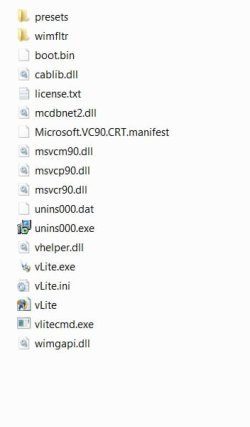
You need wimfltr folder and wimgapi in the root vlite folder , like this:


Vlie contents2009-02-22_214125.jpg

Removing from the components section should be fine - not sure about unattended , or altering UAC.
 

My Computers

System One System Two

  • Computer type
    PC/Desktop
    OS
    7 X64
    CPU
    i5 8400
    Motherboard
    gigabyte b365m ds3h
    Memory
    2x8gb 3200mhz
    Hard Drives
    various
    PSU
    pure power 11 400w cm
    Case
    Coolermaster
    Cooling
    cryorig m9i
  • Computer type
    PC/Desktop
    OS
    7x64
    CPU
    g5400
    Motherboard
    ga b365m ds3h
    Memory
    8gb ddr4 2400
    PSU
    xfx pro 450w
Worked fine when I did it.

You need wimfltr folder and wimgapi in the root vlite folder , like this:


View attachment 17528

Removing from the components section should be fine - not sure about unattended , or altering UAC.
I have everything that you have there...what WAIK are you using and vLite version?
 

My Computer

Computer Manufacturer/Model Number
Compal JFT02 (Custom Build Laptop)
OS
Windows 7 Home Premium x64 - Mac OS X 10.6.4 x64
CPU
Intel Core 2 Duo T9300 2.5 GHz
Motherboard
JFT02
Memory
4GB Kingston DDR2-800
Graphics Card(s)
NVIDIA Geforce 8600M GT (512MB Model)
Sound Card
Realtek HD Audio
Monitor(s) Displays
WUXGA Standard Laptop Display
Screen Resolution
1680*1050
Hard Drives
Toshiba 320GB 5400RPM Laptop HD
PSU
Standard Laptop Power Supply
Case
Standard Laptop Case
Cooling
Standard Laptop Cooling
Keyboard
Standard Laptop 105 Key-Keyboard
Mouse
Synaptics Touchpad
Internet Speed
Verizion Online DSL 3360/864 kbs (dl/up)
So I got vLite and the WAIK working...I completey removed their tracks from my system...reinstalled the WAIK (in vista mode) and vLite (same way). It worked then. I will be setting up some test cases of installs and seeing what works. I will probably come up with builds more gamers and just for entertainment. I might ask an admin if I could restart the vLite tutorial that a member had started in Feburary (when the RTm comes out I can readily finish the tutorial and provide some good inis for custom builds)
 

My Computer

Computer Manufacturer/Model Number
Compal JFT02 (Custom Build Laptop)
OS
Windows 7 Home Premium x64 - Mac OS X 10.6.4 x64
CPU
Intel Core 2 Duo T9300 2.5 GHz
Motherboard
JFT02
Memory
4GB Kingston DDR2-800
Graphics Card(s)
NVIDIA Geforce 8600M GT (512MB Model)
Sound Card
Realtek HD Audio
Monitor(s) Displays
WUXGA Standard Laptop Display
Screen Resolution
1680*1050
Hard Drives
Toshiba 320GB 5400RPM Laptop HD
PSU
Standard Laptop Power Supply
Case
Standard Laptop Case
Cooling
Standard Laptop Cooling
Keyboard
Standard Laptop 105 Key-Keyboard
Mouse
Synaptics Touchpad
Internet Speed
Verizion Online DSL 3360/864 kbs (dl/up)
I used v1.1.6 then installed 1.2 over the top.

No need for WAIK at all.

Copied the Vlite folder from program files (x86) to another partition - I have since reinstalled another o/s on the original partition.

vlite runs fine as an executable from where it is now.
 

My Computers

System One System Two

  • Computer type
    PC/Desktop
    OS
    7 X64
    CPU
    i5 8400
    Motherboard
    gigabyte b365m ds3h
    Memory
    2x8gb 3200mhz
    Hard Drives
    various
    PSU
    pure power 11 400w cm
    Case
    Coolermaster
    Cooling
    cryorig m9i
  • Computer type
    PC/Desktop
    OS
    7x64
    CPU
    g5400
    Motherboard
    ga b365m ds3h
    Memory
    8gb ddr4 2400
    PSU
    xfx pro 450w
here´s the settings i use. Just put it in the vlite presets folder and then you can load it in vlite.
 

Attachments

My Computer

Computer Manufacturer/Model Number
Custom
OS
Windows 7 RTM 64-Bit
CPU
AMD X2 6100+ 3,10GHz
Motherboard
MSI K9N SLI-MCP
Memory
3GB DDR2 667 MHz
Graphics Card(s)
ATI HD3850
Monitor(s) Displays
19" LG L194WS
Screen Resolution
1440x900
Hard Drives
750 GB W&D SATA II 7200RPM
PSU
600W
Internet Speed
24 MBit
Back
Top