Windows 7 Forums


Windows 7: VISTA install on "real" SATA?? How?

06 Jun 2011  
zapp22

Windows XP Pro SP3, Windows 7 Pro 32-bit, Windows 7 Ultimate 64bit, Windows XP Home SP3
615 posts
Tejas, northern Mexico
 
 
VISTA install on "real" SATA?? How?

anyone know how to install VISTA with the HD set to full SATA mode?
I didn't succeed, had to invoke ATA mode instead.

how lame....

My System SpecsSystem Spec

06 Jun 2011  
Wallonn7

Windows 7 Ultimate x64 SP1
916 posts


Hi zapp22.
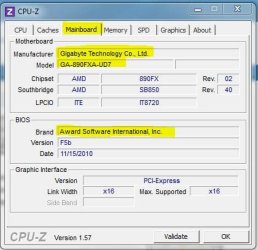
Not knowing the model of your motherboard ... Anyway, just change a setting in the BIOS. In order that I be accurate in the guidelines, please download and run cpu-z. On the mainboard tab you have the model of your motherboard. See below and post back.
Attached Thumbnails
VISTA install on "real" SATA??  How?-capturar.jpg  
My System SpecsSystem Spec
06 Jun 2011  
zapp22

Windows XP Pro SP3, Windows 7 Pro 32-bit, Windows 7 Ultimate 64bit, Windows XP Home SP3
615 posts
Tejas, northern Mexico


Dell Inc. OptiPlex 755
System Service Tag: 66ZGTH1 (support for this PC)
Chassis Serial Number: 66ZGTH1
Enclosure Type: Space-saving
Processor a Main Circuit Board b
2.40 gigahertz Intel Pentium Dual
64 kilobyte primary memory cache
1024 kilobyte secondary memory cache
64-bit ready
Multi-core (2 total)
Not hyper-threaded Board: Dell Inc. 0PU052
Serial Number: ..CN744318A609BD.
Bus Clock: 800 megahertz
BIOS: Dell Inc. A17 04/06/2010


But that's not what I want. Already did that. Running in ATA emulation mode is a waste of a good system imo.

how 'bout I install a SATA driver at the time of vista install? willthat work, and where do I get the right/best SATA driver


Quote   Quote: Originally Posted by Wallonn7 View Post
Hi zapp22.
Not knowing the model of your motherboard ... Anyway, just change a setting in the BIOS. In order that I be accurate in the guidelines, please download and run cpu-z. On the mainboard tab you have the model of your motherboard. See below and post back.
My System SpecsSystem Spec
.


06 Jun 2011  
theog

ME/XP/Vista/Win7
10,432 posts
uk Hampshire


My System SpecsSystem Spec
06 Jun 2011  
zapp22

Windows XP Pro SP3, Windows 7 Pro 32-bit, Windows 7 Ultimate 64bit, Windows XP Home SP3
615 posts
Tejas, northern Mexico


bueno!
I hope vista install is smart enough to see my usb stick
here we go

the odd thing: i searched this problem and read lots of posts. the common issue had symptom that the drive/volume was invisible. in my case, the volume pops up,but vista sees it as non-usable.
at any rate, I'll load the driver at that point and see if it changes its mind
the install went fine in ATA mode... but I need to do it the right way.
thx

Quote   Quote: Originally Posted by theog View Post
My System SpecsSystem Spec
06 Jun 2011  
zapp22

Windows XP Pro SP3, Windows 7 Pro 32-bit, Windows 7 Ultimate 64bit, Windows XP Home SP3
615 posts
Tejas, northern Mexico


i pulled a "intel matrix storage" 'driver' from the dell site. i hope this is the correct one
My System SpecsSystem Spec
06 Jun 2011  
theog

ME/XP/Vista/Win7
10,432 posts
uk Hampshire


Quote   Quote: Originally Posted by zapp22 View Post
bueno!
I hope vista install is smart enough to see my usb stick
here we go

the odd thing: i searched this problem and read lots of posts. the common issue had symptom that the drive/volume was invisible. in my case, the volume pops up,but vista sees it as non-usable.
at any rate, I'll load the driver at that point and see if it changes its mind
the install went fine in ATA mode... but I need to do it the right way.
thx

Quote   Quote: Originally Posted by theog View Post
No drivers need.

Try a full clean & full format in command prompt.
SSD / HDD : Optimize for Windows Reinstallation
My System SpecsSystem Spec
06 Jun 2011  
Wallonn7

Windows 7 Ultimate x64 SP1
916 posts


Quote   Quote: Originally Posted by zapp22 View Post
how 'bout I install a SATA driver at the time of vista install? willthat work, and where do I get the right/best SATA driver

Well, so I asked you to post the model of your motherboard ...
My System SpecsSystem Spec
06 Jun 2011  
zapp22

Windows XP Pro SP3, Windows 7 Pro 32-bit, Windows 7 Ultimate 64bit, Windows XP Home SP3
615 posts
Tejas, northern Mexico


FAIL!

well, pulled the "right one", by Service Tag, from the Dell support site.
Loaded driver at the required point, VISTA picked up the driver, no problems, went back to the Volume select screen, same error. "unable to find volume suitable...." blah blah.
My System SpecsSystem Spec
06 Jun 2011  
zapp22

Windows XP Pro SP3, Windows 7 Pro 32-bit, Windows 7 Ultimate 64bit, Windows XP Home SP3
615 posts
Tejas, northern Mexico


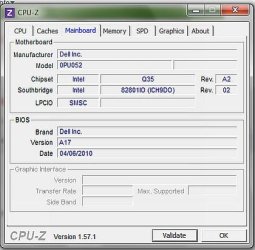
mainboard per cpu/z
as per belarc
attached

Quote   Quote: Originally Posted by Wallonn7 View Post
Hi zapp22.
Not knowing the model of your motherboard ... Anyway, just change a setting in the BIOS. In order that I be accurate in the guidelines, please download and run cpu-z. On the mainboard tab you have the model of your motherboard. See below and post back.
Attached Thumbnails
VISTA install on "real" SATA??  How?-mainboard.jpg  
My System SpecsSystem Spec
Reply

 VISTA install on "real" SATA?? How? problems?


Thread Tools


Similar help and support threads for: VISTA install on "real" SATA?? How?
Thread Forum
Windows 7/Vista Install "No Device Driver found" Drivers
Install Vista "Windows Photo Gallery" ? Customization
need help x64 vista hp to x64 W7 pro WITHOUT "clean install" Installation & Setup
Win7 x64 install error: stating "wrong version" on Vista laptop... ? Installation & Setup
security feature prevents pinning "setup", "install" Customization


All times are GMT -5. The time now is 02:16 AM.


Windows 7 Forums is an independent web site and has not been authorized,
sponsored, or otherwise approved by Microsoft Corporation.
"Windows 7" and related materials are trademarks of Microsoft Corp.
Š Designer Media Ltd