Windows 7 Forums Search
Welcome to Windows 7 Forums. Our forum is dedicated to helping you find solutions with any problems, errors or issues you are experiencing with Windows 7. The Windows 7 forum also covers news and updates and has an extensive Windows 7 tutorial section that covers a wide range of tips and tricks.


Windows 7 - dual boot win7 & winxp separate drives OR upgrade to win7 professional

 
07-29-2011   #1


windows 7 home premium 64bit


dual boot win7 & winxp separate drives OR upgrade to win7 professional

I've researched for awhile now & can't seem to find which is the best way to add winxp functionality to my laptop. I have office xp professional, painter7 & photopaint8 software that worked fine on winxp 32 bit thru sp3.

New laptop is Windows 7 home premium 64bit. Two 500gb hard drives.

Which is better- running the programs under Windows 7 xp mode (ie upgrading to professional) OR installing winxp on the 2nd hard drive?

I am not a techie- but not totally pc ignorant. Any informed advice is truly appreciated.

eastender

My System SpecsSystem Spec
07-29-2011   #2


Windows 7 Pro 64 SP1


Welcome to the forum,

Is your XP disc a retail disc?

Since you already have an XP disc, you could try out Windows Virtual PC Windows Virtual PC - Create Virtual Machine

You don't need to upgrade for that so it's free to try and you don't have to dual boot either.

There are other options too which I'm sure others can suggest.
My System SpecsSystem Spec
07-30-2011   #3


windows 7 home premium 64bit


Yes- the XP is retail. I will check out the link & see how much of the info I can absorb. I'll probably be back for more advice.

Thanks for the direction.
My System SpecsSystem Spec
.


07-30-2011   #4


Windows 7 Pro 64 SP1


Quote   Quote: Originally Posted by eastender View Post
Yes- the XP is retail. I will check out the link & see how much of the info I can absorb. I'll probably be back for more advice.

Thanks for the direction.
You're welcome. We'll be here.
My System SpecsSystem Spec
07-31-2011   #5


windows 7 home premium 64bit


I went to the link you provided. In the warning box- it doesn't mention Windows 7 home premium. So do I need to upgrade to professional in order to use the virtual machine setup?

Again- thanks for your help- I don't think I can justify in my mind the over $1,000 I would need to spend in order to purchase the 3 32 bit programs I want to use under winxp--which I'm quite satisfied with-- just because Windows 7 won't play nice with them.
My System SpecsSystem Spec
07-31-2011   #6


Windows 7 Pro 64 SP1


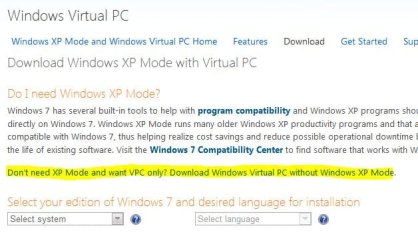
You just want Virtual PC, not XP mode since you already have an XP disc,

Download Windows XP Mode

Click on the link that says,

dual boot win7 & winxp separate drives OR upgrade to win7 professional-capture.jpg

Then select your OS version and language.

Then a link will appear below that.
My System SpecsSystem Spec
07-31-2011   #7


windows 7 home premium 64bit


I went to this article after googling windows 7 virtual machine Description of Windows Virtual PC

I see my Windows 7 version listed as a host system BUT for supported guest operating systems -- it only shows Windows XP Service Pack 3 (SP3) Professional

I have retail winxp home edition SP3. Will it work on the home edition too? The MS sites seem to contain different info relevant to installing the VM.

Thanks for your assistance.
My System SpecsSystem Spec
07-31-2011   #8


windows 7 home premium 64bit


Addendum- I think because I noted in my first post that I have Office xp professional, you may have thought of Windows xp professional. Alas- it's only the home edition. Sorry for the lack of clarity.
My System SpecsSystem Spec
07-31-2011   #9


Windows 7 Pro 64 SP1


Quote   Quote: Originally Posted by eastender View Post
Addendum- I think because I noted in my first post that I have Office xp professional, you may have thought of Windows xp professional. Alas- it's only the home edition. Sorry for the lack of clarity.
No problem, and You're welcome.

Good call, I wasn't paying close attention to that.

Here's another free option Downloads - VirtualBox

And some good info,

Chapter 1. First steps

Of course the dual boot option is there also, though not real user friendly for just three programs.... the price is right though.

I can direct some Pro's here to walk you through that if you'd like.

You can look through this too, method 2,

Dual Boot Installation with Windows 7 and XP

I was going to suggest trying to install those programs in Compatibility Mode

Not sure how that would work though after checking here Windows 7 Compatibility: Software Programs & Hardware Devices: Find Updates, Drivers, & Downloads
My System SpecsSystem Spec
07-31-2011   #10


windows 7 home premium 64bit


Thanks for the links- I will look thru them.

The programs I noted are not compatible with "straight" Windows 7. Windows 7 requires more recent versions than the ones I have- which can/will continue to serve my needs quite well when I can incorporate winxp on my new laptop.
My System SpecsSystem Spec
Reply

 dual boot win7 & winxp separate drives OR upgrade to win7 professional problems?


Thread Tools


Similar Threads for: dual boot win7 & winxp separate drives OR upgrade to win7 professional
Thread Forum
Dual Boot with WinXP over Win7, without messing up Installation & Setup
Dual Boot Win7 & Winxp Installation & Setup
how to dual boot win7 plus winxp Installation & Setup
Dual boot win7 x64 and winXP x86 Installation & Setup
Win7 and WinXP dual boot General Discussion


All times are GMT -5. The time now is 11:41 PM.


Windows 7 Forums is an independent web site and has not been authorized,
sponsored, or otherwise approved by Microsoft Corporation.
"Windows 7" and related materials are trademarks of Microsoft Corp.
© Designer Media Ltd
  

1 2 3 4 5 6 7 8 9 10 11 12 13 14 15 16 17 18 19 20 21 22 23 24 25 26 27 28 29 30