|
Welcome to Windows 7 Forums. Our forum is dedicated to helping you find solutions with any problems, errors or issues you are experiencing with Windows 7. The Windows 7 forum also covers news and updates and has an extensive Windows 7 tutorial section that covers a wide range of tips and tricks.
Windows 7 - New free system imaging program |
08-13-2011
|
#1 | | |
New free system imaging program Easeus have released Todo v3 free version.
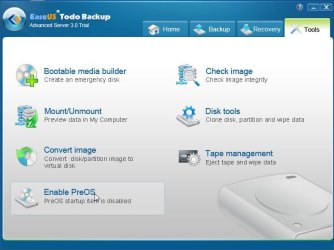
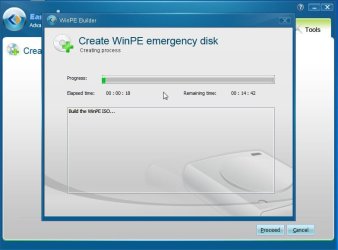
It can create winpe 3 boot media for you.
It will burn it to a cd , or put it on a flash drive for you.
It can also add it as a boot menu entry.
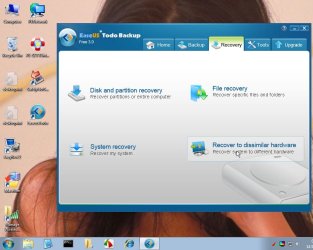
Most surprising is that Recover to dissimilar hardware also comes with the free version.
That is more than other free image apps. are offering. EaseUS Todo Backup Free - world's best free all-in-one backup & recovery software. | My System Specs | | OS Vista x64 / 7 X64 CPU E8400 Motherboard ASRock 1333 GLAN R2.0 Memory 2x1 gb 800mhz Graphics Card 9500gt 1gb Case Coolermaster Cooling Winpower 500w Hard Drives Maxtor 160gb-2mb cache |
08-13-2011
|
#2 | | |
That could be interesting. I wonder if WinPE has USB 3.0 support? Restore from external should be a lot faster if you can run at USB 3.0 speed. I'm using Macrium and at the moment I have to boot from USB stick then load the USB 3.0 driver manually if I want USB 3.0 speed. A bit of a kludge.
edit: looks like Macrium 5 now has USB 3.0 support in both the Linux and WinPE boot discs. At least according to the features page. But they want $22.50 to upgrade from 4.2 paid std version.
I got the Macrium 5 trial. The Linux boot should have USB 3.0 support. I'm not going to test it tonight though. The Macrium Free edition 5 should be out in awhile. I bet they use the same Linux boot CD for it or maybe one version behind, when that is released. But I expect it to have USB 3.0 support as there's been a lot of clamor for it on the Macrium forums.
edit2: the product you mention I looked at the instructions how to make the WinPE disc. It's version 3.0 not the latest 3.1. Also they make you download WAIK(which is a GB download) so it looks like you either don't get the full WinPE or they are somehow kludging it.
Last edited by MilesAhead; 08-13-2011 at 09:14 PM..
| My System Specs | | System Manufacturer/Model Number HP Media Center OS Windows 7 32 bit CPU AMD 5200+ dual core Memory 2 GB Graphics Card NVidia GeForce 6150SE 128 MB Monitor(s) Displays CRT Screen Resolution 1280x1024 Hard Drives 500 GB Sata internal :
SIIG USB 3.0 docking stations w/WD Caviar Black 6 Gb/s drives Other Info SIIG USB 3.0 PCIexpress card. |
08-13-2011
|
#3 | | |
You need to add usb 3 drivers to the pe3 image.
Easy to do it with dism. Quote: looks like Macrium 5 now has USB 3.0 support in both the Linux and WinPE boot discs. Macrium must have added the drivers already in the paid version download - because they aren't in the macrium pe3 you can run off if you d'l WAIK.
To make a macrium pe3 boot media:
You can use my little app from within win 7 and you don't need WAIK
d/l and install trial version of macrium 5 - any edition - server edition if you like - doesn't matter.
Run my little app and it will make a pe3 disc for you- it will also install renesas usb3 drivers. Imaging with free Macrium | My System Specs | | OS Vista x64 / 7 X64 CPU E8400 Motherboard ASRock 1333 GLAN R2.0 Memory 2x1 gb 800mhz Graphics Card 9500gt 1gb Case Coolermaster Cooling Winpower 500w Hard Drives Maxtor 160gb-2mb cache |
08-13-2011
|
#4 | | |
I run it from command prompt and it burns the CD?
Are you talking about RunMeAsAdminV2?
edit: in any case the Linux boot cd claims USB 3.0 support. That's all I need. If it doesn't work then I'll investigate further. | My System Specs | | System Manufacturer/Model Number HP Media Center OS Windows 7 32 bit CPU AMD 5200+ dual core Memory 2 GB Graphics Card NVidia GeForce 6150SE 128 MB Monitor(s) Displays CRT Screen Resolution 1280x1024 Hard Drives 500 GB Sata internal :
SIIG USB 3.0 docking stations w/WD Caviar Black 6 Gb/s drives Other Info SIIG USB 3.0 PCIexpress card. |
08-13-2011
|
#5 | | |
Thanks, I'm going to give this a try. i used their older version as it would also image Server based systems. | My System Specs | | System Manufacturer/Model Number Self-Built in July 2009 OS Windows 7 Ultimate x64 CPU Intel Q9550 2.83Ghz OC'd to 3.40Ghz Motherboard Gigabyte GA-EP45-UD3R rev. 1.1, F12 BIOS Memory 8GB G.Skill PI DDR2-800, 4-4-4-12 timings Graphics Card EVGA 1280MB Nvidia GeForce GTX570 Sound Card Realtek ALC899A 8 channel onboard audio Monitor(s) Displays 23" Acer x233H Screen Resolution 1920x1080 Keyboard ABS M1 Mechanical Mouse Logitech G9 Laser Mouse PSU Corsair 620HX modular Case Antec P182 Cooling stock Hard Drives Intel X25-M 80GB Gen 2 SSD
Western Digital 1TB Caviar Black, 32MB cache. WD1001FALS Internet Speed 15/1 cable modem Other Info Windows and Linux enthusiast. Logitech G35 Headset. |
08-13-2011
|
#6 | | |
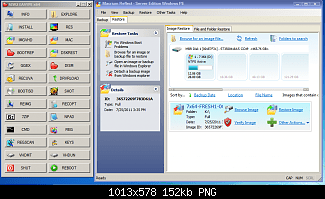
This is the app. for making Macrium pe3 media EASYPE-31x64-V2.zip
It makes this
Here is the Todo app. in one of my custom pe builds
- see | My System Specs | | OS Vista x64 / 7 X64 CPU E8400 Motherboard ASRock 1333 GLAN R2.0 Memory 2x1 gb 800mhz Graphics Card 9500gt 1gb Case Coolermaster Cooling Winpower 500w Hard Drives Maxtor 160gb-2mb cache |
08-13-2011
|
#7 | | |
Hmmmmmmmm, I just tried the Linux boot CD from Macrium 5. Does not recognize my SIIG USB 3.0 card. So looks like I'm sticking with 4.2 unless they come out with a fix.
I already have WinPE 2.0 on a USB key where I can manually load the SIIG USB 3.0 Windows driver. That's all I need.
Last edited by MilesAhead; 08-14-2011 at 12:47 AM..
| My System Specs | | System Manufacturer/Model Number HP Media Center OS Windows 7 32 bit CPU AMD 5200+ dual core Memory 2 GB Graphics Card NVidia GeForce 6150SE 128 MB Monitor(s) Displays CRT Screen Resolution 1280x1024 Hard Drives 500 GB Sata internal :
SIIG USB 3.0 docking stations w/WD Caviar Black 6 Gb/s drives Other Info SIIG USB 3.0 PCIexpress card. |
08-14-2011
|
#8 | | |
Thus far I really like what I see with the new FREE version of EaseUS ToDo Backup 3 Free;
What's so great about it; - 1 click system image, couldn't be easier
- file level backup and restore
- ability to do full backups, differential backups and incremental backups
- hardware independent restore (I haven't tested this yet)
- disk and partition cloning ability
- It's free for business use on workstations
- 1 button addition to the Windows startup menu for quick recoveries
And the other features that it offers - Various levels of compressioin
- Password Protection
- Encryption
- File Splitting
- Backup priority levels
- Email Notifications
- Ability to offsite the backup copy to an FTP server
- Throttling for the offsite copy
| My System Specs | | System Manufacturer/Model Number Self-Built in July 2009 OS Windows 7 Ultimate x64 CPU Intel Q9550 2.83Ghz OC'd to 3.40Ghz Motherboard Gigabyte GA-EP45-UD3R rev. 1.1, F12 BIOS Memory 8GB G.Skill PI DDR2-800, 4-4-4-12 timings Graphics Card EVGA 1280MB Nvidia GeForce GTX570 Sound Card Realtek ALC899A 8 channel onboard audio Monitor(s) Displays 23" Acer x233H Screen Resolution 1920x1080 Keyboard ABS M1 Mechanical Mouse Logitech G9 Laser Mouse PSU Corsair 620HX modular Case Antec P182 Cooling stock Hard Drives Intel X25-M 80GB Gen 2 SSD
Western Digital 1TB Caviar Black, 32MB cache. WD1001FALS Internet Speed 15/1 cable modem Other Info Windows and Linux enthusiast. Logitech G35 Headset. |
08-15-2011
|
#9 | | Windows 7 SP1, Home Premium, 64-bit |
I downloaded it and ran it last night. Seems to work OK, with little interaction required. I made a boot disk and was able to boot from it and go a couple of steps into the recovery process without any issues.
I wasn't clear on the distinction between "system backup" and "disk and partition backup", so I ran both. The resulting images were virtually identical--within a few hundred bytes, so I am guessing both simply made an image of C alone?? I don't have any other partitions on my boot drive.
PParks: I did not see any configuration option for compression levels. Can you advise how to do that? In fact, I saw very little in the way of configuration choices.
I may keep it around to use, alternating with Macrium. I'd just as soon get rid of Acronis, which has never been completely confidence-inspiring. | My System Specs | | System Manufacturer/Model Number Ignatz Special; 4 speed manual gearbox; factory air conditioning; one of one OS Windows 7 SP1, Home Premium, 64-bit CPU Intel Sandy Bridge i5-2500, not overclocked Motherboard Gigabyte H67A-UD3H-B3, full ATX Memory 4 GB Crucial DDR3-1333 Graphics Card none; graphics are integrated on CPU Sound Card onboard: Realtek ALC892; external: USB Behringer UF0-202 Monitor(s) Displays NEC 90GX2-BK 19" LCD Screen Resolution 800 x 640 Keyboard Leopold Tenkeyless with Cherry Blue switches, USB Mouse Logitech or Microsoft optical wired; either USB or PS 2 PSU Seasonic SS-560KM, modular Case Antec Solo II Cooling CPU: Scythe Big Shuriken; Case: Scythe Slipstream 800 & 500 Hard Drives System: Intel 320 Series SSD, 80 GB;
Data: Samsung Spinpoint 103SJ, 1 TB;
Backup: WD Caviar Green WD15EADS-00P8B0, 1.5TB Other Info Power consumption of this system, including monitor: 68 watts at idle; 144 watts at full load |
08-15-2011
|
#10 | | |
When you click on "system backup", you are choosing a 1 button simple backup....no options, no choices, it just images all physical drives on your system.
You can manually go into "disk and partition" backup if you want to do the same thing, but specify options. When you go this route, down at the bottom will be an options button and you can set all of those things that I mentioned.
These should be cooled
--Novice automatic mode
--Advanced mode. | My System Specs | | System Manufacturer/Model Number Self-Built in July 2009 OS Windows 7 Ultimate x64 CPU Intel Q9550 2.83Ghz OC'd to 3.40Ghz Motherboard Gigabyte GA-EP45-UD3R rev. 1.1, F12 BIOS Memory 8GB G.Skill PI DDR2-800, 4-4-4-12 timings Graphics Card EVGA 1280MB Nvidia GeForce GTX570 Sound Card Realtek ALC899A 8 channel onboard audio Monitor(s) Displays 23" Acer x233H Screen Resolution 1920x1080 Keyboard ABS M1 Mechanical Mouse Logitech G9 Laser Mouse PSU Corsair 620HX modular Case Antec P182 Cooling stock Hard Drives Intel X25-M 80GB Gen 2 SSD
Western Digital 1TB Caviar Black, 32MB cache. WD1001FALS Internet Speed 15/1 cable modem Other Info Windows and Linux enthusiast. Logitech G35 Headset. New free system imaging program problems? All times are GMT -5. The time now is 11:43 PM. |  |