Windows 7 Forums Search
Welcome to Windows 7 Forums. Our forum is dedicated to helping you find solutions with any problems, errors or issues you are experiencing with Windows 7. The Windows 7 forum also covers news and updates and has an extensive Windows 7 tutorial section that covers a wide range of tips and tricks.


Windows 7 - Copy CD to CD or DVD to DVD

 
08-30-2011   #1


Windows 7 Home Premium 64-bit


Copy CD to CD or DVD to DVD

Like many others on this forum I have had a hard time finding a simple program to copy non-copy protected discs.

I thought I had found what I was looking for when I read a thread similar to this one which promoted CDBurnerXP. I downloaded it and proceeded to copy a (driver) CD from Drive R: to Drive S:. I set up the Source and Target. I used "Copy or grab disc". I ticked "Finalize disc". It went through its paces as though everything was working properly, but when I looked at the contents of the target disc it was blank.

It did copy to the HDD and then to the blank CD.

These are new drives that I have verified reading and writing.

Why am I not getting a useable copy of the disc?

My System SpecsSystem Spec
08-30-2011   #2


Windows 7 Home Premium 32 bit


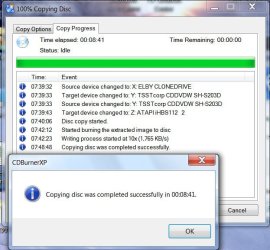
Just finished copying CD to CD using CDBurnerXP. Contents of both CDs checked. No problems.

Copy CD to CD or DVD to DVD-cdburnerxp.jpg

Obviously, there is nothing wrong with the program.

So recheck that both your drives can really write. Use a different quality media, try and then post a screenshot like above.( You may use CD-RW for the trial)
My System SpecsSystem Spec
08-30-2011   #3
mjf


Windows 7x64 Home Premium SP1 x 2


Many would use something reliable like ImgBurn
Disk -> ISO -> Disk(s)
verify on
My System SpecsSystem Spec
.


08-31-2011   #4


Win7 Pro 32-bit, Win7 Home 32-bit


+1 for ImgBurn. Even though I have Nero, I now use this all the time. I am surprised that they still provide it for FREE.
My System SpecsSystem Spec
08-31-2011   #5


Windows 7 Home Premium 64-bit


I've given up on CDBurnerXP.

I did copy a couple of discs using Imgburn but it is more complicated than I had hoped for.
1. I read a disc and it created TWO files, not an .ISO--name.bin and name.cue. For the Write it was a toss-up which to use.
2. Another disc did create an .ISO. That was okay. But when I looked at the disc contents there was an additional file--"Files ready to be written to the disc(1) - Desktop.ini. Whats with that?
3. It doesn't seem to have persistence. It wants to write to R: not S:. (Maybe that is a setting I need to adjust.)
My System SpecsSystem Spec
09-01-2011   #6
mjf


Windows 7x64 Home Premium SP1 x 2


ImgBurn will want to default to
Music CDs : .bin, .cue files
Pure data (software) : .ISO
Video DVD: .ISO, .MDS (not with copyright protection)

I my experience you have to overide ImgBurn not to get the correct format.
My System SpecsSystem Spec
Reply

 Copy CD to CD or DVD to DVD problems?


Thread Tools


Similar Threads for: Copy CD to CD or DVD to DVD
Thread Forum
transfer data through windows 7 by copy and paste perfect copy? Hardware & Devices
Can I install a new, legal copy of Seven over my 'evaluation' copy... General Discussion
I want to Copy & Rename, not Copy & Replace General Discussion
evaluation copy to permanent copy Installation & Setup
win7 evaluation copy to a retail copy install Installation & Setup


All times are GMT -5. The time now is 11:44 PM.


Windows 7 Forums is an independent web site and has not been authorized,
sponsored, or otherwise approved by Microsoft Corporation.
"Windows 7" and related materials are trademarks of Microsoft Corp.
© Designer Media Ltd
  

1 2 3 4 5 6 7 8 9 10 11 12 13 14 15 16 17 18 19 20 21 22 23 24 25 26 27 28 29 30