| Windows 7: plz help me about CCleaner |
09 Nov 2011
|
#1 | | Windows 7 Ultimate x64 India |
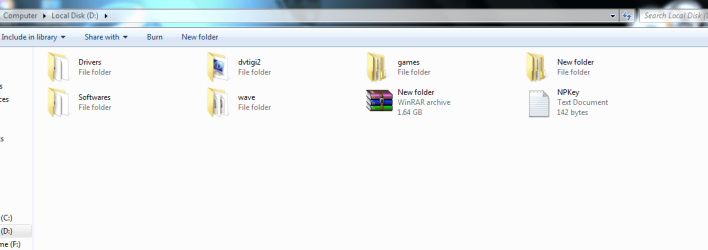
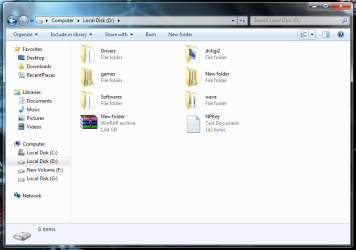
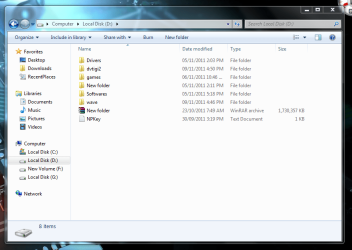
plz help me about CCleaner hay guyes plz help me about cclenear. i want my files and folders like image 1
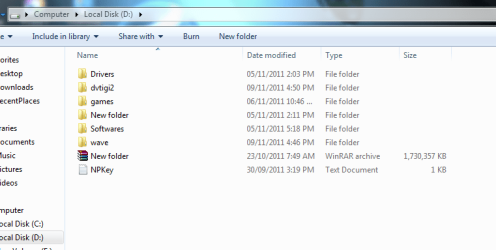
but every time i run the cclenear files and folders loks like the second image.
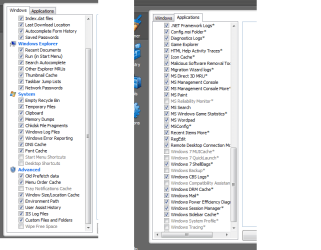
so plz tell me what option i shoud uncheck. and my start menu is also get cleared every time but i wnt to keep the resent items used in cc. plz help me i m posting my cclenear screen shot. plz help | My System Specs |
| System Manufacturer/Model Number Dell Insperon N5010 OS Windows 7 Ultimate x64 CPU i3 M380 2.53GHz Motherboard TOSHIBA MK5076GSX Memory 4 Gb Graphics Card intel HD Sound Card IDT Monitor(s) Displays Single Screen Resolution 1366x768 Keyboard Standerd PS2 Antivirus ESET Smart Security 5 Browser Firefox 19.0.2 |
09 Nov 2011
|
#2 | | Windows 7 Ultimate SP1 x64 Macedonia |
Right click on Local Disk D in blank space and go to View -> Titles(it should be). ATM I'm on Linux and can't tell you what is the correct name. If it's not Title, change view to other untill you get that on first picture. | My System Specs | | OS Windows 7 Ultimate SP1 x64 CPU Intel Pentium G630 @2.7GHz 3MB Motherboard Asus P8H61-M LX3 PLUS Memory Corsair 4GB DDR3 / 1066MHz 9-9-9-24 2T Graphics Card Intel HD Graphics Sound Card Integrated Monitor(s) Displays Philips 192EL Screen Resolution 1366 x 768 Keyboard Delux K5108 Mouse Genius PSU Hantol 500W Case Delux costumized... Cooling 120mm Hantol, Spire 80mm Hard Drives WD Caviar Blue 500GB / 16MB Internet Speed 15 Mbit Other Info Genius SW-2.1 355 Speakers,Camera,Joystick
Asus K55VJ(i5 3210, GT635M / 2GB, 8GB DDR3, 500GB HDD) |
09 Nov 2011
|
#3 | | Windows 7 SP1, Home Premium, 64-bit |

Quote: Originally Posted by aakshat and my start menu is also get cleared every time but i wnt to keep the resent items used in cc. In the Windows tab, Windows explorer section: uncheck recent documents, uncheck run (in start menu), and uncheck other explorer MRUs. | My System Specs | | System Manufacturer/Model Number Ignatz Special; 4 speed manual gearbox; factory air conditioning; one of one OS Windows 7 SP1, Home Premium, 64-bit CPU Intel Sandy Bridge i5-2500, not overclocked Motherboard Gigabyte H67A-UD3H-B3, full ATX Memory 4 GB Crucial DDR3-1333 Graphics Card none; graphics are integrated on CPU Sound Card onboard: Realtek ALC892; external: USB Behringer UF0-202 Monitor(s) Displays NEC 90GX2-BK 19" LCD Screen Resolution 800 x 640 Keyboard Leopold Tenkeyless with Cherry Blue switches, USB Mouse Logitech or Microsoft optical wired; either USB or PS 2 PSU Seasonic SS-560KM, modular Case Antec Solo II Cooling CPU: Scythe Big Shuriken; Case: Scythe Slipstream 800 & 500 Hard Drives System: Intel 320 Series SSD, 80 GB;
Data: Samsung Spinpoint 103SJ, 1 TB;
Backup: WD Caviar Green WD15EADS-00P8B0, 1.5TB Other Info Power consumption of this system, including monitor: 68 watts at idle; 144 watts at full load |
09 Nov 2011
|
#4 | | Windows 7 Professional SP1 32-bit Fantasyland |
In CCleaner, uncheck: - Menu Order Cache
- Windows Size/Location Cache
and most importantly, | My System Specs | | System Manufacturer/Model Number Custom-built OS Windows 7 Professional SP1 32-bit CPU Intel Core 2 Duo E6600 2.4GHz, overclocked to 2.7GHz Motherboard Asus PL5D2 Memory 4GB DDR2-667 (4x1GB in dual-channel config) Graphics Card nVidia GeForce 9800 GT Sound Card Creative X-Fi XtremeMusic Monitor(s) Displays Acer Screen Resolution 1920x1200 (DVI) Keyboard Standard Mouse Microsoft wireless optical mouse PSU Antec TruePower 2.0 Case Cooler Master Centurion Cooling various fans Hard Drives OCZ SSD Vertex Plus 60GB SATA (Firmware 3.55), 64MB cache
Hitachi HD321KJ SATA, 320GB, 7200rpm, 16MB cache Internet Speed DSL; ~330KB/sec down, ~110KB/sec up Other Info Have a laptop too :) (Compaq CQ60 also with Win7 Pro SP1 32-bit)
Drives in both systems:
C: - Windows 7 + apps. Pagefile is fixed size and located at the very end of the partition.
D: - various temp files/cache for Firefox and apps/games.
E: - videos, music, misc. storage, torrent downloads, etc. |
10 Nov 2011
|
#5 | | Windows 7 Ultimate x64 India |
i have a probleam with it i want my files and folders like the first image. they will look like that even aftre restart but every time after i run cclenear folders looks like the second image.so every time i have to click view options and make it tiles view. i dont like to click every time and make icons big i want to keep them always like first image. but cclenear deleates ist settings or catche. i cant find the option to uncheck clenear can leave it as it is. anyone plz help me. | My System Specs | | System Manufacturer/Model Number Dell Insperon N5010 OS Windows 7 Ultimate x64 CPU i3 M380 2.53GHz Motherboard TOSHIBA MK5076GSX Memory 4 Gb Graphics Card intel HD Sound Card IDT Monitor(s) Displays Single Screen Resolution 1366x768 Keyboard Standerd PS2 Antivirus ESET Smart Security 5 Browser Firefox 19.0.2 |
10 Nov 2011
|
#6 | | Windows 7 pro 64bit SP1 Grandville, MI. USA |
Uninstall ccleaner and delete its folder, then download and reinstall it with it's default settings.
You have it set to delete things that are not harmful and really don't take up much space or cause problems.
In fact you are causing many problems by having it over clean.
Last edited by nojmit; 10 Nov 2011 at 04:04 AM..
| My System Specs | | System Manufacturer/Model Number Dell XPS 8300 Desktop OS Windows 7 pro 64bit SP1 CPU i7 2600@3.4GHz Motherboard Dell OY2MRG Memory 8 GB DDR3 @ 665MHz Graphics Card ATI Radeon HD 5700 Sound Card Realtek High Definition Audio Monitor(s) Displays SyncMaster Screen Resolution 900x1440 Keyboard Micro$oft Natural Keyboard Pro Mouse Microsoft Trackball Explorer PSU yup Case ugly assed black thing Hard Drives Seagate 1.5 TB Internet Speed Comcast Cable Other Info Main Computer is Dell XPS 8300
Laptop is Sony
Netbook is Dell 1011,
Linksys E3200 router w/WPA2 , Comcast Cable, Avast, Malwarebytes free, SpywareBlaster, Super AntiSpyware free |

10 Nov 2011
|
#7 | | Windows 7 Professional SP1 32-bit Fantasyland |
I wouldn't call them problems per se, but yes, the settings are a bit too aggressive. aakshat, did you turn off any of the entries in CCleaner we told you to? Did that not help with the Explorer issue? | My System Specs | | System Manufacturer/Model Number Custom-built OS Windows 7 Professional SP1 32-bit CPU Intel Core 2 Duo E6600 2.4GHz, overclocked to 2.7GHz Motherboard Asus PL5D2 Memory 4GB DDR2-667 (4x1GB in dual-channel config) Graphics Card nVidia GeForce 9800 GT Sound Card Creative X-Fi XtremeMusic Monitor(s) Displays Acer Screen Resolution 1920x1200 (DVI) Keyboard Standard Mouse Microsoft wireless optical mouse PSU Antec TruePower 2.0 Case Cooler Master Centurion Cooling various fans Hard Drives OCZ SSD Vertex Plus 60GB SATA (Firmware 3.55), 64MB cache
Hitachi HD321KJ SATA, 320GB, 7200rpm, 16MB cache Internet Speed DSL; ~330KB/sec down, ~110KB/sec up Other Info Have a laptop too :) (Compaq CQ60 also with Win7 Pro SP1 32-bit)
Drives in both systems:
C: - Windows 7 + apps. Pagefile is fixed size and located at the very end of the partition.
D: - various temp files/cache for Firefox and apps/games.
E: - videos, music, misc. storage, torrent downloads, etc. |
10 Nov 2011
|
#8 | | Win 7 Ultimate x64 Etobicoke, Ontario |
Uncheck Thumbnail Cache under Windows Explorer. | My System Specs | | System Manufacturer/Model Number Me OS Win 7 Ultimate x64 CPU Phenom II x4 955 @ 4 GHz. Motherboard Asus M5A97 EVO Memory 2x2 GB Kingston HyperX DDR3 1600 Graphics Card Sapphire HD 6850 Sound Card Xonar DGX w/ Logitech X-530 Monitor(s) Displays Acer S232HL Abid Screen Resolution 1920x1080 Keyboard Logitech Wave Mouse Logitech G5 v2 PSU Antec Earthwatts 650W Green Case Antec Three Hundred Cooling Cooler Master 212 EVO Hard Drives 120 GB OCZ Vertex 3
500 GB Seagate 7200.12 Internet Speed 24000/1000 plz help me about CCleaner problems? All times are GMT -5. The time now is 11:02 AM. | |