|
Welcome to Windows 7 Forums. Our forum is dedicated to helping you find solutions with any problems, errors or issues you are experiencing with Windows 7. The Windows 7 forum also covers news and updates and has an extensive Windows 7 tutorial section that covers a wide range of tips and tricks.
Windows 7 - DirectX install error - An internal system error occurred. |
12-17-2011
|
#1 | | Windows 7 Home Premium 64bit |
DirectX install error - An internal system error occurred. I recently re-installed windows and am now trying to install the DirectX End-User Runtimes (June 2010). All goes well, it installs everything, but as it finished I get this error:
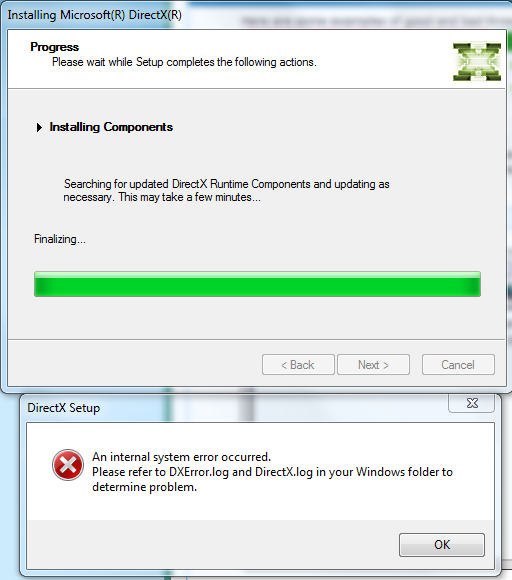
I have tried redownloading, using other installers and updating my graphics drivers. Nothing will work. It's probably worth mentioning that the first time I tried installing, about a week ago, my computer totally froze in the middle of the install and I had to force restart.
Any ideas on how to fix this problem? | My System Specs | | OS Windows 7 Home Premium 64bit CPU Intel i7 860 Motherboard Gigabyte GA-P55A-UD6 Memory 4GB Corsair DDR3 1600MHz Graphics Card XFX 5870 Monitor(s) Displays Samsung SyncMaster 226BW PSU Hiper Power 800W Case CoolerMaster Cosmos Hard Drives 80GB SATA II
1TB SATA III |
12-18-2011
|
#2 | | Windows 7 Home Premium x64 SP1 |
Welcome to Seven Forums callumshell1. The 1st thing I would suggest would be to run the System Files Checker. SFC /SCANNOW Command - System File Checker
See if it finds and corrects any errors. Also, see if you locate the 2 dx logs mentioned, in the windows directory, and post them here, or just the text if they are short, which they may well be.
A Guy | My System Specs | | OS Windows 7 Home Premium x64 SP1 CPU INTEL Core i5-750 Quad-Core 3.37GHz Motherboard ASUS P7P55D Memory KINGSTON 4GB (2 x 2GB) HyperX PC3-12800 DDR3 1600MHz CL8 Graphics Card MSI N240GT-MD1G/D5 GeForce GT 240 1GB 128-bit GDDR5 Monitor(s) Displays Samsung SyncMaster B2430H 24" , SyncMaster P2050 20" Screen Resolution 1920 x 1080 , 1440 x 900 PSU ANTEC TruePower New TP-550, 80 PLUS, 550W Case ANTEC Three Hundred Illusion Cooling COOLER MASTER Hyper 212 Plus, 3 x 120mm 1 x 140mm Case Hard Drives Intel X25M Gen2 80GB, SEAGATE 500GB Barracudaź 7200.12, SATA 3 Gb/s, 7200 RPM, 16MB cache Internet Speed 20 + Mbps |
12-18-2011
|
#3 | | Windows 7 Home Premium 64bit |
Thanks, I'll try that.
I forgot to mention, but I have no log files in my Windows folder.
Wait yes I do. http://www.mediafire.com/?u2kmvyt6uryl0ea
I also ran that SFC scan, said there were errors but it couldn't fix them. | My System Specs | | OS Windows 7 Home Premium 64bit CPU Intel i7 860 Motherboard Gigabyte GA-P55A-UD6 Memory 4GB Corsair DDR3 1600MHz Graphics Card XFX 5870 Monitor(s) Displays Samsung SyncMaster 226BW PSU Hiper Power 800W Case CoolerMaster Cosmos Hard Drives 80GB SATA II
1TB SATA III |
12-18-2011
|
#4 | | Windows 7 Home Premium x64 SP1 |
Quote: If SFC could not fix something, then run the command again to see if it may be able to the next time. Sometimes it may take running the sfc /scannow command 3 or more times to completely fix everything that it's able to. It found errors, that is where I would concentrate first. If it can't correct them, then the CBS log may point to where the issue lies. A Guy
P.S. From your DirectX.log
12/14/11 22:14:47: DXWSetup: A newer version of DirectX have been installed already.
Open regedit
Start> In search box type
regedit
Enter
Navigate to HKEY_LOCAL_MACHINE>Software>Microsoft>DirectX
Confirm version is 4.09.00.0904
This is the latest version, and the version your log says you have now. Quote: 12/14/11 22:14:47: DXWSetup: DirectX Version: 4.09.00.0904.00
12/14/11 22:14:47: DXWSetup: Setup Version: 4.09.00.0904.00
12/14/11 22:14:47: DXWSetup: A newer version of DirectX have been installed already.
Last edited by A Guy; 12-18-2011 at 09:07 PM..
| My System Specs | | OS Windows 7 Home Premium x64 SP1 CPU INTEL Core i5-750 Quad-Core 3.37GHz Motherboard ASUS P7P55D Memory KINGSTON 4GB (2 x 2GB) HyperX PC3-12800 DDR3 1600MHz CL8 Graphics Card MSI N240GT-MD1G/D5 GeForce GT 240 1GB 128-bit GDDR5 Monitor(s) Displays Samsung SyncMaster B2430H 24" , SyncMaster P2050 20" Screen Resolution 1920 x 1080 , 1440 x 900 PSU ANTEC TruePower New TP-550, 80 PLUS, 550W Case ANTEC Three Hundred Illusion Cooling COOLER MASTER Hyper 212 Plus, 3 x 120mm 1 x 140mm Case Hard Drives Intel X25M Gen2 80GB, SEAGATE 500GB Barracudaź 7200.12, SATA 3 Gb/s, 7200 RPM, 16MB cache Internet Speed 20 + Mbps |
12-19-2011
|
#5 | | Windows 7 Home Premium 64bit |
Thanks, but there is still a problem. I'm trying to install Battlefield 3 but during the stage where it installs DirectX it fails, meaning I cannot play the game. Any ideas how I would fix this? | My System Specs | | OS Windows 7 Home Premium 64bit CPU Intel i7 860 Motherboard Gigabyte GA-P55A-UD6 Memory 4GB Corsair DDR3 1600MHz Graphics Card XFX 5870 Monitor(s) Displays Samsung SyncMaster 226BW PSU Hiper Power 800W Case CoolerMaster Cosmos Hard Drives 80GB SATA II
1TB SATA III |
04-20-2012
|
#6 | | Microsoft Windows 7 Home Premium , Service Pack 1, 64 bit |

Quote: Originally Posted by callumshell1 Thanks, but there is still a problem. I'm trying to install Battlefield 3 but during the stage where it installs DirectX it fails, meaning I cannot play the game. Any ideas how I would fix this? First go to Computer > C > Program Files (x86) > Origin Games
Once you are in the Origin folder go into your BF3 Folder > _Installer > DirectX > redist
Once you are in this folder you will notice a bunch of .rar's. Delete ALL of the .rar files OUT of the redist folder. DO NOT DELETE: DSETUP.dll, dsetup32.dll, or DXSETUP.exe
Once the redist folder only has those 3 files that you DIDN'T delete are left, go back into Origin and hit the "Ready to Install" button again and it should be all set.. | My System Specs | | OS Microsoft Windows 7 Home Premium , Service Pack 1, 64 bit CPU Intel(R) Core(TM) i7 CPU 860 @ 2.80GHz Motherboard Acer, H57M01, , U01L101701309 Memory 8.0GB Dual-Channel DDR3 @ 659MHz (9-9-9-24) Graphics Card ATI Radeon HD 5700 Series, 1024 Mb Hard Drives C: Total - 468941 MB, Free - 269855 MB; D: Total - 469464 MB, Free - 282338 MB; DirectX install error - An internal system error occurred. problems? All times are GMT -5. The time now is 11:49 PM. |  |