|
Welcome to Windows 7 Forums. Our forum is dedicated to helping you find solutions with any problems, errors or issues you are experiencing with Windows 7. The Windows 7 forum also covers news and updates and has an extensive Windows 7 tutorial section that covers a wide range of tips and tricks.
Windows 7 - Looking for CPU temp in Win7 sys tray |
01-05-2012
|
#1 | | Win 7, Win 8, Ubuntu (64 bit) |
Looking for CPU temp in Win7 sys tray Have tried many varieties.
My CPU is a AMD Phemon II 4 core. AMD's PC Probe works well, but the UI is something sent from beyond the bowels of hell. I'm looking for something that minimizes to the systray and just shows if the temp is high. I've tried CoreTemp, which doesn't display the temperature from the CPU at all, CPU Thermometer, TempTaskbar, and several others.
Any other thoughts?
Cheers
| My System Specs | | System Manufacturer/Model Number Custom (Sora) OS Win 7, Win 8, Ubuntu (64 bit) CPU AMD Phenom 2 3.2 GHz Quad Core (AM3) Motherboard Asus M4N82 Deluxe (nF 980 SLI) Memory 8 gb matched Corsair DDR2 Graphics Card GeForce GTX 580 Sound Card RealTek (onboard) Monitor(s) Displays 2x Dell LCDs Screen Resolution 1680 x 1050 Keyboard MS DMP 1031 Mouse Logitech MX Revolution PSU 950 Watt ThermalTake Toughpower Case Aluminum Cooling 3x 120mm fans, 2x 80 mm fans, 1x horizontal 80 mm fan pair Hard Drives 1x 1.8 tb SATA
1x 1.0 tb SATA (backup) Internet Speed 3 mb/s cable |
01-05-2012
|
#2 | | Systems 1 and 2: Windows 7 Enterprise x64, Win 8 Developer |
CPUID, but I don't recall if it displays in the system tray. CPUID - System & hardware benchmark, monitoring, reporting | My System Specs | | System Manufacturer/Model Number Dell and Custom OS Systems 1 and 2: Windows 7 Enterprise x64, Win 8 Developer CPU System 1: i7 2600@3.4GHz, System 2: AMD FX-4100 Zambezi 3.6G Motherboard System 1:Dell 06NWYK System 2: ASUS M5A97 AM3+ Memory System 1: 8GB System 2: 8GB Graphics Card System 1: ATI FirePro V4800 System 2: Radeon HD 6850 Sound Card System 1: onboard System 2: onboard Monitor(s) Displays System1: Viewsonic HDMI 24" Screen Resolution System 1: 1920x1080 System 2: 1920x1080 Case System 1: Dell System 2: Cooler Master Hard Drives System 1: Mirrored .5B drives System 2: Seagate Barracuda ST1000DM003 1TB 7200 RPM 64MB Cache SATA 6.0Gb/s Internet Speed 10 MBPS |
01-05-2012
|
#3 | | Windows 7 Ultimate x64 sp1 |
Real temp shows cpu temp in notification area. Real Temp - CPU temperature monitoring | My System Specs | | System Manufacturer/Model Number 2011 Christmas gift from self. OS Windows 7 Ultimate x64 sp1 CPU Intel Core i7 3930K Sandy Bridge-E 3.2GHz. Motherboard Gigabyte GA-X79-UD7 LGA 2011 Memory Corsair Vengeance CML16GX3M4A1600C9 16GB Graphics Card Gigabyte GeForce GTX 570 1280MB OC V2 Sound Card Onboard Monitor(s) Displays Asus VW266H Screen Resolution 1920x1200 @ 60Hz Keyboard Logitech Media Keyboard 600 Mouse Logitech M705 Marathon Mouse PSU Corsair 850 hx Case Antec Eleven Hundred Black Cooling Intel RTS2011LC Liquid Cooling System Hard Drives Crucial M4 SSD 128GB
WD 1TB Black Caviar
WD 2TB Green
Samsung F3 1TB x 2 Internet Speed Wireless Mobile Broadband 21.5mbs |
01-05-2012
|
#4 | | Win 7, Win 8, Ubuntu (64 bit) |
Strikeout on RealTemp, doesn't work with Phenom II | My System Specs | | System Manufacturer/Model Number Custom (Sora) OS Win 7, Win 8, Ubuntu (64 bit) CPU AMD Phenom 2 3.2 GHz Quad Core (AM3) Motherboard Asus M4N82 Deluxe (nF 980 SLI) Memory 8 gb matched Corsair DDR2 Graphics Card GeForce GTX 580 Sound Card RealTek (onboard) Monitor(s) Displays 2x Dell LCDs Screen Resolution 1680 x 1050 Keyboard MS DMP 1031 Mouse Logitech MX Revolution PSU 950 Watt ThermalTake Toughpower Case Aluminum Cooling 3x 120mm fans, 2x 80 mm fans, 1x horizontal 80 mm fan pair Hard Drives 1x 1.8 tb SATA
1x 1.0 tb SATA (backup) Internet Speed 3 mb/s cable |
01-05-2012
|
#5 | | Windows 7 HP / Ultimate x64 |
^ Yep, RealTemp is intended for Intel processors. Quote: CoreTemp, which doesn't display the temperature from the CPU at all Are you sure? I have CoreTemp displaying the temps. for all four cores on my Phenom II X4 proccy.
Here's a simpler option: http://anonymous-thing.deviantart.co...ws-7-202370829 | My System Specs | | System Manufacturer/Model Number Dell / Custom OS Windows 7 HP / Ultimate x64 CPU Core i5 / X4 955 BE Motherboard OEM / Gigabyte 880GM-USB3 Memory 4GB DDR3 1333Mhz / 8GB DDR3 1600Mhz Graphics Card HD5470 / HD5670 Sound Card Onboard Monitor(s) Displays FullHD 15" / Dell 22" WS Screen Resolution 1920x1080 / 1680x1050 Keyboard Logitech Mouse Logitech PSU CM Case CM Cooling CM, Antec Hard Drives 320GB / 1.5TB |
01-05-2012
|
#6 | | Win 7, Win 8, Ubuntu (64 bit) |
CoreTemp displays the temp as 0*(?), which I read about in its documentation, but the "fixes" didn't help.
I also tried Temp Taskbar - the closest thing to what I am looking for - but it has a constant JIT error on mouseover | My System Specs | | System Manufacturer/Model Number Custom (Sora) OS Win 7, Win 8, Ubuntu (64 bit) CPU AMD Phenom 2 3.2 GHz Quad Core (AM3) Motherboard Asus M4N82 Deluxe (nF 980 SLI) Memory 8 gb matched Corsair DDR2 Graphics Card GeForce GTX 580 Sound Card RealTek (onboard) Monitor(s) Displays 2x Dell LCDs Screen Resolution 1680 x 1050 Keyboard MS DMP 1031 Mouse Logitech MX Revolution PSU 950 Watt ThermalTake Toughpower Case Aluminum Cooling 3x 120mm fans, 2x 80 mm fans, 1x horizontal 80 mm fan pair Hard Drives 1x 1.8 tb SATA
1x 1.0 tb SATA (backup) Internet Speed 3 mb/s cable |
01-05-2012
|
#7 | | Windows 7 Ultimate 32-bit & 64-bit both SP1 |
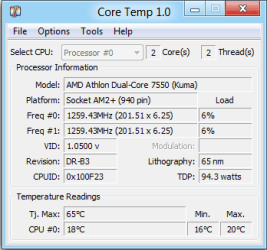
Core Temp does display the temperature in the Notification Area.
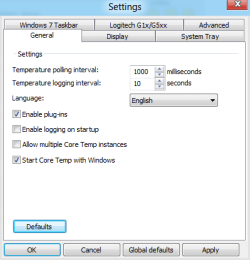
Click on Options > Settings and then the following tabs. Make the settings as shown. All other tabs should be set to their defaults.
Note that you can set the font, text, and background colours to those of your choice. You can also set it to use °F as opposed to °C if you wish. Click OK when done.
This shows both of my core temperatures in the Notification Area (you might need to change the settings to Show icon and notifications).
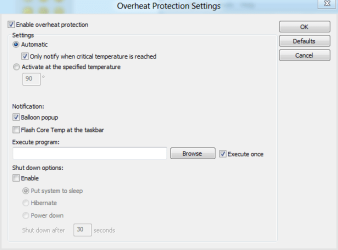
Now click on Options > Overheat protection.
These are the default settings for my CPU. If you wish, you can set it to Activate at the specified temperature and change the trigger temperature to a suitable value below its default (critical). Also uncheck Only notify when critical temperature is reached if you select this option, otherwise you will still only get a notification at the critical temperature and not your custom setting. You can also change the type of notification you receive.
This shows the type of notification you will receive (note that I have deliberately changed the temperature setting above in order to get this to display). If you want it to just notify you when it reaches/exceeds that temperature, you need to change the Notification Area settings to Only show notifications. | My System Specs | | System Manufacturer/Model Number Home Built, N/A OS Windows 7 Ultimate 32-bit & 64-bit both SP1 CPU AMD Athlon (tm) 64 X2 Dual Core Processor 7550 @2.5GHz Motherboard Gigabyte GA-MA770-ES3 Memory 2 x 2GB PC2-6400 (DDR2-800), Ganged Mode, (4GB total) Graphics Card Nvidia GeForce GTX 550 Ti 1GB Sound Card Realtek High Definition on board solution (ALC 892) Monitor(s) Displays ViewSonic VA1912w Widescreen (VGA) Screen Resolution 1440x900 Keyboard Microsoft Digital Media Pro Keyboard (USB) Mouse Microsoft Comfort Optical Mouse 3000 (USB) PSU XFX Pro Series 850W Semi-Modular Case Antec NSK 4000B II Cooling 1 x 80mm Front Inlet (with filter) 1 x 120mm Rear Exhaust Hard Drives OCZ Petrol SSD 64GB SATA III
OCZ Petrol SSD 128GB SATA III
Samsung HD501LJ 500GB SATA II x2
Hitachi HDS721010CLA332 1TB SATA II
1 x Iomega 1.5TB Ext USB 2.0 Internet Speed NetGear DG834Gv3 ADSL Modem/Router (Ethernet) ~4.0 Mb/s (O2) Other Info PCI-Express SATA III controller (Marvell 88SE9128 chipset)
Optical Drive: HL-DT-ST BD-RE BH10LS30 SATA Bluray
Lexmark S305 Printer/Scanner/Copier (USB)
CTF-430 Tablet & Pen
WEI Score: |
01-05-2012
|
#8 | | Win 7, Win 8, Ubuntu (64 bit) |
Thank you, Dwarf, but my problem with CoreTemp is that it does not recognize my CPU. The tmep display is 0*(?), and the system tray just shows 0. | My System Specs | | System Manufacturer/Model Number Custom (Sora) OS Win 7, Win 8, Ubuntu (64 bit) CPU AMD Phenom 2 3.2 GHz Quad Core (AM3) Motherboard Asus M4N82 Deluxe (nF 980 SLI) Memory 8 gb matched Corsair DDR2 Graphics Card GeForce GTX 580 Sound Card RealTek (onboard) Monitor(s) Displays 2x Dell LCDs Screen Resolution 1680 x 1050 Keyboard MS DMP 1031 Mouse Logitech MX Revolution PSU 950 Watt ThermalTake Toughpower Case Aluminum Cooling 3x 120mm fans, 2x 80 mm fans, 1x horizontal 80 mm fan pair Hard Drives 1x 1.8 tb SATA
1x 1.0 tb SATA (backup) Internet Speed 3 mb/s cable |
01-05-2012
|
#9 | | Windows 7 Ultimate 32-bit & 64-bit both SP1 |
See if the following FAQs help, in particular point 6. ALCPU Forums • View topic - Core Temp - FAQ | My System Specs | | System Manufacturer/Model Number Home Built, N/A OS Windows 7 Ultimate 32-bit & 64-bit both SP1 CPU AMD Athlon (tm) 64 X2 Dual Core Processor 7550 @2.5GHz Motherboard Gigabyte GA-MA770-ES3 Memory 2 x 2GB PC2-6400 (DDR2-800), Ganged Mode, (4GB total) Graphics Card Nvidia GeForce GTX 550 Ti 1GB Sound Card Realtek High Definition on board solution (ALC 892) Monitor(s) Displays ViewSonic VA1912w Widescreen (VGA) Screen Resolution 1440x900 Keyboard Microsoft Digital Media Pro Keyboard (USB) Mouse Microsoft Comfort Optical Mouse 3000 (USB) PSU XFX Pro Series 850W Semi-Modular Case Antec NSK 4000B II Cooling 1 x 80mm Front Inlet (with filter) 1 x 120mm Rear Exhaust Hard Drives OCZ Petrol SSD 64GB SATA III
OCZ Petrol SSD 128GB SATA III
Samsung HD501LJ 500GB SATA II x2
Hitachi HDS721010CLA332 1TB SATA II
1 x Iomega 1.5TB Ext USB 2.0 Internet Speed NetGear DG834Gv3 ADSL Modem/Router (Ethernet) ~4.0 Mb/s (O2) Other Info PCI-Express SATA III controller (Marvell 88SE9128 chipset)
Optical Drive: HL-DT-ST BD-RE BH10LS30 SATA Bluray
Lexmark S305 Printer/Scanner/Copier (USB)
CTF-430 Tablet & Pen
WEI Score: |
01-05-2012
|
#10 | | Systems 1 and 2: Windows 7 Enterprise x64, Win 8 Developer |
| My System Specs | | System Manufacturer/Model Number Dell and Custom OS Systems 1 and 2: Windows 7 Enterprise x64, Win 8 Developer CPU System 1: i7 2600@3.4GHz, System 2: AMD FX-4100 Zambezi 3.6G Motherboard System 1:Dell 06NWYK System 2: ASUS M5A97 AM3+ Memory System 1: 8GB System 2: 8GB Graphics Card System 1: ATI FirePro V4800 System 2: Radeon HD 6850 Sound Card System 1: onboard System 2: onboard Monitor(s) Displays System1: Viewsonic HDMI 24" Screen Resolution System 1: 1920x1080 System 2: 1920x1080 Case System 1: Dell System 2: Cooler Master Hard Drives System 1: Mirrored .5B drives System 2: Seagate Barracuda ST1000DM003 1TB 7200 RPM 64MB Cache SATA 6.0Gb/s Internet Speed 10 MBPS Looking for CPU temp in Win7 sys tray problems? All times are GMT -5. The time now is 11:50 PM. |  |