
- Local time
- 5:09 AM
- Messages
- 14
How do I unhide folders when the "unhide" button is greyed out?
I'm dealing with either the aftermath of a virus or the aftermath of overzealous antivirus software (Avast free antivirus). I use the Portable Apps suite on my USB Disk on Key. I think Avast tagged Autorun.inf as a virus (or worm).
Anyway, I now have problems saving new files to my DoK because, for example, Word will not show me the folder which I want to save the file to, because it's hidden. (Yes, I know I can "Show Hidden Folders").
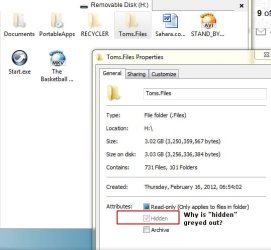
I want to Unhide my folders. See the image below. It shows that the Unhide button is greyed out. And may even be telling me that the folders are set to "read only". How do I resolve this problem?
In on Windows 7.
I'm dealing with either the aftermath of a virus or the aftermath of overzealous antivirus software (Avast free antivirus). I use the Portable Apps suite on my USB Disk on Key. I think Avast tagged Autorun.inf as a virus (or worm).
Anyway, I now have problems saving new files to my DoK because, for example, Word will not show me the folder which I want to save the file to, because it's hidden. (Yes, I know I can "Show Hidden Folders").
I want to Unhide my folders. See the image below. It shows that the Unhide button is greyed out. And may even be telling me that the folders are set to "read only". How do I resolve this problem?
In on Windows 7.
Attachments
My Computer
At a glance
Windows 7 Enterprise
- OS
- Windows 7 Enterprise


