| Windows 7: Hard Drive Partitions - Changing with GParted |
28 Aug 2009
|
#1 | | |
Hard Drive Partitions - Changing with GParted The Windows 7 "Disk Management" utility fulfills some basic partition management functions. However it is limited. The Open Source GParted is a full featured partition management utility and is easy to use. In the following example, the Windows 7 partition (labled X) needed to be expanded. Unfortunately, as it was the second partition, Windows 7 was unable to move the partition to the left and absorb the unallocated space.
Here, step by step, is how to use GParted to change the partition size: 1. Go to this site and download "SystemRescueCD". GParted is one of the programs on the CD. After burning the ISO to CD, you have a bootable, live cd (meaning the programs run off of the CD and nothing needs to be installed to the hard drive) that you can boot to and run the program. 
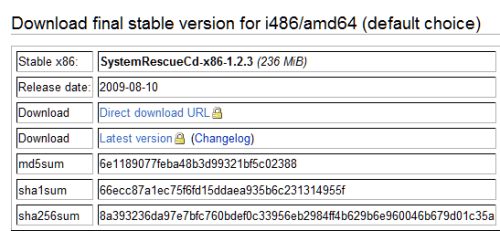
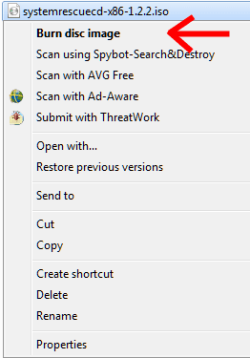
2. You can use Windows 7 to burn the ISO file to CD which will make it bootable. 
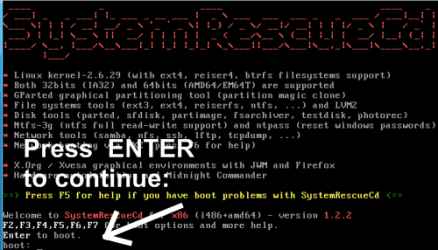
3. Boot to your SystemRescueCD and this is what you should see: 4. Press ENTER to boot and continue. 
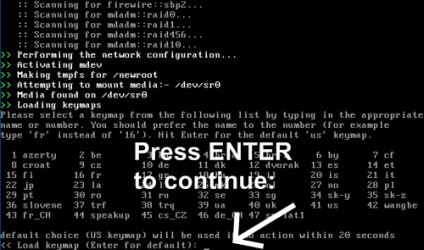
5. Press enter to use the default keyboard and continue. 
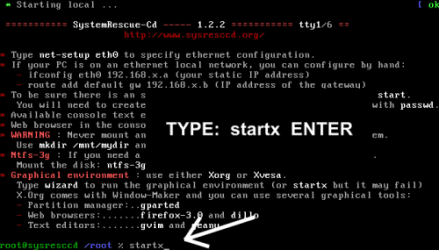
6. TYPE: startx to open the graphical user interface. 
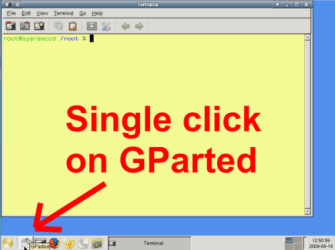
7. GParted is the icon next to the start button. A single click will start it. 
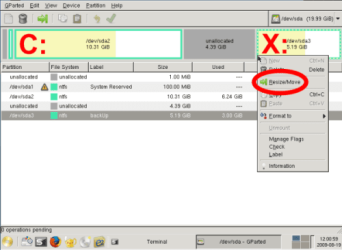
8. Right click on the partition you wish to change and select "Resize/Move". 
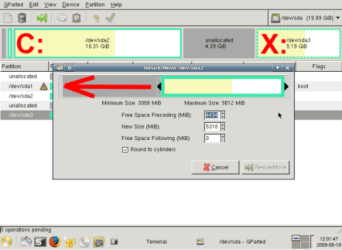
9. Make changes to the partition with the sliding bars. 
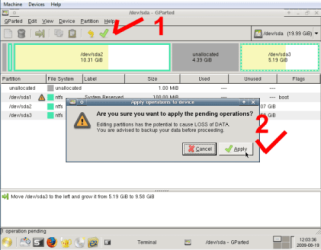
10. Click the green check mark, and verify with "Apply". 
11. When the process is finished, click "Close". 
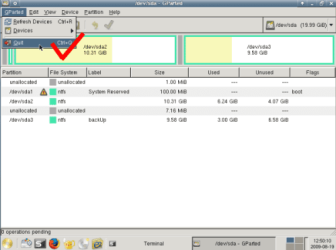
12. Exit GParted ... 
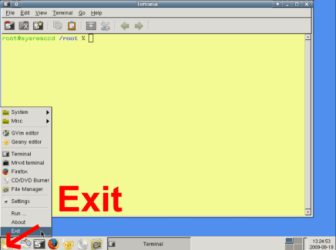
13. ... and Exit the GUI. 
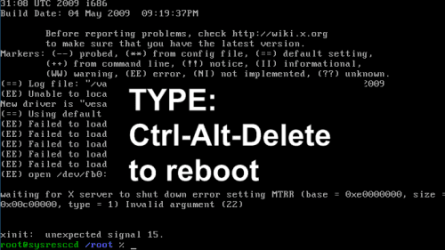
14. Finally, TYPE: Ctrl-Alt-Delete to reboot the computer. 
After you reboot into Windows (be sure to remove the CD), "checkdisk" may want to check your file system. That is OK, let it finish. The X: partition, in this example, should now be nearly 10GB bigger.
Robert
Last edited by iseeuu; 17 Jan 2010 at 04:07 PM..
Reason: typos
| My System Specs |
| |
28 Aug 2009
|
#2 | | Windows 7 Ultimate The Southern Hinterlands |
Nice find on the System Rescue CD.. As a long time Linux user, I have used gparted quite a few times.. A Ubuntu Live cd is always in my toolkit for instances like these...
Another fine tutorial.. | My System Specs | | System Manufacturer/Model Number ASUSTeK Computer INC. CM5675 OS Windows 7 Ultimate CPU Core(TM) i5 CPU 650 @ 3.20GHz Motherboard ASUSTeK Computer INC. CM5675 Memory 6.00 GB Graphics Card Intel(R) HD Graphics Sound Card Intel HD integtrated Monitor(s) Displays Samsung 24' Screen Resolution 1900/1020 Hard Drives (1) INTEL SSD SA2M120G2GC ATA Device (2) ST31000528AS ATA Device Internet Speed 30mb |
28 Aug 2009
|
#3 | | |

Quote: Originally Posted by Tews Nice find on the System Rescue CD.. As a long time Linux user, I have used gparted quite a few times.. A Ubuntu Live cd is always in my toolkit for instances like these...
Another fine tutorial..  Thanks Tews!
Actually, thanks should go to DarkDavil for the inspiration to put this together and the collaboration with Dave76 and Night Hawk who made valuable contributions to the thread. I was sort of in a hurry at the time, but I though it might be easier to find if I moved it here so search could find it.
Many thanks!
Robert | My System Specs | | |
28 Aug 2009
|
#4 | | Win 8 Release candidate 8400 |
Good Tutorial Robert
Did you ask about putting it in tutorials? | My System Specs | | System Manufacturer/Model Number HP Pavillion dv-7 1005 Tx OS Win 8 Release candidate 8400 CPU 2@2.4 Memory 4 gigs Graphics Card Nvidia 9600M Sound Card HD built-in Monitor(s) Displays 17" Wxga Screen Resolution 1440x900 Cooling none Internet Speed 45Mb down 5Mb up |
28 Aug 2009
|
#5 | | |

Quote: Originally Posted by zigzag3143 Good Tutorial Robert
Did you ask about putting it in tutorials? There is a lot of software. Whereas some of it, like this Open Source utility, can be useful, it is not Windows or Windows 7 specific. It is just too easy to clutter up the Windows Seven Tutorials with everybody's favorite prog, when the Tutorials should, at least in my opinion, feature Windows and Windows 7 specific software. This is fine. It is here and search can find it. Its not about credit. Its about helping.
Robert | My System Specs | | |
29 Aug 2009
|
#6 | | |
I believe that someone said Gparted is not Windows Specific so I was just curious if it works on Win XP ??
Thanks | My System Specs | | OS Windows 7 Pro CPU Intel(R) Pentium(R) Duel CPU E2200 2.20 Ghz Motherboard GA-G41M-ES2L Memory 4 gb 2.96 Usable Graphics Card Onboard Sound Card Onboard Hard Drives 2 - 1TB WD Sata Drives |
29 Aug 2009
|
#7 | | |
This I did from Win XP because I don't have a burner setup right now on the Win 7 machine.
I must have done something wrong. I downloaded systemrescuecd-x86-1.2.3.iso. I then burned the disc image file using Roxio. As far as I can see, it is not boot disc. Any clues ???
Thanks | My System Specs | | OS Windows 7 Pro CPU Intel(R) Pentium(R) Duel CPU E2200 2.20 Ghz Motherboard GA-G41M-ES2L Memory 4 gb 2.96 Usable Graphics Card Onboard Sound Card Onboard Hard Drives 2 - 1TB WD Sata Drives |
29 Aug 2009
|
#8 | | |

Quote: Originally Posted by huffman I believe that someone said Gparted is not Windows Specific so I was just curious if it works on Win XP ??
Thanks Hi huffman!
What is meant by not Windows or Windows 7 specific is the software is not written by Microsoft or on Windows code.
Many Open Source programs are written to run on Windows. In this case, GParted runs off of the CD which, because it is bootable and a "live" CD, the CD becomes the OS allowing the programs to run on any computer that will boot to the CD.
GParted is able to work with many file systems including Windows NTFS and fat32, as well as many used in Linux.
So yes, you can use GParted to manage your XP hard drive partitions.
Robert | My System Specs | | |
29 Aug 2009
|
#9 | | |

Quote: Originally Posted by huffman This I did from Win XP because I don't have a burner setup right now on the Win 7 machine.
I must have done something wrong. I downloaded systemrescuecd-x86-1.2.3.iso. I then burned the disc image file using Roxio. As far as I can see, it is not boot disc. Any clues ???
Thanks huffman;
I have a copy of Roxio 8 and have wasted many CDs I thought were going to be bootable. They just don't make it easy, as easy as Windows 7 does.
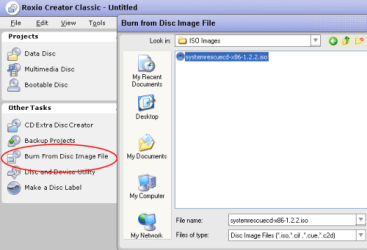
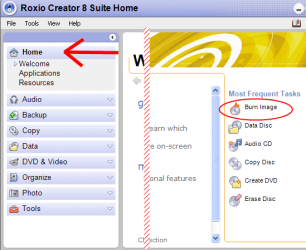
With Roxio 8, you must select to "Burn the Image" like here:
I hope you can find something similar in your copy of Roxio.
Robert | My System Specs | | |
29 Aug 2009
|
#10 | | |
This is what ImgBurn lives for. The Official ImgBurn Website
You might as well uninstall Roxio. :P | My System Specs | | System Manufacturer/Model Number Too many to list. OS XP, Seven, 2008R2 CPU AMD, Intel, VIA Motherboard Various Memory Corsair, Kingston, etc. Graphics Card ATI, NVIDIA Monitor(s) Displays Samsung Keyboard qwerty Hard Drives Maxtor, Western Digital Internet Speed 22 Mb/s @ home, 1 Gb/s @ server Other Info All of my systems still run fastest on XP 32-bit for the most part. Win7 is fun to play with, but I still prefer XP for raw speed, security, and functionality. Hard Drive Partitions - Changing with GParted problems? All times are GMT -5. The time now is 05:22 PM. | |