System Manufacturer/Model Number Custom Built OS Windows 7 Build 7000 x64 CPU DualCore AMD Athlon 64 X2, 2000 MHz (10 x 200) 3800 Motherboard Asus M2N-E Memory 4096 MB (DDR2-800 DDR2 SDRAM) Graphics Card ATI Radeon X800 XL (R430) Monitor(s) Displays LG L194WTX(Digital), LG L1952T (Analog)
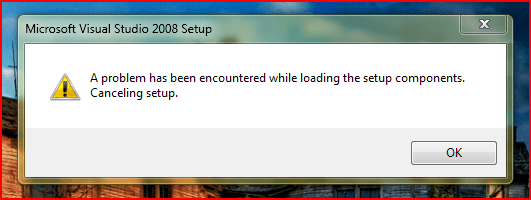
When I try to install VS2008 Pro I get the attached message. I've tried running in compatability mode but still fails.
Anyone run into this problem?
Thanks in advance.
compatibility*
Yeah, that issue doesn't seem resolvable. It might even be a problem with 64-bit distributions because I also ran into similar issues during the setup process. You could try extracting from the exe using 7-zip and manually registering DLLs, etc.
Computer type PC/Desktop OS Windows 8 Pro x64 CPU i7 3820 @ 4.44GHz Motherboard ASUS Rampage IV Extreme RoG BF3 Memory F3-12800CL9D-8GBXL (32GB) Graphics Card GTX 480 SLI Sound Card Auzentech X-Fi HomeTheater HD Monitor(s) Displays Sony 32V5500 Screen Resolution 1920 x 1080
Keyboard Cyborg V.7 Mouse Razer Lachesis 3.5G 5600dpi PSU OCZ ZX 1250W Case HAF X Cooling H80 Hard Drives LSI MR9260-4i (RAID10):
Toshiba DT01ACA300 x 4
iaStorA:
OCZ Vertex Enterprise 120GB
ST3500320AS 500GB
Intel 520 Series 120GB Internet Speed 23296kbps ds / 812kbps us ADSL2+ Browser Mozilla/5.0 (Windows NT 6.2; Win64; x64; rv:23.0) Gecko/2013 Other Info AverMedia C127 Game Broadcaster HD
According to this page, the fix to your problem is:
Quote:
Click the Start button , click All Programs, and then click Accessories.
Right-click Command Prompt, and then click Run as administrator. In the User Account Control window, verify that Program name is Windows Command Processor, and then click Yes.
In the Administrator: Command Prompt window, type or paste the following text at the prompt: reg delete HKLM\SOFTWARE\Microsoft\SQMClient\Windows\DisabledSessions /va /f
Press Enter to install the solution.
If The operation completed successfully displays, close the Administrator: Command Prompt window to complete this procedure. If "ERROR: Access is denied" displays, repeat this procedure from the top, making sure you clicked Run as administrator in step two.
OS Windows 7 Professional 32bit CPU AMD Sempron 2800+ @ 1.7GHz Motherboard MSI K8n Neo4 Memory 2GB DDR Graphics Card nVidia GeForce 7300GS Sound Card realtek Monitor(s) Displays Ag Neovo "15
PSU Forton 500W Case Home made silent case with sound absorbent material Cooling CPU, PSU Active, GPU passive cooling. One noctua in-take. Hard Drives SSD OCZ Vertex Series 30GB sata
HDD Seagate 7200.12 500GB sata
HDD Seagate 7200.7 120GB ide
Hello
Unzip your ISO file to local directory.
Then go to <your dir>Setup\
Execute setup.exe within the Setup folder.
That is it!! I had hanging VS 2008 installation window at Windows 7 Professional. I went to Setup window directly and launched the Setup\setup.exe file...
Cheers