Solved Can't remove Yahoo! Messenger from startup!

daydr3am3r

New member
Power User
Local time
3:38 PM
Messages
96
Location
Bucharest, Romania
Hi all
About 2 months ago I installed the latest update for Yahoo! Messenger. From that day, YM keeps popping out at boot, no matter what I do.
I tried disabling it from YM preference menu but I noticed it still appears in MS Config so I also removed it from there.
I tried using 3rd party apps to remove it from startup, I manually deleted a shortcut from my user's startup folder and I tried searching the registry for some sort of key to remove, all without luck.
I also uninstalled YM, I deleted all related folders and registry keys, I performed a registry clean up and reinstalled it but it still pops out at start up.
Obviouslly, I performed a full system scan with my av (Norton 360), SpyBot S&D and Eset/Bitdefender Online Scanner and none of these found anything.
Any ideas?
It's not YM the fact that YM start on boot bothers me but the fact that it usually starts before other essential drivers and services and it hangs, slowing down everything. And my system already takes a lot of time to boot due to high amount of drivers and services it has on startup and I cannot remove (because I need them on startup).
 

My Computer My Computer

At a glance

Windows 7 Professional x64 SP1Intel Quad Core q93004*2Gb A-Data Extreme 800 MhzASUS GeForce GTX285 1Gb DDR 3
Computer type
PC/Desktop
OS
Windows 7 Professional x64 SP1
CPU
Intel Quad Core q9300
Motherboard
ASUS Striker II Formula
Memory
4*2Gb A-Data Extreme 800 Mhz
Graphics Card(s)
ASUS GeForce GTX285 1Gb DDR 3
Sound Card
Supreme FX II
Monitor(s) Displays
Philips LCD 220VW
Screen Resolution
1680 x 1050
Hard Drives
1 x 1TB WD Caviar Black 64 Mb 7200RPM SATA 3
Case
Antec P190B
Keyboard
Microsoft Natural Ergonomic Keyboard 4000
Mouse
Logitech G5 Refresh
Antivirus
Norton 360
Browser
Opera
I also uninstalled YM, I deleted all related folders and registry keys. . .

Just for confirmation, did you delete it through Control Panel > Programs and Features? Sometimes Yahoo will have an expandable tree in P&F. You'll have to uncheck YM. This might be in addition to the usual steps here:


1. Click Start > Yahoo! Messenger > Yahoo! Messenger
2. Click Messenger menu > Preferences. Preferences dialog box opens.
3. Click General tab. Uncheck the check box of "Automatically start Yahoo! Messenger."
4. Restart computer.
 

My Computer My Computer

At a glance

Win 7 Pro 64-bitIntel i5 2.4 Ghz8GB DDR3Intel HD 3000
Computer type
Laptop
Computer Manufacturer/Model Number
Sony Vaio VPCEB47GM Laptop
OS
Win 7 Pro 64-bit
CPU
Intel i5 2.4 Ghz
Memory
8GB DDR3
Graphics Card(s)
Intel HD 3000
Sound Card
IDT High Definition
Monitor(s) Displays
15.6 WGXA Anti-Glare LED
Screen Resolution
1280x800
Hard Drives
640Gb 7200rpm
Antivirus
MSE
Browser
Opera (primary) with IE9 backup
I removed it from Control Panel/ Programs & Feature.
And I unchecked that right after installation. And even if it loads on boot, that option appears as unchecked.
However, if I check MS Config, after every restart it's still there, even if I remove it.
 

My Computer My Computer

At a glance

Windows 7 Professional x64 SP1Intel Quad Core q93004*2Gb A-Data Extreme 800 MhzASUS GeForce GTX285 1Gb DDR 3
Computer type
PC/Desktop
OS
Windows 7 Professional x64 SP1
CPU
Intel Quad Core q9300
Motherboard
ASUS Striker II Formula
Memory
4*2Gb A-Data Extreme 800 Mhz
Graphics Card(s)
ASUS GeForce GTX285 1Gb DDR 3
Sound Card
Supreme FX II
Monitor(s) Displays
Philips LCD 220VW
Screen Resolution
1680 x 1050
Hard Drives
1 x 1TB WD Caviar Black 64 Mb 7200RPM SATA 3
Case
Antec P190B
Keyboard
Microsoft Natural Ergonomic Keyboard 4000
Mouse
Logitech G5 Refresh
Antivirus
Norton 360
Browser
Opera
I know that a lot of Yahoo's add-ons can be difficult to remove. Seems like once they get on a machine they never want to leave. Just a couple more suggestions for whatever it's worth. You might want run a few free anti-malware scans just in case something is preventing a clean removal of Messenger. In addition to your own anti-virus suite, these free tools are recommended quite often on this Forum.

Malwarebytes

ESET Online Scanner

Superantispyware

Windows Defender Offline

TDSSKiller

If still no joy you could try Revo Uninstaller. The Pro version has a free 30 day trial and utilizes a forced uninstall option. Sometimes it can remove stubborn programs that defy regular uninstallation methods.

Revo Uninstaller Pro - Uninstall Software, Remove Programs easily, Forced Uninstall
 

My Computer My Computer

At a glance

Win 7 Pro 64-bitIntel i5 2.4 Ghz8GB DDR3Intel HD 3000
Computer type
Laptop
Computer Manufacturer/Model Number
Sony Vaio VPCEB47GM Laptop
OS
Win 7 Pro 64-bit
CPU
Intel i5 2.4 Ghz
Memory
8GB DDR3
Graphics Card(s)
Intel HD 3000
Sound Card
IDT High Definition
Monitor(s) Displays
15.6 WGXA Anti-Glare LED
Screen Resolution
1280x800
Hard Drives
640Gb 7200rpm
Antivirus
MSE
Browser
Opera (primary) with IE9 backup
Sorry for my late reply and thanks for your help.
I used Revo Uninstaller to get rid of it and it worked.
 

My Computer My Computer

At a glance

Windows 7 Professional x64 SP1Intel Quad Core q93004*2Gb A-Data Extreme 800 MhzASUS GeForce GTX285 1Gb DDR 3
Computer type
PC/Desktop
OS
Windows 7 Professional x64 SP1
CPU
Intel Quad Core q9300
Motherboard
ASUS Striker II Formula
Memory
4*2Gb A-Data Extreme 800 Mhz
Graphics Card(s)
ASUS GeForce GTX285 1Gb DDR 3
Sound Card
Supreme FX II
Monitor(s) Displays
Philips LCD 220VW
Screen Resolution
1680 x 1050
Hard Drives
1 x 1TB WD Caviar Black 64 Mb 7200RPM SATA 3
Case
Antec P190B
Keyboard
Microsoft Natural Ergonomic Keyboard 4000
Mouse
Logitech G5 Refresh
Antivirus
Norton 360
Browser
Opera
That's really great news. Thanks for posting back! :thumbsup:
 

My Computer My Computer

At a glance

Win 7 Pro 64-bitIntel i5 2.4 Ghz8GB DDR3Intel HD 3000
Computer type
Laptop
Computer Manufacturer/Model Number
Sony Vaio VPCEB47GM Laptop
OS
Win 7 Pro 64-bit
CPU
Intel i5 2.4 Ghz
Memory
8GB DDR3
Graphics Card(s)
Intel HD 3000
Sound Card
IDT High Definition
Monitor(s) Displays
15.6 WGXA Anti-Glare LED
Screen Resolution
1280x800
Hard Drives
640Gb 7200rpm
Antivirus
MSE
Browser
Opera (primary) with IE9 backup
I've spoken too soon :|
After a few days without problems it started all over again after a power failure.
That was about 1 hour ago.
I'll give it another try.
Anyway, thank you all for your help.
 

My Computer My Computer

At a glance

Windows 7 Professional x64 SP1Intel Quad Core q93004*2Gb A-Data Extreme 800 MhzASUS GeForce GTX285 1Gb DDR 3
Computer type
PC/Desktop
OS
Windows 7 Professional x64 SP1
CPU
Intel Quad Core q9300
Motherboard
ASUS Striker II Formula
Memory
4*2Gb A-Data Extreme 800 Mhz
Graphics Card(s)
ASUS GeForce GTX285 1Gb DDR 3
Sound Card
Supreme FX II
Monitor(s) Displays
Philips LCD 220VW
Screen Resolution
1680 x 1050
Hard Drives
1 x 1TB WD Caviar Black 64 Mb 7200RPM SATA 3
Case
Antec P190B
Keyboard
Microsoft Natural Ergonomic Keyboard 4000
Mouse
Logitech G5 Refresh
Antivirus
Norton 360
Browser
Opera
Wow, pesky little app isn't it? Couple of other things to try.

1. Go to C:\Program Files and C:\Program Files (x86). If there are any folders related to Messenger you can try uninstalling them.

2. If that doesn't work you could try installing Messenger again. It's possible the built-in uninstaller became corrupted and isn't working any more. A fresh install should repair the uninstaller.

3. If you're familiar with and comfortable editing the registry you could look for instances of Yahoo Messenger and delete them. CAUTION: Editing the registry improperly could leave you with a non-working computer.
 

My Computer My Computer

At a glance

Win 7 Pro 64-bitIntel i5 2.4 Ghz8GB DDR3Intel HD 3000
Computer type
Laptop
Computer Manufacturer/Model Number
Sony Vaio VPCEB47GM Laptop
OS
Win 7 Pro 64-bit
CPU
Intel i5 2.4 Ghz
Memory
8GB DDR3
Graphics Card(s)
Intel HD 3000
Sound Card
IDT High Definition
Monitor(s) Displays
15.6 WGXA Anti-Glare LED
Screen Resolution
1280x800
Hard Drives
640Gb 7200rpm
Antivirus
MSE
Browser
Opera (primary) with IE9 backup
Thanks for the suggestions. Done this too.
It seamed to work for a short period of time but now it started all over again. :|
I don't get it. I didn't install any toolbar or other ads Yahoo! comes with, I uninstalled it normally and I used forced uninstall, cleaned up the registry, searched for every single Yahoo related key, scan my system with 4 AV software and it still starts on boot.
This is one of the most frustrating problems I've had in years.
 

My Computer My Computer

At a glance

Windows 7 Professional x64 SP1Intel Quad Core q93004*2Gb A-Data Extreme 800 MhzASUS GeForce GTX285 1Gb DDR 3
Computer type
PC/Desktop
OS
Windows 7 Professional x64 SP1
CPU
Intel Quad Core q9300
Motherboard
ASUS Striker II Formula
Memory
4*2Gb A-Data Extreme 800 Mhz
Graphics Card(s)
ASUS GeForce GTX285 1Gb DDR 3
Sound Card
Supreme FX II
Monitor(s) Displays
Philips LCD 220VW
Screen Resolution
1680 x 1050
Hard Drives
1 x 1TB WD Caviar Black 64 Mb 7200RPM SATA 3
Case
Antec P190B
Keyboard
Microsoft Natural Ergonomic Keyboard 4000
Mouse
Logitech G5 Refresh
Antivirus
Norton 360
Browser
Opera
In reading a lot of different posts about permanently disabling or removing Yahoo Messenger, the one common thought is to delete the primary Yahoo account ( yourname<at>yahoo<dot>com ). Doing so also deletes all other Yahoo services. I'm guessing you don't want to delete your primary account. But is it possible that there's an alias or "other user" Yahoo account that's opening Messenger?

Another possibility is to use a 3rd party app to delay startups. For example, with WinPatrol, you can schedule any startup program by right clicking on it, move it to delayed start. Then in Delayed Start tab, got to the Delay Start option. WinPatrol has a free and paid version. Or another company called r2 Studios has an app.

BillP Studios - WinPatrol Classic 2012

r2 Studios - Startup Delayer
 

My Computer My Computer

At a glance

Win 7 Pro 64-bitIntel i5 2.4 Ghz8GB DDR3Intel HD 3000
Computer type
Laptop
Computer Manufacturer/Model Number
Sony Vaio VPCEB47GM Laptop
OS
Win 7 Pro 64-bit
CPU
Intel i5 2.4 Ghz
Memory
8GB DDR3
Graphics Card(s)
Intel HD 3000
Sound Card
IDT High Definition
Monitor(s) Displays
15.6 WGXA Anti-Glare LED
Screen Resolution
1280x800
Hard Drives
640Gb 7200rpm
Antivirus
MSE
Browser
Opera (primary) with IE9 backup
Did you click Save or Apply after unchecking these options? Just a thought.
You can also try CCleaner, it has options for turning off start up items. I really doubt you need all those items to start with w7 because they can always be started from the Start Menu or other shortcut.
 

My Computer My Computer

At a glance

Windows 7 Ultimate X64 SP1Intel i5-2550K, Differing ~4.4-4.8GHz No buil...16GB G.Skill Sniper 1866MHz @ 2133MHz 2x8GBASUS GTX650TIB-DC2OC-2GD5, (650TI Boost)
Computer type
PC/Desktop
Computer Manufacturer/Model Number
Home Built Desktop By DataTech
OS
Windows 7 Ultimate X64 SP1
CPU
Intel i5-2550K, Differing ~4.4-4.8GHz No built in GPU
Motherboard
ASUS P8Z68-V PRO/GEN3
Memory
16GB G.Skill Sniper 1866MHz @ 2133MHz 2x8GB
Graphics Card(s)
ASUS GTX650TIB-DC2OC-2GD5, (650TI Boost)
Sound Card
Onboard Realtek 5-1
Monitor(s) Displays
Samsung P2570HD
Screen Resolution
1920x1080
Hard Drives
Samsung 840 Pro 256GB SSD for OS, 500GB Seagate Constellation (Enterprise drive) for Data
PSU
Corsair HX650W
Case
Inwin Dragon Rider
Cooling
Hyper 212 EVO w/two Noctua fans, push-pull, @1300 RPM
Keyboard
E-Z Eyes, bright yellow keys with large characters
Mouse
steelseries SENSEI Laser Pro Gaming
Internet Speed
48-51Mbs Mbs down, 11 Mbs up Xfinity Cable
Antivirus
Norton Internet Security 2013
Browser
IE 10, Opera, Pale Moon if needed
Other Info
4 case fans, LG BluRay-RE, ASUS DVD-RW, Mr. Fusion power supply, 1.21 gigawatts.
Of course I did :)).
I also tried using other apps to delay it but the thing is it does not appear in those apps.
I tried with Tune Up Utilities, CCleaner, Revo Uninstaller but there is no trace of Yahoo.
Before uninstalling YM I was able to see a startup entry in at least one of these apps but now it's only visible in MSCONFIG and I remove it every time :|
Also, what do you mean by deleting my account? If you are referring to removing my account from YM and adding it again, I already did it. I also deleted all other accounts (actually there was only one other account) and the entire YM installation folder.
And I checked to see if there is any YM related services that may cause this.
----
As for those items in startup most of them are drivers and server related items (Oracle, MS SQL Server, MySQL and other stuff) and the delay is usually caused by Oracle services and HP drivers.
Other than those I only have 2-3 nobrainer apps on startup.
 

My Computer My Computer

At a glance

Windows 7 Professional x64 SP1Intel Quad Core q93004*2Gb A-Data Extreme 800 MhzASUS GeForce GTX285 1Gb DDR 3
Computer type
PC/Desktop
OS
Windows 7 Professional x64 SP1
CPU
Intel Quad Core q9300
Motherboard
ASUS Striker II Formula
Memory
4*2Gb A-Data Extreme 800 Mhz
Graphics Card(s)
ASUS GeForce GTX285 1Gb DDR 3
Sound Card
Supreme FX II
Monitor(s) Displays
Philips LCD 220VW
Screen Resolution
1680 x 1050
Hard Drives
1 x 1TB WD Caviar Black 64 Mb 7200RPM SATA 3
Case
Antec P190B
Keyboard
Microsoft Natural Ergonomic Keyboard 4000
Mouse
Logitech G5 Refresh
Antivirus
Norton 360
Browser
Opera
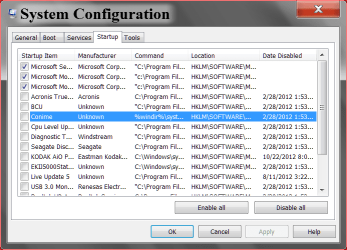
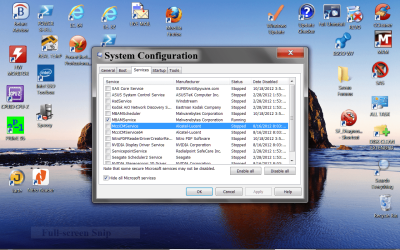
daydr3am3r take a look at these two pictures. This will let us know if we are on the same page. Please take notice what I have checked in Start Up and Non Microsoft Services. Your little problem could be hiding in Services. A little note. If a company like Yahoo gave me the hell you are having their/there would be nothing from that company on my computer.
today 10 22.PNG
Capture.PNnow now.PNG
In Non Microsoft Services I have security checked only. I do all my other up dates manually.
 
Last edited:

My Computer My Computer

At a glance

Windows 10 Pro. 64/ version 1709 Windows 7 Pr...Intel i7-6800K @ 4.3Corsair Platinum 16 gig @2400EVGA GTX 1070 OC
Computer type
PC/Desktop
Computer Manufacturer/Model Number
Home made Desktop
OS
Windows 10 Pro. 64/ version 1709 Windows 7 Pro/64
CPU
Intel i7-6800K @ 4.3
Motherboard
ASUS X-99 Deluxe II
Memory
Corsair Platinum 16 gig @2400
Graphics Card(s)
EVGA GTX 1070 OC
Monitor(s) Displays
Asus 27" LED LCD/VE278Q
Screen Resolution
1920-1080 or 1280-720 HDMI
Hard Drives
INTEL SSD 730-240 Gb Sata 3.0/
PSU
EVGA Platium 1200W
Case
Phanteks Luxe Tempered Glass 8 fans/ one radiator
Cooling
XSPC/ Water Cooled CPU
Keyboard
Das 4 Professional
Mouse
Logitech M705/MX Anywhere 2-S
Internet Speed
100 mbits
Antivirus
Microsoft Security Essentials/ Malwarebytes Premium 3.0/ SAS
Browser
I.E. 11 default/Firefox/ ISP Time Warner Cable/Spectrum
Other Info
LG BluRay Burner/
Sound system-KLipsch-THX/
Icy Dock ssd Hot Swap bays.
Back
Top