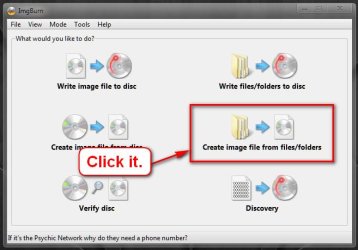
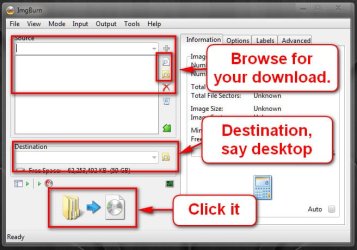
Ok Arc I think I am beginning to see what you mean ? I have to copy the stick folder items to a file elsewhere on my hard drive and then follow the sbips in post 21.
That is the ImgBurn feature that I was trying to use via that instruction sheet from the Dell site.
Sorry mate but what is second nature to you and most of the others is very overly complicated to me
My Computer
At a glance
Desk1 7 Home Prem / Desk2 10 Pro / Main lap A...Desk1 i5 3750K / Laptop i7 GTX 860M / Desk2 i...Desk1 8GB (1866) / Desk2 16GB (1333) / Laptop...Desk 1& 2NVidia GTX 650 & Laptops on board Intel
Computer type
PC/Desktop
Computer Manufacturer/Model Number
Own build (new) Desk1 / Asus ROG Win 7 / Desk2 1st build
OS
Desk1 7 Home Prem / Desk2 10 Pro / Main lap Asus ROG 10 Pro 2 laptop Toshiba 7 Pro Asus P2520 7 & 10
One other Desktop (tester) and spare Toshba laptop both with SSD's
Running Kaspersky 2016 ISS on all machines config'd identically
Logitec audio stereo systems on each machine (x3)
Canon MG5250MFC
Router/modem TP-Link running WPA2SK
Well late last night I tried a reinstall of ImgBurn on another computer and the folder went across - I cannot for the life of me remember what I clicked on but it did. But it ran through and ended with a very loud OH NO!! and referred me to the Windows ISO burner.
I downloaded and tried that and it started a slow burn and ended with a fail message. So it is either a dud download or made for Dell or some such.
So am giving this one away I think as it has kept me at it for four days now and quite frankly my friend will have to come up with some money somehow for 7.
Anyway sincere thanks to everyone for the help as I know it must be as frustrating for you as it has been for me.
My Computer
At a glance
Desk1 7 Home Prem / Desk2 10 Pro / Main lap A...Desk1 i5 3750K / Laptop i7 GTX 860M / Desk2 i...Desk1 8GB (1866) / Desk2 16GB (1333) / Laptop...Desk 1& 2NVidia GTX 650 & Laptops on board Intel
Computer type
PC/Desktop
Computer Manufacturer/Model Number
Own build (new) Desk1 / Asus ROG Win 7 / Desk2 1st build
OS
Desk1 7 Home Prem / Desk2 10 Pro / Main lap Asus ROG 10 Pro 2 laptop Toshiba 7 Pro Asus P2520 7 & 10
One other Desktop (tester) and spare Toshba laptop both with SSD's
Running Kaspersky 2016 ISS on all machines config'd identically
Logitec audio stereo systems on each machine (x3)
Canon MG5250MFC
Router/modem TP-Link running WPA2SK