Windows 7 Forums Search
Welcome to Windows 7 Forums. Our forum is dedicated to helping you find solutions with any problems, errors or issues you are experiencing with Windows 7. The Windows 7 forum also covers news and updates and has an extensive Windows 7 tutorial section that covers a wide range of tips and tricks.


Windows 7 - Photoshop CS4 - Super Slow Redraw

 
09-24-2009   #1


Windows 7 Ultimate


Photoshop CS4 - Super Slow Redraw

Hello all,

I have searched this forum and have adjusted my OS and software settings per you advice:

Virtual memory: check (per Adobe's instructions)
Scratch Disk: check
'Enable Open GL Drawing': check (off)

System Info:
Dell Optiplex GX 620
Intel 3.00GHz
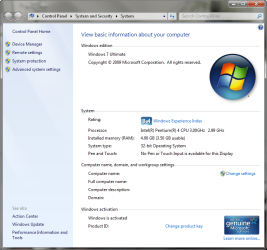
4.00GB RAM (3.5GB usable)
32-bit OS (Windows 7 Ultimate)

Photoshop settings:
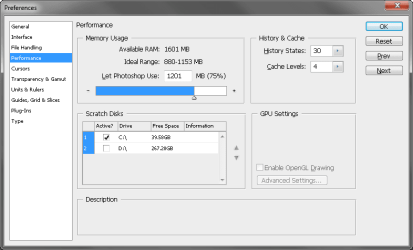
Photoshop is using 75% of my system's resources
'Available RAM' = 1603MB
'History States' = 30
'Cache Levels' = 4
Compatibility = Windows XP (Service Pack 2)

Photoshop is running very slowly, even with tiny files (50k). I haven't had the need to run large CMYK files, but I am guessing those will drastically slow the already molasses-like redraw.

I did not have any issues when installing Windows 7 or CS4. Neither crash or are glitchy in any other way... I spend 90% of my work day in PS, so it is mandatory, for my personal sanity and productivity that PS run as fast or faster than when installed on XP.

I am about an hour away from reinstalling XP. Please advise.

TIA,
Mark

My System SpecsSystem Spec
09-24-2009   #2


Win7 7600 x64


Strange result your having, your computer spec seems fine for PS CS4. I have it running on both my 32bit and 64bit set ups. One with a lower spec than yours! I have not adjusted any of the settings that were set as default during the install. Only I did a custom install and selected just Photoshop and bridge nothing else.

Why are you using XP compatibility?
Is your Windows 7 the final RTM or RC?
My System SpecsSystem Spec
09-24-2009   #3


Windows 7 Ultimate


Quote   Quote: Originally Posted by ilesal View Post
Strange result your having, your computer spec seems fine for PS CS4. I have it running on both my 32bit and 64bit set ups. One with a lower spec than yours! I have not adjusted any of the settings that were set as default during the install. Only I did a custom install and selected just Photoshop and bridge nothing else.

Why are you using XP compatibility?
Is your Windows 7 the final RTM or RC?
Hi ilesal, yes it is strange. I am happy to know that PS is working well on other systems, so it must be a setting on my OS or PS itself... hopefully.

Google results suggested running CS4 in compatibility mode when installed on 7. PS is super slow when not in compatibility mode as well.
My System SpecsSystem Spec
.


09-24-2009   #4


Windows 7 Ultimate x64


Your available ram seems to be wrong see attached for my settings.

Last edited by kodi; 03-25-2011 at 01:28 PM..
My System SpecsSystem Spec
09-24-2009   #5


Windows 7 Ultimate


Quote   Quote: Originally Posted by kodi View Post
Your available ram seems to be wrong see attached for my settings.
Hi Kodi, is there a way to change that (maybe a OS reboot prompt)?

I've attached my Prefs/Performance capture in case there's something else I missed.
Attached Thumbnails
Photoshop CS4 - Super Slow Redraw-ps_performance.png  
My System SpecsSystem Spec
09-24-2009   #6


Windows 7 Ultimate x64


Your system seems to have only 2gig of ram.
Go to Controlpanel/system and see what ram you have.
Why have you turned off open Gl you may as well use CS3 if you don't make use of that great improvement to Photoshop.
You have a lot more space on "D" drive why not make it your scratch disc instead of "C".
You need to fill in your system specs so it makes it easier for someone helping you.
If they were filled in i could have advised you on the ram and Open GL question a lot better but I am not going to spend 10 minutes on the web looking for your specs and not knowing if i got the right model.
My System SpecsSystem Spec
09-24-2009   #7


Windows 7 Ultimate


Quote   Quote: Originally Posted by kodi View Post
Your system seems to have only 2gig of ram.
Go to Controlpanel/system and see what ram you have.
Why have you turned off open Gl you may as well use CS3 if you don't make use of that great improvement to Photoshop.
You have a lot more space on "D" drive why not make it your scratch disc instead of "C".
You need to fill in your system specs so it makes it easier for someone helping you.
If they were filled in i could have advised you on the ram and Open GL question a lot better but I am not going to spend 10 minutes on the web looking for your specs and not knowing if i got the right model.
Brian, I have updated my specs to the best of my ability and have attached a screen capture of the 'basic information' dialog box.

I set the scratch disk to C because that's the drive that CS4 is installed on, and because there is plenty of free space there. I am not opposed to changing that.

As for the Open GL, that option is disabled (grayed out). Should I download the optional plug-in?:

Adobe - Photoshop : For Windows : Adobe Photoshop CS4 GPU optional plug-ins

Thank you,
Mark
Attached Thumbnails
Photoshop CS4 - Super Slow Redraw-w7_basic.png  
My System SpecsSystem Spec
09-24-2009   #8


7264x64/7260x86


Disable video card support.
My System SpecsSystem Spec
09-24-2009   #9


Windows 7 Ultimate x64


The screenshot of your specs looks like you can enable OpenGL drawing Try clicking in the box.
Not sure what it is but you have a problem with Ram, Windows sees 4 gig but Adobe sees 2 gig
My System SpecsSystem Spec
09-24-2009   #10


Windows 7 Ultimate


Quote   Quote: Originally Posted by copernicus View Post
Disable video card support.
How? Where?

Quote   Quote: Originally Posted by kodi View Post
The screenshot of your specs looks like you can enable OpenGL drawing Try clicking in the box.
Not sure what it is but you have a problem with Ram, Windows sees 4 gig but Adobe sees 2 gig
I tried checking that box - it is indeed disabled. I suppose my video card does not support OpenGL 2.0.
My System SpecsSystem Spec
Reply

 Photoshop CS4 - Super Slow Redraw problems?


Thread Tools


Similar Threads for: Photoshop CS4 - Super Slow Redraw
Thread Forum
IE8 super slow Browsers & Mail
VPN super Slow Network & Sharing
super SLOW Performance & Maintenance
ati 4850 super slow on 7 fast on xp Graphic Cards
Super Processor, or Slow Memory? Hardware & Devices


All times are GMT -5. The time now is 11:54 PM.


Windows 7 Forums is an independent web site and has not been authorized,
sponsored, or otherwise approved by Microsoft Corporation.
"Windows 7" and related materials are trademarks of Microsoft Corp.
© Designer Media Ltd
  

1 2 3 4 5 6 7 8 9 10 11 12 13 14 15 16 17 18 19 20 21 22 23 24 25 26 27 28 29 30