
Windows 7 Forums


Windows 7: "Open with..." Problem: Will not change Default Program

03 Jan 2013   #1

Windows 7 Ultimate x64
 
 
"Open with..." Problem: Will not change Default Program

Problem: All .max files on my PC automatically open with Adobe Acrobat (obviously the incorrect program).

If I go to "Open with..." only Adobe Acrobat is available.

Clicking "Browse.." and trying to change the program yields no change.

I haven't tried uninstalling (then reinstalling) either program yet, as I am using both of them frequently for a university assignment.
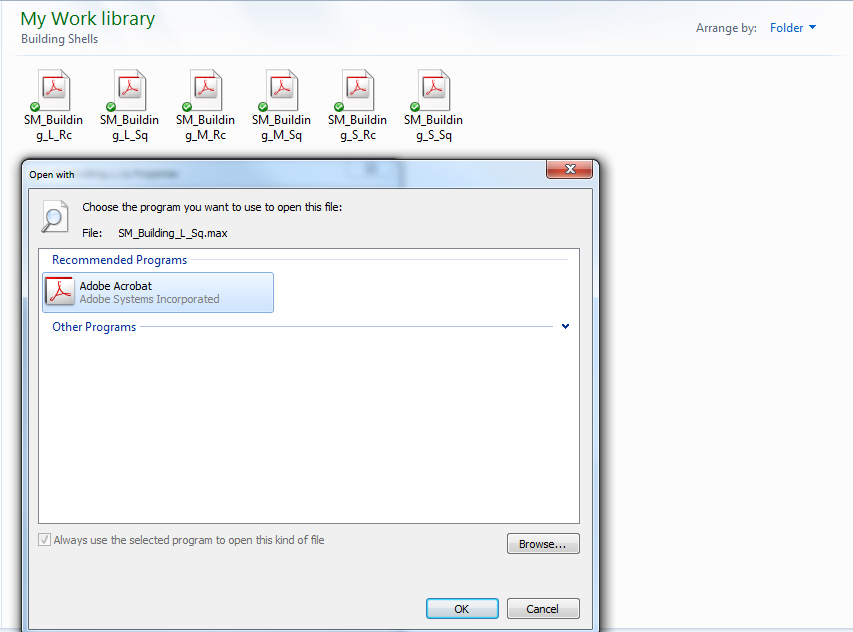

Here is a screenshot of my "Open With" window, along with other .max files in the background.

I can open .max files from Autodesk 3ds Max, but this is more tedious and time consuming than it sounds, and it isn't really a solution.

Help me Obi Wa... I mean Seven Forums, you are my only hope.

My System SpecsSystem Spec

03 Jan 2013   #2

Win 7 Ult 64-bit


Control panel - Default programs - Set associations

Default Programs - Associate a File Type or Protocol

Last edited by Brink; 03 Jan 2013 at 01:31 PM.. Reason: added tutorial link for more info
My System SpecsSystem Spec
03 Jan 2013   #3

Windows 7 Ultimate x64


Hmmm, I think this might possibly be a Max problem.

Via "Control panel - Default programs - Set associations" I can change the program to any program, other than 3ds Max
My System SpecsSystem Spec
.


03 Jan 2013   #4

64-bit Windows 7 Ultimate SP1 & Windows 8 Enterprise
Texas


Hello LostAtSea, and welcome to Seven Forums.

When you were using Open with, were you able to select Autodesk 3ds Max, or select the .exe file for the Autodesk 3ds Max program while browsing?

If you go into Set your default programs instead, is Autodesk 3ds Max listed to be able to set it as the default program for all of it's associations?
My System SpecsSystem Spec
03 Jan 2013   #5

Windows 7 Ultimate x64


Sorry, I should have stated that I can click on the Autodesk 3ds Max .exe but it doesn't change anything and takes me back to the suggested programs list. It only does this for the Autodesk 3ds Max .exe though. I can for example change it so the file opens with Word, or Excel, or Flash etc. but not Max.
My System SpecsSystem Spec
03 Jan 2013   #6

64-bit Windows 7 Ultimate SP1 & Windows 8 Enterprise
Texas


My System SpecsSystem Spec
04 Jan 2013   #7

Windows 7 Ultimate x64


Thanks Brink. I had actually found this before posting on here and it didn't help me at the time, however after going back and reviewing it, I realised that I had missed something very crucial out.

My problem is now fixed! Huzzah!

Thanks once again for all the help.
My System SpecsSystem Spec
04 Jan 2013   #8

64-bit Windows 7 Ultimate SP1 & Windows 8 Enterprise
Texas


Great news.
My System SpecsSystem Spec
Reply

 "Open with..." Problem: Will not change Default Program problems?


Thread Tools


Similar help and support threads for: "Open with..." Problem: Will not change Default Program
Thread Forum
how do i change the default "open" folder icon in application bar? Customization
Solved When I download programs, it default to the correct "program files" ? Software
Change default location for "Change Icon..." button? Customization
Problem: Cannot change the default program to open a file-type. Software
Replace default "Windows can't open this file" dialog Customization


All times are GMT -5. The time now is 12:19 AM.


Windows 7 Forums is an independent web site and has not been authorized,
sponsored, or otherwise approved by Microsoft Corporation.
"Windows 7" and related materials are trademarks of Microsoft Corp.
© Designer Media Ltd