Windows 7 Forums


Windows 7: iTunes x64 not installing for windows 7 x64

02 Oct 2009   #1

Windows 7 Pro x64
 
 
iTunes x64 not installing for windows 7 x64

I'm trying to install itunes 9 on a computer running windows 7 pro x64. I don't know why, but the installation goes to about 80% and then doesn't finish. And yes, I am using the itunes x64 installer. Is there any way to completely remove the apple files so that it would start installing fresh, or is there some kind of compatibility issue with win 7?

My System SpecsSystem Spec

02 Oct 2009   #2

Windows 7 Professional x64


I downloaded and installed Itunes x64 today and it worked fine. Maybe if you run ccleaner and try and install it again. Failing that I guess the 32bit version should work.
My System SpecsSystem Spec
02 Oct 2009   #3

Windows Seven x64
Idaho


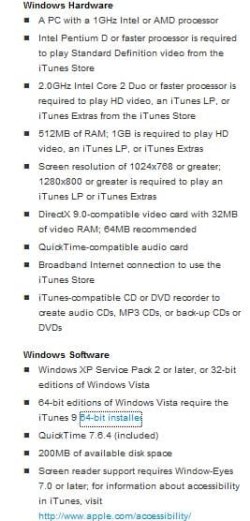
Just to let you know iTunes is NOT supported on Windows 7 yet... accroding to Apple's website..
but like Quackpot said he was able to install it.. It should work with Windows 7 but right now it is not supported..

I do not use iTunes personally but like Quackpot said run ccleaner and even restart your Operating System and try a reinstall..

Hope this Helps..
Attached Thumbnails
iTunes x64 not installing for windows 7 x64-itunes-9.jpg  
My System SpecsSystem Spec
.


02 Oct 2009   #4

Windows® 8 Pro (64-bit)
Mumbai, India


using itunes 9 on x64 Windows 7. you will need to uninstall old itunes versions before installing it. or, run the installer in compatibility mode.
My System SpecsSystem Spec
03 Oct 2009   #5

Windows 7 Pro x64


Well, still doesn't work. CCleaner didn't do anything. There was no version of itunes installed before, this is a brand new computer and I just installed windows 7 on it.

I hate iTunes with a passion, but I need to use it because I have an iPhone, and I am unable to update it at all without itunes working.

Trust me, if I could not use it, I wouldn't.

How do you run the installer in compatibility mode?
My System SpecsSystem Spec
03 Oct 2009   #6

Windows 7 Professional x64


Try downloading it from another source or maybe an older version. It should work.

Failing that just download the 32bit version.
My System SpecsSystem Spec
03 Oct 2009   #7

Windows 7 Pro x64


Nope, tried both of those.
My System SpecsSystem Spec
04 Oct 2009   #8

Windows 7 Ultimate x64 SP1


Definitely installs and works on Win 7x64 without any compatibility settings. If you want to install it in Vista compatibility mode, just right click the setup-properties - Unblock it, then go to compatibility tab, and check the box, choose Vista-Apply/OK. If that doesn't work, try this..


If...iTunes/Quicktime appears in the Uninstall list in Programs and Features, or if any of these folders below exist in the listed places, then..


Uninstall iTunes and Quicktime, make sure after it's uninstalled that Apple Application Support, Bonjour, Apple Software Update are uninstalled as well in Programs and features.

Then find these folders/files and delete them if they're still there.

Program Files - iTunes folder
Program Files (x86) - iTunes/Quicktime folder
Program Data - Apple folder/Apple Computer folder
Appdata/Roaming - Apple Computer folder
Appdata/LocalLow - Apple Computer folder
Appdata/Local - Apple/Apple Computer folder

If anything in Appdata/Local/Temp folder exists, delete the contents in there, not the folder itself.

Open Regedit

go to Hkey_current_user/software- Delete Apple Computer, Inc.

Reboot, and download itunes for windows again, right click the setup, unblock it, and install. See if it will install then.

If that doesn't work, I don't really know why it won't install for you.
My System SpecsSystem Spec
05 Oct 2009   #9

Windows 7 7600 1 X64
Lake Buena Vista The Magic Kingdom


Quote   Quote: Originally Posted by balickma View Post
I'm trying to install itunes 9 on a computer running windows 7 pro x64. I don't know why, but the installation goes to about 80% and then doesn't finish. And yes, I am using the itunes x64 installer. Is there any way to completely remove the apple files so that it would start installing fresh, or is there some kind of compatibility issue with win 7?
Thanks for posting, as we understand your issue that ITunes fails, then does install but fails to run.
We are not clear as to the version you are trying to install? I suggest that you may be trying to install ver. 9?
Since you attempted to install a version of ITunes and the first attempt was unsuccessful you will need to remove/uninstall all ITunes programs, either use windows uninstaller for clean removal or what ever program you favour.
Remove the following:
  • ITunes
  • Quicktime
  • Bonjour
  • ITunes updater
  • ITune Installer
  • Apple Mobile Device support
Reboot you system.
Download the latest version of ITunes, in this case it is ver. 9
Close all apps
Locate the installer app on your sysem, hilite the installer app and right click your mouse and on the drop down menu hilite run as administrator and run the installer. Some nomenclature on version 9, it does support Windows 7 both in x86 and x64 bit machines.

report back if you choose and let us know the outcome.
My System SpecsSystem Spec
Reply

 iTunes x64 not installing for windows 7 x64 problems?


Thread Tools


Similar help and support threads for: iTunes x64 not installing for windows 7 x64
Thread Forum
Trouble installing iTunes 9 on brand new laptop running Windows 7 Software
Solved Icons Gone after installing new iTunes General Discussion
Problem when installing iTunes on Windows 7 Software
iTunes installing issues- windows 7 Software
Trouble installing iTunes on Windows 7 Software


All times are GMT -5. The time now is 12:09 AM.


Seven Forums Android App Seven Forums IOS App Follow us on Facebook

Windows 7 Forums is an independent web site and has not been authorized,
sponsored, or otherwise approved by Microsoft Corporation.
"Windows 7" and related materials are trademarks of Microsoft Corp.
© Designer Media Ltd
  

1 2 3 4 5 6 7 8 9 10 11 12 13 14 15 16 17 18 19 20 21 22 23 24 25 26 27 28 29 30 31 32