JavaScript is disabled. For a better experience, please enable JavaScript in your browser before proceeding.
You are using an out of date browser. It may not display this or other websites correctly.
You should upgrade or use an
alternative browser .
How to set up VLC media player as your default player.
I took the following steps by:
Using the "open with" method and browsing and selecting vlc on the browse section but it still wont show up on the interface menu or be selected as my default player
I also tryed selecting it from "default program" but VLC is still not showing up
finally I tryed to do it manually by going to VLC and selecting preferences and clicking all the media extentions for it to be a default player on VLC and still no success
So how do I exactly make VLC my Default player? I'm assuming the problem that my computer can not recognize VLC at all?
windows 7 Home Premium 64bit Intel(R) Core(Tm) i7-2670QM CPU @2.20 GHz (8C... Hewlett Packard windows 7 Home Premium 64bit Intel(R) Core(Tm) i7-2670QM CPU @2.20 GHz (8CPUs),~2.2GHz
Last edited by a moderator: Jan 12, 2013
Windows 8.1 Pro i5 3550 Ivy Bridge 8gb 1600 GSkill 9-9-9-24 xmp Gigabyte GTX 760 OC PC/Desktop Home Build Windows 8.1 Pro i5 3550 Ivy Bridge Gigabyte Z77MX-D3H 8gb 1600 GSkill 9-9-9-24 xmp Gigabyte GTX 760 OC VIA VT2021 onboard BenQ GL2760H 27inch hdmi; LG Flatron E2351 23inch dvi 1920x1080 1x Samsung 850 Evo 120GB Cooler Master V750 Coolermaster HAF 912 Advanced Standard Logitech K120 USB Razor Abyssus USB Broadband MSE + Malwarebytes Palemoon It's been the worst day since yesterday (thanks Flogging Molly) so apt!
Righteous Dude
Guru
VIP
SF Team
Windows 10 Home x64 INTEL Core i5-750 Quad-Core 3.37GHz HyperX Fury Black Series 8GB (2 x 4GB) 1866Mhz EVGA GeForce GTX 750 Superclocked 1GB 128-Bit... PC/Desktop Windows 10 Home x64 INTEL Core i5-750 Quad-Core 3.37GHz ASUS P7P55D HyperX Fury Black Series 8GB (2 x 4GB) 1866Mhz EVGA GeForce GTX 750 Superclocked 1GB 128-Bit GDDR5 LG 32MA68HY 32" IPS 1920 x 1080 Samsung 840 Evo 120GB, SEAGATE 500GB Barracuda® 7200.12, SATA 3 Gb/s, 7200 RPM, 16MB cache ANTEC TruePower New TP-550, 80 PLUS, 550W ANTEC Three Hundred Illusion COOLER MASTER Hyper 212 Plus, 4 x 120mm 1 x 140mm Noctua's 85 + Mbps Avast Vivaldi
New member
Thread Starter
windows 7 Home Premium 64bit Intel(R) Core(Tm) i7-2670QM CPU @2.20 GHz (8C... Hewlett Packard windows 7 Home Premium 64bit Intel(R) Core(Tm) i7-2670QM CPU @2.20 GHz (8CPUs),~2.2GHz
New member
Thread Starter
reply
On my third statement I did mention
"finally I tryed to do it manually by going to VLC and selecting preferences and clicking all the media extentions for it to be a default player on VLC and still no success"
windows 7 Home Premium 64bit Intel(R) Core(Tm) i7-2670QM CPU @2.20 GHz (8C... Hewlett Packard windows 7 Home Premium 64bit Intel(R) Core(Tm) i7-2670QM CPU @2.20 GHz (8CPUs),~2.2GHz
R.I.P. 7/09/2014
Guru
VIP
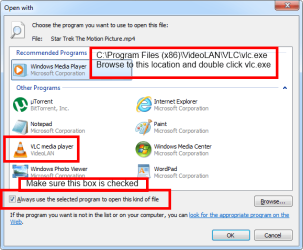
Follow this guide by right clicking on a media file you want VLC to open.
You have to browse to
C:\Program Files (x86)\VideoLAN\VLC\vlc.exe
Windows 7 Ultimate X64 SP1 Intel i5-2550K, Differing ~4.4-4.8GHz No buil... 16GB G.Skill Sniper 1866MHz @ 2133MHz 2x8GB ASUS GTX650TIB-DC2OC-2GD5, (650TI Boost) PC/Desktop Home Built Desktop By DataTech Windows 7 Ultimate X64 SP1 Intel i5-2550K, Differing ~4.4-4.8GHz No built in GPU ASUS P8Z68-V PRO/GEN3 16GB G.Skill Sniper 1866MHz @ 2133MHz 2x8GB ASUS GTX650TIB-DC2OC-2GD5, (650TI Boost) Onboard Realtek 5-1 Samsung P2570HD 1920x1080 Samsung 840 Pro 256GB SSD for OS, 500GB Seagate Constellation (Enterprise drive) for Data Corsair HX650W Inwin Dragon Rider Hyper 212 EVO w/two Noctua fans, push-pull, @1300 RPM E-Z Eyes, bright yellow keys with large characters steelseries SENSEI Laser Pro Gaming 48-51Mbs Mbs down, 11 Mbs up Xfinity Cable Norton Internet Security 2013 IE 10, Opera, Pale Moon if needed 4 case fans, LG BluRay-RE, ASUS DVD-RW, Mr. Fusion power supply, 1.21 gigawatts.
New member
Thread Starter
thanks sensei.
Follow this guide by right clicking on a media file you want VLC to open.
You have to browse to
C:\Program Files (x86)\VideoLAN\VLC\vlc.exe
View attachment 250039
Thank you sensei
windows 7 Home Premium 64bit Intel(R) Core(Tm) i7-2670QM CPU @2.20 GHz (8C... Hewlett Packard windows 7 Home Premium 64bit Intel(R) Core(Tm) i7-2670QM CPU @2.20 GHz (8CPUs),~2.2GHz