You are using an out of date browser. It may not display this or other websites correctly.
You should upgrade or use an
alternative browser.
Solved Remove Explorer Componets
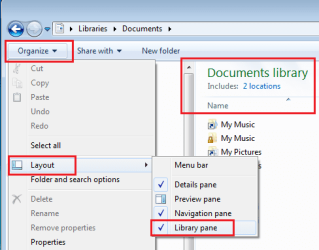
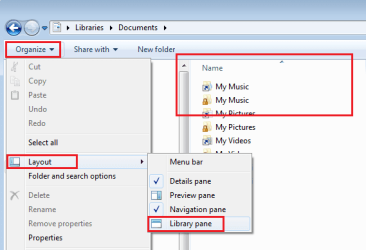
I would like to remove that bar from explorer (this highlighted red)?
I know it's weird, but get irritated with it!
I am grateful!
- Computer type
- PC/Desktop
- OS
- Windows 7 SP1 x64
a.k.a. UNI
Guru
Gold Member
Welcome to the Seven Forums.
Try removing the check from "Library Pane"
- Computer type
- Laptop
- Computer Manufacturer/Model Number
- Employer provided Dell Latitude
- OS
- W7 Pro SP1 64bit
- CPU
- i7
- Memory
- 8GB
- Graphics Card(s)
- Intel HD Graphics
- Hard Drives
- crappy SSD
- Antivirus
- Employer mandated Symantec Endpoint Protection
- Browser
- Pale Moon 64bit, IE11 64bit & Chrome 64bit

