Windows 7 Forums


Windows 7: uTorrent DL window prompt, disable

17 Feb 2013   #1

window 7 64 bit
 
 
uTorrent DL window prompt, disable

I use both azureus and utorrent if I open up .torrent file with azureus it auto download it without showing up a azureus download window asking where you want to save it, what files you want to skip and download etc.

but uTorrent each time I open up a .torrent the download window pops out and is freaking annoying. I have already set path in settings on where to save the file, and window shows settings things which I could find in regular options/settings already no need to ask me everytime I download something, I can also skip files or set priority etc during download.


is there ANYWAY to disable it? azureus work nicely with mass opening torrent files, where as utorrent isnt. trying to click on 50+ torrent links on browser and it auto switches from browser to utorrent program after each click, damn annoying.

please help, thank you
My System SpecsSystem Spec

17 Feb 2013   #2

Microsoft Windows 7 Home Premium 64-bit 7600
cornwall UK


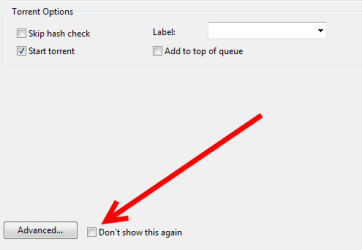
is there not a checkbox on the pop out window to stop it showing.
i have to say i prefer to see if there are a ton of extra folders or files in a torrent before i download it that way i can un tick the boxes on the files i dont need.

edit,just checked ...

uTorrent DL window prompt, disable-ut.png
My System SpecsSystem Spec
17 Feb 2013   #3

Win7 Home Premium 64-bit


might try uTorrent forums for assistance. it's where I go first and always get a solution.
My System SpecsSystem Spec
.


17 Feb 2013   #4

Microsoft Windows 7 Home Premium 64-bit 7600
cornwall UK


i just gave the solution
My System SpecsSystem Spec
25 Feb 2013   #5

window 7 64 bit


thanks, somehow it keep switching back to utorrent window even though I unchecked the boxes in UI, then proceed for an update and that fixed the problem =/
My System SpecsSystem Spec
28 Feb 2013   #6

Windows 7 Ultimatex64


Just to add some info on what I do with my torrents I'm going to download. I use that popup window to check who the trackers are cause some torrents have a couple trackers, trackers that don't exist, refuse connection or download off their specific site.
I have a notepad on my desktop with a list of about 15 trackers that I know work, so I replace the tracker list with my own tracker list (Copy/Paste).
If you get exceptionally slow torrents then it would be worthwhile to look into the tracker list to see if there are non-working trackers hindering the downloading process. There are oodles of tracker lists throughout the internet so you have to pick and choose the ones that do the job, its a bit more work but IMO its worth it to get the torrent in as fast as possible to be able to watch the show.
My System SpecsSystem Spec
28 Feb 2013   #7

W7 X-64 RTM,SUSE 11.1, XP PRO SP3 as a VM, VMware ESXi
Hafnarfjörður IS


Quote   Quote: Originally Posted by AlterUrEgo View Post
Just to add some info on what I do with my torrents I'm going to download. I use that popup window to check who the trackers are cause some torrents have a couple trackers, trackers that don't exist, refuse connection or download off their specific site.
I have a notepad on my desktop with a list of about 15 trackers that I know work, so I replace the tracker list with my own tracker list (Copy/Paste).
If you get exceptionally slow torrents then it would be worthwhile to look into the tracker list to see if there are non-working trackers hindering the downloading process. There are oodles of tracker lists throughout the internet so you have to pick and choose the ones that do the job, its a bit more work but IMO its worth it to get the torrent in as fast as possible to be able to watch the show.
Hi there
What you do with utorrent is between you and your maker -- torrents CAN be a legit way of distributing stuff so I'll make no comment on what you want the program to do.

I'd suggest (hopefully in a polite way) however that you confine your problem only to the functionality of utorrent -- as the main assumption will inevitably be that you are downloading pirated music, software, films, books etc -- and the forum rules do forbid discussion on any methods of acquiring pirated material OF ANY TYPE whether intentional or not.

As I said - what you do with utorrent is entirely up to you -- and it looks like you've solved the issue.

We all value these Forums so we don't want them to get into trouble because some people in Hollywood or elsewhere think the Forums are being used to aid in any way the acquisition of Pirated Material including this "Latest version of Windows". !!

Cheers
jimbo
Attached Images
 
My System SpecsSystem Spec
Reply

 uTorrent DL window prompt, disable problems?


Thread Tools


Similar help and support threads for: uTorrent DL window prompt, disable
Thread Forum
Getting to command prompt to disable bitlocker when comp won't boot System Security
How do U disable driver signature enforcement for Win7 IN CMD PROMPT? Drivers
Disable the Windows update restart prompt completely Windows Updates & Activation
how to disable admin prompt everytime i want to install Microsoft Office
Command Prompt won't Disable Administrator Account General Discussion


All times are GMT -5. The time now is 12:13 PM.


Windows 7 Forums is an independent web site and has not been authorized,
sponsored, or otherwise approved by Microsoft Corporation.
"Windows 7" and related materials are trademarks of Microsoft Corp.
© Designer Media Ltd