
Hi
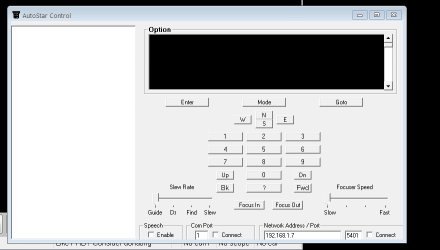
the attached picure shows a control panel for software that i use to control a telescope. the black panel, top and slightly right, should have text showing. the text is balck, and therefore cannot be seen, against a balck panel.
the only way to get the text visible, is to choose windoes classic setting for display colours.
the software is Meade AutoStar Suite.
i have tried changes colours etc, but the problem persists, if anyone can help, i would appreciate this.
the attached picure shows a control panel for software that i use to control a telescope. the black panel, top and slightly right, should have text showing. the text is balck, and therefore cannot be seen, against a balck panel.
the only way to get the text visible, is to choose windoes classic setting for display colours.
the software is Meade AutoStar Suite.
i have tried changes colours etc, but the problem persists, if anyone can help, i would appreciate this.
Attachments
My Computer
At a glance
win7 64
- Computer type
- PC/Desktop
- Computer Manufacturer/Model Number
- home built
- OS
- win7 64


