
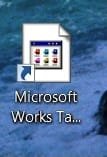
I just got a new Gateway laptop with Windows 7 and Microsoft Works 9.0. The day I got it, Microsoft Works worked fine and displayed fine. I deleted the Works shortcut from the desktop, and then tried to put it back. Ever since, the icon does not have the original image (current icon that I do see is attached). It looks like this on the desktop and also anywhere the file is located. I have tried opening "properties" and going to "change icon" and the original icon is still there to select. So I select the original, but it doesn't change. The program works fine also, no problems there. Any suggestions on how to get the MS Works 9.0 icon back?

Attachments
My Computer
At a glance
windows 7
- OS
- windows 7


 . Still bugs me though...


