| | Welcome to Windows 7 Forums. Our forum is dedicated to helping you find solutions with any problems, errors or issues you are experiencing with Windows 7. The Windows 7 forum also covers news and updates and has an extensive Windows 7 tutorial section that covers a wide range of tips and tricks. | Windows 7 - original Microsoft Works icon gone
|
11-09-2009
|
#1 | | |
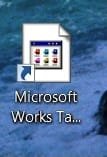
original Microsoft Works icon gone I just got a new Gateway laptop with Windows 7 and Microsoft Works 9.0. The day I got it, Microsoft Works worked fine and displayed fine. I deleted the Works shortcut from the desktop, and then tried to put it back. Ever since, the icon does not have the original image (current icon that I do see is attached). It looks like this on the desktop and also anywhere the file is located. I have tried opening "properties" and going to "change icon" and the original icon is still there to select. So I select the original, but it doesn't change. The program works fine also, no problems there. Any suggestions on how to get the MS Works 9.0 icon back?[IMG]file:///C:/Users/Eric/Desktop/works%20icon.jpg[/IMG]
| My System Specs | | |
11-09-2009
|
#2 | | Windows 7 Ultimate x86-64 |
Go to where you installed the program, locate the .exe choose send to desktop (create shortcut) reboot and post back. | My System Specs | | System Manufacturer/Model Number Sony Vaio Z46GDU OS Windows 7 Ultimate x86-64 CPU P9700@2.8GHz 1066MHz FSB Motherboard Sony branded Memory 6GB DDR3 1066MHz Graphics Card 9300M GS 256MB Dedicated (Speed) + Intel4500MHD (Stamina) Sound Card Realtek HD Audio Monitor(s) Displays 13.1' WXGA Screen Resolution 1600x900 Hard Drives 320GB 7200RPM w/ 16MB cache Internet Speed 1MB/s |
11-09-2009
|
#3 | | Windows 7 Home Premium SP1, clean install, upgrade disc |
If the prior suggestion does not work, you can try a system image from the time prior to the problem. | My System Specs | | System Manufacturer/Model Number Dell XPS 420 OS Windows 7 Home Premium SP1, clean install, upgrade disc CPU Intel Core2 processsor Q8200(2.33Ghz 1333FSB) Quad Core Tech Motherboard Dell Memory 6 gb Graphics Card ATI Radeon 256MB HD3650 Sound Card Intergrated 7.1 Channel Audio Monitor(s) Displays Dell SP2009W 20" Keyboard Dell USB Keyboard Mouse Dell Premium Optical USB Cooling Fan Hard Drives 640 GB Serial ATA Hard drive Internet Speed DSL 2.85 |
11-09-2009
|
#4 | | W7x64 Pro, SuSe 12.1/** W7 x64 Pro, XP MCE |
I'm not certain, but this might help: Icon Cache - Rebuild - Vista Forums | My System Specs | | System Manufacturer/Model Number DIY OS W7x64 Pro, SuSe 12.1/** W7 x64 Pro, XP MCE CPU Phenom II 1090T w/Noctua NH-D14 /**4400+ X2 w/CM Hyper TX 3 Motherboard ASRock 890FX Deluxe 4/**A8N-SLI Memory 2 x 2GB Patriot PGS34g1600LLKA/**4x1GB Corsair VS Graphics Card EVGA GTX460 SC/**EVGA 8800GTS Sound Card Asus Xonar D2X/**Xonar D1 Monitor(s) Displays Acer X233H, KDS AV-7TF/**LG M237-WD Screen Resolution 1920x1080 & 1280x1024/**1980x1080 Keyboard Logitech Media USB/**Saitek Eclipse Mouse Cordless Trackman Wheel/**Ditto PSU CM RS600 w/ APC BX1000G/**Antec 500 TP w/ APC BX1000 Case HAF922/**Antec 1040IIB Cooling 3x200mm, 1x140 and 1x120mm/**5x80mm fans Hard Drives WDC 2TB, 1.5TB, 1TB, 500GB,Seagate 500GB , Maxtor 80GB /**500GB Seagate & WDC 1TB Black Internet Speed 3.3Mbps Other Info SB 560 5.1 w/ Sennheiser RS140/**Creative T20 speakers, Dvico FusionHDTV7 Gold RT, Cisco E3000, HP 5510V AIO, Linksys E3000, Belkin F5U237 hub and **F5D8055 adapter
(** = 2nd rig) |
11-10-2009
|
#5 | | |
None of the suggestions worked. The images looks the same still. Any other suggestions? If not, thanks for you prior messages. | My System Specs | | |
11-10-2009
|
#6 | | Windows 7 Home Premium SP1, clean install, upgrade disc |
Why not insert your DVD for works. If it has a repair function it may bring back the icon. Does not work, maybe you can reinstall. Make an image of what you have now, first. If my suggestion goes wrong, you can always bring everything back with the image. | My System Specs | | System Manufacturer/Model Number Dell XPS 420 OS Windows 7 Home Premium SP1, clean install, upgrade disc CPU Intel Core2 processsor Q8200(2.33Ghz 1333FSB) Quad Core Tech Motherboard Dell Memory 6 gb Graphics Card ATI Radeon 256MB HD3650 Sound Card Intergrated 7.1 Channel Audio Monitor(s) Displays Dell SP2009W 20" Keyboard Dell USB Keyboard Mouse Dell Premium Optical USB Cooling Fan Hard Drives 640 GB Serial ATA Hard drive Internet Speed DSL 2.85 |
11-11-2009
|
#7 | | |
I actually tried reinstalling already, and it is asking me for the install disk. The problem there is that Works was already installed when I bought the computer, so I don't have a Works disk. I have some recovery disks for the computer, but I didn't think that would help.
This icon thats broken is for the "Works Task Launcher", which brings up sort of a "home page" for Works, and from there I select if I want to open a spreadsheet or word processor. I was able to successfully create seperate shortcuts for each of these two programs, and also pin them to the taskbar. This is a good enough solution for me I guess  . Still bugs me though... | My System Specs | | |
11-11-2009
|
#8 | | Windows 7 Home Premium SP1, clean install, upgrade disc |
Try this, I hate losing, go to the start icon, bring up the menu of programs. Find Microsoft works, right click, then send to desktop (if not available documents) lets see how that goes, unless that is the way you tried already. I know that there must be a way. | My System Specs | | System Manufacturer/Model Number Dell XPS 420 OS Windows 7 Home Premium SP1, clean install, upgrade disc CPU Intel Core2 processsor Q8200(2.33Ghz 1333FSB) Quad Core Tech Motherboard Dell Memory 6 gb Graphics Card ATI Radeon 256MB HD3650 Sound Card Intergrated 7.1 Channel Audio Monitor(s) Displays Dell SP2009W 20" Keyboard Dell USB Keyboard Mouse Dell Premium Optical USB Cooling Fan Hard Drives 640 GB Serial ATA Hard drive Internet Speed DSL 2.85 |
11-12-2009
|
#9 | | |
I tried "sending to desktop" from multiple locations with no luck. I don't see the original icon anywhere. Wherever I see MS Works, it has that icon the I attached in my original post (whether in the Start menu, the .exe file, in the taskbar, on the desktop, etc). | My System Specs | | |
11-12-2009
|
#10 | | |

Quote: Originally Posted by estark13 I actually tried reinstalling already, and it is asking me for the install disk. The problem there is that Works was already installed when I bought the computer, so I don't have a Works disk. I have some recovery disks for the computer, but I didn't think that would help.
This icon thats broken is for the "Works Task Launcher", which brings up sort of a "home page" for Works, and from there I select if I want to open a spreadsheet or word processor. I was able to successfully create seperate shortcuts for each of these two programs, and also pin them to the taskbar. This is a good enough solution for me I guess  . Still bugs me though...  I didn't see this in the thread, although I'm not optimistic that it'll help:
Right click on the shortcut. Go to the "shortcut" tab. Click the "change icon" button.
Is the proper icon displayed? If so, switch to it. | My System Specs | | System Manufacturer/Model Number homegrown OS Windows 7 X64 SP1 CPU Intel Core I7-2600k Motherboard Asus P8Z68-V Pro Memory 16 GB Corsair Vengeance DDR3-1866 Graphics Card Sapphire Radeon HD 7970 Sound Card Asus Sonar DX Monitor(s) Displays Samsung 245BW Screen Resolution 1920 X 1200 Keyboard cheap Logitech USB Mouse Microsoft Intellimouse Explorer (old optical) USB PSU PCP&C Silencer 750 Crossfire Case Silverstone FT02 Cooling Thermalright Ultra 120 Extreme Hard Drives OCZ Vertex 3 SSD, 120 GB
WDC 1.5TB Caviar Black Internet Speed 6Mb cable Other Info Pioneer BDR-205
Samsung SH-203B
Monsoon 5.1 speakers original Microsoft Works icon gone problems? All times are GMT -5. The time now is 04:57 AM. |  |