JavaScript is disabled. For a better experience, please enable JavaScript in your browser before proceeding.
You are using an out of date browser. It may not display this or other websites correctly.
You should upgrade or use an
alternative browser .
Remove Quicktime item from Control Panel jumplist ?
Hi
I uninstalled Quicktime due to the fact that I never use it, however after I uninstalled it, I realized that I need Quicktime in order for itunes to work. So after learning that I just installed the "QuickTime Alternative"
Free-Codecs.com : QuickTime Alternative 3.1.0 : QuickTime Alternative will allow you to play QuickTime files (.mov, .qt and other extensions) without having to install the official QuickTime Player. as opposed to having to reinstall the full QuickTime Program again.
- Please see attached pic -
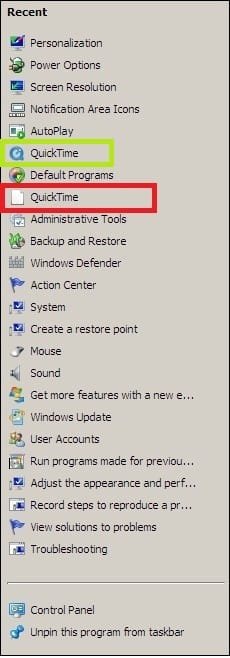
However now when I right click on the Control Panel icon on my Windows 7 Taskbar, there are 2 Quicktime icons. The Quicktime in the Green rectangle is what I want, however the one in the red rectangle is the old one that I would like to remove.
I can't seem to remove it even when right clicking on the item and clicking on "Remove From this List". Nothing happens when I do that.
Is there anywhere in the Registry where I can just delete it ?
Thanks
PS
I'm a bit of a neat freak
Jordan
cap.jpg
24.3 KB
· Views: 20
Windows 7 baby ! : D Intel Core i7 720QM @ 1.60GHz 6.0GB Dual-Channel DDR3 @ 662MHz ATI Mobility Radeon HD 5650 HP Envy 17 4054ca Windows 7 baby ! : D Intel Core i7 720QM @ 1.60GHz Hewlett-Packard 1449 (CPU) 6.0GB Dual-Channel DDR3 @ 662MHz ATI Mobility Radeon HD 5650 IDT High Definition Audio CODEC Generic PnP Monitor @ 1600x900 1600X900 78.15GB INTEL SSDSA2M080G2GC ATA Device (IDE)
Administrator
Staff member
64-bit Windows 11 Pro for Workstations Intel i7-8700K OC'd to 5 GHz 64 GB (4x16GB) G.SKILL TridentZ RGB DDR4 3600... ASUS ROG-STRIX-GTX1080TI-O11G-GAMING PC/Desktop Self built custom 64-bit Windows 11 Pro for Workstations Intel i7-8700K OC'd to 5 GHz ASUS ROG Maximus XI Formula Z390 64 GB (4x16GB) G.SKILL TridentZ RGB DDR4 3600 MHz ASUS ROG-STRIX-GTX1080TI-O11G-GAMING Integrated 2 x Samsung Odyssey G7 27" 2560x1440 1TB Samsung 990 PRO M.2, Seasonic Prime Titanium 850W Thermaltake Core P3 Corsair Hydro H115i Logitech wireless K800 Logitech MX Master 4 2 Gb/s Download and 100 Mb/s Upload Malwarebyte Anti-Malware Premium Google Chrome Logitech Z625 speaker system,
New member
Thread Starter
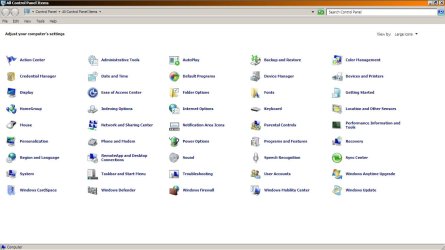
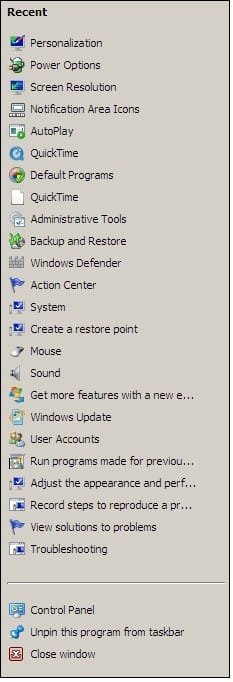
Thanks for your reply Brink, The QuickTime icon is hidden when I open the Control Panel window (see picture) however the 2 Quicktime icons are still visible when I right click the jumplist
I wonder If there would be a way to clear the jumplists and rebuild them or something ?
1.jpg
76.1 KB
· Views: 79
2.jpg
24.2 KB
· Views: 21
Windows 7 baby ! : D Intel Core i7 720QM @ 1.60GHz 6.0GB Dual-Channel DDR3 @ 662MHz ATI Mobility Radeon HD 5650 HP Envy 17 4054ca Windows 7 baby ! : D Intel Core i7 720QM @ 1.60GHz Hewlett-Packard 1449 (CPU) 6.0GB Dual-Channel DDR3 @ 662MHz ATI Mobility Radeon HD 5650 IDT High Definition Audio CODEC Generic PnP Monitor @ 1600x900 1600X900 78.15GB INTEL SSDSA2M080G2GC ATA Device (IDE)
Administrator
Staff member
Since this is the Recent list, you can turn
Recent items off and on to clear the list.
64-bit Windows 11 Pro for Workstations Intel i7-8700K OC'd to 5 GHz 64 GB (4x16GB) G.SKILL TridentZ RGB DDR4 3600... ASUS ROG-STRIX-GTX1080TI-O11G-GAMING PC/Desktop Self built custom 64-bit Windows 11 Pro for Workstations Intel i7-8700K OC'd to 5 GHz ASUS ROG Maximus XI Formula Z390 64 GB (4x16GB) G.SKILL TridentZ RGB DDR4 3600 MHz ASUS ROG-STRIX-GTX1080TI-O11G-GAMING Integrated 2 x Samsung Odyssey G7 27" 2560x1440 1TB Samsung 990 PRO M.2, Seasonic Prime Titanium 850W Thermaltake Core P3 Corsair Hydro H115i Logitech wireless K800 Logitech MX Master 4 2 Gb/s Download and 100 Mb/s Upload Malwarebyte Anti-Malware Premium Google Chrome Logitech Z625 speaker system,
New member
Thread Starter
wonderful ! I think it's gone for good now, I wasn't aware that right clicking the control panel icons gave to the "recent lists". I thought it was supposed to include every item included in Control Panel.
Thanks you Brink
PS
Are you Shawn or Brink, because I thought I saw someone around here with the same pic as you, however with the name Shawn
Thanks again !
Windows 7 baby ! : D Intel Core i7 720QM @ 1.60GHz 6.0GB Dual-Channel DDR3 @ 662MHz ATI Mobility Radeon HD 5650 HP Envy 17 4054ca Windows 7 baby ! : D Intel Core i7 720QM @ 1.60GHz Hewlett-Packard 1449 (CPU) 6.0GB Dual-Channel DDR3 @ 662MHz ATI Mobility Radeon HD 5650 IDT High Definition Audio CODEC Generic PnP Monitor @ 1600x900 1600X900 78.15GB INTEL SSDSA2M080G2GC ATA Device (IDE)
Administrator
Staff member
You're most welcome Jordan.
The full name is Shawn Brink, but either will do.
64-bit Windows 11 Pro for Workstations Intel i7-8700K OC'd to 5 GHz 64 GB (4x16GB) G.SKILL TridentZ RGB DDR4 3600... ASUS ROG-STRIX-GTX1080TI-O11G-GAMING PC/Desktop Self built custom 64-bit Windows 11 Pro for Workstations Intel i7-8700K OC'd to 5 GHz ASUS ROG Maximus XI Formula Z390 64 GB (4x16GB) G.SKILL TridentZ RGB DDR4 3600 MHz ASUS ROG-STRIX-GTX1080TI-O11G-GAMING Integrated 2 x Samsung Odyssey G7 27" 2560x1440 1TB Samsung 990 PRO M.2, Seasonic Prime Titanium 850W Thermaltake Core P3 Corsair Hydro H115i Logitech wireless K800 Logitech MX Master 4 2 Gb/s Download and 100 Mb/s Upload Malwarebyte Anti-Malware Premium Google Chrome Logitech Z625 speaker system,