|
Welcome to Windows 7 Forums. Our forum is dedicated to helping you find solutions with any problems, errors or issues you are experiencing with Windows 7. The Windows 7 forum also covers news and updates and has an extensive Windows 7 tutorial section that covers a wide range of tips and tricks.
Windows 7 - Paragon Virtualization Manager 9.5 - Free Today |
03-10-2010
|
#1 | | |
Paragon Virtualization Manager 9.5 - Free Today March 10, 2010
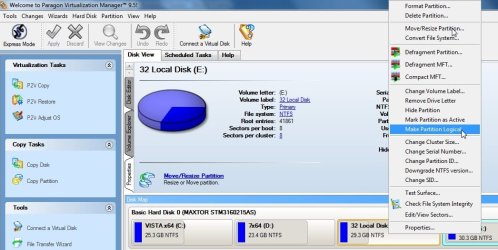
Easily migrate a Windows-based computer to a virtual environment (P2V) and vice versa (V2P). Work with virtual disks from one easy-to-use interface of Virtualization Manager, without starting a virtual machine: migrate from one virtual environment to another (V2V), exchange data between your physical environment and the virtual one, perform any partitioning operations and more.
Recover the OS startup ability after a system migration to a different hardware or unsuccessful virtualization by a 3rd party tool. Virtualization Manager 9.5 Personal allows you to: - Migrate a Windows-based computer to a virtual environment (P2V)
- Migrate from a virtual environment to physical (V2P)
- Virtualize system from its backup image (P2V)
- Migrate from one virtual environment to another (V2V)
- Recover the OS startup ability after system migration to a different hardware or unsuccessful virtualization by a 3rd party tool (P2P and P2V Adjust)
- Clone a partition or an entire hard disk
- Exchange data between your physical environment and the virtual one, or between a virtual disk and its snapshots
- Accomplish virtual drive partitioning (create, format, delete, move, resize etc.)
Source: Paragon Virtualization Manager 9.5 Personal (English) | My System Specs | | System Manufacturer/Model Number Gateway P7805uFX OS Vista Ultimate x64 CPU Intel T9600, 2.8GHz Motherboard Intel PM 45 Memory 8GB DDR3 Graphics Card Nvidia GeForce 9800M GTS 1GB Monitor(s) Displays LG WUXGA 17" Screen Resolution 1920x 1200 Case Notebook FX Hard Drives 2x WD500GB Other Info B-Tooth, B-Drive, GPS |
03-10-2010
|
#3 | | W7 X-64 RTM,SUSE 11.1, XP PRO SP3 as a VM, VMware ESXi |
Hi there
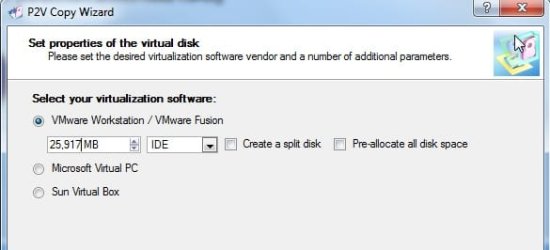
What Virtual Machine formats does it convert to -- Vmware, Microsoft, Sun Virtual Box or is it "generic".
I couldn't see this type of info -- and I don't want the hassle of having to register and download if it doesn't do what I'd like it to do.
Cheers
jimbo | My System Specs | | System Manufacturer/Model Number Custom built OS W7 X-64 RTM,SUSE 11.1, XP PRO SP3 as a VM, VMware ESXi CPU Q9400 QUAD Motherboard P5QL-CM Memory 8GB Graphics Card On Motherborad Sound Card Realtek HD audio Monitor(s) Displays Apple Cinema display Mouse Toshiba wireless laser Hard Drives 4 X 1TB SATA Internet Speed > 20MB up |
03-10-2010
|
#4 | | |
Hi Jimbo,
This is free version so it only makes vmware, microsoft virtual machine, and sun vbox.
I have the Corporate edition , which is obviously better.
I know you like to be critical , so I warn you now - it takes a while to create vhd,s. I notice some people posting it is quicker than other apps. thay have tried - it seems pretty slow to me.
It runs at a very low level of resource usage - I continued working over the top , completely unaware it was actually doing anything - had to check it was still going - so it's good from that point of view.
Anyone who has no use for the Virtualization stuf can just use it as a partition manager - a lot of functionality there. | My System Specs | | OS Vista x64 / 7 X64 CPU E8400 Motherboard ASRock 1333 GLAN R2.0 Memory 2x1 gb 800mhz Graphics Card 9500gt 1gb Case Coolermaster Cooling Winpower 500w Hard Drives Maxtor 160gb-2mb cache |
03-10-2010
|
#5 | | |
Having difficulty getting to the Registration Page (or anything else at Paragon).... popular website today!! | My System Specs | | System Manufacturer/Model Number Gateway DX4720-03 OS Windows 7 64bit CPU Pentium dual-core E5200(2.50GHz) 2MB L2 Cache 2MB FSB 800MHz Memory 4 GB of DDR2 667/800 MHz SDRAM Graphics Card NVIDIA GeForce 7100 Integrated Graphics Sound Card 8-Channel (7.1) High Definition Audio Monitor(s) Displays Gateway 19'' flat-screen monitor Screen Resolution 1024 X 768 Keyboard Premium Multimedia Keyboard Mouse USB Optical 2-Button Wheel Mouse Case 16.34" x 7.09" x 11.22" 24.25 lbs Hard Drives 640GB SATA II, 16MB Cache 7200 RPM
500GB Parallel ATA hard disk 5400 RPM Internet Speed Cable Internet Road Runner Other Info 18X DVD+/-R/RW SuperMulti Drive featuring Labelflash Technology
10/100/1000 Mbps Ethernet LAN
300W
Card Reader - 15-in-1 High Speed Digital Media Card Reader w/Smart Copy Button
Compact Flash I & II, IBM Microdrive, Secure Digital (SD & Mini SD), Multi Media Card (MMC, MMC Plus, RS-MMC, and MMC Mobile), Memory Stick (MS, MS Duo, MS Pro, and MS Pro Duo), xD-Picture Card, SmartMedia Card |
03-10-2010
|
#6 | | |
If you want to make a winpe 3.0 boot cd for it, you need the 7 32 bit install media ( or the 32 bit recovery disc), and this little app: 7pecreatorVM1
Rt click and run as admin on 7clickonmeVM.cmd. | My System Specs | | OS Vista x64 / 7 X64 CPU E8400 Motherboard ASRock 1333 GLAN R2.0 Memory 2x1 gb 800mhz Graphics Card 9500gt 1gb Case Coolermaster Cooling Winpower 500w Hard Drives Maxtor 160gb-2mb cache Paragon Virtualization Manager 9.5 - Free Today problems? All times are GMT -5. The time now is 12:14 AM. |  |