Windows 7 Forums Search
Welcome to Windows 7 Forums. Our forum is dedicated to helping you find solutions with any problems, errors or issues you are experiencing with Windows 7. The Windows 7 forum also covers news and updates and has an extensive Windows 7 tutorial section that covers a wide range of tips and tricks.


Windows 7 - Kodak Camera Not Recognised by Windows 7...


04-22-2009   #1


Windows 7


Kodak Camera Not Recognised by Windows 7...

Hey all

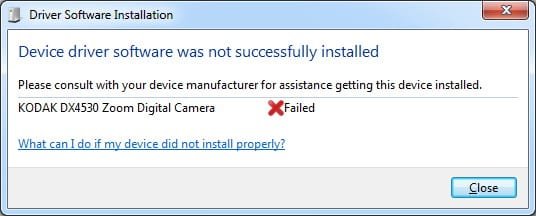
I can't get my Kodak Camera DX4530 to be recognised properly by Windows 7, when I connect it up windows attempted to install drivers but fails.....any suggestions please? I installed Kodak Easyshare Software but it made no difference

Thanks in advance

My System SpecsSystem Spec
04-22-2009   #2


Windows 7 Ultimate x64 + x86 + Windows 8 x64


Hi Not sure what drivers you have tried but the best chance is by using the latest Vista Drivers ...

KODAK EASYSHARE DX4530 Zoom Digital Camera Downloads and Upgrades

You may have to use the driver compatibility mode when offered
My System SpecsSystem Spec
04-22-2009   #3


Windows 7


I'll try and install the Easyshare Software in Vista compatibility and see how that goes....thx
My System SpecsSystem Spec
.


04-24-2009   #4


Windows 7


I installed the Kodak Easyshare Software in Vista Compatibility and Windows 7 still doesnt recognise the camera when I connect it, it won't install the driver....

See attached
Attached Thumbnails
Kodak Camera Not Recognised by Windows 7...-kodakerror.jpg  
My System SpecsSystem Spec
04-24-2009   #5


Windows 7 Ultimate x64


For now you'll need to use an SD card reader to get your photos off.

Luckily for me, all of my cameras are seen as USB drives (attached storage) and require no drivers.

Bye.
My System SpecsSystem Spec
04-24-2009   #6


Windows 7


I guess my digi cam is a bit "too old"

Its probably not worth me buying an SD Card Reader, Kodak are supposed to release some beta drivers "soon" for Kodak cameras etc so I hear
My System SpecsSystem Spec
04-24-2009   #7


Windows 7 Ultimate x64 + x86 + Windows 8 x64


Hi Simcut,

You can use the USB / SD adaptors that are available from the Poundland chain, I have a couple and use them without issue, they normally work quicker than the camera anyway.

If you need software to work with 7 try CamtoPC freeware

cam2pc - Image Viewer and fully featured Digital Imaging software to Download, Organize, Modify and Share your photos
My System SpecsSystem Spec
04-24-2009   #8


Windows 7 Ultimate 32bit SP1


I have a Kodak EasyShare DX4330 ... it works just fine with Windows 7. Uninstall the EasyShare, then plug your camera into a USB port .... then turn on the camera.

I use Picasa 3 to send and share photos.
My System SpecsSystem Spec
04-25-2009   #9


Windows 7


I did all that but that error still comes up for me, that error message u see above.
My System SpecsSystem Spec
05-04-2009   #10


Windows XP, Windows Vista Ultimate, Windows 7 Beta


I have an EasyShare Z710. I was able to get it to work in 2 steps...

#1 - when I plugged it in, it would detect as a Kodak Z710, but, the driver wouldn't install successfully. I had to go into device manager and change the driver to MTP USB Device. Once I did that, the system recognized it normally as a Kodak Z710 each and every time I hooked it up and turned it on.

#2 - the Kodak software didn't seem to like Windows 7 without compatibility mode, but, oddly enough, when I put it into compatibility mode, it came up with a message asking me if I wanted to turn it off? Anyhow, I set it to Vista compatibility and the issues are gone!

Best of luck!
My System SpecsSystem Spec
Reply

Kodak Camera Not Recognised by Windows 7... problems?


Thread Tools


Similar Threads for: Kodak Camera Not Recognised by Windows 7...
Thread Forum
Not Recognised As Admin By Windows 7 General Discussion
Windows 7 DVD not recognised by my dvd drive Installation & Setup
IDE Not Recognised by Windows Hardware & Devices
cant get kodak camera to work with win7 rc 7100 Drivers


All times are GMT -5. The time now is 04:28 AM.


Windows 7 Forums is an independent web site and has not been authorized,
sponsored, or otherwise approved by Microsoft Corporation.
"Windows 7" and related materials are trademarks of Microsoft Corp.
© Designer Media Ltd
  

1 2 3 4 5 6 7 8 9 10 11 12 13 14 15 16 17 18 19 20 21 22 23 24 25 26 27 28 29 30