
You are using an out of date browser. It may not display this or other websites correctly.
You should upgrade or use an alternative browser.
You should upgrade or use an alternative browser.
Sony Sound Forge 9.0e
- Thread starter succotash
- Start date
So I tried troubleshooting with the Win 7 application which took me through the steps of running Sound Forge as a system admin and also in WinXP SP2 compatibility mode. Nothing helped. Then the troubleshooting app checked with the Microsoft database and determined that, as of now, SF9 is an incompatible program.
My Computer
At a glance
Windows 7
- OS
- Windows 7

torrentg
New member
- Local time
- 11:08 AM
- Messages
- 5,747

My Computer
At a glance
7600.20510 x86P4 550 3.4 GHz HT running at 3.5 GHzOCZ 2 GB(2x1GB) DDR400mHz running @ 414 mHzHIS Radeon HD 3850 IceQ 3 Turbo HDMI Dual DL-...
- Computer Manufacturer/Model Number
- self built
- OS
- 7600.20510 x86
- CPU
- P4 550 3.4 GHz HT running at 3.5 GHz
- Motherboard
- MSI PM8M3-V (MS-7211 v1.x) Micro-ATX mainboard
- Memory
- OCZ 2 GB(2x1GB) DDR400mHz running @ 414 mHz
- Graphics Card(s)
- HIS Radeon HD 3850 IceQ 3 Turbo HDMI Dual DL-DVI AGP
- Sound Card
- MOTU Traveler firewire studio interface 192 kHz 24 bit
- Monitor(s) Displays
- 22" widescreen Acer X223W LCD, 17" Compaq P75 CRT
- Screen Resolution
- 1680x1050 and 1280x1024
- Hard Drives
- SATA I x2 WD, 400 GB and 120 GB, SATA 2 WD Caviar Black 1 TB
- PSU
- 350W generic
- Case
- Cybertronpc, it glows blue
- Cooling
- stock cpu fan, Ice-Q 3 gpu and system, many case fans
- Keyboard
- Logitch Classical Keyboard 200
- Mouse
- Logitech Mediaplay cordless
- Internet Speed
- 1792/448 kbits/sec
- Other Info
- SATA II PCI fake RAID adapter, 1 GB Readyboost, original ATI Remote Wonder (even works with WMC perfectly), Logitech Rumblepad 2 game controller x2
If there was a perfect example of the need for Virtual XP this would be it. You might want to consider installing Sound Forge via XPM.
My Computer
At a glance
Windows 7 Professional 64-bitIntel E8400 3GHzKingston PC3-10700H 4GbXFX Radeon HD 5850 BlackEd.
- Computer Manufacturer/Model Number
- self built
- OS
- Windows 7 Professional 64-bit
- CPU
- Intel E8400 3GHz
- Motherboard
- Intel DX48BT2
- Memory
- Kingston PC3-10700H 4Gb
- Graphics Card(s)
- XFX Radeon HD 5850 BlackEd.
- Sound Card
- Asus Xonar DG
- Monitor(s) Displays
- 2x Samsung SM-T220HD 22"
- Screen Resolution
- 1680x1050 on two monitors
- Hard Drives
- OCZ Vertex 2 120gb 3.5" (OS)
Seagate Momentus XT 500gb
Samsung F3 1Tb (games)
2x Samsung F1 1Tb
- PSU
- Thermaltake ToughPower 850w
- Case
- Thermaltake Armor
- Cooling
- Scythe Mugen II
- Keyboard
- Microsoft Comfort Curve USB
- Mouse
- Razer Diamondback 3G
- Internet Speed
- 8128/443
torrentg
New member
- Local time
- 11:08 AM
- Messages
- 5,747
If there was a perfect example of the need for Virtual XP this would be it. You might want to consider installing Sound Forge via XPM.
lol did you post this before having the chance to see my reply above? It installed regular, no need for to do anything special at all.
My Computer
At a glance
7600.20510 x86P4 550 3.4 GHz HT running at 3.5 GHzOCZ 2 GB(2x1GB) DDR400mHz running @ 414 mHzHIS Radeon HD 3850 IceQ 3 Turbo HDMI Dual DL-...
- Computer Manufacturer/Model Number
- self built
- OS
- 7600.20510 x86
- CPU
- P4 550 3.4 GHz HT running at 3.5 GHz
- Motherboard
- MSI PM8M3-V (MS-7211 v1.x) Micro-ATX mainboard
- Memory
- OCZ 2 GB(2x1GB) DDR400mHz running @ 414 mHz
- Graphics Card(s)
- HIS Radeon HD 3850 IceQ 3 Turbo HDMI Dual DL-DVI AGP
- Sound Card
- MOTU Traveler firewire studio interface 192 kHz 24 bit
- Monitor(s) Displays
- 22" widescreen Acer X223W LCD, 17" Compaq P75 CRT
- Screen Resolution
- 1680x1050 and 1280x1024
- Hard Drives
- SATA I x2 WD, 400 GB and 120 GB, SATA 2 WD Caviar Black 1 TB
- PSU
- 350W generic
- Case
- Cybertronpc, it glows blue
- Cooling
- stock cpu fan, Ice-Q 3 gpu and system, many case fans
- Keyboard
- Logitch Classical Keyboard 200
- Mouse
- Logitech Mediaplay cordless
- Internet Speed
- 1792/448 kbits/sec
- Other Info
- SATA II PCI fake RAID adapter, 1 GB Readyboost, original ATI Remote Wonder (even works with WMC perfectly), Logitech Rumblepad 2 game controller x2
well the other guy was having problems.
My Computer
At a glance
Windows 7 Professional 64-bitIntel E8400 3GHzKingston PC3-10700H 4GbXFX Radeon HD 5850 BlackEd.
- Computer Manufacturer/Model Number
- self built
- OS
- Windows 7 Professional 64-bit
- CPU
- Intel E8400 3GHz
- Motherboard
- Intel DX48BT2
- Memory
- Kingston PC3-10700H 4Gb
- Graphics Card(s)
- XFX Radeon HD 5850 BlackEd.
- Sound Card
- Asus Xonar DG
- Monitor(s) Displays
- 2x Samsung SM-T220HD 22"
- Screen Resolution
- 1680x1050 on two monitors
- Hard Drives
- OCZ Vertex 2 120gb 3.5" (OS)
Seagate Momentus XT 500gb
Samsung F3 1Tb (games)
2x Samsung F1 1Tb
- PSU
- Thermaltake ToughPower 850w
- Case
- Thermaltake Armor
- Cooling
- Scythe Mugen II
- Keyboard
- Microsoft Comfort Curve USB
- Mouse
- Razer Diamondback 3G
- Internet Speed
- 8128/443
torrentg
New member
- Local time
- 11:08 AM
- Messages
- 5,747
well the other guy was having problems.
Ahhh. Ok, I hear ya.

Maybe he has a corrupted install.
My Computer
At a glance
7600.20510 x86P4 550 3.4 GHz HT running at 3.5 GHzOCZ 2 GB(2x1GB) DDR400mHz running @ 414 mHzHIS Radeon HD 3850 IceQ 3 Turbo HDMI Dual DL-...
- Computer Manufacturer/Model Number
- self built
- OS
- 7600.20510 x86
- CPU
- P4 550 3.4 GHz HT running at 3.5 GHz
- Motherboard
- MSI PM8M3-V (MS-7211 v1.x) Micro-ATX mainboard
- Memory
- OCZ 2 GB(2x1GB) DDR400mHz running @ 414 mHz
- Graphics Card(s)
- HIS Radeon HD 3850 IceQ 3 Turbo HDMI Dual DL-DVI AGP
- Sound Card
- MOTU Traveler firewire studio interface 192 kHz 24 bit
- Monitor(s) Displays
- 22" widescreen Acer X223W LCD, 17" Compaq P75 CRT
- Screen Resolution
- 1680x1050 and 1280x1024
- Hard Drives
- SATA I x2 WD, 400 GB and 120 GB, SATA 2 WD Caviar Black 1 TB
- PSU
- 350W generic
- Case
- Cybertronpc, it glows blue
- Cooling
- stock cpu fan, Ice-Q 3 gpu and system, many case fans
- Keyboard
- Logitch Classical Keyboard 200
- Mouse
- Logitech Mediaplay cordless
- Internet Speed
- 1792/448 kbits/sec
- Other Info
- SATA II PCI fake RAID adapter, 1 GB Readyboost, original ATI Remote Wonder (even works with WMC perfectly), Logitech Rumblepad 2 game controller x2
Ahhh. Ok, I hear ya.
Maybe he has a corrupted install.
I did install it as an update to Vista, and not a clean install. Strange, everything else seems to work perfectly. My problem with Sony Sound Forge is not that I can't run it, but that I can't seem to register the 30 day trial version. Let me expand on this. Before I upgraded to Win 7, I was running the trial version with 20 days of functionality left on it. After upgrading to Win 7 and trying to run Sound Forge, the program stated that I had to re-register it with Sony servers. When I tried doing that, it kept giving me errors that it cannot complete the registration process and it gave me the error (-40). So I looked up what that code meant in the Sony's knowledge database and it said the following:
"This occurs because the user account is likely not the administrator account. The reason you are getting the error message is that your account does not have enough permissions to create the cookie portion of our Machine ID. You could try right clicking on the icon of the application and selecting to "Run As Administrator".
I checked my user account to make sure that I was listed as an admin and even tried to right click on the program icon and choosing the option of running it as an admin, to no avail. Now it may be that if you already purchased the software and entered the serial number, it would work fine and this problem is only restricted to the trial version of the software. As I do plan to plunk down 250 bucks and buy the full version, I wanted to make sure that it was compatible with Win 7 as I obviously do not want to revert to Vista.
Also, I did try to uninstall Sound Forge 9 trial and reinstall it as I thought that the program might have been corrupted during the OS upgrade, and it did not help the situation any.
[SIZE=-9]
[/SIZE]
Last edited:
My Computer
At a glance
Windows 7
- OS
- Windows 7
Here is the response from Sony support tech
"Thank you for contacting Sony Creative Software.
Sound Forge 9.0 is not compatible with Windows 7 and is not generating a full computer ID due to this incompatibility. There should be 2 more digits after another dash at the end of the ID you provided. "
I guess I will either have to wait until Sony comes out with Sound Forge that is supported by Windows or revert back to Vista, install the purchased version, and then update to Win 7.
Thank you everybody who has responded for you help.
"Thank you for contacting Sony Creative Software.
Sound Forge 9.0 is not compatible with Windows 7 and is not generating a full computer ID due to this incompatibility. There should be 2 more digits after another dash at the end of the ID you provided. "
I guess I will either have to wait until Sony comes out with Sound Forge that is supported by Windows or revert back to Vista, install the purchased version, and then update to Win 7.
Thank you everybody who has responded for you help.
My Computer
At a glance
Windows 7
- OS
- Windows 7
torrentg
New member
- Local time
- 11:08 AM
- Messages
- 5,747
Well, from my screenshot, you can very well trust me that 7 works completely perfect with SF9 regardless of what Sony says.
How can I say this?...um...
Here's what I would do if I were you. Pay them for the software so you are a licensed user.
Then find a torrent with it and the patcher that works great.
In your case, you may need to clean the registry of any previous Sound Forge entries, or possibly clean install 7 first.
My point is if you have a clean system, it will install for you perfectly and then you can patch it to run without ever connecting to their servers.
But make sure you pay them first! lol
How can I say this?...um...
Here's what I would do if I were you. Pay them for the software so you are a licensed user.
Then find a torrent with it and the patcher that works great.
In your case, you may need to clean the registry of any previous Sound Forge entries, or possibly clean install 7 first.
My point is if you have a clean system, it will install for you perfectly and then you can patch it to run without ever connecting to their servers.
But make sure you pay them first! lol
My Computer
At a glance
7600.20510 x86P4 550 3.4 GHz HT running at 3.5 GHzOCZ 2 GB(2x1GB) DDR400mHz running @ 414 mHzHIS Radeon HD 3850 IceQ 3 Turbo HDMI Dual DL-...
- Computer Manufacturer/Model Number
- self built
- OS
- 7600.20510 x86
- CPU
- P4 550 3.4 GHz HT running at 3.5 GHz
- Motherboard
- MSI PM8M3-V (MS-7211 v1.x) Micro-ATX mainboard
- Memory
- OCZ 2 GB(2x1GB) DDR400mHz running @ 414 mHz
- Graphics Card(s)
- HIS Radeon HD 3850 IceQ 3 Turbo HDMI Dual DL-DVI AGP
- Sound Card
- MOTU Traveler firewire studio interface 192 kHz 24 bit
- Monitor(s) Displays
- 22" widescreen Acer X223W LCD, 17" Compaq P75 CRT
- Screen Resolution
- 1680x1050 and 1280x1024
- Hard Drives
- SATA I x2 WD, 400 GB and 120 GB, SATA 2 WD Caviar Black 1 TB
- PSU
- 350W generic
- Case
- Cybertronpc, it glows blue
- Cooling
- stock cpu fan, Ice-Q 3 gpu and system, many case fans
- Keyboard
- Logitch Classical Keyboard 200
- Mouse
- Logitech Mediaplay cordless
- Internet Speed
- 1792/448 kbits/sec
- Other Info
- SATA II PCI fake RAID adapter, 1 GB Readyboost, original ATI Remote Wonder (even works with WMC perfectly), Logitech Rumblepad 2 game controller x2
Jeremy Gray
New member
- Local time
- 6:08 PM
- Messages
- 3
Sound Forge 9
Sound Forge 9 Works On Window 7 (7077 32bit)...Benn Using It 4 A While Now...
Was Wondering if Anyone Knows If It Would Work On Build 7600 64bit Though??
Sound Forge 9 Works On Window 7 (7077 32bit)...Benn Using It 4 A While Now...
Was Wondering if Anyone Knows If It Would Work On Build 7600 64bit Though??
My Computer
At a glance
windows 7 (Build 7077 32bit)Intel Quad E6600Kingston 3 GigATI Radeon HD 2600 XT
- Computer Manufacturer/Model Number
- Me
- OS
- windows 7 (Build 7077 32bit)
- CPU
- Intel Quad E6600
- Motherboard
- Gigabyte P35-DS4
- Memory
- Kingston 3 Gig
- Graphics Card(s)
- ATI Radeon HD 2600 XT
- Sound Card
- Onboard
- Monitor(s) Displays
- Acer 19"
- Hard Drives
- Seagate - 320 Gig + 500 Gig
- PSU
- A-Open
- Case
- A-Open
- Cooling
- Intel

- Local time
- 4:08 PM
- Messages
- 7,146
yes it does - oh, and there's really no need to capitalise all your first letters in a word...
My Computer
At a glance
- Computer Manufacturer/Model Number
- mickey megabyte 1234
- OS
- ultimate 64 sp1
- CPU
- i5 2500K [email protected]
- Motherboard
- MSI P67A-GD53
- Memory
- 8 gigs GSkill Ripjaws 1600
- Graphics Card(s)
- amd hd6950
- Sound Card
- creative x-fi gamer
- Monitor(s) Displays
- samsung 24"
- Screen Resolution
- 1920x1080
- Hard Drives
- ocz vertex 2e 60 gig, samsung f3 1tb, buffalo 2tb ext
- PSU
- antec 550
- Case
- antec three hundred
- Cooling
- i'm a cooling fan
- Keyboard
- saitek eclipse ii
- Mouse
- logitech g3
- Internet Speed
- about 4 Mbps
- Other Info
- i love win7
Jeremy Gray
New member
- Local time
- 6:08 PM
- Messages
- 3
Thanx mickey megabyte
My Computer
At a glance
windows 7 (Build 7077 32bit)Intel Quad E6600Kingston 3 GigATI Radeon HD 2600 XT
- Computer Manufacturer/Model Number
- Me
- OS
- windows 7 (Build 7077 32bit)
- CPU
- Intel Quad E6600
- Motherboard
- Gigabyte P35-DS4
- Memory
- Kingston 3 Gig
- Graphics Card(s)
- ATI Radeon HD 2600 XT
- Sound Card
- Onboard
- Monitor(s) Displays
- Acer 19"
- Hard Drives
- Seagate - 320 Gig + 500 Gig
- PSU
- A-Open
- Case
- A-Open
- Cooling
- Intel
- Local time
- 4:08 PM
- Messages
- 7,146
no problem, glad to be of help...
My Computer
At a glance
- Computer Manufacturer/Model Number
- mickey megabyte 1234
- OS
- ultimate 64 sp1
- CPU
- i5 2500K [email protected]
- Motherboard
- MSI P67A-GD53
- Memory
- 8 gigs GSkill Ripjaws 1600
- Graphics Card(s)
- amd hd6950
- Sound Card
- creative x-fi gamer
- Monitor(s) Displays
- samsung 24"
- Screen Resolution
- 1920x1080
- Hard Drives
- ocz vertex 2e 60 gig, samsung f3 1tb, buffalo 2tb ext
- PSU
- antec 550
- Case
- antec three hundred
- Cooling
- i'm a cooling fan
- Keyboard
- saitek eclipse ii
- Mouse
- logitech g3
- Internet Speed
- about 4 Mbps
- Other Info
- i love win7

- Local time
- 11:08 AM
- Messages
- 716
Sound Forge 9.0e and CD Architect 5.2d working fine. Have installed it in W7 x64 RC7100, v7127, v7232 and now v7600 (Technet Retail Ultimate download - activated).
There were no special considerations for a successful installation.
There were no special considerations for a successful installation.
My Computer
At a glance
XP Pro & Vista Home Premium (x86); Windows Ul...
- OS
- XP Pro & Vista Home Premium (x86); Windows Ultimate 7600 x64 Retail

Go to Adobe, and download Soundbooth CS4 trail. It works with no problems on my system (view system spec in left hand corner). Also Adobe still puts out Audition, however they do not support it with updates because of the addition of Soundbooth (you should be able to download a trail version of Audition). Adobe bought out Cool Edit Pro and turned it into Audition. 
My Computer
At a glance
Win 7 Pro x64, VM Win XP, Win7 Pro Sandbox, K...AMD Athlon(tm) II X4 640 @ 3.0 Gbz12GB 1066MHz DDR3 SDRAM - 2x4GB, 2x2GBATI Radeon HD 4350 HD Graphics/Audio with 512MB
- Computer Manufacturer/Model Number
- HP Pavilion a4302f
- OS
- Win 7 Pro x64, VM Win XP, Win7 Pro Sandbox, Kubuntu 11
- CPU
- AMD Athlon(tm) II X4 640 @ 3.0 Gbz
- Memory
- 12GB 1066MHz DDR3 SDRAM - 2x4GB, 2x2GB
- Graphics Card(s)
- ATI Radeon HD 4350 HD Graphics/Audio with 512MB
- Sound Card
- Realtek High Definition Audio
- Monitor(s) Displays
- 1. Dell 23" SP2307, 2. Mitsublishi 40" HDTV, Hannspree 25"
- Screen Resolution
- 1. 2048x1152, 2. 1920-1080, 3. 1920x1200
- Hard Drives
- Int: 1 120 Gig SSD i
1 - 2.5" 500 USB External HDD
1 -1 Tb USB External HDD
- Case
- Mid Tower
- Cooling
- Standard Fans - 5 fans (very quiet)
- Keyboard
- Microsoft Wireless 2000
- Mouse
- Microsoft Wireless Mouse 5000
- Internet Speed
- 10 Mbit (realistically 500 Kbit - 1.2 Mbit)
- Other Info
- Speakers - Bose Desktop (Excellent Sound)
1 external CD|DVD\Blue-ray Recorders/Players (Sony)
Sorry for bringing up an old thread but i'm not able to install Sony Sound Forge in Win7..
Getting pretty frustrating. I tried the compatibility settings and still nothing. I can't install virtual XP cause my system doesn't have Intel® Virtualization Technology..
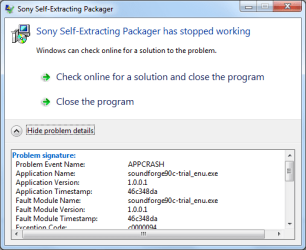
Getting pretty frustrating. I tried the compatibility settings and still nothing. I can't install virtual XP cause my system doesn't have Intel® Virtualization Technology..
My Computer
At a glance
Windows 7 Ultimate x86 7600Intel Pentium Dual CPU E2180 @ 2.00 GHz1 x 2GB | 1 x 1GB Kingston 667512MB Nvidia GeForce EN8500GT Silent Magic
- Computer Manufacturer/Model Number
- DIY
- OS
- Windows 7 Ultimate x86 7600
- CPU
- Intel Pentium Dual CPU E2180 @ 2.00 GHz
- Motherboard
- Gigabyte G41M Combo (rev 1.3)
- Memory
- 1 x 2GB | 1 x 1GB Kingston 667
- Graphics Card(s)
- 512MB Nvidia GeForce EN8500GT Silent Magic
- Sound Card
- Onboard HD 7.1 Audio
- Monitor(s) Displays
- 22" LG W2242T
- Screen Resolution
- 1680 X 1050
- Hard Drives
- 1 x 500GB SATA Hitachi ( Internal )
1 x 1TB SATA Hitachi ( Internal )
1 x 320GB Western Digital ( External )
- PSU
- 500W
- Case
- Coolermaster
- Cooling
- Coolermaster
- Keyboard
- Logitech Media Wireless Keyboard
- Mouse
- A4Tech G6 Wireless Mouse
- Internet Speed
- DL : 12MB/s | UL : 1.2MB/s
- Other Info
- I'm not a gamer. I don't overclock. I use my PC for web browsing, listening to music and watching HD movies.

zigzag3143
New member
- Local time
- 11:08 AM
- Messages
- 27,140
Sorry for bringing up an old thread but i'm not able to install Sony Sound Forge in Win7..
Getting pretty frustrating. I tried the compatibility settings and still nothing. I can't install virtual XP cause my system doesn't have Intel® Virtualization Technology..
View attachment 25390
Should work on 32 bit see above post. Is your install a clean or an upgrade?
Ken
My Computer
At a glance
- Computer Manufacturer/Model Number
- HP Pavillion dv-7 1005 Tx
- OS
- Win 8 Release candidate 8400
- Memory
- 4 gigs
- Graphics Card(s)
- Nvidia 9600M
- Sound Card
- HD built-in
- Monitor(s) Displays
- 17" Wxga
- Screen Resolution
- 1440x900
- Cooling
- none
- Internet Speed
- 45Mb down 5Mb up
Should work on 32 bit see above post. Is your install a clean or an upgrade?
Ken
Thanks for your reply.
I'm on 32 bit. I did a clean install.
My Computer
At a glance
Windows 7 Ultimate x86 7600Intel Pentium Dual CPU E2180 @ 2.00 GHz1 x 2GB | 1 x 1GB Kingston 667512MB Nvidia GeForce EN8500GT Silent Magic
- Computer Manufacturer/Model Number
- DIY
- OS
- Windows 7 Ultimate x86 7600
- CPU
- Intel Pentium Dual CPU E2180 @ 2.00 GHz
- Motherboard
- Gigabyte G41M Combo (rev 1.3)
- Memory
- 1 x 2GB | 1 x 1GB Kingston 667
- Graphics Card(s)
- 512MB Nvidia GeForce EN8500GT Silent Magic
- Sound Card
- Onboard HD 7.1 Audio
- Monitor(s) Displays
- 22" LG W2242T
- Screen Resolution
- 1680 X 1050
- Hard Drives
- 1 x 500GB SATA Hitachi ( Internal )
1 x 1TB SATA Hitachi ( Internal )
1 x 320GB Western Digital ( External )
- PSU
- 500W
- Case
- Coolermaster
- Cooling
- Coolermaster
- Keyboard
- Logitech Media Wireless Keyboard
- Mouse
- A4Tech G6 Wireless Mouse
- Internet Speed
- DL : 12MB/s | UL : 1.2MB/s
- Other Info
- I'm not a gamer. I don't overclock. I use my PC for web browsing, listening to music and watching HD movies.
zigzag3143
New member
- Local time
- 11:08 AM
- Messages
- 27,140
Thanks for your reply.
I'm on 32 bit. I did a clean install.
Could you go into event viewer (type event viewer in search) and see what errors are in the app tab that relate to this problem
Ken
My Computer
At a glance
- Computer Manufacturer/Model Number
- HP Pavillion dv-7 1005 Tx
- OS
- Win 8 Release candidate 8400
- Memory
- 4 gigs
- Graphics Card(s)
- Nvidia 9600M
- Sound Card
- HD built-in
- Monitor(s) Displays
- 17" Wxga
- Screen Resolution
- 1440x900
- Cooling
- none
- Internet Speed
- 45Mb down 5Mb up
Similar threads

- Replies
- 3
- Views
- 10K
- Replies
- 13
- Views
- 10K


- Replies
- 1
- Views
- 7K
- Replies
- 15
- Views
- 39K
