Windows 7 Forums


Windows 7: How to Autorun USB on Win 7

04 Jun 2010   #1

W7 and Vista
 
 
How to Autorun USB on Win 7

Hi,

I want to make a USB flash drive auto run a website link in Windows 7.

I know the auto run function has been removed in Win 7, but can I at least make a pop up window appear whenever a USB flash drive is inserted in the PC and have the user the option to click and open the link???

Help anyone...please

My System SpecsSystem Spec

04 Jun 2010   #2

Windows® 8 Pro (64-bit)
Mumbai, India


My System SpecsSystem Spec
04 Jun 2010   #3

Windows 7 Pro 64 SP1
East Bay Area, CA


Welcome aaaltd,

See if this helps you out,

http://www.sevenforums.com/tutorials...e-autorun.html


Edit: My slow typing got me again, nice tutorial Dinesh.
My System SpecsSystem Spec
.


04 Jun 2010   #4

W7 and Vista


Thanks Dinesh.

I forgot to mention though...without having to alter any setting on the Windows 7 PC. Basically, is there something that can be done in the autorun.inf file stored in the USB flash drive so that when inserted, it will prompt a pop up window...kinda like what happens with Vista. So the Windows 7 user will have the option to click the link once the window pops up and again, without having the user alter any security settings on thier windows 7 PC.
My System SpecsSystem Spec
04 Jun 2010   #5

Windows 7 Professional x86


Quote   Quote: Originally Posted by aaaltd View Post
Thanks Dinesh.

I forgot to mention though...without having to alter any setting on the Windows 7 PC. Basically, is there something that can be done in the autorun.inf file stored in the USB flash drive so that when inserted, it will prompt a pop up window...kinda like what happens with Vista. So the Windows 7 user will have the option to click the link once the window pops up and again, without having the user alter any security settings on thier windows 7 PC.
#2 has clearly answered you, if you read the link carefully, you will know what to do.
My System SpecsSystem Spec
07 Jun 2010   #6

W7 and Vista


#2 has clearly answered you, if you read the link carefully, you will know what to do.

Thanks Xiezhoupeng351.

Unless I'm missing something from the link, my understanding is that one has to alter the setting in their PC for it to auto play. I prefer not to do that. I am planning to give usb flash drives with a link to a website. I want it to auto play when plugged into the computer so it opens the browser automatically and they can right away see the website so the receipient doesn't have to do anything.

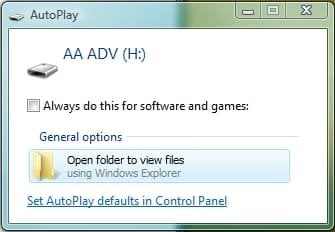
For security reasons, I know most pc by default has this turned off. So my next best option is to have a pop up window option. Please see attachment.

This pop up window automatically comes out in XP & Vista but not Windows 7. When the usb flash drive is inserted in a Windows 7 PC, it doesn't respond at all.

Is there a way to make the pop out window come up in Windows 7 without doing alterations on the PC. I prefer not to give out usb flash drives with instructions on altering their PC's security settings...?
Attached Thumbnails
How to Autorun USB on Win 7-pop-up.jpg  
My System SpecsSystem Spec
07 Jun 2010   #7

Windows 7 Pro 64 SP1
East Bay Area, CA


It's right there in the tutorial, method 1. There is no editing security settings just enabling autoplay.
Attached Thumbnails
How to Autorun USB on Win 7-autoplay.jpg  
My System SpecsSystem Spec
07 Jun 2010   #8

Vista x64 / 7 X64


Is nobody reading the Question? LOL.


Quote:
my understanding is that one has to alter the setting in their PC for it to auto play. I prefer not to do that...I want it to auto play when plugged into the computer so it opens the browser automatically ...
No , there isn't a way ( that I know of ) without the user enabling it themselves.
My System SpecsSystem Spec
07 Jun 2010   #9

Windows 7 Pro 64 SP1
East Bay Area, CA


Quote   Quote: Originally Posted by SIW2 View Post
Is nobody reading the Question? LOL.


Quote:
my understanding is that one has to alter the setting in their PC for it to auto play. I prefer not to do that...I want it to auto play when plugged into the computer so it opens the browser automatically ...
No , there isn't a way ( that I know of ) without the user enabling it themselves.
I guess I misunderstood, my bad.
My System SpecsSystem Spec
Reply

 How to Autorun USB on Win 7 problems?


Thread Tools


Similar help and support threads for: How to Autorun USB on Win 7
Thread Forum
DVD/CD won't autorun Hardware & Devices
No Autorun? General Discussion
recycled.scr and autorun.ini System Security
USB autorun in W7 General Discussion
Autorun.dll Installation & Setup


All times are GMT -5. The time now is 11:20 PM.


Seven Forums Android App Seven Forums IOS App Follow us on Facebook

Windows 7 Forums is an independent web site and has not been authorized,
sponsored, or otherwise approved by Microsoft Corporation.
"Windows 7" and related materials are trademarks of Microsoft Corp.
© Designer Media Ltd
  

1 2 3 4 5 6 7 8 9 10 11 12 13 14 15 16 17 18 19 20 21 22 23 24 25 26 27 28 29 30 31 32