
| Windows 7: Did MS patches (May) break rmvb support in MPC? |
17 Jun 2010
|
#1 | | Windows 7 Ultimate SP1 (64 bit), Windows XP SP3, Linux Mint 14 MATE (64 bit) Adelaide |
Did MS patches (May) break rmvb support in MPC? Why are media players so difficult to setup? 
Setting up Windows is "a piece of cake", compared to the codec nightmares involved in media players (also unlike Windows, Linux & Graphics programs, I haven't seen any decent websites on the subject). Did MS Patches in May break rmvb support in MPC-HC?
Yesterday I tried to play some rmvb files using Media Player Classic - Home Cinema (MPC-HC).
I know that the files are good because I can play them using Real Player and via a network-linked "movie dock" (and until recently I could play them on my PC).
This problem is present on my XP SP3 and Windows 7 installs.
The video plays perfectly, but no sound is available.
I receive the following message:
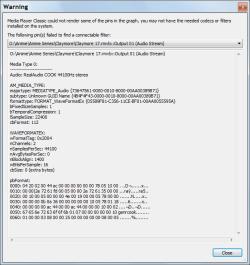
I tried the following, to no avail: - installing the latest version of K-Lite (604 full and 607 patch) and Real Player.
- installing Real Alternative (that wouldn't play sound or video on my PC - initially).
- Internet search solutions, including deleting some Reg Keys.
- re-imaged my HDD using my backup from after May's Patch Tuesday (I foolishly deleted my April OS backup files.
).
I do have some earlier backups, but its a bit of a pain to replace the partitions and then have Windows and multiple programs start screaming for their updates.
Did the patches in May delete/disable codecs that were on my PC?
Has anyone else experienced this?
Does anyone know how to fix this problem?
Does anyone know a good site, that explains how to set the 1000s of codec/media player options?
Thanks in advance.
Last edited by lehnerus2000; 19 Jun 2010 at 06:23 AM..
Reason: Correction
| My System Specs |
| System Manufacturer/Model Number n/a OS Windows 7 Ultimate SP1 (64 bit), Windows XP SP3, Linux Mint 14 MATE (64 bit) CPU AMD Phenom II x6 1055T, 2.8 GHz Motherboard ASRock 880GMH-LE/USB3 Memory 8GB DDR3 1333 G-Skill Ares F3-1333C9D-8GAO (4GB x 2) Graphics Card ATI Radeon HD6450 Sound Card Realtek? Monitor(s) Displays Samsung S23B350 Screen Resolution 1920x1080 Mouse Wired Optical Case Tower Hard Drives Western Digital 1 TB (SATA), Western Digital 1.5 TB (SATA), Western Digital 2 TB (SATA) Internet Speed DSL Other Info Ubuntu 10.04 (64 bit) replaced with Linux Mint 14 MATE (64 bit) - 2013-01-14
RAM & Graphics Card Upgraded - 2013-01-13
Monitor Upgraded - 2012-04-20
System Upgraded - 2011-05-21, 2010-07-14
HDD Upgraded - 2010-08-11, 2011-08-24 |
19 Jun 2010
|
#2 | | Windows 7 Home Premium x64 SP1 Bay Area Peninsula |
This program will help you identify what codecs are needed to play a media file. GSpot
You can then see if you have it, or download latest version. Since you installed klite codec pack, you would normally be covered. It's possible you have a corrupted codec and it was not successfully overwritten by the new installation. Klite does uninstall older version 1st. But you might try removing with Revo Uninstaller Free, then make a fresh install. Alternately, you could see if VLC will play it correctly.
A Guy | My System Specs | | OS Windows 7 Home Premium x64 SP1 CPU INTEL Core i5-750 Quad-Core 3.37GHz Motherboard ASUS P7P55D Memory KINGSTON 4GB (2 x 2GB) HyperX PC3-12800 DDR3 1600MHz CL8 Graphics Card MSI N240GT-MD1G/D5 GeForce GT 240 1GB 128-bit GDDR5 Monitor(s) Displays Samsung SyncMaster B2430H 24" Screen Resolution 1920 x 1080 PSU ANTEC TruePower New TP-550, 80 PLUS, 550W Case ANTEC Three Hundred Illusion Cooling COOLER MASTER Hyper 212 Plus, 4 x 120mm 1 x 140mm Noctua's Hard Drives Intel X25M Gen2 80GB, SEAGATE 500GB Barracudaź 7200.12, SATA 3 Gb/s, 7200 RPM, 16MB cache Internet Speed 20 + Mbps Antivirus Avast Browser Opera |
19 Jun 2010
|
#3 | | Windows 7 Ultimate SP1 (64 bit), Windows XP SP3, Linux Mint 14 MATE (64 bit) Adelaide |
Thanks, A Guy 
Quote: Originally Posted by A Guy This program will help you identify what codecs are needed to play a media file. GSpot
You can then see if you have it, or download latest version. Since you installed klite codec pack, you would normally be covered. It's possible you have a corrupted codec and it was not successfully overwritten by the new installation. Klite does uninstall older version 1st. But you might try removing with Revo Uninstaller Free, then make a fresh install. Alternately, you could see if VLC will play it correctly.
A Guy Thanks for your reply.
I have GSpot and it says that I need something called Cook (at least that is what I think it is saying).
I have searched my PC and I have Cook (Real Player has it).
During April, I was able to successfully play rmvb files (sound and video). Since May I can only play rmvb video.
The only thing that I can recall changing is, I installed the various patches for XP SP3 and Windows 7, that MS made available.
Hence my question.
I have tried Gom, MPC-HC and Real Alternative (they all display the same behaviour).
Only Real Player will play the files correctly on my PC (now).
I was wondering if it would be possible to create/edit the Registry locations mentioned (see screenshot) and include a pointer to the appropriate file. I have done some Registry editing and created simple additions, but I am "first grade" level compared to some of the guys who contribute to this site.
Last edited by lehnerus2000; 19 Jun 2010 at 06:20 AM..
Reason: Spelling
| My System Specs | | System Manufacturer/Model Number n/a OS Windows 7 Ultimate SP1 (64 bit), Windows XP SP3, Linux Mint 14 MATE (64 bit) CPU AMD Phenom II x6 1055T, 2.8 GHz Motherboard ASRock 880GMH-LE/USB3 Memory 8GB DDR3 1333 G-Skill Ares F3-1333C9D-8GAO (4GB x 2) Graphics Card ATI Radeon HD6450 Sound Card Realtek? Monitor(s) Displays Samsung S23B350 Screen Resolution 1920x1080 Mouse Wired Optical Case Tower Hard Drives Western Digital 1 TB (SATA), Western Digital 1.5 TB (SATA), Western Digital 2 TB (SATA) Internet Speed DSL Other Info Ubuntu 10.04 (64 bit) replaced with Linux Mint 14 MATE (64 bit) - 2013-01-14
RAM & Graphics Card Upgraded - 2013-01-13
Monitor Upgraded - 2012-04-20
System Upgraded - 2011-05-21, 2010-07-14
HDD Upgraded - 2010-08-11, 2011-08-24 |
10 Jul 2010
|
#4 | | Windows 7 Ultimate SP1 (64 bit), Windows XP SP3, Linux Mint 14 MATE (64 bit) Adelaide |
Update - I should have said April "During April, I was able to successfully play rmvb files (sound and video)."
That must have been before the updates for that month.
I tried re-imaging my XP partition with my April backup (I found it on one of my external drives).
Still no joy.
I installed VLC Plus and it does play the files correctly.
Last edited by lehnerus2000; 10 Jul 2010 at 11:07 PM..
Reason: Correction
| My System Specs | | System Manufacturer/Model Number n/a OS Windows 7 Ultimate SP1 (64 bit), Windows XP SP3, Linux Mint 14 MATE (64 bit) CPU AMD Phenom II x6 1055T, 2.8 GHz Motherboard ASRock 880GMH-LE/USB3 Memory 8GB DDR3 1333 G-Skill Ares F3-1333C9D-8GAO (4GB x 2) Graphics Card ATI Radeon HD6450 Sound Card Realtek? Monitor(s) Displays Samsung S23B350 Screen Resolution 1920x1080 Mouse Wired Optical Case Tower Hard Drives Western Digital 1 TB (SATA), Western Digital 1.5 TB (SATA), Western Digital 2 TB (SATA) Internet Speed DSL Other Info Ubuntu 10.04 (64 bit) replaced with Linux Mint 14 MATE (64 bit) - 2013-01-14
RAM & Graphics Card Upgraded - 2013-01-13
Monitor Upgraded - 2012-04-20
System Upgraded - 2011-05-21, 2010-07-14
HDD Upgraded - 2010-08-11, 2011-08-24 |
13 Jul 2010
|
#5 | | |
Hello I have a file format as mpg, avi, rmvb and when there will be some
with windows media player does not give me audio and I'm going and what the real habro
audio player and has no problems ... then I open the same file
with windows media player and runs smoothly
The truth to me pretty tired and this ...
I have windows 7 32 bit professional and full K-lite 5.83 .- I started to
malfunction after a MS update but did not know which ... | My System Specs | | OS Windows 7 Graphics Card Onboard Sound Card Onboard |
28 Dec 2010
|
#6 | | Windows 7 Ultimate SP1 (64 bit), Windows XP SP3, Linux Mint 14 MATE (64 bit) Adelaide |
Update - Fixed MPC Audio Problem (rmvb files) I finally fixed my MPC (K-Lite Codec Pack) problem. 
Real Player was preventing MPC from working correctly. What I did: - Uninstalled Real Player (Rhapsody doesn't have to be removed).
- Used ASC3, CCleaner and Glary Utilities to cleanup the "orphaned" Registry entries
- Downloaded windows-essential-20071007.zip
- Extracted the following files from the zip file (to a folder):
- cook.dll
- drv33260.dll
- drv43260.dll
- pncrt.dll
- sipr3260.dll
- Copied the extracted dlls to c:\Windows
- Downloaded K-Lite Mega Codec Pack (the 32 bit version)
- Installed K-Lite Mega Codec Pack (I chose "Profile 7: Lots of Stuff")
You can install K-Lite Mega Codec Pack in the default location or in a location of your choice.
I tried these locations: - "C:\Program Files (x86)"
- "E:\Programs 7\Media Player"
The installer creates a folder called "K-Lite Codec Pack".
windows-essential-20071007.zip http://www.mplayerhq.hu/design7/dload.html
Look for:
Table: Binary Codec Packages (about 1/3 of the way down the page). Entry: Windows x86 20071007 K-Lite Mega Codec Pack Codec Guide: K-Lite Codec Pack - Windows 7 codecs
Forum Rules:
Deleted the direct link to the zip file.
Last edited by lehnerus2000; 28 Dec 2010 at 09:44 AM..
Reason: Layout, Forum Rules
| My System Specs | | System Manufacturer/Model Number n/a OS Windows 7 Ultimate SP1 (64 bit), Windows XP SP3, Linux Mint 14 MATE (64 bit) CPU AMD Phenom II x6 1055T, 2.8 GHz Motherboard ASRock 880GMH-LE/USB3 Memory 8GB DDR3 1333 G-Skill Ares F3-1333C9D-8GAO (4GB x 2) Graphics Card ATI Radeon HD6450 Sound Card Realtek? Monitor(s) Displays Samsung S23B350 Screen Resolution 1920x1080 Mouse Wired Optical Case Tower Hard Drives Western Digital 1 TB (SATA), Western Digital 1.5 TB (SATA), Western Digital 2 TB (SATA) Internet Speed DSL Other Info Ubuntu 10.04 (64 bit) replaced with Linux Mint 14 MATE (64 bit) - 2013-01-14
RAM & Graphics Card Upgraded - 2013-01-13
Monitor Upgraded - 2012-04-20
System Upgraded - 2011-05-21, 2010-07-14
HDD Upgraded - 2010-08-11, 2011-08-24 |
20 Jun 2011
|
#7 | | Windows 7 Ultimate 64bit British Columbia, Canada |
Just to inform you, none of the above would be nessasary if you had used the Win7codecs from Shark007. | My System Specs | | System Manufacturer/Model Number Selfbuilt OS Windows 7 Ultimate 64bit CPU i7 2600k Motherboard asus P8Z68-V LE Memory 16GB (4x4) corsair vengeance Graphics Card Intel HD3000 iGPU / AMD HD6870 1024MB Sound Card bitstreamed to an Onkyo 609 Monitor(s) Displays Asus VE278 27" LED / Bravia EX7 60" LED Screen Resolution native 1080p x2 Keyboard Dell Mouse logitech m505 PSU 650w Antec Case NZXT tempest evo Cooling air/stock Hard Drives 4x 2TB int. + 2x 2TB external and a SSD for the boot drive. Internet Speed dual: cable/blackberry tether for travel use Other Info BD re-writer //
asus notebook G73Jw Did MS patches (May) break rmvb support in MPC? problems? All times are GMT -5. The time now is 01:16 PM. | |