Windows 7 Forums Search
Welcome to Windows 7 Forums. Our forum is dedicated to helping you find solutions with any problems, errors or issues you are experiencing with Windows 7. The Windows 7 forum also covers news and updates and has an extensive Windows 7 tutorial section that covers a wide range of tips and tricks.


Windows 7 - Realtek HD Audio Manager and Realtek Audio Driver

 
08-07-2010   #1


Windows 7 64 Bit


Realtek HD Audio Manager and Realtek Audio Driver

Help. I recently did a clean install of Windows 7 64bit (on my HP Vista 32 machine). Life is grand! My problems started when I tried to listen to the microphone input through my speakers. The front microphone inputs did not work so I downlaed the Realtek HD Audio Drivers (recently updated) from the realtek site. The inputs now work and I can record from the microphone through the Sound Recorder app in Accessories but can not hear the microphone through the speakers while I am recording. After searching the web I noticed a lot of chatter about setting things up in the Realtek HD Audio Manager. This app does not show up in my control panel. Does anyone know where I can get it (if I really need it). The Realtek site only has the driver download (not the manager). Am I missing something, am I confused, or both?

My System SpecsSystem Spec
08-07-2010   #2


Windows 7 Ultimate x64 SP1


Quote   Quote: Originally Posted by NTexan View Post
Help. I recently did a clean install of Windows 7 64bit (on my HP Vista 32 machine). Life is grand! My problems started when I tried to listen to the microphone input through my speakers. The front microphone inputs did not work so I downlaed the Realtek HD Audio Drivers (recently updated) from the realtek site. The inputs now work and I can record from the microphone through the Sound Recorder app in Accessories but can not hear the microphone through the speakers while I am recording. After searching the web I noticed a lot of chatter about setting things up in the Realtek HD Audio Manager. This app does not show up in my control panel. Does anyone know where I can get it (if I really need it). The Realtek site only has the driver download (not the manager). Am I missing something, am I confused, or both?

Welcome to SF!
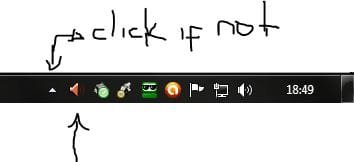
Realtek HD Control Panel is in the Windows notification area. See image below. I hope I helped!

"PLEASE REP ANYONE WHO HELPS YOU"
Attached Thumbnails
Realtek HD Audio Manager and Realtek Audio Driver-capturar.jpg  
My System SpecsSystem Spec
08-07-2010   #3


Windows 7 64 Bit


Thanks for the quick response. The icon was not on my toolbar nor was the app in my control panel. I reinstalled the driver from realtek and rebooted my system. The icon showed up but I got an error the audio service was not started. So, I rebooted again and now the icon does not show up, but the app is in my control panel and my speakers now play what is input through the mic. Note the icon does appear once I run the app from the control panel. Everything now works. Thanks again.
My System SpecsSystem Spec
.


08-07-2010   #4


Windows 7 Ultimate x64 SP1


Quote   Quote: Originally Posted by NTexan View Post
Thanks for the quick response. The icon was not on my toolbar nor was the app in my control panel. I reinstalled the driver from realtek and rebooted my system. The icon showed up but I got an error the audio service was not started. So, I rebooted again and now the icon does not show up, but the app is in my control panel and my speakers now play what is input through the mic. Note the icon does appear once I run the app from the control panel. Everything now works. Thanks again.
You're welcome! Is your problem really solved?!...
My System SpecsSystem Spec
08-07-2010   #5


Windows 7 64 Bit


So far yes. I am recording audoi from the mic and I can hear it and configure things. I will assume it is fixed if it continues to work after the next 5 reboots. But I think I am good. (man is the realtek website confusing). Enjoy your day wherever you are.
My System SpecsSystem Spec
08-07-2010   #6


Windows 7 Ultimate x64 SP1


Quote   Quote: Originally Posted by NTexan View Post
So far yes. I am recording audoi from the mic and I can hear it and configure things. I will assume it is fixed if it continues to work after the next 5 reboots. But I think I am good. (man is the realtek website confusing). Enjoy your day wherever you are.

I agree with you that the Realtek web site difficult to navigate, not to mention the look outdated ...
About your problem, I ask you to return here when you feel safe and let us know if it is solved or not.

"PLEASE REP ANYONE WHO HELPS YOU"
My System SpecsSystem Spec
08-12-2010   #7


Windows 7 64 Bit


Problem is solved. Thanks for your help.
My System SpecsSystem Spec
08-13-2010   #8


Windows 7 Ultimate x64 SP1


Quote   Quote: Originally Posted by NTexan View Post
Problem is solved. Thanks for your help.

I'm glad to hear that! Therefore, I ask that you report this thread as solved. How? Just click on the triangle that is on the top right of this post and report.
Any other problems or questions, please feel free to return to SF!


"PLEASE REP ANYONE WHO HELPS YOU"
My System SpecsSystem Spec
Reply

 Realtek HD Audio Manager and Realtek Audio Driver problems?


Thread Tools


Similar Threads for: Realtek HD Audio Manager and Realtek Audio Driver
Thread Forum
Realtek driver installed, but no Audio Manager Drivers
ASUS/Realtek, Latest Realtek versus default W7 Audio driver Sound & Audio
No 5.1 Audio in Realtek HD Audio Manager Sound & Audio
Realtek HD Audio Manager Sound & Audio
I have Realtek HD driver but no HD Audio Manager? Sound & Audio


All times are GMT -5. The time now is 10:21 PM.


Windows 7 Forums is an independent web site and has not been authorized,
sponsored, or otherwise approved by Microsoft Corporation.
"Windows 7" and related materials are trademarks of Microsoft Corp.
© Designer Media Ltd
  

1 2 3 4 5 6 7 8 9 10 11 12 13 14 15 16 17 18 19 20 21 22 23 24 25 26 27 28 29 30