Windows 7 Forums


Windows 7: wicked audio level

20 Aug 2010   #1

Windows 7
 
 
wicked audio level

when listening to music the audio level suddenly gets set to 0 or 100% both in the player and in the general windows mixer. I can slide the level controls as much I want (in app or windows mixer) , it gets set back to 0 or 100%. only reboot gives me control on audio level back ...


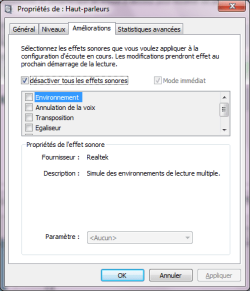
I have checked the "desactivate sound effects" for the speaker (this should desactivate loudness equalization ) and also set the action for when communication is detected to "do nothing"

but still, the d*mn wicked thing would not let me deal with the audio level myself...

if someone has any idea about how I could get it to keep it's nose out of this, it would be very helpful !

many thanks in advance!

V
Attached Thumbnails
wicked audio level-moz-screenshot-1.png  

Last edited by v2belleville; 20 Aug 2010 at 07:56 PM.. Reason: attachement
My System SpecsSystem Spec

21 Aug 2010   #2

Windows 7 Home Premium
Southwest U.S.


That's a strange problem... the only thing I can think of is some type of program running in the background that has audio settings.

Are you running anything like Skype or other type program that uses the audio system?

Ap
My System SpecsSystem Spec
21 Aug 2010   #3

Windows 7, 64 bit Home SP1, Win 8 Pro 64 bit
Citrus Co, FL


A long time ago this was happening on Dell's and Windows XP. The fix was to clear the "NVRAM" (reset the BIOS).
My System SpecsSystem Spec
.


21 Aug 2010   #4

Windows 7


hey, Thanks for your reply

Quote:
Are you running anything like Skype or other type program that uses the audio system?
nop ... last night it happened as I was only using the player ...

@fireberd: hope this can be settled without rummaging in the BIOS ...

I am still investigating so any input welcome!
My System SpecsSystem Spec
22 Aug 2010   #5

Windows 7, 64 bit Home SP1, Win 8 Pro 64 bit
Citrus Co, FL


A BIOS reset is not a big deal. Just write down any customization you have in the BIOS so after you reset it you can set up your customized settings again. Easiest way to reset the BIOS is, with the PC powered off, remove the CMOS backup battery (usually a CR2032 coin cell) for about 10 minutes. Reinstall and the BIOS is reset.

No guarantee this will work on your PC, just that it worked on older Dell's.
My System SpecsSystem Spec
03 Sep 2010   #6

Windows 7


I have a wireless audio device connected with a usb dongle

I use to leave the dongle on the PC even when not using the audio device

looks like unplugging it prevents the weird audio level behaviour described above from happening

My System SpecsSystem Spec
03 Sep 2010   #7

Windows 7 Ultimate x64
Brisbane, Queensland, Australia


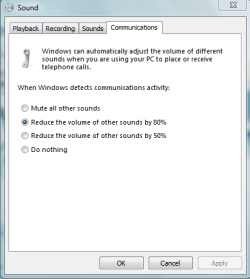
in the playback devices there is a tab communications, do you have this selected maybe?
Attached Thumbnails
wicked audio level-capture.png  
My System SpecsSystem Spec
Reply

 wicked audio level problems?


Thread Tools


Similar help and support threads for: wicked audio level
Thread Forum
Wicked Wacky Desktop Customization
USB generic audio driver Line level input Sound & Audio
Help fixing USB audio level reset Sound & Audio
Low system sound level, high music level? Sound & Audio
Is it just me or is this thing wicked ? Chillout Room


All times are GMT -5. The time now is 03:17 AM.


Seven Forums Android App Seven Forums IOS App Follow us on Facebook

Windows 7 Forums is an independent web site and has not been authorized,
sponsored, or otherwise approved by Microsoft Corporation.
"Windows 7" and related materials are trademarks of Microsoft Corp.
© Designer Media Ltd
  

1 2 3 4 5 6 7 8 9 10 11 12 13 14 15 16 17 18 19 20 21 22 23 24 25 26 27 28 29 30 31 32