Windows 7 Forums Search
Welcome to Windows 7 Forums. Our forum is dedicated to helping you find solutions with any problems, errors or issues you are experiencing with Windows 7. The Windows 7 forum also covers news and updates and has an extensive Windows 7 tutorial section that covers a wide range of tips and tricks.


Windows 7 - Creative X-Fi Xtremegamer

 
10-13-2010   #1


Windows 7 Home Premium 32 bit


Creative X-Fi Xtremegamer

hi

I have the above sound card installed and when I play music the music is nice and loud but when I talk on the mic then then the mic is very quiet and people can hardly here me. Is there a mic boost facilty on this card??

I have installed the most up to date drivers

I use this sound card on PalTalk Quiz rooms where I play music and let the roomies know who got the points etc

Many thanks

My System SpecsSystem Spec
10-13-2010   #2


ultimate 64 sp1


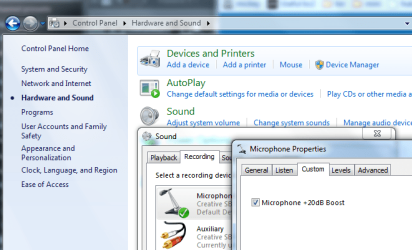
control panel >> hardware and sound >> sound >> recording >> click microphone >> properties >> custom >> +20dB boost
Attached Thumbnails
Creative X-Fi Xtremegamer-cont.png  
My System SpecsSystem Spec
10-14-2010   #3


Windows 7 Home Premium 32 bit


Hi and thanks for the reply

I have followed your instructions but alas, Mic Boost is not showing anywhere

Any further advice please
My System SpecsSystem Spec
.


10-14-2010   #4


ultimate 64 sp1


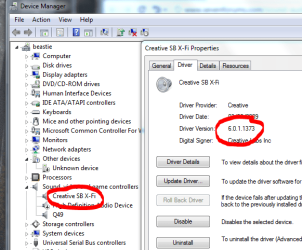
do you know which drivers you have installed?

check with device manager.
Attached Thumbnails
Creative X-Fi Xtremegamer-cre.png  
My System SpecsSystem Spec
10-15-2010   #5


Windows 7 Home Premium 32 bit


Hi and once again, thanks for your message

The driver details installed for this card are as follows

Creative
Version 6.0.1.1375
Date 05/05/2010

Hope this helps you to help me resolve this problem
King Regards
My System SpecsSystem Spec
10-15-2010   #6


ultimate 64 sp1


your driver seems more recent than mine.

have you also installed the creative audio control panel and the creative console launcher? you'll need to find them on the creative website, i can't give you a link unfortunately.

there is also a mic-boost option on the game mode view of the console.

it's a bit fiddly to get at though. select microphone in the recording drop-down menu, then a little + sign should appear above the slider.

click on the + and activate the boost.

let me know if this works.
Attached Thumbnails
Creative X-Fi Xtremegamer-boost.jpg  
My System SpecsSystem Spec
10-17-2010   #7


Windows 7 Home Premium 32 bit


Hi

Once again thanks for your reply and advice

I have found the mic boost under the Audio player mode so now I have micropnone and what you hear but it seems I can only have one of the above working at any one time

I wonder if this is normal or just a quirk with my settngs

Once again ~~ thanks for your advice
My System SpecsSystem Spec
10-17-2010   #8


ultimate 64 sp1


it's normal - you can only record from one source at a time.
My System SpecsSystem Spec
Reply

 Creative X-Fi Xtremegamer problems?


Thread Tools


Similar Threads for: Creative X-Fi Xtremegamer
Thread Forum
Creative X-Fi XtremeGamer vs NUMARK DJ I/O Sound & Audio
NEED HELP creative Xtremegamer soundcard Sound & Audio
Proublem with X-Fi XtremeGamer on W7 Sound & Audio
All the tries went bad with my SB X-FI XtremeGamer Sound & Audio
X-Fi XtremeGamer and Win 7 x64 Sound & Audio


All times are GMT -5. The time now is 10:23 PM.


Windows 7 Forums is an independent web site and has not been authorized,
sponsored, or otherwise approved by Microsoft Corporation.
"Windows 7" and related materials are trademarks of Microsoft Corp.
© Designer Media Ltd
  

1 2 3 4 5 6 7 8 9 10 11 12 13 14 15 16 17 18 19 20 21 22 23 24 25 26 27 28 29 30