Windows 7 Forums Search
Welcome to Windows 7 Forums. Our forum is dedicated to helping you find solutions with any problems, errors or issues you are experiencing with Windows 7. The Windows 7 forum also covers news and updates and has an extensive Windows 7 tutorial section that covers a wide range of tips and tricks.


Windows 7 - I have to reverse my speakers position. (L is at R and vice versa)

 
10-18-2010   #1


Windows 7 Home Premium 64-bit


I have to reverse my speakers position. (L is at R and vice versa)

IDK y but if I don't reverse my speakers, the sound from my games sounds reverse.

For example. If I put my speakers in the proper order, sounds of bullet will come from my left speaker but actually it's coming from my right side and vice versa. This also happens on my old speakers and old computer and other games too.

Is it just me?

My System SpecsSystem Spec
10-18-2010   #2


Windows 7 Ultimate x86


Some games can reverse left and right in the audio options. So first check if you didn't click that by accident.

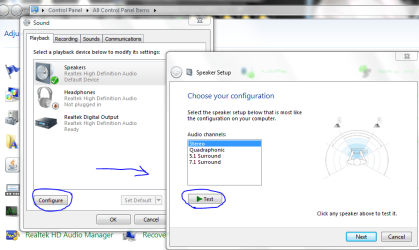
If that's OK, go to Control panel/Sound/Speaker/Configure and run the test.
If it comes up reversed, just unplug and switch the speakers .

I have to reverse my speakers position. (L is at R and vice versa)-capture.png

-DG
My System SpecsSystem Spec
10-18-2010   #3


Windows 7 Home Premium 64-bit


yea it comes out reverse because I reverse the speakers. But in games, reversing the speakers is normal for me. As far as I know, none of the games I play have reverse audio option such as BC2.
My System SpecsSystem Spec
.


10-18-2010   #4


Windows 7 Ultimate x86


you might have an option in your sound drivers that has been switched because I've never come across a game that had the sound reversed...then again, I don't play many FPS games...I'm more a D&D guy
My System SpecsSystem Spec
10-18-2010   #5


Windows 7 Home Premium 64-bit


Could it be just be my brain? since i also mention that this happens on my old computer too and with different speakers and different games.
My System SpecsSystem Spec
10-18-2010   #6


Windows 7 Home Premium


Quote   Quote: Originally Posted by imeem View Post
Could it be just be my brain? since i also mention that this happens on my old computer too and with different speakers and different games.
If you're 100% positive the speakers are positioned correctly (they should me marked left/right) than it's possible the speakers were accidentally wired in reverse, which seems like the most likely scenario.

Here's an easy test you can try, this will tell you if the speakers are correct.
(unless they are USB speakers, then this test doesn't apply)

Pull out the speaker plug, make sure the speakers are on and at a medium/low volume. Touch the tip of the plug with a finger, helps if you dampen the end of the finger first, a quick lick will do.

You should hear static or a pop out of the LEFT speaker.

Ap
My System SpecsSystem Spec
10-20-2010   #7


Windows 7 Ultimate x64 SP1 Build 7601


I've got same problem too. But in mine it's laptop built-in speaker so I can't reverse it
Problem gone after I reinstall Windows and update drive
I've got Realtek BTW
My System SpecsSystem Spec
10-20-2010   #8


Windows 7 Home Premium 64-bit


Quote   Quote: Originally Posted by Aphelion View Post
Quote   Quote: Originally Posted by imeem View Post
Could it be just be my brain? since i also mention that this happens on my old computer too and with different speakers and different games.
If you're 100% positive the speakers are positioned correctly (they should me marked left/right) than it's possible the speakers were accidentally wired in reverse, which seems like the most likely scenario.

Here's an easy test you can try, this will tell you if the speakers are correct.
(unless they are USB speakers, then this test doesn't apply)

Pull out the speaker plug, make sure the speakers are on and at a medium/low volume. Touch the tip of the plug with a finger, helps if you dampen the end of the finger first, a quick lick will do.

You should hear static or a pop out of the LEFT speaker.

Ap
it doesn't make any sound.
My System SpecsSystem Spec
10-20-2010   #9


Windows 7 Home Premium


Quote   Quote: Originally Posted by imeem View Post
Quote   Quote: Originally Posted by Aphelion View Post
Quote   Quote: Originally Posted by imeem View Post
Could it be just be my brain? since i also mention that this happens on my old computer too and with different speakers and different games.
If you're 100% positive the speakers are positioned correctly (they should me marked left/right) than it's possible the speakers were accidentally wired in reverse, which seems like the most likely scenario.

Here's an easy test you can try, this will tell you if the speakers are correct.
(unless they are USB speakers, then this test doesn't apply)

Pull out the speaker plug, make sure the speakers are on and at a medium/low volume. Touch the tip of the plug with a finger, helps if you dampen the end of the finger first, a quick lick will do.

You should hear static or a pop out of the LEFT speaker.

Ap
it doesn't make any sound.
You have amplified speakers correct? Turn them up a bit, you should hear something out of the left side when you touch the tip of the speaker plug.

Ap
My System SpecsSystem Spec
10-21-2010   #10


Windows 7 Home Premium 64-bit


Quote   Quote: Originally Posted by Aphelion View Post
Quote   Quote: Originally Posted by imeem View Post
Quote   Quote: Originally Posted by Aphelion View Post

If you're 100% positive the speakers are positioned correctly (they should me marked left/right) than it's possible the speakers were accidentally wired in reverse, which seems like the most likely scenario.

Here's an easy test you can try, this will tell you if the speakers are correct.
(unless they are USB speakers, then this test doesn't apply)

Pull out the speaker plug, make sure the speakers are on and at a medium/low volume. Touch the tip of the plug with a finger, helps if you dampen the end of the finger first, a quick lick will do.

You should hear static or a pop out of the LEFT speaker.

Ap
it doesn't make any sound.
You have amplified speakers correct? Turn them up a bit, you should hear something out of the left side when you touch the tip of the speaker plug.

Ap
yea I hear the popping noises in my left speaker, I have to turn it to max volume to hear it.
My System SpecsSystem Spec
Reply

 I have to reverse my speakers position. (L is at R and vice versa) problems?


Thread Tools


Similar Threads for: I have to reverse my speakers position. (L is at R and vice versa)
Thread Forum
File Sharing - Between XP and W7 (and vice versa) Tutorials
Can connect to laptop from desktop, but not vice versa... Network & Sharing
Unable to ping a VM from another machine, but vice-versa is possible Virtualization
Sharing files from Seven to Vista and vice-versa Network & Sharing
Audio from speakers, not from headset, vice-versa. Sound & Audio


All times are GMT -5. The time now is 10:23 PM.


Windows 7 Forums is an independent web site and has not been authorized,
sponsored, or otherwise approved by Microsoft Corporation.
"Windows 7" and related materials are trademarks of Microsoft Corp.
© Designer Media Ltd
  

1 2 3 4 5 6 7 8 9 10 11 12 13 14 15 16 17 18 19 20 21 22 23 24 25 26 27 28 29 30