Windows 7 Forums


Windows 7: No audio output device is installed

20 Oct 2010   #1

Windows 7 Profesional 32 bit
 
 
No audio output device is installed

This is the message i am getting at the bottom of my screen so i now have no audio. I re installed windows 7 but went from 64 to 32 bit and now i have no audio. I have looked everywere to download drivers etc but no luck.


I hope you can help.
My System SpecsSystem Spec

20 Oct 2010   #2

Windows 7 Ultimate x64 Service Pack 1
Doncaster, UK


Hi RAFC1990 and welcome to Windows 7 Forums

Some specs would be useful, namely the make and full model number (including revision, if any) of your motherboard.
My System SpecsSystem Spec
20 Oct 2010   #3

Windows 7 Profesional 32 bit
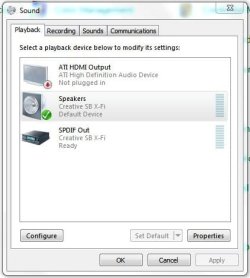


I recently replaced my graphics card, that was the reason for the re install if that helps. Ive installed the graphics card drivers.

Motherboard is Asus PSLP - LE maybe P5LP - LE there seems to be results for both.
My System SpecsSystem Spec
.


20 Oct 2010   #4

Windows 7 Ultimate x64 Service Pack 1
Doncaster, UK


I can't seem to find a board with that reference. Are you sure that it's correct?

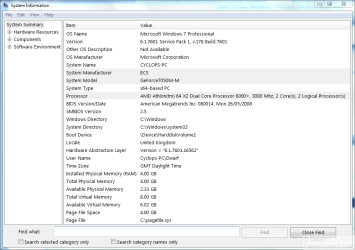
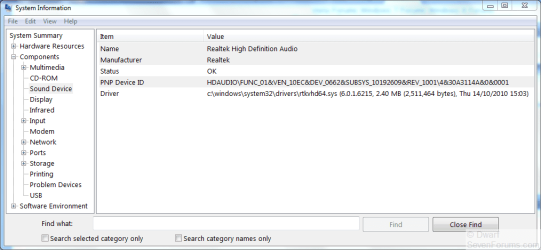
What does System Information have to say? I'm interested in the highlighted items, in particular the PNP Device ID shown in the second image.

No audio output device is installed-capture.png No audio output device is installed-capture1.png
My System SpecsSystem Spec
20 Oct 2010   #5

Win 7 Ultimate x64
Etobicoke, Ontario


Despite the number of results on Google pretty sure that PSLP-LE is a typo (that and the few links I checked that had pictures of it, it is the same as the P5LP-LE) and that this is the motherboard,

Motherboard Specifications, P5LP-LE (Leonite) - HP Customer Care (United States - English)

which if it is has the Realtek ALC888 on it and you can find links to the latest driver here,

Latest Realtek HD Audio Driver Version
My System SpecsSystem Spec
20 Oct 2010   #6

Windows 7 Profesional 32 bit


My System SpecsSystem Spec
20 Oct 2010   #7

Windows 7 Profesional 32 bit


My System SpecsSystem Spec
20 Oct 2010   #8

Windows 7 Profesional 32 bit


Quote   Quote: Originally Posted by stormy13 View Post
Despite the number of results on Google pretty sure that PSLP-LE is a typo (that and the few links I checked that had pictures of it, it is the same as the P5LP-LE) and that this is the motherboard,

Motherboard Specifications, P5LP-LE (Leonite) - HP Customer Care (United States - English)

which if it is has the Realtek ALC888 on it and you can find links to the latest driver here,

Latest Realtek HD Audio Driver Version
Ive downloaded them drivers they dont seem to do anything, on system information it just says im on NVIDIA
My System SpecsSystem Spec
20 Oct 2010   #9

Win 7 Ultimate x64
Etobicoke, Ontario


Grab this,

Speccy - System Information - Free Download

and post a screen shot of the Summary page please.
My System SpecsSystem Spec
20 Oct 2010   #10

Windows 7 Profesional 32 bit


I cant afford the download mate,

I dont understand why there is no realtek driver when i have installed one just nvidia i think this is the problem.
My System SpecsSystem Spec
Reply

 No audio output device is installed problems?


Thread Tools


Similar help and support threads for: No audio output device is installed
Thread Forum
No audio output device installed Sound & Audio
ALC 888 // No audio output device is installed Sound & Audio
Realtek Audio: No Audio Output Device is Installed Sound & Audio
No audio Output Device installed Sound & Audio
No Audio Output Device is installed Sound & Audio


All times are GMT -5. The time now is 01:19 AM.


Seven Forums Android App Seven Forums IOS App Follow us on Facebook

Windows 7 Forums is an independent web site and has not been authorized,
sponsored, or otherwise approved by Microsoft Corporation.
"Windows 7" and related materials are trademarks of Microsoft Corp.
© Designer Media Ltd
  

1 2 3 4 5 6 7 8 9 10 11 12 13 14 15 16 17 18 19 20 21 22 23 24 25 26 27 28 29 30 31 32