| Windows 7: Volume spiking up randomly |
23 Nov 2010
|
#1 | | |
Volume spiking up randomly Hello, I've only started encountering this problem after switching to Windows 7 Ultimate 64x. My volume tends to fluctuate randomly, and I'm not sure why. It happens while I'm playing games. It's usually quiet, how I like it, but it will suddenly decide to spike up and hurt my ears :/. Also, when I watch youtube videos, some videos are much louder than others, while being much louder than all other noises on my PC. Note that these are videos I watched before I upgraded and they didn't have this sound problem. This problem occurs very often with people talking on ventrilo. While someone is in the middle of a sentence, their volume will increase 3 fold and I'll have to mute my computer since it sounds like they're screaming. Anyone else get this problem? Patiently awaiting a response, thanks! | My System Specs |
| OS Windows 7 Ultimate x64 |
23 Nov 2010
|
#2 | | Windows 7 Home Premium Southwest U.S. |
Hey again...
Right click the Microsoft speaker icon in the taskbar and select "Playback" devices.
Select the communications tab and try selecting "Do Nothing"
The other problem area can be having the "Loudness Equalization" enable.
Again follow the above and select Playback devices, this time select the Default output device (green check mark), at this point the Properties button should become active. Select properties then the "Enhancements" tab, first select "Immediate Mode" then scroll down and un-check "Loudness Equalization".
May have to reboot... see if that evens things out.
Ap | My System Specs | | System Manufacturer/Model Number Assembled in my workshop OS Windows 7 Home Premium CPU Intel Core 2 Duo @ 3.00gHz Motherboard Gigabyte GA-P35-S3G Memory 4 GB Graphics Card ATI Radeon HD 2600 XT Sound Card RME 24/96 Card, Realtek Internal Audio PreSonus FireStudio Monitor(s) Displays Acer 1917 (x2) Screen Resolution 1280 x 1024 on both monitors Keyboard Macally w/2/USB ports. Mouse Trackman Wheel PSU Rosewill 500-watt Case Rosewill mid-tower Cooling Noctua NH-U9B (CPU), PwrSupply fan + single large case Fan Hard Drives Three 250GB Seagate SATA Barracuda 7200rpm Other Info Event 20/20 bas studio monitors, Yamaha sub.
Rackmount Korg/Roland/Yamaha synthesizers,
Cubase MIDI/audio recording. Sony Soundforge audio/mastering software. CD Architect Mastering. RME & Presonus audio interfaces. |
23 Nov 2010
|
#3 | | |
Haha, hey again, unfortunately, I've tried both of those suggestions prior to making this thread, and not much changed. The "Do Nothing" option didn't affect anything. Loudness Equalization was already unchecked on my headphones. Any other ideas? | My System Specs | | OS Windows 7 Ultimate x64 |
23 Nov 2010
|
#4 | | Windows 7, 64 bit Home SP1, Win 8 Pro 64 bit Citrus Co, FL |
Is this ONLY with headphones? Does the sound change when you use the PC's speakers? Or, plug the headset into the GREEN speaker jack on the rear of the PC and see if the sound level changes. | My System Specs | | Computer type PC/Desktop System Manufacturer/Model Number My Own Build OS Windows 7, 64 bit Home SP1, Win 8 Pro 64 bit CPU Intel i7 3770 Motherboard Gigabyte GA-Z77X-UD5H Memory 16GB GSkill Ripsaw F3-14900CL9Q-16GBXL Graphics Card Sapphire HD7770 Sound Card RealTek Monitor(s) Displays Viewsonic VA2448 Series 24" LED Screen Resolution 1920X1080 Keyboard Kensington wired Mouse Logitech Wireless PSU Antec High Current Gamer HCG-620M Modular Case Coolermaster HAF XM Cooling Corsair H80 Liquid cooling with aftermarket Nexus quiet fans Hard Drives 240GB Intel 520 SSD for Win 7
128GB OCZ Vertex 4 SSD for Win 8
1 TB Seagate drive for backup Internet Speed 40 MB/sec (Cable) Antivirus Microsoft Security Essentials and Malwarebytes Browser I.E9/Firefox Other Info Sonar X2 Professional 64 bit Recording Software with Roland Octa-Capture and MAudio Fast Track Ultra 8R recording interfaces, Frontier Tranzport wireless control unit, Behringer BCF2000 Control Surface.
Five USB connected optical drives for CD Audio production using Nero 11
Other systems: Desktop with i5 3550 CPU, LenovoZ560 Laptop with Win 7 64 bit HP, SP1, new iPad |
23 Nov 2010
|
#5 | | |

Quote: Originally Posted by fireberd Is this ONLY with headphones? Does the sound change when you use the PC's speakers? Or, plug the headset into the GREEN speaker jack on the rear of the PC and see if the sound level changes. I've never actually tried using using my speakers yet, so I'm not sure. But I'll try plugging my headphones into the rear end of the computer and see what happens. | My System Specs | | OS Windows 7 Ultimate x64 |
23 Nov 2010
|
#6 | | Windows 7 Home Premium Southwest U.S. |
I'm also curious if your speakers do this as well?
Are these USB headphones (which are a separate audio device) or plugged into the onboard Realtek?
If plugged into the Realtek, might want to clean the input jack by putting a little alcohol on the headphone plug and working it in an out a few times.
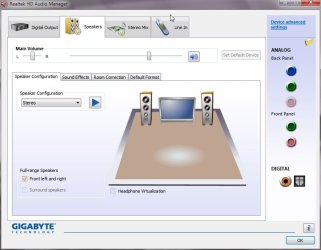
Do you have the Realtek audio manager running? If not, it's probably in the control panel area.
Do you have the small folder icon in the upper right quadrant? If so click on it, select "Disable Front Panel Jack Detection" un-check the "Enable auto popup dialog..."
If you right click over the colored jack icons there are other options.
Ap | My System Specs | | System Manufacturer/Model Number Assembled in my workshop OS Windows 7 Home Premium CPU Intel Core 2 Duo @ 3.00gHz Motherboard Gigabyte GA-P35-S3G Memory 4 GB Graphics Card ATI Radeon HD 2600 XT Sound Card RME 24/96 Card, Realtek Internal Audio PreSonus FireStudio Monitor(s) Displays Acer 1917 (x2) Screen Resolution 1280 x 1024 on both monitors Keyboard Macally w/2/USB ports. Mouse Trackman Wheel PSU Rosewill 500-watt Case Rosewill mid-tower Cooling Noctua NH-U9B (CPU), PwrSupply fan + single large case Fan Hard Drives Three 250GB Seagate SATA Barracuda 7200rpm Other Info Event 20/20 bas studio monitors, Yamaha sub.
Rackmount Korg/Roland/Yamaha synthesizers,
Cubase MIDI/audio recording. Sony Soundforge audio/mastering software. CD Architect Mastering. RME & Presonus audio interfaces. |
23 Nov 2010
|
#7 | | |
Hm, surprisingly, I don't have the folder you mentioned in my Realtek audio manager. However, I will try the alcohol solution. | My System Specs | | OS Windows 7 Ultimate x64 |
23 Nov 2010
|
#8 | | Windows 7, 64 bit Home SP1, Win 8 Pro 64 bit Citrus Co, FL |
I would suggest connecting the speakers in case the problem is the Headset as plugging the headset into the rear jack can produce the same problems as plugging into the front headphone jack. | My System Specs | | Computer type PC/Desktop System Manufacturer/Model Number My Own Build OS Windows 7, 64 bit Home SP1, Win 8 Pro 64 bit CPU Intel i7 3770 Motherboard Gigabyte GA-Z77X-UD5H Memory 16GB GSkill Ripsaw F3-14900CL9Q-16GBXL Graphics Card Sapphire HD7770 Sound Card RealTek Monitor(s) Displays Viewsonic VA2448 Series 24" LED Screen Resolution 1920X1080 Keyboard Kensington wired Mouse Logitech Wireless PSU Antec High Current Gamer HCG-620M Modular Case Coolermaster HAF XM Cooling Corsair H80 Liquid cooling with aftermarket Nexus quiet fans Hard Drives 240GB Intel 520 SSD for Win 7
128GB OCZ Vertex 4 SSD for Win 8
1 TB Seagate drive for backup Internet Speed 40 MB/sec (Cable) Antivirus Microsoft Security Essentials and Malwarebytes Browser I.E9/Firefox Other Info Sonar X2 Professional 64 bit Recording Software with Roland Octa-Capture and MAudio Fast Track Ultra 8R recording interfaces, Frontier Tranzport wireless control unit, Behringer BCF2000 Control Surface.
Five USB connected optical drives for CD Audio production using Nero 11
Other systems: Desktop with i5 3550 CPU, LenovoZ560 Laptop with Win 7 64 bit HP, SP1, new iPad Volume spiking up randomly problems? All times are GMT -5. The time now is 02:14 PM. | |