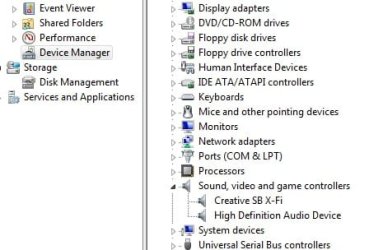
I have just installed Windows 7 64bit on my PC, fresh format. Everything seems to be working except that I have no sound from my X-Fi Fatality Pro.
There are no error messages. W7 thinks there are no problems. The X-Fi is the default sound device as I have disabled the onboard audio. I am running the latest drivers for the X-Fi - 2.18.15.
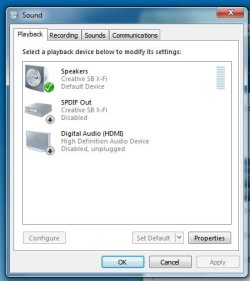
There are 3 audio devices in the "Sound" section.
1. Speakers
Creative SB X-Fi
Default Device
2. SPDIF
Creative SB X-Fi
Disabled
3. Digital Audio (HDMI)
High Definition Audio Device
Disabled, unplugged
The only noise the speakers have made since installing W7 is a faint 'click' when drivers are installed. I have read a lot of threads regarding X-Fi soundcards and poor driver support, though none have helped me.
If I try to play audio, various software programs either refuse without errors (iTunes), pretend to play audio very slowly (WMP) or pretend to play audio at normal speed (Creative Mediasource 5), although none actually output any sound whatsoever.
There are no error messages. W7 thinks there are no problems. The X-Fi is the default sound device as I have disabled the onboard audio. I am running the latest drivers for the X-Fi - 2.18.15.
There are 3 audio devices in the "Sound" section.
1. Speakers
Creative SB X-Fi
Default Device
2. SPDIF
Creative SB X-Fi
Disabled
3. Digital Audio (HDMI)
High Definition Audio Device
Disabled, unplugged
The only noise the speakers have made since installing W7 is a faint 'click' when drivers are installed. I have read a lot of threads regarding X-Fi soundcards and poor driver support, though none have helped me.
If I try to play audio, various software programs either refuse without errors (iTunes), pretend to play audio very slowly (WMP) or pretend to play audio at normal speed (Creative Mediasource 5), although none actually output any sound whatsoever.
My Computer
At a glance
Windows 7 Home Premium x64Athlon XP60004GBATI Radeon 4850
- OS
- Windows 7 Home Premium x64
- CPU
- Athlon XP6000
- Motherboard
- Asus M2V
- Memory
- 4GB
- Graphics Card(s)
- ATI Radeon 4850
- Sound Card
- SoundBlaster X-fi Fatality Pro


 ))
))