
| Windows 7: No audio while playing avi. in WMP |
29 Nov 2010
|
#1 | | Windows 7 Prof x64 Dublin |
No audio while playing avi. in WMP Hi Folks,
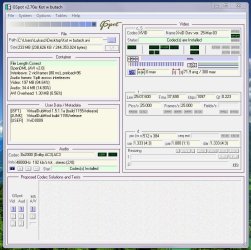
I do have a small problem with, I think codecs. I have a movie with .avi extension. Now the problem is that there is no audio being played. Other movies are ok, it's just this one that is troublesome. The problem lies in audio codec - see G-spot below:
Please note the Audio information which says: 0x2000 (Dolby AC3) AC3
48000Hz 192 kb/s tot , stereo (2/0)
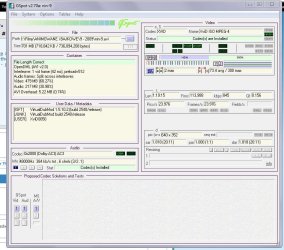
now another instant of a movie with nearly the same stats is below (audio there is working properly) 0x2000 (Dolby AC3) AC3
48000Hz 384 kb/s tot , 6 chnls (3/2 .1)
Anyone knows how to get the sound working in first example? it seems that codecs are installed, however something is not fully right...
Thanks. | My System Specs |
| System Manufacturer/Model Number Home Built OS Windows 7 Prof x64 CPU Phenom II x4 955 BE Motherboard GA-790FXTA-UD5 Memory 8GB Corsair Dominator 1333 Graphics Card MSI N460 GTX Cyclone 768D5 OC Sound Card Realtek integrated Monitor(s) Displays Iiyama ProLite E2407HDS Screen Resolution 1920 X 1080 Keyboard Logitech Mouse Razer Krait PSU Cooler Master 700W Case Thermaltake Element S VK600 series Cooling CPU Noctua NH-U9B SE2 Hard Drives Samsung Spinpoint F3 HD502HJ Internet Speed Mobile Broadband |
30 Nov 2010
|
#2 | | Windows 7, 64 bit Home SP1, Win 8 Pro 64 bit Citrus Co, FL |
Download and install the K Lite Codec Pack. It should have any codec that you need. | My System Specs | | Computer type PC/Desktop System Manufacturer/Model Number My Own Build OS Windows 7, 64 bit Home SP1, Win 8 Pro 64 bit CPU Intel i7 3770 Motherboard Gigabyte GA-Z77X-UD5H Memory 16GB GSkill Ripsaw F3-14900CL9Q-16GBXL Graphics Card Sapphire HD7770 Sound Card RealTek Monitor(s) Displays Viewsonic VA2448 Series 24" LED Screen Resolution 1920X1080 Keyboard Kensington wired Mouse Logitech Wireless PSU Antec High Current Gamer HCG-620M Modular Case Coolermaster HAF XM Cooling Corsair H80 Liquid cooling with aftermarket Nexus quiet fans Hard Drives 240GB Intel 520 SSD for Win 7
128GB OCZ Vertex 4 SSD for Win 8
1 TB Seagate drive for backup Internet Speed 40 MB/sec (Cable) Antivirus Microsoft Security Essentials and Malwarebytes Browser I.E9/Firefox Other Info Sonar X2 Professional 64 bit Recording Software with Roland Octa-Capture and MAudio Fast Track Ultra 8R recording interfaces, Frontier Tranzport wireless control unit, Behringer BCF2000 Control Surface.
Five USB connected optical drives for CD Audio production using Nero 11
Other systems: Desktop with i5 3550 CPU, LenovoZ560 Laptop with Win 7 64 bit HP, SP1, new iPad |
30 Nov 2010
|
#3 | | Windows 7 Pro SP1 64-bit England, Cheshire |

Quote: Originally Posted by fireberd Download and install the K Lite Codec Pack. It should have any codec that you need. As fireberd has stated, K lite should do the trick but i have also used xvid - Xvid.org: Home of the Xvid Codec
other than that VLC Player seems to play most Ok.
Regards,
JDobbsy1987 | My System Specs | | System Manufacturer/Model Number Self Built OS Windows 7 Pro SP1 64-bit CPU Intel Core i5-2500K @ 3.30GHz - S1155 Motherboard Asus P8P67 LE Rev3, Intel P67, S115 Memory 8GB Corsair DDR3 XMS3, PC3-12800 Graphics Card 1GB XFX Radeon HD 6770, PCI-E 2.1 (x16) Sound Card On-Board Monitor(s) Displays 2 x 19" {Entended Display} Screen Resolution 1280 x 1024 Keyboard Logitech K120 Mouse World of Warcraft Cataclysm MMO Gaming Mouse PSU 550W Coolermaster GX550 Case Silverstone Precision PS04B Cooling Stock Hard Drives 1TB Seagate Internet Speed 40 MB |
30 Nov 2010
|
#4 | | Windows 7 Prof x64 Dublin |
Hi Folks,
Thanks for getting back to me.
First of all I#m trying to avoid installing any large codecs packs as Win 7 already has a significant pack that allows proper playback - to be honest K-Lite is the one that i would never install (Shark Codecs, maybe yes, but not K-Lite).
I thought somebody would give me more detailed information in regard to the audio - as that's where the problem is I think - wouldn't AC3 filter on its own sort out the thing?
Another question would be in relation to Win 7 native codec settings? Is there any application or option to have a look at these and modify in Win 7?
Cheers,
Luc. | My System Specs | | System Manufacturer/Model Number Home Built OS Windows 7 Prof x64 CPU Phenom II x4 955 BE Motherboard GA-790FXTA-UD5 Memory 8GB Corsair Dominator 1333 Graphics Card MSI N460 GTX Cyclone 768D5 OC Sound Card Realtek integrated Monitor(s) Displays Iiyama ProLite E2407HDS Screen Resolution 1920 X 1080 Keyboard Logitech Mouse Razer Krait PSU Cooler Master 700W Case Thermaltake Element S VK600 series Cooling CPU Noctua NH-U9B SE2 Hard Drives Samsung Spinpoint F3 HD502HJ Internet Speed Mobile Broadband |
30 Nov 2010
|
#5 | | Windows 7 Pro SP1 64-bit England, Cheshire |
Me personally would just get a new player or go with one of the above mentioned codec's as it seems a little too much work trying to edit native windows setting for something relatively simple.
I wouldn't say the codecs are that big
Everyones preferences are different though so i hope you get what you are after | My System Specs | | System Manufacturer/Model Number Self Built OS Windows 7 Pro SP1 64-bit CPU Intel Core i5-2500K @ 3.30GHz - S1155 Motherboard Asus P8P67 LE Rev3, Intel P67, S115 Memory 8GB Corsair DDR3 XMS3, PC3-12800 Graphics Card 1GB XFX Radeon HD 6770, PCI-E 2.1 (x16) Sound Card On-Board Monitor(s) Displays 2 x 19" {Entended Display} Screen Resolution 1280 x 1024 Keyboard Logitech K120 Mouse World of Warcraft Cataclysm MMO Gaming Mouse PSU 550W Coolermaster GX550 Case Silverstone Precision PS04B Cooling Stock Hard Drives 1TB Seagate Internet Speed 40 MB |
30 Nov 2010
|
#6 | | Windows 7 Home Premium Southwest U.S. |

Quote: Originally Posted by Ukiii Hi Folks,
Thanks for getting back to me.
First of all I#m trying to avoid installing any large codecs packs as Win 7 already has a significant pack that allows proper playback -
Luc. Just curious... what is your speaker/audio monitoring setup?
Everything looks good and should be working from the pics you posted.
Ap | My System Specs | | System Manufacturer/Model Number Assembled in my workshop OS Windows 7 Home Premium CPU Intel Core 2 Duo @ 3.00gHz Motherboard Gigabyte GA-P35-S3G Memory 4 GB Graphics Card ATI Radeon HD 2600 XT Sound Card RME 24/96 Card, Realtek Internal Audio PreSonus FireStudio Monitor(s) Displays Acer 1917 (x2) Screen Resolution 1280 x 1024 on both monitors Keyboard Macally w/2/USB ports. Mouse Trackman Wheel PSU Rosewill 500-watt Case Rosewill mid-tower Cooling Noctua NH-U9B (CPU), PwrSupply fan + single large case Fan Hard Drives Three 250GB Seagate SATA Barracuda 7200rpm Other Info Event 20/20 bas studio monitors, Yamaha sub.
Rackmount Korg/Roland/Yamaha synthesizers,
Cubase MIDI/audio recording. Sony Soundforge audio/mastering software. CD Architect Mastering. RME & Presonus audio interfaces. |
30 Nov 2010
|
#7 | | Windows 7 Prof x64 Dublin |
Hi Aphelion,
I have a simple 2.1 Labtec set plugged into the back of the motherboard into Realtek analog slot (small jack). Everything in the Realtek HD audio manager seems to be set correctly (the speakers are set to work in stereo mode). All other movies work great and it's just this particular one that causes problems. If you need more info let me know.
Thanks,
Luc. | My System Specs | | System Manufacturer/Model Number Home Built OS Windows 7 Prof x64 CPU Phenom II x4 955 BE Motherboard GA-790FXTA-UD5 Memory 8GB Corsair Dominator 1333 Graphics Card MSI N460 GTX Cyclone 768D5 OC Sound Card Realtek integrated Monitor(s) Displays Iiyama ProLite E2407HDS Screen Resolution 1920 X 1080 Keyboard Logitech Mouse Razer Krait PSU Cooler Master 700W Case Thermaltake Element S VK600 series Cooling CPU Noctua NH-U9B SE2 Hard Drives Samsung Spinpoint F3 HD502HJ Internet Speed Mobile Broadband |
30 Nov 2010
|
#8 | | Win 7 Ultimate 64-bit SP1 (desktop) east central NY state |
If you do decide to install something, the Shark codec pack is recommended....everything I've ever tried to play in WMP has played. | My System Specs | | Computer type PC/Desktop System Manufacturer/Model Number Gigabyte Technology Co., Ltd. OS Win 7 Ultimate 64-bit SP1 (desktop) CPU Intel Core 2 Duo E8400 Motherboard Gigabyte GA-EP35-DS3R Memory 2x 2GB OCZ DDR II SDRAM PC2-6400 Graphics Card NVIDIA GeForce 9400GT Monitor(s) Displays HP 2009m(primary), Acer P191W Screen Resolution 1600x900, 1440x900 Keyboard Logitech Wave Mouse Logitech M-SBF90 PSU Antec Earthwatts EA500D Case Antec Sonata III Cooling 4 fans Hard Drives Internal:WD Caviar Black 640GB 32MB cache 7200RPM
External:Samsung Story Station 1TB HDD desktop drive
500GB Toshiba portable drive Internet Speed Slow due to home Wireless-G router Antivirus MSE, Hitman Pro, Malwarebytes Browser Chrome and Palemoon Other Info Laptop....Acer 5750Z-4835
15.6" HD Widescreen CineCrystal™ LED-backlit LCD Display: (1366x768 resolution, 16:9 aspect ratio)
Intel® Pentium® Processor B940 (2.0GHz, 2MB L3 cache)
Windows® 7 Home Premium,500GB Hard Drive,4GB DDR3 RAM, Intel® HD Graphics,8X DVD-Super Multi Double-Layer Drive
Multi-in-1 Digital Media Card Reader,802.11b/g/n Wi-Fi
Chrome and Palemoon, MSE, Hitman Pro |
30 Nov 2010
|
#9 | | Windows 7 Prof x64 Dublin |
Solved Well, VLC sorted my problem. It still doesn't work in WMP though. It seems that it's not the codec issue, but the player itself.
I think I'll leave the VLC for the time being on my system.
Thanks everyone involved in the thread.
Cheers,
Luc. | My System Specs | | System Manufacturer/Model Number Home Built OS Windows 7 Prof x64 CPU Phenom II x4 955 BE Motherboard GA-790FXTA-UD5 Memory 8GB Corsair Dominator 1333 Graphics Card MSI N460 GTX Cyclone 768D5 OC Sound Card Realtek integrated Monitor(s) Displays Iiyama ProLite E2407HDS Screen Resolution 1920 X 1080 Keyboard Logitech Mouse Razer Krait PSU Cooler Master 700W Case Thermaltake Element S VK600 series Cooling CPU Noctua NH-U9B SE2 Hard Drives Samsung Spinpoint F3 HD502HJ Internet Speed Mobile Broadband |
30 Nov 2010
|
#10 | | Windows 7 Pro SP1 64-bit England, Cheshire |

Quote: Originally Posted by Ukiii Well, VLC sorted my problem. It still doesn't work in WMP though. It seems that it's not the codec issue, but the player itself.
I think I'll leave the VLC for the time being on my system.
Thanks everyone involved in the thread.
Cheers,
Luc. I know it wasn't exactly what you were after but VLC is always a winner for me | My System Specs | | System Manufacturer/Model Number Self Built OS Windows 7 Pro SP1 64-bit CPU Intel Core i5-2500K @ 3.30GHz - S1155 Motherboard Asus P8P67 LE Rev3, Intel P67, S115 Memory 8GB Corsair DDR3 XMS3, PC3-12800 Graphics Card 1GB XFX Radeon HD 6770, PCI-E 2.1 (x16) Sound Card On-Board Monitor(s) Displays 2 x 19" {Entended Display} Screen Resolution 1280 x 1024 Keyboard Logitech K120 Mouse World of Warcraft Cataclysm MMO Gaming Mouse PSU 550W Coolermaster GX550 Case Silverstone Precision PS04B Cooling Stock Hard Drives 1TB Seagate Internet Speed 40 MB No audio while playing avi. in WMP problems? All times are GMT -5. The time now is 05:06 AM. | |