|
Welcome to Windows 7 Forums. Our forum is dedicated to helping you find solutions with any problems, errors or issues you are experiencing with Windows 7. The Windows 7 forum also covers news and updates and has an extensive Windows 7 tutorial section that covers a wide range of tips and tricks.
Windows 7 - The volume bar shows sound but no sound through speakers. |
12-02-2010
|
#1 | | |
The volume bar shows sound but no sound through speakers. Hi,
I am pretty stumped with this one.
I upgraded my office to windows 7 32bit pro. 10 computers all the same, but one of them has audio issues.
When I play the sample music the volume bar shows the equalizer bouncing like it is sending out audio, but any speakers I plug into it produce no sound.
I have tried: different speakers, different jacks, 4 on the back 1 on the front, updating the audio driver, windows updates, rebooting, and yelling and now I am out of ideas.
When I use a usb based headphone I can get sound.
it lists the default sound device as a S/pdif high definition audio device...
Any suggestions on how to fix this?
Thanks. | My System Specs | | OS Windows 7 pro 32 bit CPU e5200 intel Memory 2G Graphics Card Nvidia NVS 295 |
12-02-2010
|
#2 | | |
re: S/pdif high definition audio device
That's the digital output, you won't get any sound with that. Does it show "Speakers" listed in the same Window?
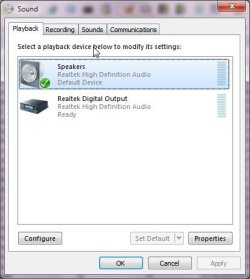
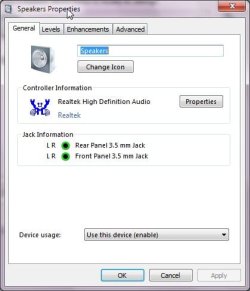
Right click on the Microsoft speaker icon in the taskbar, select playback devices, if you have Speakers listed, single left click on them and select "Set Default".
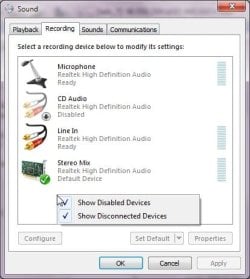
If you don't have speakers listed, make sure you have a pair of speakers plugged into the light green audio jack in the back then open the playback devices window as above... right click in the middle of the window and enable both "show disconnected/disabled devices".
Any speakers showing up yet?
Ap | My System Specs | | System Manufacturer/Model Number Assembled in my workshop OS Windows 7 Home Premium CPU Intel Core 2 Duo @ 3.00gHz Motherboard Gigabyte GA-P35-S3G Memory 4 GB Graphics Card ATI Radeon HD 2600 XT Sound Card RME 24/96 Card, Realtek Internal Audio PreSonus FireStudio Monitor(s) Displays Acer 1917 (x2) Screen Resolution 1280 x 1024 on both monitors Keyboard Macally w/2/USB ports. Mouse Trackman Wheel PSU Rosewill 500-watt Case Rosewill mid-tower Cooling Noctua NH-U9B (CPU), PwrSupply fan + single large case Fan Hard Drives Three 250GB Seagate SATA Barracuda 7200rpm Other Info Event 20/20 bas studio monitors, Yamaha sub.
Rackmount Korg/Roland/Yamaha synthesizers,
Cubase MIDI/audio recording. Sony Soundforge audio/mastering software. CD Architect Mastering. RME & Presonus audio interfaces. |
12-03-2010
|
#3 | | |
it does not show any speakers listed, when I click show disconnected and disabled devices still nothing is shown.
When I plug in the usb head set a second icon does show up, and the configure button is able to be selected, but the configure button is not active when only the spdif connection is shown. | My System Specs | | OS Windows 7 pro 32 bit CPU e5200 intel Memory 2G Graphics Card Nvidia NVS 295 |
12-03-2010
|
#4 | | |
At this point you can forgo any speaker, cable or jack testing as digital audio will output nothing.
With speakers plugged in and on, (green audio jack in back) go to Device Manager and un-install the audio driver, then reboot.
Also, you can try going to Control Panel/Programs and Features and see if your audio driver is listed there, if so, un-install and reboot.
What is the name of the audio system, Realtek, Conexant, VIA....?
If you look at one of the other office PCs you will probably see the speaker icon with the green default check mark beside it, this is what you need to see to get audio.
Ap | My System Specs | | System Manufacturer/Model Number Assembled in my workshop OS Windows 7 Home Premium CPU Intel Core 2 Duo @ 3.00gHz Motherboard Gigabyte GA-P35-S3G Memory 4 GB Graphics Card ATI Radeon HD 2600 XT Sound Card RME 24/96 Card, Realtek Internal Audio PreSonus FireStudio Monitor(s) Displays Acer 1917 (x2) Screen Resolution 1280 x 1024 on both monitors Keyboard Macally w/2/USB ports. Mouse Trackman Wheel PSU Rosewill 500-watt Case Rosewill mid-tower Cooling Noctua NH-U9B (CPU), PwrSupply fan + single large case Fan Hard Drives Three 250GB Seagate SATA Barracuda 7200rpm Other Info Event 20/20 bas studio monitors, Yamaha sub.
Rackmount Korg/Roland/Yamaha synthesizers,
Cubase MIDI/audio recording. Sony Soundforge audio/mastering software. CD Architect Mastering. RME & Presonus audio interfaces. |
12-03-2010
|
#5 | | |
tried both of those with no result.
I am not sure how to find the name of audio system.
I really appriciate your help on this, its confused me to no end. | My System Specs | | OS Windows 7 pro 32 bit CPU e5200 intel Memory 2G Graphics Card Nvidia NVS 295 |
12-04-2010
|
#6 | | |

Quote: Originally Posted by City Green tried both of those with no result.
I am not sure how to find the name of audio system.
I really appriciate your help on this, its confused me to no end. Finding the name of the audio system:
System Information/Components/Sound
(System Info is located in Accessories/System Tools)
Someone mentioned using the Windows 7 troubleshooter, might want to give that a try.
Ap | My System Specs | | System Manufacturer/Model Number Assembled in my workshop OS Windows 7 Home Premium CPU Intel Core 2 Duo @ 3.00gHz Motherboard Gigabyte GA-P35-S3G Memory 4 GB Graphics Card ATI Radeon HD 2600 XT Sound Card RME 24/96 Card, Realtek Internal Audio PreSonus FireStudio Monitor(s) Displays Acer 1917 (x2) Screen Resolution 1280 x 1024 on both monitors Keyboard Macally w/2/USB ports. Mouse Trackman Wheel PSU Rosewill 500-watt Case Rosewill mid-tower Cooling Noctua NH-U9B (CPU), PwrSupply fan + single large case Fan Hard Drives Three 250GB Seagate SATA Barracuda 7200rpm Other Info Event 20/20 bas studio monitors, Yamaha sub.
Rackmount Korg/Roland/Yamaha synthesizers,
Cubase MIDI/audio recording. Sony Soundforge audio/mastering software. CD Architect Mastering. RME & Presonus audio interfaces. |
12-06-2010
|
#7 | | |
Name High Definition Audio Device
Manufacturer Microsoft
Status OK
PNP Device ID HDAUDIO\FUNC_01&VEN_10EC&DEV_0662&SUBSYS_1043837F&REV_1001\4&2C2530A5&0&0001 Driver c:\windows\system32\ drivers\hdaudio.sys (6.1.7600.16385, 297.00 KB (304,128 bytes), 13/07/2009 4:51 PM) | My System Specs | | OS Windows 7 pro 32 bit CPU e5200 intel Memory 2G Graphics Card Nvidia NVS 295 |
12-06-2010
|
#8 | | |

Quote: Originally Posted by City Green Name High Definition Audio Device
Manufacturer Microsoft
Status OK
PNP Device ID HDAUDIO\FUNC_01&VEN_10EC&DEV_0662&SUBSYS_1043837F&REV_1001\4&2C2530A5&0&0001 Driver c:\windows\system32\ drivers\hdaudio.sys (6.1.7600.16385, 297.00 KB (304,128 bytes), 13/07/2009 4:51 PM)
Ok, that's a Realtek audio chip, same one that's on my motherboard (0662)
I suggest going to the Realtek site: Realtek
And downloading the latest Realtek driver for the stubborn PC.
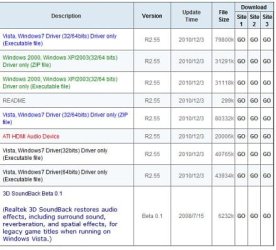
The one you want is the 6th driver from the top, first one in black ink.
File size 40765.
The first install may only remove the exisiting drivers... in that case reinstall them again.
Not sure about that as the drivers in there are Realtek/Microsoft drivers.
Check Device manager after the first install, you should see Realtek High Definition Audio.
Ap | My System Specs | | System Manufacturer/Model Number Assembled in my workshop OS Windows 7 Home Premium CPU Intel Core 2 Duo @ 3.00gHz Motherboard Gigabyte GA-P35-S3G Memory 4 GB Graphics Card ATI Radeon HD 2600 XT Sound Card RME 24/96 Card, Realtek Internal Audio PreSonus FireStudio Monitor(s) Displays Acer 1917 (x2) Screen Resolution 1280 x 1024 on both monitors Keyboard Macally w/2/USB ports. Mouse Trackman Wheel PSU Rosewill 500-watt Case Rosewill mid-tower Cooling Noctua NH-U9B (CPU), PwrSupply fan + single large case Fan Hard Drives Three 250GB Seagate SATA Barracuda 7200rpm Other Info Event 20/20 bas studio monitors, Yamaha sub.
Rackmount Korg/Roland/Yamaha synthesizers,
Cubase MIDI/audio recording. Sony Soundforge audio/mastering software. CD Architect Mastering. RME & Presonus audio interfaces. |
12-06-2010
|
#9 | | |
I tried that out. When I Installed the file it went through the process but when checking in device manager it still listed high definition audio device, it never updated to Realtek.
I installed flat out, then removed the current, then installed. I also tried removing then updating the driver from the location I had the new driver saved.
Nothing! | My System Specs | | OS Windows 7 pro 32 bit CPU e5200 intel Memory 2G Graphics Card Nvidia NVS 295 |
12-06-2010
|
#10 | | |

Quote: Originally Posted by City Green I tried that out. When I Installed the file it went through the process but when checking in device manager it still listed high definition audio device, it never updated to Realtek.
I installed flat out, then removed the current, then installed. I also tried removing then updating the driver from the location I had the new driver saved.
Nothing!
I'm almost stumped... can you boot into the BIOS and see what it's set at for Audio, and what the choices are?
Ap | My System Specs | | System Manufacturer/Model Number Assembled in my workshop OS Windows 7 Home Premium CPU Intel Core 2 Duo @ 3.00gHz Motherboard Gigabyte GA-P35-S3G Memory 4 GB Graphics Card ATI Radeon HD 2600 XT Sound Card RME 24/96 Card, Realtek Internal Audio PreSonus FireStudio Monitor(s) Displays Acer 1917 (x2) Screen Resolution 1280 x 1024 on both monitors Keyboard Macally w/2/USB ports. Mouse Trackman Wheel PSU Rosewill 500-watt Case Rosewill mid-tower Cooling Noctua NH-U9B (CPU), PwrSupply fan + single large case Fan Hard Drives Three 250GB Seagate SATA Barracuda 7200rpm Other Info Event 20/20 bas studio monitors, Yamaha sub.
Rackmount Korg/Roland/Yamaha synthesizers,
Cubase MIDI/audio recording. Sony Soundforge audio/mastering software. CD Architect Mastering. RME & Presonus audio interfaces. The volume bar shows sound but no sound through speakers. problems? All times are GMT -5. The time now is 10:26 PM. |  |