Windows 7 Forums


Windows 7: Weird text glitch in volume mixer

12 Jul 2011   #11

Windows 7 Ultimate x64


Still did not find a solution, and even worse, now they appear on my brand new laptop too. I did not install anything out of the ordinary on my laptop. Hopeless...

My System SpecsSystem Spec

06 Nov 2011   #12

Windows 7 x64 Ultimate SP1
Croatia


I see this too often on my laptop, an it has nothing to do with Foobar. It is either a Windows bug (more probable) or a Realtek driver bug (less probable). The tooltip displayed for the sound source doesn't have that square.
My System SpecsSystem Spec
26 Mar 2012   #13

Windows 7 Ultimate x64


I re-installed Windows 7 and the squares where there again, BUT I got rid of them now. It seems the solution, for me anyway, was to delete the file FNTCACHE.DAT in Windows\System32 and restart.
I tried this before re-installing windows 7 but it did not work, this time however it worked. For two weeks now I'm free of the squares and Chinese characters are displayed correctly too in explorer.
Yes it seems the problem with Chinese characters displayed as squares in explorer and the squares in mixer volume are going hand in hand and is a bug in windows 7 font cache or something...
My System SpecsSystem Spec
.


13 Jun 2012   #14

Windows 7 Home Premium x64


I also have this squares problem, like yours. It has the squares on all volume mixer sliders, and appears most of the time. However, at the start, just after bootup, if I click the volume mixer BEFORE I play any audio, they don't appear. Why is this, and how do I remove them? Also I have heard that deleting the font cache can result in BSOD, I have had enough BSODS on my computer (even though its only 1 yr old!) so is it safe to delete it?
Thank you
Princechromey
My System SpecsSystem Spec
13 Jun 2012   #15

Windows 7 Ultimate x64


I had exactly the same behavior as you described and yes, by deleting that file was the only way I got rid of them for good.
My System SpecsSystem Spec
13 Jun 2012   #16

Windows 7 Home Premium x64


Will that file re-appear in the system32 folder after the restart? Im just a bit concerned that I do not want to ruin anything, since the system32 folder is needed for the O/S, and I do not want to ruin the laptop.... and you are sure that it is safe to do?
Thank you
Princechromey
My System SpecsSystem Spec
13 Jun 2012   #17

Windows 7 Home Premium x64


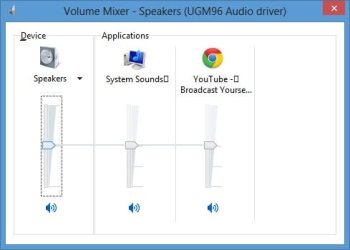
By the way, this is the screenshot of what I am getting.
Is it safe to delete that fntcache.dat file?

Thank you

Princechromey
My System SpecsSystem Spec
13 Jun 2012   #18

Windows 7 Ultimate x64


Well from my experience by deleting it from my main PC and laptop (I had the squares on both, the PC and laptop), it was not a problem because it was recreated after restart. But if somethings goes wrong, which is unlikely, don't make me responsible!
My System SpecsSystem Spec
14 Jun 2012   #19

Windows 7 Home Premium x64


Those funny squares have came up again, even though the laptop had to perform some windows updates yesterday, hoping they would cure it!! Anyway, will try deleting the fntcache.dat and will see what happens.
My System SpecsSystem Spec
14 Jun 2012   #20

Windows 7 Home Premium x64


Okay, I deleted the file and restarted. After nervously waiting for the re-boot, I found out that the system did indeed re-create the font cache after the computer was restarted.
Argh!!! The square boxes are still there!!! What do I do now? (P.S. I have no windows disk, so re-install isn`t an option)
My System SpecsSystem Spec
Reply

 Weird text glitch in volume mixer problems?


Thread Tools


Similar help and support threads for: Weird text glitch in volume mixer
Thread Forum
Volume mixer does not open. Sound & Audio
Volume Mixer problems Sound & Audio
Volume Mixer issue Sound & Audio
Volume Mixer Being Pissy Sound & Audio
2x Volume Mixer Appearing Sound & Audio


All times are GMT -5. The time now is 02:21 AM.


Seven Forums Android App Seven Forums IOS App Follow us on Facebook

Windows 7 Forums is an independent web site and has not been authorized,
sponsored, or otherwise approved by Microsoft Corporation.
"Windows 7" and related materials are trademarks of Microsoft Corp.
© Designer Media Ltd
  

1 2 3 4 5 6 7 8 9 10 11 12 13 14 15 16 17 18 19 20 21 22 23 24 25 26 27 28 29 30 31 32