| Windows 7: Audigy SE - Can't Record "What U Hear" |
07 Jan 2011
|
#1 | | Windows 7 Home Premium 32bit |
Audigy SE - Can't Record "What U Hear" Hi Folks:
I'm completely frustrated with my Audigy SE Sound Blaster Card from Creative.  I've read many posts and still can't find or get my sound card to record.
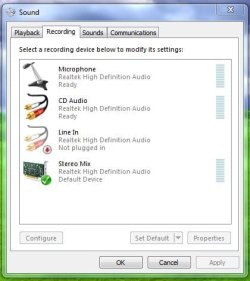
Under "recording devices": I do not have 'What U Hear' or 'Stereo Mix' even if I right-click the white space and ask the system to show all devices.
I was given updated drivers from Creative for my Audigy SE but they are bare bones and are not working properly at all. I've had to install about three times and Windows 7 has had problems accepting the audio card.
I'm using Windows 7 Home Premium Edition.
Any suggestions or am I looking at purchasing another item for Windows 7.
Thanks,
MS
Last edited by MissSherlock; 07 Jan 2011 at 12:22 PM..
Reason: edit
| My System Specs |
| System Manufacturer/Model Number Dell 5150 OS Windows 7 Home Premium 32bit CPU Pentium D820 Dual Core 2.8GHz Motherboard n/a Memory 3 GBs Graphics Card Nvidia 6800 Sound Card Audigy Sound Blaster SE 24-bit Monitor(s) Displays Dell Keyboard Microsoft Wireless Mouse Microsoft Laser 6000 Wireless Hard Drives 250 GBs Internet Speed 6 Mbps |
07 Jan 2011
|
#2 | | Windows 7 ultimate 64 bit / XP Home sp3 Gulf Coast Texas |
Welcome to Seven Forums
Have you tried the Daniel K drivers for your card? Download audigy se daniel k drivers
If you decide to try them I would suggest creating a restore point before you install them I find it much easier to go back to where you were if your unsuccessful with these drivers.
Fabe | My System Specs | | System Manufacturer/Model Number Self Built OS Windows 7 ultimate 64 bit / XP Home sp3 CPU intel Core 2 Duo E8400 3.0ghz Motherboard Asus P5ND bios 1401 Memory 8 gigs 1066 OCZ Fata1ty Graphics Card EVGA GTX 580 Call of Duty Black Ops Edition Sound Card Creative Soundblaster Audigy 2zs Monitor(s) Displays Asus 24in LCD's 2MS X2 Screen Resolution 1920x1080p @60Hz Keyboard Logitech Bluetooth Wireless MX5000 Mouse Logitech Bluetooth Wireless MX1000 PSU OCZ 700W GameXtreme Case NZXT Apollo Cooling Corsair H50 CPU/120mm x3 /60mm x2 /Corsair Dominator Ram Hard Drives WD Caviar 500 Black/ WD Caviar 200 Blue Internet Speed Download 19.83 Upload 0.97 Other Info Logitech Z2300 Speakers/ Bose Noise Cancelling Headphones/Avermedia PCI-e Hybrid TV Bravo/Epson NX415 all in one/ 4 Port Powered USB Hub/ LG 10x Bluray Burner /TSST Corp DVDRW External |
07 Jan 2011
|
#3 | | Windows 7, 64 bit Home SP1, Win 8 Pro 64 bit Citrus Co, FL |
I see you have a Dimension 5150. I have a Dimension E510 which is identical (the 5150 was sold in the US only as the E510). I also have an Audigy SE sound card installed and it has the What You Hear but it has Vista Home 32 bit OS, not Win 7.
I went through this about a year and a half ago researching this for a client. At the time, SoundBlaster had several versions of the drivers listed. An older driver had the What You Hear but the newer driver did not. I haven't looked at the Creative downloads for the Audigy SE but if there are several versions, try an older Vista compatible version and see if it gives you the What You Hear.
I have no idea why Creative removed that function. I'll start up the E510 and see if I can determine the version and post back.
I have an HT Omega "Striker 7" PCI sound card installed in my main PC and it has the System Mixer function (what SoundBlaster calls "what you hear"). It is fully Win 7 compatible. | My System Specs | | Computer type PC/Desktop System Manufacturer/Model Number My Own Build OS Windows 7, 64 bit Home SP1, Win 8 Pro 64 bit CPU Intel i7 3770 Motherboard Gigabyte GA-Z77X-UD5H Memory 16GB GSkill Ripsaw F3-14900CL9Q-16GBXL Graphics Card Sapphire HD7770 Sound Card RealTek Monitor(s) Displays Viewsonic VA2448 Series 24" LED Screen Resolution 1920X1080 Keyboard Kensington wired Mouse Logitech Wireless PSU Antec High Current Gamer HCG-620M Modular Case Coolermaster HAF XM Cooling Corsair H80 Liquid cooling with aftermarket Nexus quiet fans Hard Drives 240GB Intel 520 SSD for Win 7
128GB OCZ Vertex 4 SSD for Win 8
1 TB Seagate drive for backup Internet Speed 40 MB/sec (Cable) Antivirus Microsoft Security Essentials and Malwarebytes Browser I.E9/Firefox Other Info Sonar X2 Professional 64 bit Recording Software with Roland Octa-Capture and MAudio Fast Track Ultra 8R recording interfaces, Frontier Tranzport wireless control unit, Behringer BCF2000 Control Surface.
Five USB connected optical drives for CD Audio production using Nero 11
Other systems: Desktop with i5 3550 CPU, LenovoZ560 Laptop with Win 7 64 bit HP, SP1, new iPad |
07 Jan 2011
|
#4 | | Windows 7, 64 bit Home SP1, Win 8 Pro 64 bit Citrus Co, FL |
I found the driver - 2.12.2002 on the Creative site. It's listed under Vista 32 bit drivers. The listing says it is Win 7 compatible. No guarantees that it will provide the What you hear but worth a try. Creative Worldwide Support | My System Specs | | Computer type PC/Desktop System Manufacturer/Model Number My Own Build OS Windows 7, 64 bit Home SP1, Win 8 Pro 64 bit CPU Intel i7 3770 Motherboard Gigabyte GA-Z77X-UD5H Memory 16GB GSkill Ripsaw F3-14900CL9Q-16GBXL Graphics Card Sapphire HD7770 Sound Card RealTek Monitor(s) Displays Viewsonic VA2448 Series 24" LED Screen Resolution 1920X1080 Keyboard Kensington wired Mouse Logitech Wireless PSU Antec High Current Gamer HCG-620M Modular Case Coolermaster HAF XM Cooling Corsair H80 Liquid cooling with aftermarket Nexus quiet fans Hard Drives 240GB Intel 520 SSD for Win 7
128GB OCZ Vertex 4 SSD for Win 8
1 TB Seagate drive for backup Internet Speed 40 MB/sec (Cable) Antivirus Microsoft Security Essentials and Malwarebytes Browser I.E9/Firefox Other Info Sonar X2 Professional 64 bit Recording Software with Roland Octa-Capture and MAudio Fast Track Ultra 8R recording interfaces, Frontier Tranzport wireless control unit, Behringer BCF2000 Control Surface.
Five USB connected optical drives for CD Audio production using Nero 11
Other systems: Desktop with i5 3550 CPU, LenovoZ560 Laptop with Win 7 64 bit HP, SP1, new iPad |
07 Jan 2011
|
#5 | | Windows 7, 64 bit Home SP1, Win 8 Pro 64 bit Citrus Co, FL |
Last edited by fireberd; 07 Jan 2011 at 01:49 PM..
Reason: double post
| My System Specs | | Computer type PC/Desktop System Manufacturer/Model Number My Own Build OS Windows 7, 64 bit Home SP1, Win 8 Pro 64 bit CPU Intel i7 3770 Motherboard Gigabyte GA-Z77X-UD5H Memory 16GB GSkill Ripsaw F3-14900CL9Q-16GBXL Graphics Card Sapphire HD7770 Sound Card RealTek Monitor(s) Displays Viewsonic VA2448 Series 24" LED Screen Resolution 1920X1080 Keyboard Kensington wired Mouse Logitech Wireless PSU Antec High Current Gamer HCG-620M Modular Case Coolermaster HAF XM Cooling Corsair H80 Liquid cooling with aftermarket Nexus quiet fans Hard Drives 240GB Intel 520 SSD for Win 7
128GB OCZ Vertex 4 SSD for Win 8
1 TB Seagate drive for backup Internet Speed 40 MB/sec (Cable) Antivirus Microsoft Security Essentials and Malwarebytes Browser I.E9/Firefox Other Info Sonar X2 Professional 64 bit Recording Software with Roland Octa-Capture and MAudio Fast Track Ultra 8R recording interfaces, Frontier Tranzport wireless control unit, Behringer BCF2000 Control Surface.
Five USB connected optical drives for CD Audio production using Nero 11
Other systems: Desktop with i5 3550 CPU, LenovoZ560 Laptop with Win 7 64 bit HP, SP1, new iPad |
07 Jan 2011
|
#6 | | Windows 7 Home Premium 32bit |
Audigy SE - Can't Record "What U Hear" Hi the fabe and fireberd:
Thanks so much for the quick response.
I did see the DanielK drivers mentioned in other posts but was a little hesistant to try them out. I just installed my system and have had to re-sit the audio card about three times already (and install the drivers).
The Vista 2.12.2002 drivers I found on the Audigy website. However, there is note that states not to install with Audigy SE/LE sound cards.
Any additional suggestions that will work with Windows 7 and have 'Record What U Hear'. Does the HT Omega allow for a two speak set up? I was trying to find something less than $100.00.
Thanks, MS | My System Specs | | System Manufacturer/Model Number Dell 5150 OS Windows 7 Home Premium 32bit CPU Pentium D820 Dual Core 2.8GHz Motherboard n/a Memory 3 GBs Graphics Card Nvidia 6800 Sound Card Audigy Sound Blaster SE 24-bit Monitor(s) Displays Dell Keyboard Microsoft Wireless Mouse Microsoft Laser 6000 Wireless Hard Drives 250 GBs Internet Speed 6 Mbps |
08 Jan 2011
|
#7 | | Windows 7, 64 bit Home SP1, Win 8 Pro 64 bit Citrus Co, FL |
I have an Audigy SE sound card, in my Dell desktop, and that is the driver I'm using.
Last edited by fireberd; 08 Jan 2011 at 07:51 AM..
Reason: typo
| My System Specs | | Computer type PC/Desktop System Manufacturer/Model Number My Own Build OS Windows 7, 64 bit Home SP1, Win 8 Pro 64 bit CPU Intel i7 3770 Motherboard Gigabyte GA-Z77X-UD5H Memory 16GB GSkill Ripsaw F3-14900CL9Q-16GBXL Graphics Card Sapphire HD7770 Sound Card RealTek Monitor(s) Displays Viewsonic VA2448 Series 24" LED Screen Resolution 1920X1080 Keyboard Kensington wired Mouse Logitech Wireless PSU Antec High Current Gamer HCG-620M Modular Case Coolermaster HAF XM Cooling Corsair H80 Liquid cooling with aftermarket Nexus quiet fans Hard Drives 240GB Intel 520 SSD for Win 7
128GB OCZ Vertex 4 SSD for Win 8
1 TB Seagate drive for backup Internet Speed 40 MB/sec (Cable) Antivirus Microsoft Security Essentials and Malwarebytes Browser I.E9/Firefox Other Info Sonar X2 Professional 64 bit Recording Software with Roland Octa-Capture and MAudio Fast Track Ultra 8R recording interfaces, Frontier Tranzport wireless control unit, Behringer BCF2000 Control Surface.
Five USB connected optical drives for CD Audio production using Nero 11
Other systems: Desktop with i5 3550 CPU, LenovoZ560 Laptop with Win 7 64 bit HP, SP1, new iPad |
08 Jan 2011
|
#8 | | Windows 7 Home Premium 64 bit Illinois |
"What U Hear" Recording - Enable
In addition to the tutorial, if any of your devices are disabled, highlight the device and select "Properties" and "Use this device (enable)". | My System Specs | | System Manufacturer/Model Number Self-built OS Windows 7 Home Premium 64 bit CPU Intel Core i7-3770 Motherboard MSI Z77A-G45 Memory G.SKILL 8GB (2 x 4GB) DDR3 F3-10666CL9D-8GBNT Graphics Card Sapphire ATI Radeon HD 6670 Sound Card On-Board Realtek Monitor(s) Displays Samsung SyncMaster P2370HD, Dell 1703FPT Screen Resolution 1920 x 1080, 1280 x 1024 Keyboard Logitech K270 Mouse Logitech M705 PSU SeaSonic M12II SS-500GM Case Lian Li PC-9F Cooling Zalman CNPS9900ALED Hard Drives Samsung HD103SJ Internet Speed 16 Mbps Other Info Bose Companion 2 Multimedia Speakers |
09 Jan 2011
|
#9 | | Windows 7 Home Premium 32bit |
Audigy SE Hi fireberd and p5bdkw:
Thanks fireberd, I will try your drivers and I also found my old ones for XP/Vista.
p5bdkw - thank you for the link. I've read this tutorial and it is excellent. In my particular case the "record what u hear" is not disable. The new drivers from Creative remove this particular feature.
I was able to confirm with Creative this week. This option/tool is no longer available in the updated driver(s) for Windows 7.
Will let you know what happens,
MS | My System Specs | | System Manufacturer/Model Number Dell 5150 OS Windows 7 Home Premium 32bit CPU Pentium D820 Dual Core 2.8GHz Motherboard n/a Memory 3 GBs Graphics Card Nvidia 6800 Sound Card Audigy Sound Blaster SE 24-bit Monitor(s) Displays Dell Keyboard Microsoft Wireless Mouse Microsoft Laser 6000 Wireless Hard Drives 250 GBs Internet Speed 6 Mbps |
09 Jan 2011
|
#10 | | Windows 7 SP1, Home Premium, 64-bit |
Sherlock:
See my comments in the thread near this one entitled "trouble recording from the desktop with Audacity".
Short story: You may solve it easily, with difficulty, or never.
In which case you buy another sound card. | My System Specs | | System Manufacturer/Model Number Ignatz Special; 4 speed manual gearbox; factory air conditioning; one of one OS Windows 7 SP1, Home Premium, 64-bit CPU Intel Sandy Bridge i5-2500, not overclocked Motherboard Gigabyte H67A-UD3H-B3, full ATX Memory 4 GB Crucial DDR3-1333 Graphics Card none; graphics are integrated on CPU Sound Card onboard: Realtek ALC892; external: USB Behringer UF0-202 Monitor(s) Displays NEC 90GX2-BK 19" LCD Screen Resolution 800 x 640 Keyboard Leopold Tenkeyless with Cherry Blue switches, USB Mouse Logitech or Microsoft optical wired; either USB or PS 2 PSU Seasonic SS-560KM, modular Case Antec Solo II Cooling CPU: Scythe Big Shuriken; Case: Scythe Slipstream 800 & 500 Hard Drives System: Intel 320 Series SSD, 80 GB;
Data: Samsung Spinpoint 103SJ, 1 TB;
Backup: WD Caviar Green WD15EADS-00P8B0, 1.5TB Other Info Power consumption of this system, including monitor: 68 watts at idle; 144 watts at full load Audigy SE - Can't Record "What U Hear" problems? All times are GMT -5. The time now is 07:33 AM. | |