Windows 7 Forums


Windows 7: Acer Aspire 6920G and 5.1 Speakers Setup

10 Jan 2011   #1

Windows 7 Ultimate x32
 
 
Acer Aspire 6920G and 5.1 Speakers Setup

I have an Acer Aspire 6920G Laptop and I want to connect some Creative 5700 5.1 Speakers to it, what is the best way to do this. I have tried connecting the Inspire 5.1 decoder using a din cable and then into the laptop (via the headphone/spdif/line out socket), but I get no sound. I have been into the control panel and selected 5.1 sound, but that still does not work. The soundcard is Realtek HD Audio.

See below for some pictures of the connectors etc.

ImageShack® - Online Photo and Video Hosting

ImageShack® - Online Photo and Video Hosting

ImageShack® - Online Photo and Video Hosting

ImageShack® - Online Photo and Video Hosting

Any ideas on what I am doing wrong?

A step by step guide would be great.

Regards,
Jez

My System SpecsSystem Spec

10 Jan 2011   #2

Win 7 Ultimate x64
Etobicoke, Ontario


JezPX73, welcome to the Seven Forums.

Quote:
I have tried connecting the Inspire 5.1 decoder using a din cable and then into the laptop (via the headphone/spdif/line out socket), but I get no sound.
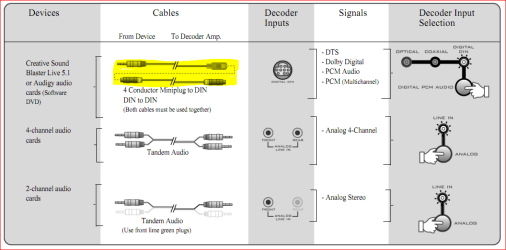
Did you remember to set the default playback device in the Windows playback properties to SPDIF/digital? If you left it set to speakers, that could be why you're not getting any sound. Also I assume this is what you used for the connection,

Acer Aspire 6920G and 5.1 Speakers Setup-5700.png

It is possible that the DIN connection will only work with Creative sound cards. If that is the case try it using the single connection from above for 2 channel audio, and then use either CMSS or Dobly Prologic to upmix it to 5.1.

You might even be able to get away with the coax connection using the same single cable as above from the laptop and one of these,

For only $0.21 each when QTY 50+ purchased - RCA Plug to 3.5mm Mono Jack Adaptor - Gold Plated | 3.5mm <--> RCA Adapters

on the RCA coax jack on the bos.
My System SpecsSystem Spec
10 Jan 2011   #3

Windows 7 Ultimate x32


Many thanks for your reply.

I will give both methods you suggest a try and let you know how I get on.
My System SpecsSystem Spec
.


13 Jan 2011   #4

Windows 7 Ultimate x32


Thanks stormy13

I have purchased an optical cable and a Toslink Adaptor and the 5.1 sound now works fine.

Cheers for your help

Regards,
Jez
My System SpecsSystem Spec
Reply

 Acer Aspire 6920G and 5.1 Speakers Setup problems?


Thread Tools


Similar help and support threads for: Acer Aspire 6920G and 5.1 Speakers Setup
Thread Forum
Acer Aspire Stuck on setup is starting services Hardware & Devices
How To Setup Dual-Boot on Acer Aspire Installation & Setup
No sound through PC speakers but headphones working - Acer Aspire 5336 Sound & Audio
Solved Acer eAudio Manager on Acer Aspire 5920G with Windows 7 Drivers
Acer Aspire M3203 and Acer's Windows 7 upgrade software Installation & Setup


All times are GMT -5. The time now is 11:00 PM.


Seven Forums Android App Seven Forums IOS App Follow us on Facebook

Windows 7 Forums is an independent web site and has not been authorized,
sponsored, or otherwise approved by Microsoft Corporation.
"Windows 7" and related materials are trademarks of Microsoft Corp.
© Designer Media Ltd
  

1 2 3 4 5 6 7 8 9 10 11 12 13 14 15 16 17 18 19 20 21 22 23 24 25 26 27 28 29 30 31 32