Windows 7 Forums


Windows 7: How do you Install Sound scheme

11 Jan 2011   #1

Windows 8 32 bit
 
 
How do you Install Sound scheme

I am trying to make my windows look like a Mac. I only have one thing missing and that is the sound scheme. Is their away you can add all the sound scheme instead of choosing one by one.

http://img715.imageshack.us/img715/2002/80466113.png

My System SpecsSystem Spec

11 Jan 2011   #2

Windows 7 ultimate 64 bit / XP Home sp3
Gulf Coast Texas


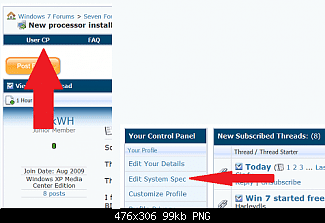
Welcome to Windows Seven Forums. We'll need your full system specs here
Name:  usercp%201.png
Views: 3543
Size:  65.0 KB

Most importantly we'll need the sound card since the option to set a scheme will be in the driver package or addition software for that card.
Thanks. Fabe
My System SpecsSystem Spec
11 Jan 2011   #3

Windows 8 32 bit


Alright I will Edit my profile later. I took a picture of my whole system, have a look at the image.my sound card is

Realtek High Definition Audio
Unimodem Half-Duplex Audio Device
High Definition Audio Device

http://img411.imageshack.us/img411/1804/28810619.png

Last edited by raiden92; 12 Jan 2011 at 04:27 AM..
My System SpecsSystem Spec
.


Reply

 How do you Install Sound scheme problems?


Thread Tools


Similar help and support threads for: How do you Install Sound scheme
Thread Forum
Sound Scheme changes not remembered Sound & Audio
Sound Scheme Changes Sound & Audio
windows 7 sound scheme Sound & Audio
Can you have 2 different sound scheme's Sound & Audio
Missing Sound Scheme(s) Sound & Audio


All times are GMT -5. The time now is 02:13 PM.


Seven Forums Android App Seven Forums IOS App Follow us on Facebook

Windows 7 Forums is an independent web site and has not been authorized,
sponsored, or otherwise approved by Microsoft Corporation.
"Windows 7" and related materials are trademarks of Microsoft Corp.
© Designer Media Ltd
  

1 2 3 4 5 6 7 8 9 10 11 12 13 14 15 16 17 18 19 20 21 22 23 24 25 26 27 28 29 30 31 32