|
Welcome to Windows 7 Forums. Our forum is dedicated to helping you find solutions with any problems, errors or issues you are experiencing with Windows 7. The Windows 7 forum also covers news and updates and has an extensive Windows 7 tutorial section that covers a wide range of tips and tricks.
Windows 7 - 5.1 surround sound help |
06-23-2009
|
#1 | | |
5.1 surround sound help I've recently found out that my sound card application (creative audigy) is not compatable with Windows 7 and have yet to find any creative programs that work with my computer. Is there a way around this to still be able to play music on 5.1 surround sound? Like a generic application to play music in 5.1? Or am i just being dumb?
| My System Specs | | System Manufacturer/Model Number Dell XPS M1530 OS Windows 7 Build 7229 x86 CPU Intel Core 2 Duo T7250 (2.0GHz/800Mhz FSB 2M L2 Cache) Memory 4.00 GB DDR2, 667MHz 2 Dimm Graphics Card 128MB NVIDIA GeForce 8400M G Sound Card SigmaTel High Definition Audio Monitor(s) Displays 15.4 inch Wide Screen WSXGA+ TrueLife; 31.5'" HDTV Screen Resolution 1680 X 1050 Keyboard Logitech Cordless Desktop MX5500 Revolution Bluetooth Mouse Logitech Cordless Desktop MX5500 Revolution Bluetooth Hard Drives 200G 7200RPM SATA Hard Drive Free Fall Sensor Internet Speed 100 mbps |
06-23-2009
|
#2 | | Windows 7 Ultimate x64, XP Mode(VPC and VMLite), VM Player 4.02, W8 CPreview |
That should be "x86" not "x84" in your system specs just to let you know for the 32bit.
Which Creative model are you running? If you have one of the Audigy 4 models or any X-Fi series card no problem on the drivers and audio console launcher! I've been through the Creative support site for those enough times. You system specs show SigmaTEl for the sound card. | My System Specs | | OS Windows 7 Ultimate x64, XP Mode(VPC and VMLite), VM Player 4.02, W8 CPreview CPU AMD Phenom II X4 Deneb 3.4 Motherboard Gigabyte GA-790XTA-UD4 Memory Kingston Hyper X DDR3 1600 8gb 1.5v Graphics Card MSI Radeon 5750 1gb Sound Card Creative Labs X-Fi XtremeGamer Monitor(s) Displays 2 x Acer P191W 19" widesscreen Screen Resolution 1440x900 native Keyboard Microsoft Recusa Razor Mouse MS Trackball Explorer PSU Corsair 750TX Case Antec 900-2 - SSD compatible Cooling Zalman CNPS9900A Hard Drives WD Black Edition 1tb Sata 6.0 = 2
WD Black Edition 1tb Sata 3.0 = 2 (OS drives)
WD 1tb Green Power sata = 2 1 external
usb flash drives = 15 Internet Speed 30mbps upgrade |
06-23-2009
|
#3 | | |

Quote: Originally Posted by Night Hawk That should be "x86" not "x84" in your system specs just to let you know for the 32bit.
Which Creative model are you running? If you have one of the Audigy 4 models or any X-Fi series card no problem on the drivers and audio console launcher! I've been through the Creative support site for those enough times. You system specs show SigmaTEl for the sound card.
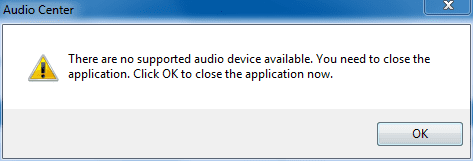
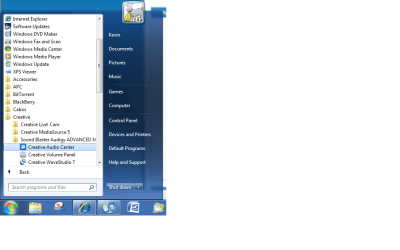
Sorry mistype lol. Anyway, Right now its a sigmatel high definition audio but it only supports 2.1 when i look into it. The screen shots show what my problem is. i used to use my creative audio center to play in 5.1 surround sound but i cant seem to open it. I've been through Dell and they told me its not compatable with Windows 7 and creative hasnt given me any help either. I tried downloading all the beta drivers for like every audigy but they dont install because they arent compatable. | My System Specs | | System Manufacturer/Model Number Dell XPS M1530 OS Windows 7 Build 7229 x86 CPU Intel Core 2 Duo T7250 (2.0GHz/800Mhz FSB 2M L2 Cache) Memory 4.00 GB DDR2, 667MHz 2 Dimm Graphics Card 128MB NVIDIA GeForce 8400M G Sound Card SigmaTel High Definition Audio Monitor(s) Displays 15.4 inch Wide Screen WSXGA+ TrueLife; 31.5'" HDTV Screen Resolution 1680 X 1050 Keyboard Logitech Cordless Desktop MX5500 Revolution Bluetooth Mouse Logitech Cordless Desktop MX5500 Revolution Bluetooth Hard Drives 200G 7200RPM SATA Hard Drive Free Fall Sensor Internet Speed 100 mbps |
06-23-2009
|
#4 | | Windows 7 Ultimate x64, XP Mode(VPC and VMLite), VM Player 4.02, W8 CPreview |
No problem! I've been doing some of that typo stuff lately!  But since that was in your profile info I thought I would let you know about it.
The first problem right off since you are no longer running any Creative card is to remove all Creative software/ drivers since the software part is likely the cause due to a clash with that for the SigmaTel card's own. You can't mix the softwares and drivers for two different brands without running into some type of problem.
You'll need to take a trip into the Programs+Features section in the control panel to see those uninstalled there. Also look in the device manager in the sound, video, and game controllers section for any Creative items left over. | My System Specs | | OS Windows 7 Ultimate x64, XP Mode(VPC and VMLite), VM Player 4.02, W8 CPreview CPU AMD Phenom II X4 Deneb 3.4 Motherboard Gigabyte GA-790XTA-UD4 Memory Kingston Hyper X DDR3 1600 8gb 1.5v Graphics Card MSI Radeon 5750 1gb Sound Card Creative Labs X-Fi XtremeGamer Monitor(s) Displays 2 x Acer P191W 19" widesscreen Screen Resolution 1440x900 native Keyboard Microsoft Recusa Razor Mouse MS Trackball Explorer PSU Corsair 750TX Case Antec 900-2 - SSD compatible Cooling Zalman CNPS9900A Hard Drives WD Black Edition 1tb Sata 6.0 = 2
WD Black Edition 1tb Sata 3.0 = 2 (OS drives)
WD 1tb Green Power sata = 2 1 external
usb flash drives = 15 Internet Speed 30mbps upgrade |
06-24-2009
|
#5 | | |
Pssst...HT Omega products are the future. I have the Claro plus, it has Windows 7 x64 drivers....it's got the latest cmedia oxygen chip, it sounds FANTASTIC! I never, ever hear a snap, crackle or even a pop. Oh, DTS, no problems! HT Omega - The Next Generation in Audio. | My System Specs | | System Manufacturer/Model Number Dell E520 OS 7600x64 RTM CPU Intel® Q6700, 2.66 GHz stock clock (upgraded) Motherboard Dell Memory 4g (upgraded) Graphics Card Sapphire Radeon Toxic HD 3870 512MB GDDR4 (upgraded) Sound Card HT Omega Claro Plus (upgraded) Monitor(s) Displays 22' , 40" Screen Resolution 1050, 1080p Keyboard dell Mouse dell PSU Zalman 600w (upgraded) Case Dell Cooling stock Dell Hard Drives 1.5tb (upgraded) Internet Speed 100m Fiber optical Other Info Bought the Dell secondhand for cheap and upgraded cpu, vga, ram, soundcard, psu and HDD's. |
06-24-2009
|
#6 | | |
First of all you XPS M1530 never had a Creative sound card in it, so installing anything from Creative is a waste of time. What it has is the Sigamtel onboard audio, and what you are trying to get to work is the Audigy (or even possibly X-Fi) MB software. What this is is a software package that Dell and a few others bought/licensed from Creative so that the onboard sound can use some of the audigy or X-Fi software, it in no way means that you can install the Creative drivers or any of the software directly.
You have to have the updated MB package from Dell, and no Creative will not help you with this. Until Dell gets an updated version that works with Vista and/or Windows 7, you're stuck with just using the driver that is available from Dell, Drivers & Downloads
Have a look on the dell forums and I'll bet you'll find quite a few people with the same problems. Time to start nagging on Dell to get it updated. 
Quote: Originally Posted by spliff Pssst...HT Omega products are the future. I have the Claro plus, it has Windows 7 x64 drivers....it's got the latest cmedia oxygen chip, it sounds FANTASTIC! I never, ever hear a snap, crackle or even a pop. Oh, DTS, no problems! HT Omega - The Next Generation in Audio. Going to look funny trying to jam one of those into his laptop. | My System Specs | | System Manufacturer/Model Number Me OS Win 7 Ultimate x64 CPU Phenom II x4 955 @ 4 GHz. Motherboard Asus M5A97 EVO Memory 2x2 GB Kingston HyperX DDR3 1600 Graphics Card Sapphire HD 6850 Sound Card X-Fi Xtreme Music w/ Logitech X-530 Monitor(s) Displays Acer S232HL Abid Screen Resolution 1920x1080 Keyboard Logitech Wave Mouse Logitech G5 v2 PSU Antec Earthwatts 650W Green Case Antec Three Hundred Cooling Cooler Master 212 EVO Hard Drives 120 GB OCZ Vertex 3
500 GB Seagate 7200.12 Internet Speed 24000/1000 |
06-24-2009
|
#7 | | |
If i used to use the SB audigy then is there another program i can use to play in 5.1 with the sigmatel audio hd? | My System Specs | | System Manufacturer/Model Number Dell XPS M1530 OS Windows 7 Build 7229 x86 CPU Intel Core 2 Duo T7250 (2.0GHz/800Mhz FSB 2M L2 Cache) Memory 4.00 GB DDR2, 667MHz 2 Dimm Graphics Card 128MB NVIDIA GeForce 8400M G Sound Card SigmaTel High Definition Audio Monitor(s) Displays 15.4 inch Wide Screen WSXGA+ TrueLife; 31.5'" HDTV Screen Resolution 1680 X 1050 Keyboard Logitech Cordless Desktop MX5500 Revolution Bluetooth Mouse Logitech Cordless Desktop MX5500 Revolution Bluetooth Hard Drives 200G 7200RPM SATA Hard Drive Free Fall Sensor Internet Speed 100 mbps |
06-24-2009
|
#8 | | |
Not that I can think off the top of my head. I can pretty much guarantee that there won't be any updates for it coming from Creative, that is unless enough people put enough pressure on Dell to get it updated. You could also get in touch with Dell and see if the version of the X-Fi MB they have is compatible with your card, and if so see about buying it from them (probably around $30.00 from what I have seen). If they do have it and it is compatible then you need to ask them when they plan on having a version that works with Windows 7, X-Fi MB & Win 7 - DELL COMMUNITY
Have you checked in the Windows playback options (I assume there is zero software support that gets installed with the Sigmatel drivers), and see if there is an option for speaker fill (if there is it will be under the Enhancements tab, if the tab is even there)? Also make sure that you have it set to 5.1 in the Windows settings.
Another thing you can try after checking the above settings is if you don't have it, get Winamp (free version will do), Winamp Media Player - MP3, Multimedia, and Music Player
and use this plugin, VL Sound for Vista v1.0.0.5 - Customize Winamp Media Player
It works very well at playing stereo sources (all mp3's) in 5.1. | My System Specs | | System Manufacturer/Model Number Me OS Win 7 Ultimate x64 CPU Phenom II x4 955 @ 4 GHz. Motherboard Asus M5A97 EVO Memory 2x2 GB Kingston HyperX DDR3 1600 Graphics Card Sapphire HD 6850 Sound Card X-Fi Xtreme Music w/ Logitech X-530 Monitor(s) Displays Acer S232HL Abid Screen Resolution 1920x1080 Keyboard Logitech Wave Mouse Logitech G5 v2 PSU Antec Earthwatts 650W Green Case Antec Three Hundred Cooling Cooler Master 212 EVO Hard Drives 120 GB OCZ Vertex 3
500 GB Seagate 7200.12 Internet Speed 24000/1000 |
06-24-2009
|
#9 | | |
Ya but can you replace a laptops sound card? | My System Specs | | System Manufacturer/Model Number Dell XPS M1530 OS Windows 7 Build 7229 x86 CPU Intel Core 2 Duo T7250 (2.0GHz/800Mhz FSB 2M L2 Cache) Memory 4.00 GB DDR2, 667MHz 2 Dimm Graphics Card 128MB NVIDIA GeForce 8400M G Sound Card SigmaTel High Definition Audio Monitor(s) Displays 15.4 inch Wide Screen WSXGA+ TrueLife; 31.5'" HDTV Screen Resolution 1680 X 1050 Keyboard Logitech Cordless Desktop MX5500 Revolution Bluetooth Mouse Logitech Cordless Desktop MX5500 Revolution Bluetooth Hard Drives 200G 7200RPM SATA Hard Drive Free Fall Sensor Internet Speed 100 mbps System Manufacturer/Model Number Me OS Win 7 Ultimate x64 CPU Phenom II x4 955 @ 4 GHz. Motherboard Asus M5A97 EVO Memory 2x2 GB Kingston HyperX DDR3 1600 Graphics Card Sapphire HD 6850 Sound Card X-Fi Xtreme Music w/ Logitech X-530 Monitor(s) Displays Acer S232HL Abid Screen Resolution 1920x1080 Keyboard Logitech Wave Mouse Logitech G5 v2 PSU Antec Earthwatts 650W Green Case Antec Three Hundred Cooling Cooler Master 212 EVO Hard Drives 120 GB OCZ Vertex 3
500 GB Seagate 7200.12 Internet Speed 24000/1000 5.1 surround sound help problems? All times are GMT -5. The time now is 10:28 PM. |  |