Windows 7 Forums Search
Welcome to Windows 7 Forums. Our forum is dedicated to helping you find solutions with any problems, errors or issues you are experiencing with Windows 7. The Windows 7 forum also covers news and updates and has an extensive Windows 7 tutorial section that covers a wide range of tips and tricks.


Windows 7 - Sound on my comp doesn't work - pls help

 
03-01-2011   #1


Windows 7 Ultimate 32bit


Sound on my comp doesn't work - pls help

Hello,

I see that this is a common problem and I have read many posts on this issue, but still have no solution.

I installed Windows 7 and now there is no sound. Before that I had WinXP. I tried to update the driver through the device manager but it says that it is up to date.

Processor is Pentium Dual Core E5200, Motherboard Asus P5KPL-AM.

Does anyone have any ideas? Pls help!

Thank you!

My System SpecsSystem Spec
03-01-2011   #2


Win7 H.Prem. 32bit+SP1


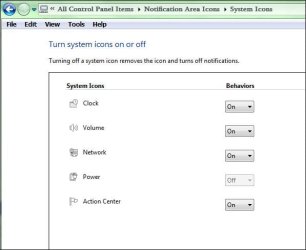
Hi Time, no pun intended, if you click on the small triangle on the task bar, then customise, you'll get this:-

Sound on my comp doesn't work - pls help-rr.jpg

Hope this help.
My System SpecsSystem Spec
03-01-2011   #3


Windows 7 Ultimate 32bit


Yes, that's correct. How is this helping me?

There is no sound at all.
My System SpecsSystem Spec
.


03-01-2011   #4


Win7 H.Prem. 32bit+SP1


Seemingly its not, I take it all your sound cables are connected properly and your speakers are not 'muted'. Then again you could be deaf!!! Name:  AngelPray.gif
Views: 257
Size:  2.4 KB
My System SpecsSystem Spec
03-01-2011   #5


Windows 7 Ultimate 32bit


That's very funny, thx.

I would appreciate some help on this matter.
My System SpecsSystem Spec
03-01-2011   #6


Windows 7 Home Premium 64 bit


Selecting the Windows 7 Volume Mixer, Playback devices, what output device is checked?
My System SpecsSystem Spec
03-01-2011   #7


64-Bit Windows7 Ult-SP1


Quote   Quote: Originally Posted by Time View Post
That's very funny, thx.

I would appreciate some help on this matter.
hiya Time..

are you using the motherboard's onboard sound..?
My System SpecsSystem Spec
03-02-2011   #8


Windows 7 Ultimate 32bit


Quote   Quote: Originally Posted by p5bdkw View Post
Selecting the Windows 7 Volume Mixer, Playback devices, what output device is checked?
Speakers.

Quote   Quote: Originally Posted by BugMeister View Post
Quote   Quote: Originally Posted by Time View Post
That's very funny, thx.

I would appreciate some help on this matter.
hiya Time..

are you using the motherboard's onboard sound..?
Hi, yes.
My System SpecsSystem Spec
03-03-2011   #9


64-Bit Windows7 Ult-SP1


there should be a sound manager somewhere..
where you can set and test the speaker arrangement

this is the Realtek one:


you should have something similar..

- do a search on your system, it may point you in the right direction..
My System SpecsSystem Spec
03-03-2011   #10


Windows 7 Home Premium 64 bit


Check your BIOS and make sure that the Audio Controller [Azalia] is not set to All Disabled or Disabled.
Set the HD Audio mode to HD Audio.

and / or

Try Re-installing your drivers.
Realtek
My System SpecsSystem Spec
Reply

 Sound on my comp doesn't work - pls help problems?


Thread Tools


Similar Threads for: Sound on my comp doesn't work - pls help
Thread Forum
Hard drive from one comp work in another comp like it did before? General Discussion
Sound Occasionally Doesn't Work (Win7x64Ultimate) Sound & Audio
Sound doesn't work in Windows 7 Sound & Audio
Sound doesn't work Sound & Audio


All times are GMT -5. The time now is 10:29 PM.


Windows 7 Forums is an independent web site and has not been authorized,
sponsored, or otherwise approved by Microsoft Corporation.
"Windows 7" and related materials are trademarks of Microsoft Corp.
© Designer Media Ltd
  

1 2 3 4 5 6 7 8 9 10 11 12 13 14 15 16 17 18 19 20 21 22 23 24 25 26 27 28 29 30