
Settings - full range speakers not staying on restart

CovertDeath

New member
hi, i really hope you guys can help me out. i have a Creative Sound Blaster X-Fi Surround 5.1 USB sound card, it works great, i have a logitech X-540 speaker system hooked up to it for surround sound.

my problem is that windows 7 will not keep the settings for "full-range speakers" under configuration. this is very frustrating cause it sounds very dull and i have to change them back to full range after every reboot.

here are some screens of what i'm talking about:

1. right click the speaker and properties everything looks normal
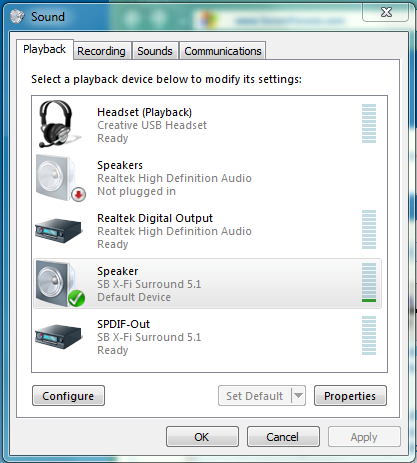
1.png


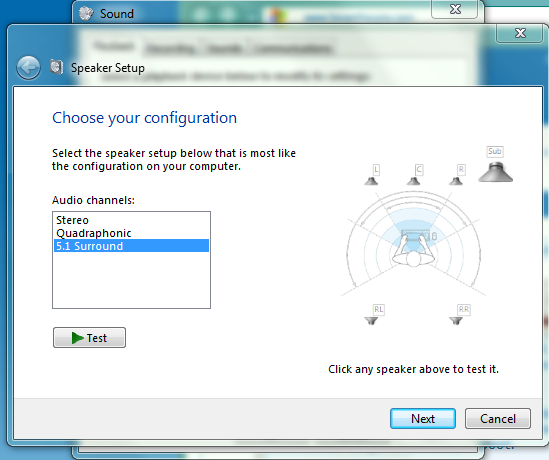
2.clicking configure on my speaker output brings up this... notice the "small" size of the speakers in the setup (this means they aren't setup for full range) but it is correctly set to 5.1 output by default
2.png


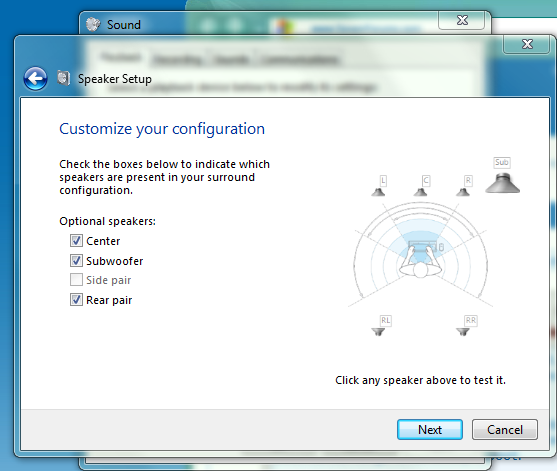
3.the layout is also correctly set every time
3.png


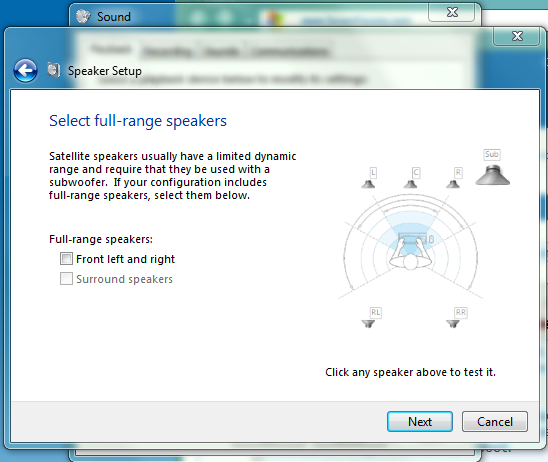
4.here is where the problem is, neither of these check boxes save upon restart and they make a huge difference in sound quality. how do i get this to STAY checked upon restart???
4.png


5. this is what it looks like after i select both check boxes, notice the "bigger" speakers in the setup. this is what i want it to look like as soon as it boots up.
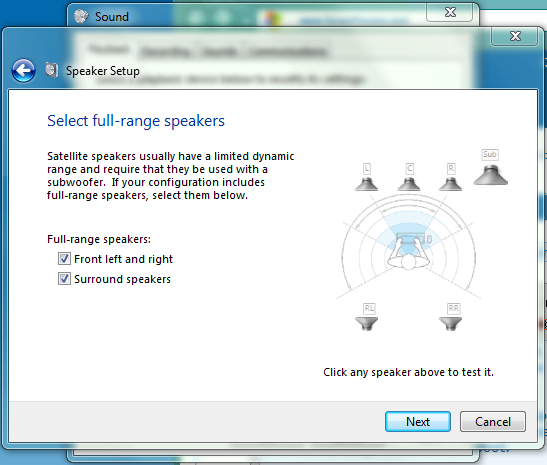
5.png


this problem is very frustrating and i could really use some guidance as to why it is not recognizing my speakers as full range when the card and the speakers support it. once i set it up to full range it works fine for the rest of that session but once i reboot i have to set it back up again... why is it not remembering!!! :/
 

My Computer

Computer Manufacturer/Model Number
Custom Built
OS
Windows 7 Ultimate x64
CPU
AMD Phenom II x4 955 ~4.1Ghz
Motherboard
AsRock Extreme 4 990FX
Memory
G.Skill 8Gb 1600 (2x 4Gb)
Graphics Card(s)
2x GTX 460 EVGA in SLI
Sound Card
Creative Sound Blaster X-Fi Surround 5.1 USB Sound Card
Monitor(s) Displays
ASUS 24 in LED
Screen Resolution
1920x1080
Hard Drives
2x WD 500Gb @7200rpm in RAID 0
SATA3 Force GT 60Gb SSD
120Gb WD HDD (minor backup)
1Tb external nightly back-up of RAID 0 Drive
PSU
Corsair TX750W
Case
Azza mid tower
Cooling
Corsair H80 Liquid cooling
Keyboard
Logitech G110
Mouse
mx518
Internet Speed
15mb/3mb
I also notice you have a RealTek digital output icon, which suggests the Integrated Audio is NOT disabled in the BIOS and if it's not disabled it can conflict with the SoundBlaster and cause problems. I ran across this on the Dell users forum with several users that were having flakey problems and as soon as I had them disable the Integrated audio their problems went away.

Also, Did you install Creative (SoundBlaster) drivers for this or did you allow Windows to install the drivers? (even though they may be Creative). If you are not using Creative drivers, go to the Creative site and download the latest version for your card and Win 7 64 bit.
 

My Computer

Computer type
PC/Desktop
Computer Manufacturer/Model Number
My Own Build
OS
Windows 10 64 bit
CPU
Intel i7 6700K
Motherboard
ASUS ROG Maximus VIII Hero
Memory
16GB Corsair Dominator
Graphics Card(s)
Intel CPU Graphics
Sound Card
RealTek
Monitor(s) Displays
27" Dell S2719dgf
Screen Resolution
2560X1440
Hard Drives
1 TB Samsung 850 EVO SSD for Win 10 Pro
500GB Samsung 850 EVO SSD for Win 10 Insider
2 TB drive for backup
PSU
EVGA Supernova 750G2
Case
BeQuiet Silent Base 600
Cooling
Deepcool Captain 120EX
Keyboard
Microsoft Wireless 2000
Mouse
Microsoft wireless
Internet Speed
100 MB/sec (Cable)
Antivirus
Microsoft Defender and Malwarebytes
Browser
Edge/Firefox
Other Info
Cakewalk (Sonar) by BandLab and Studio One 4.1 Pro recording studio software. MOTU 896Mk3 Hybrid recording interface, Frontier Tranzport wireless control unit, Behringer X-Touch Control Surface.
Five USB connected optical drives for CD Audio production using Nero BurningROM
i will try to disable the RealTek output to see if this works... as for the creative drivers, i'm not sure which is best to use, i DO have them installed but since my device is not the PRO external USB card (its the previous model) they only have a win7 beta driver which i am using... would it be better to use the windows vista drivers since they are not beta?

UPDATE:

okay i disabled all realtek audio devices (mobo sound board) and it is still having the same problem... next step i will download the non beta drivers (looks like the jan 10' non beta driver had 7 support after all :P) ill post back and let you know how this works
 
Last edited:

My Computer

Computer Manufacturer/Model Number
Custom Built
OS
Windows 7 Ultimate x64
CPU
AMD Phenom II x4 955 ~4.1Ghz
Motherboard
AsRock Extreme 4 990FX
Memory
G.Skill 8Gb 1600 (2x 4Gb)
Graphics Card(s)
2x GTX 460 EVGA in SLI
Sound Card
Creative Sound Blaster X-Fi Surround 5.1 USB Sound Card
Monitor(s) Displays
ASUS 24 in LED
Screen Resolution
1920x1080
Hard Drives
2x WD 500Gb @7200rpm in RAID 0
SATA3 Force GT 60Gb SSD
120Gb WD HDD (minor backup)
1Tb external nightly back-up of RAID 0 Drive
PSU
Corsair TX750W
Case
Azza mid tower
Cooling
Corsair H80 Liquid cooling
Keyboard
Logitech G110
Mouse
mx518
Internet Speed
15mb/3mb
same issue still with latest non-beta drivers.... any ideas? is there a config file or SOMETHING i can edit to permanently lock it to full range?
 

My Computer

Computer Manufacturer/Model Number
Custom Built
OS
Windows 7 Ultimate x64
CPU
AMD Phenom II x4 955 ~4.1Ghz
Motherboard
AsRock Extreme 4 990FX
Memory
G.Skill 8Gb 1600 (2x 4Gb)
Graphics Card(s)
2x GTX 460 EVGA in SLI
Sound Card
Creative Sound Blaster X-Fi Surround 5.1 USB Sound Card
Monitor(s) Displays
ASUS 24 in LED
Screen Resolution
1920x1080
Hard Drives
2x WD 500Gb @7200rpm in RAID 0
SATA3 Force GT 60Gb SSD
120Gb WD HDD (minor backup)
1Tb external nightly back-up of RAID 0 Drive
PSU
Corsair TX750W
Case
Azza mid tower
Cooling
Corsair H80 Liquid cooling
Keyboard
Logitech G110
Mouse
mx518
Internet Speed
15mb/3mb
I wonder if this is caused by the USB connection? rather than the SoundBlaster drivers.

Are leaving this plugged in when you boot up or are you plugging it in after Windows is initialized?

In case there is a corruption between the device and Windows, leave the unit connected then go to the Device Manager and Uninstall the SoundBlaster (Right click to highlight the entry then Left click on "Uninstall" - DO NOT check the box to uninstall the drivers), then disconnect the device from the PC, restart the PC and after Windows is initialized connect the unit to the PC and Windows should find and install the device. This resolves many flakey problems with USB connected devices. No guarantee that it will fix yours but worth a try.
 

My Computer

Computer type
PC/Desktop
Computer Manufacturer/Model Number
My Own Build
OS
Windows 10 64 bit
CPU
Intel i7 6700K
Motherboard
ASUS ROG Maximus VIII Hero
Memory
16GB Corsair Dominator
Graphics Card(s)
Intel CPU Graphics
Sound Card
RealTek
Monitor(s) Displays
27" Dell S2719dgf
Screen Resolution
2560X1440
Hard Drives
1 TB Samsung 850 EVO SSD for Win 10 Pro
500GB Samsung 850 EVO SSD for Win 10 Insider
2 TB drive for backup
PSU
EVGA Supernova 750G2
Case
BeQuiet Silent Base 600
Cooling
Deepcool Captain 120EX
Keyboard
Microsoft Wireless 2000
Mouse
Microsoft wireless
Internet Speed
100 MB/sec (Cable)
Antivirus
Microsoft Defender and Malwarebytes
Browser
Edge/Firefox
Other Info
Cakewalk (Sonar) by BandLab and Studio One 4.1 Pro recording studio software. MOTU 896Mk3 Hybrid recording interface, Frontier Tranzport wireless control unit, Behringer X-Touch Control Surface.
Five USB connected optical drives for CD Audio production using Nero BurningROM
this unfortunately i have tried :/ i just don't see why it won't remember full range speakers... it seems like the oddest thing to just NOT save
 

My Computer

Computer Manufacturer/Model Number
Custom Built
OS
Windows 7 Ultimate x64
CPU
AMD Phenom II x4 955 ~4.1Ghz
Motherboard
AsRock Extreme 4 990FX
Memory
G.Skill 8Gb 1600 (2x 4Gb)
Graphics Card(s)
2x GTX 460 EVGA in SLI
Sound Card
Creative Sound Blaster X-Fi Surround 5.1 USB Sound Card
Monitor(s) Displays
ASUS 24 in LED
Screen Resolution
1920x1080
Hard Drives
2x WD 500Gb @7200rpm in RAID 0
SATA3 Force GT 60Gb SSD
120Gb WD HDD (minor backup)
1Tb external nightly back-up of RAID 0 Drive
PSU
Corsair TX750W
Case
Azza mid tower
Cooling
Corsair H80 Liquid cooling
Keyboard
Logitech G110
Mouse
mx518
Internet Speed
15mb/3mb
This is happening to me with my sound blaster z and hd 598 in 2015. Any solution to this problem yet?
 

My Computer

Computer type
PC/Desktop
Computer Manufacturer/Model Number
Custom Build
OS
Windows 7 64-bit
CPU
i5 3570k
Motherboard
Asrock z77 extreme4
Memory
16gb
Graphics Card(s)
gtx 970
Hard Drives
SSD
Antivirus
eset antivirus 8
Browser
mozilla firefox
I don't think there was ever a resolution, and if it was it wasn't posted. This post is 4 years old, the original user with the problem probably doesn't even visit this site any more.
 

My Computer

Computer type
PC/Desktop
Computer Manufacturer/Model Number
My Own Build
OS
Windows 10 64 bit
CPU
Intel i7 6700K
Motherboard
ASUS ROG Maximus VIII Hero
Memory
16GB Corsair Dominator
Graphics Card(s)
Intel CPU Graphics
Sound Card
RealTek
Monitor(s) Displays
27" Dell S2719dgf
Screen Resolution
2560X1440
Hard Drives
1 TB Samsung 850 EVO SSD for Win 10 Pro
500GB Samsung 850 EVO SSD for Win 10 Insider
2 TB drive for backup
PSU
EVGA Supernova 750G2
Case
BeQuiet Silent Base 600
Cooling
Deepcool Captain 120EX
Keyboard
Microsoft Wireless 2000
Mouse
Microsoft wireless
Internet Speed
100 MB/sec (Cable)
Antivirus
Microsoft Defender and Malwarebytes
Browser
Edge/Firefox
Other Info
Cakewalk (Sonar) by BandLab and Studio One 4.1 Pro recording studio software. MOTU 896Mk3 Hybrid recording interface, Frontier Tranzport wireless control unit, Behringer X-Touch Control Surface.
Five USB connected optical drives for CD Audio production using Nero BurningROM
It's hard to believe there is no way to get the settings to stick. There has got to be a way.
 

My Computer

Computer type
PC/Desktop
Computer Manufacturer/Model Number
Custom Build
OS
Windows 7 64-bit
CPU
i5 3570k
Motherboard
Asrock z77 extreme4
Memory
16gb
Graphics Card(s)
gtx 970
Hard Drives
SSD
Antivirus
eset antivirus 8
Browser
mozilla firefox

My Computer

Computer type
PC/Desktop
Computer Manufacturer/Model Number
Custom Build
OS
Windows 7 Ultimate x64 SP1
CPU
AMD Phenom 2 1090T
Motherboard
Gigabyte GA-890FXA-UD5
Memory
2x8GB Kingston HyperX Fury Black 1600Mhz Unganged
Graphics Card(s)
MSI GTX 970 Gaming 4G
Sound Card
Realtek On-Board HD 7.1 Audio / Logitech G35
Monitor(s) Displays
3xAcer GD245HQ
Screen Resolution
1920x1080
Hard Drives
Samsung 850 Pro 512GB SSD - OS /
WD Caviar Black SATA 3 - 1 TBx2 - Dynamic RAID 0 /
WD Caviar Green SATA 2 - 640GBx2 - Dynamic RAID 0 /
WD Caviar Green SATA 2 - 640GB - Internal Backup /
Seagate Barracude SATA 3 - 3TB - External Backup/ Sync
PSU
HighPower 1000W
Case
Cooler Master HAF 932
Cooling
Noctua NH-D14
Keyboard
Logitech G19
Mouse
Logitech G500
Internet Speed
100/4 Mbit Cable (100GB quota)
Antivirus
ZoneAlarm Extreme Security / MBAM Pro / MBAE Free / SAS Free
Browser
IE 11 - Firefox - Chrome
Other Info
Logitech F710/ G27/ G940/ Z5500 // TrackIR 5 // Nvidia 3D Surround Vision
I figured out the answer. It's the creative software. Whenever it loads it resets it back. All you have to do is disable all creative processes in msconfig. That includes anything in the startup AND services tab.
 

My Computer

Computer type
PC/Desktop
Computer Manufacturer/Model Number
Custom Build
OS
Windows 7 64-bit
CPU
i5 3570k
Motherboard
Asrock z77 extreme4
Memory
16gb
Graphics Card(s)
gtx 970
Hard Drives
SSD
Antivirus
eset antivirus 8
Browser
mozilla firefox
Back
Top