Subliminal
New member
- Local time
- 5:23 PM
- Messages
- 18
Hey folks,
So I'm trying to set up karaoke for a party. I have my computer in the office and lines run to my living room. DVI to the tv and SPDIF to the receiver.
I can listen to music and watch movies and output the sound just fine.
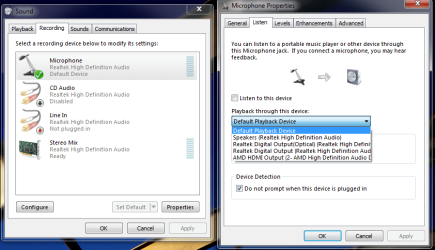
However, the mic still comes through the analog speakers, even when they are disabled.
The only way I can get it to work is if I check 'listen to this device', but as you probably know, that totally lags the sound.
I've updated my drivers and tried about every option I can.
Anyone have any advice?
Thanks!
So I'm trying to set up karaoke for a party. I have my computer in the office and lines run to my living room. DVI to the tv and SPDIF to the receiver.
I can listen to music and watch movies and output the sound just fine.
However, the mic still comes through the analog speakers, even when they are disabled.
The only way I can get it to work is if I check 'listen to this device', but as you probably know, that totally lags the sound.
I've updated my drivers and tried about every option I can.
Anyone have any advice?
Thanks!
My Computer
At a glance
Seven
- OS
- Seven