| Windows 7: No audio output device installed |
23 Apr 2011
|
#1 | | |
No audio output device installed Hi all,
In the taskbar I have a volume-icon with a red cross on it. When I go to this icon, "No audio output device installed" appears.
I have a Intel Corporation DQ965GF mainboard with onboard sound.
When I go to Control panel -> sound, everything is gray and not clickable.
In Device Manager, I found "file as volume driver", "volume manager" and "high definition audio controller", under system devices. Nothing else...
I searched on the intel website but did not find a solution or drivers...
Can someone help me, because atm I have no sound. | My System Specs |
| |
23 Apr 2011
|
#2 | | Windows 7 Home Premium 64 bit Illinois |
Make sure that in the BIOS, that the on board sound is turned on. | My System Specs | | System Manufacturer/Model Number Self-built OS Windows 7 Home Premium 64 bit CPU Intel Core i7-3770 Motherboard MSI Z77A-G45 Memory G.SKILL 8GB (2 x 4GB) DDR3 F3-10666CL9D-8GBNT Graphics Card Sapphire ATI Radeon HD 6670 Sound Card On-Board Realtek Monitor(s) Displays Samsung SyncMaster P2370HD, Dell 1703FPT Screen Resolution 1920 x 1080, 1280 x 1024 Keyboard Logitech K270 Mouse Logitech M705 PSU SeaSonic M12II SS-500GM Case Lian Li PC-9F Cooling Zalman CNPS9900ALED Hard Drives Samsung HD103SJ Internet Speed 16 Mbps Other Info Bose Companion 2 Multimedia Speakers |
24 Apr 2011
|
#3 | | |
Hi,
Bios settings are:
Audio: Enabled
High Definition Front Panel Audio: Enabled | My System Specs | | |
24 Apr 2011
|
#4 | | Win7 Enterprise, Win7 x86 (Ult 7600), Win7 x64 Ult 7600, TechNet RTM on AMD x64 (2.8Ghz) SomeWhere in the HOT Arizona Desert ! |
Welcome babbelut
Could you give us a screen snip of Device Manager & Sound expanded ? | My System Specs | | Computer type PC/Desktop System Manufacturer/Model Number Built them myself, Science Experiments ! OS Win7 Enterprise, Win7 x86 (Ult 7600), Win7 x64 Ult 7600, TechNet RTM on AMD x64 (2.8Ghz) CPU AMD fx8350 4ghz, AMD-32 2400mhz, AMD-64 3200mhz, AMDx64 2.8G Motherboard SIS 755, ECS-K8M890M-M (Ult 7600), GigaByte & others Memory 2gb, 4gb on the Ult 7600, 4gb on Technet RTM, 32gb on FX8350 Graphics Card Draw my own Graphics, several nVidia cards Sound Card on motherboard Monitor(s) Displays 19" flat scr, 28" I-Inc widescr,22" Emprex Widescr, 23" Acer Screen Resolution 1280 x 1024, 1440 x 900, 1920 x 1080 Keyboard Compaq & Dell recycled from GoodWill Mouse Made in China Optical Wired Mouse PSU 430w, 550w, 600w, 700, 800, etc Case All Generic Full Towers Cooling Open Air & a few fans, some w/ colored LEDs Hard Drives 6 pata Ide HD's & 2 Sata HD's
added 80gb external on Ult 7600 computer,
numerous extra 1tb, 2TB, 3Tb SATA HD's
A collection of ext HD Docks w/ HDs Internet Speed Fast Cable InterNet Antivirus AVG Free on 24 different Desktops, NO Problems! Browser IE 8 is preferred, but use FireFox sometimes Other Info Linksys Routers, switches, & Hubs
Too Many USB Flash Drives to count, Biggest is 64GB !
Eight computers in my home network.
Sixteen computers at my business network.
Linked via TeamViewer !
Lots of old used spare computer parts everywhere! |
24 Apr 2011
|
#5 | | |
I can't because in device manager there is no "sound, video and games controllers" | My System Specs | | |
24 Apr 2011
|
#6 | | Windows 7 Home Premium 64 bit Illinois |
It could be that the audio driver is no longer installed.
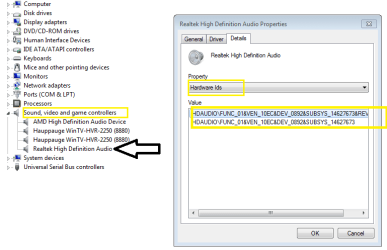
Right click on "high definition audio controller" > Properties > Details > Property and select Hardware Ids.
Post a picture using the snipping tool.
Example Screenshots and Files - Upload and Post in Seven Forums | My System Specs | | System Manufacturer/Model Number Self-built OS Windows 7 Home Premium 64 bit CPU Intel Core i7-3770 Motherboard MSI Z77A-G45 Memory G.SKILL 8GB (2 x 4GB) DDR3 F3-10666CL9D-8GBNT Graphics Card Sapphire ATI Radeon HD 6670 Sound Card On-Board Realtek Monitor(s) Displays Samsung SyncMaster P2370HD, Dell 1703FPT Screen Resolution 1920 x 1080, 1280 x 1024 Keyboard Logitech K270 Mouse Logitech M705 PSU SeaSonic M12II SS-500GM Case Lian Li PC-9F Cooling Zalman CNPS9900ALED Hard Drives Samsung HD103SJ Internet Speed 16 Mbps Other Info Bose Companion 2 Multimedia Speakers |
24 Apr 2011
|
#8 | | Windows 7 Home Premium 64 bit Illinois |
First, re-install your chipset drivers from here. http://downloadcenter.intel.com/Deta...&DownloadType=
Post a snip of your device manager (Sound, video....items) after installing. | My System Specs | | System Manufacturer/Model Number Self-built OS Windows 7 Home Premium 64 bit CPU Intel Core i7-3770 Motherboard MSI Z77A-G45 Memory G.SKILL 8GB (2 x 4GB) DDR3 F3-10666CL9D-8GBNT Graphics Card Sapphire ATI Radeon HD 6670 Sound Card On-Board Realtek Monitor(s) Displays Samsung SyncMaster P2370HD, Dell 1703FPT Screen Resolution 1920 x 1080, 1280 x 1024 Keyboard Logitech K270 Mouse Logitech M705 PSU SeaSonic M12II SS-500GM Case Lian Li PC-9F Cooling Zalman CNPS9900ALED Hard Drives Samsung HD103SJ Internet Speed 16 Mbps Other Info Bose Companion 2 Multimedia Speakers |
24 Apr 2011
|
#10 | | Windows 7 Home Premium 64 bit Illinois |
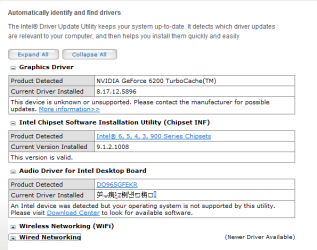
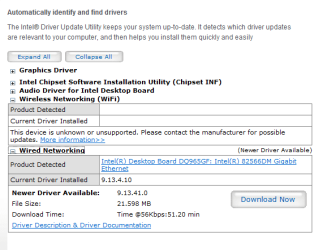
Try this
It may work best with IE Intel® Driver Update Utility | My System Specs | | System Manufacturer/Model Number Self-built OS Windows 7 Home Premium 64 bit CPU Intel Core i7-3770 Motherboard MSI Z77A-G45 Memory G.SKILL 8GB (2 x 4GB) DDR3 F3-10666CL9D-8GBNT Graphics Card Sapphire ATI Radeon HD 6670 Sound Card On-Board Realtek Monitor(s) Displays Samsung SyncMaster P2370HD, Dell 1703FPT Screen Resolution 1920 x 1080, 1280 x 1024 Keyboard Logitech K270 Mouse Logitech M705 PSU SeaSonic M12II SS-500GM Case Lian Li PC-9F Cooling Zalman CNPS9900ALED Hard Drives Samsung HD103SJ Internet Speed 16 Mbps Other Info Bose Companion 2 Multimedia Speakers No audio output device installed problems? All times are GMT -5. The time now is 08:49 AM. | |