Windows 7 Forums


Windows 7: headphones mode audio problem

01 May 2011  
slovakftw

windows7 64bit
1 posts
 
 
headphones mode audio problem

Recently upgraded from xp and i feel like an idiot for upgrading. so i am using an creative xfi fatality sound card and there is no plug to connect to front audio ports. I am trying to get my headphones to work under headphone mode and not speakers.
now my problem is when i go to playback options in windows7 i am given speakers which is enable, and headphones which are disabled. the headphone mode under advanced tab only has the front jacks under jack information. i tried going to advance on speakers but i am only given modes like stereo 5.1 and 7.1.
so basicly i want the ability to plug in my headphone to my sound card in the back n get the nice directional sound i had in XP.

My System SpecsSystem Spec

01 May 2011  
stormy13

Win 7 Ultimate x64
6,700 posts
Etobicoke, Ontario


slovakftw, welcome to the Seven Forums.

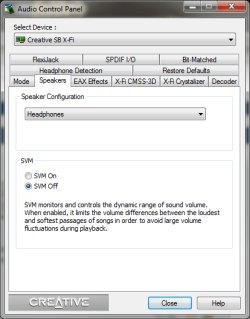
You can't make the changes you want in the Windows audio properties, it has to be done in the X-Fi controls. If all you installed for the card was the drivers you should have this,

headphones mode audio problem-acp.png

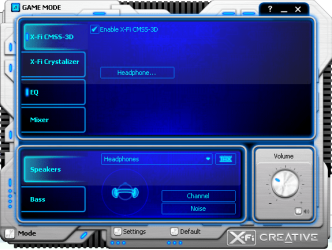
where you can set the card to headphone mode, and then enable or disabled CMSS3D, which is what you are looking for. Alternatively if you didn't install it you can find the Console Launcher (which has all the settings as the above control panel and a few more),

headphones mode audio problem-conslauncher.png

You can find the latest version here,

Creative Worldwide Support > Sound Blaster

Locate your card, then click on "beta application" and download the Console Launcher. The beta is a fair bit newer than the last official release and works just fine (or at least I haven't come across any bugs in it on mine).
My System SpecsSystem Spec
Reply

 headphones mode audio problem problems?


Thread Tools


Similar help and support threads for: headphones mode audio problem
Thread Forum
Strange problem with audio playback devices. Headphones not showing up Sound & Audio
HP + IDT HD Audio = Selective Headphones Sound & Audio
PC vs. Laptop - Different audio in headphones Sound & Audio
Headphones problems/audio Sound & Audio
Bluetooth audio headphones problem - constant stopping Drivers


All times are GMT -5. The time now is 02:42 AM.


Windows 7 Forums is an independent web site and has not been authorized,
sponsored, or otherwise approved by Microsoft Corporation.
"Windows 7" and related materials are trademarks of Microsoft Corp.
© Designer Media Ltd