| Windows 7: No Sound from Speakers with Onboard Audio |
08 May 2011
|
#1 | | Windows 7 Ultimate x64 (6.1, Build 7601) |
No Sound from Speakers with Onboard Audio I recently put together a new system with a fresh installation of Windows 7 64 bit. I cannot get sound to come from my speakers no matter what I have tried. I have trolled through all the forums I could find on the subject, and tried every possible solution, to no avail. I am hoping I simply missed something somewhere along the way, so I will list my specs, as well as everything I have tried thus far.
I am going to attempt to provide as much information as possible, but if I miss something you need to get the full picture, please let me know.
Specs first: - MSI 870A-G54 motherboard (with onboard audio - Chipset integrated by Realtek® ALC892)
- AMD Athlon II X2 255 CPU - 3.1 Ghz Dual Core
- Corsair 8 Gb Ram - DDR3 1333 MHz
- Windows 7 64 bit (also tried to get this working on Vista 32 bit installation on same machine, with same results)
- XFX ATI Radeon HD 5550 Graphics Card
- Seagate 1 TB SATA 300 HDD
- Antec 500W PSU
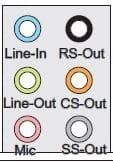
- Creative 5.1 surround speakers - The jacks are the usual black, orange and green, for Center/Sub, Rear, and Left/Right
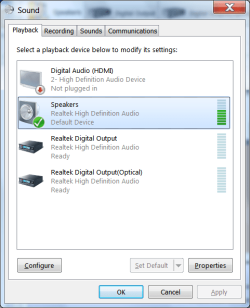
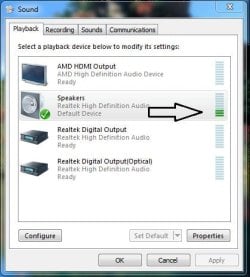
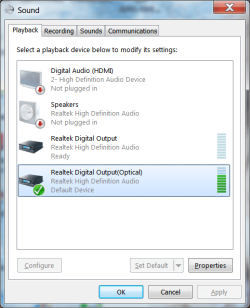
Now, here are the steps I have followed: Installed Win 7, and soon discovered sound was not configured properly. The system kept picking the optical output as the default device, even though there was no optical device connected, and it also showed that the speakers were not plugged in, even though they were, as in the pic below
- After digging through various forums, got advice to click on the Connector Settings (the icon that looks like a folder) in the Realtek Audio Manager, and selecting 'Disable Front Panel Jack Detection', as in the pic below
- This enabled the speakers, but even though the system showed them as working, there was still no sound coming from them. This is shown below
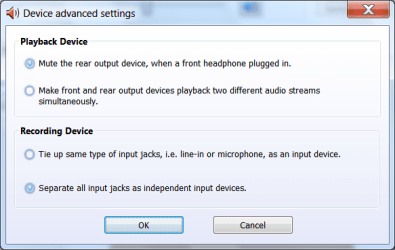
- I played with various settings in the 'Device Advanced Settings Tab', but none of them enabled the speakers to function, and sometimes actually disabled the speakers. The settings I have stuck with are shown below
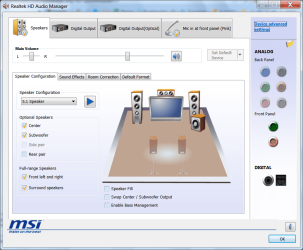
- I did notice that in the Audio manager, the rear panel jacks appear to be faded out, as opposed to the front jack images. This strikes me as odd considering the settings, and perhaps is related to the speakers not actually playing sound, even though they are supposedly getting a signal. The faded rear input images are shown below
I tried running a virtual version of XP, as well as a separate installation of Windows Vista, 32 bit. I could not get any sound from the speakers in any configuration. I have also tried installing the drivers from the link on these forums, as an alternate, but they did not resolve the issue.
I am at my wit's end on this one. I know these speakers work, and have tested them on other systems successfully. Is this onboard audio simply dead, or am I missing something else? If anyone can offer a new solution to try, I am all ears.
Lane | My System Specs |
| System Manufacturer/Model Number System Build OS Windows 7 Ultimate x64 (6.1, Build 7601) CPU Athlon II X2 255 (Dual Core @3.1Ghz) Motherboard MSI 870A-G54 Memory Corsair 8 Gb - 1333 MHz Graphics Card XFX ATI Radeon HD 5550 (1 GB) Sound Card Onboard Sound - Realtek HD Audio Monitor(s) Displays Dell E173FP Screen Resolution 1280 x 1024 Keyboard Dell Standard Keyboard Mouse 5 button optical mouse PSU Antec True Power 500W Cooling Stock Cooling Fan plus 3 case fans Hard Drives Seagate 1 TB SATA 300 7200 RPM
Western Digital 250GB SATA 300 7200 RPM
Maxtor 200 GB IDE Drive Internet Speed 2.5 Mbps Down / .39 Mbps Up Other Info This is a self-build |
08 May 2011
|
#2 | | Windows 7 Home Premium 64 bit Illinois |
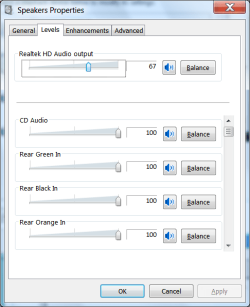
One thing that comes to mind, is that the levels may need to be adjusted.
Go to the Windows Sound manager and select Speakers > Properties > Levels
Look for the "Front" and other necessary levels.......make sure they're not at zero. | My System Specs | | System Manufacturer/Model Number Self-built OS Windows 7 Home Premium 64 bit CPU Intel Core i7-3770 Motherboard MSI Z77A-G45 Memory G.SKILL 8GB (2 x 4GB) DDR3 F3-10666CL9D-8GBNT Graphics Card Sapphire ATI Radeon HD 6670 Sound Card On-Board Realtek Monitor(s) Displays Samsung SyncMaster P2370HD, Dell 1703FPT Screen Resolution 1920 x 1080, 1280 x 1024 Keyboard Logitech K270 Mouse Logitech M705 PSU SeaSonic M12II SS-500GM Case Lian Li PC-9F Cooling Zalman CNPS9900ALED Hard Drives Samsung HD103SJ Internet Speed 16 Mbps Other Info Bose Companion 2 Multimedia Speakers |
08 May 2011
|
#3 | | Windows 7 Ultimate x64 (6.1, Build 7601) |
Thanks for the suggestion, p5bdkw, but I have already done that. I even tried setting the levels for up for things like 'Rear Green In', etc. And to be clear, I tried various settings of these levels, both at zero and 100, to no avail. By all means, keep the suggestions coming, though. I am open to trying just about anything here, because I really don't want to have to go through the hassle of removing this mobo and replacing it if there is an actual solution.
Lane | My System Specs | | System Manufacturer/Model Number System Build OS Windows 7 Ultimate x64 (6.1, Build 7601) CPU Athlon II X2 255 (Dual Core @3.1Ghz) Motherboard MSI 870A-G54 Memory Corsair 8 Gb - 1333 MHz Graphics Card XFX ATI Radeon HD 5550 (1 GB) Sound Card Onboard Sound - Realtek HD Audio Monitor(s) Displays Dell E173FP Screen Resolution 1280 x 1024 Keyboard Dell Standard Keyboard Mouse 5 button optical mouse PSU Antec True Power 500W Cooling Stock Cooling Fan plus 3 case fans Hard Drives Seagate 1 TB SATA 300 7200 RPM
Western Digital 250GB SATA 300 7200 RPM
Maxtor 200 GB IDE Drive Internet Speed 2.5 Mbps Down / .39 Mbps Up Other Info This is a self-build |
08 May 2011
|
#4 | | Windows 7 Home Premium 64 bit Illinois |
Lane
You probably already checked, but are your connections correct? | My System Specs | | System Manufacturer/Model Number Self-built OS Windows 7 Home Premium 64 bit CPU Intel Core i7-3770 Motherboard MSI Z77A-G45 Memory G.SKILL 8GB (2 x 4GB) DDR3 F3-10666CL9D-8GBNT Graphics Card Sapphire ATI Radeon HD 6670 Sound Card On-Board Realtek Monitor(s) Displays Samsung SyncMaster P2370HD, Dell 1703FPT Screen Resolution 1920 x 1080, 1280 x 1024 Keyboard Logitech K270 Mouse Logitech M705 PSU SeaSonic M12II SS-500GM Case Lian Li PC-9F Cooling Zalman CNPS9900ALED Hard Drives Samsung HD103SJ Internet Speed 16 Mbps Other Info Bose Companion 2 Multimedia Speakers |
08 May 2011
|
#5 | | Windows 7 Ultimate x64 (6.1, Build 7601) |
I have confirmed the color coding according to the motherboard manual, and they are, indeed, correct. Just to be sure, though, I tried each plug in each rear panel jack. Still no sound. I can tell there is some kind of signal going to the speakers, though, because I can hear that characteristic 'buzz' when plugging and unplugging the input jacks. | My System Specs | | System Manufacturer/Model Number System Build OS Windows 7 Ultimate x64 (6.1, Build 7601) CPU Athlon II X2 255 (Dual Core @3.1Ghz) Motherboard MSI 870A-G54 Memory Corsair 8 Gb - 1333 MHz Graphics Card XFX ATI Radeon HD 5550 (1 GB) Sound Card Onboard Sound - Realtek HD Audio Monitor(s) Displays Dell E173FP Screen Resolution 1280 x 1024 Keyboard Dell Standard Keyboard Mouse 5 button optical mouse PSU Antec True Power 500W Cooling Stock Cooling Fan plus 3 case fans Hard Drives Seagate 1 TB SATA 300 7200 RPM
Western Digital 250GB SATA 300 7200 RPM
Maxtor 200 GB IDE Drive Internet Speed 2.5 Mbps Down / .39 Mbps Up Other Info This is a self-build |
08 May 2011
|
#6 | | Windows Home Premium 64bit St. Thomas, Ontario |
Hi lane and welcome to the Forum. I am absolutely sure you have already checked this - but.
In BIOS, under Integrated Peripherals. HD Audio Controller. Is it enabled?
Regards
JohnnyA | My System Specs | | System Manufacturer/Model Number Toshiba C650 OS Windows Home Premium 64bit CPU T61-- 2.0ghz Motherboard Toshiba Memory 4 GB Graphics Card On board Sound Card On board Monitor(s) Displays 15.6" Hard Drives 500 GB |
08 May 2011
|
#7 | | Windows 7 Ultimate x64 (6.1, Build 7601) |
Thanks for the welcome, Johnnya.
Yes, I have made sure it was enabled in the BIOS.
In addition, I have flashed the BIOS with the latest version available from the manufacturers website. Keep the suggestions coming, by all means. | My System Specs | | System Manufacturer/Model Number System Build OS Windows 7 Ultimate x64 (6.1, Build 7601) CPU Athlon II X2 255 (Dual Core @3.1Ghz) Motherboard MSI 870A-G54 Memory Corsair 8 Gb - 1333 MHz Graphics Card XFX ATI Radeon HD 5550 (1 GB) Sound Card Onboard Sound - Realtek HD Audio Monitor(s) Displays Dell E173FP Screen Resolution 1280 x 1024 Keyboard Dell Standard Keyboard Mouse 5 button optical mouse PSU Antec True Power 500W Cooling Stock Cooling Fan plus 3 case fans Hard Drives Seagate 1 TB SATA 300 7200 RPM
Western Digital 250GB SATA 300 7200 RPM
Maxtor 200 GB IDE Drive Internet Speed 2.5 Mbps Down / .39 Mbps Up Other Info This is a self-build |
09 May 2011
|
#8 | | Windows 7 Ultimate 32 Bit, Windows Developer Preview, Linux Mint 9 Gnome 32 Bit Philippines |
Have you tried adjusting the sound quality to the lowest sound quality which is CD quality? Try adjusting it to CD quality and see if it does anything. | My System Specs | | System Manufacturer/Model Number Custom Built OS Windows 7 Ultimate 32 Bit, Windows Developer Preview, Linux Mint 9 Gnome 32 Bit CPU Intel Pentium Dual CPU E2180@2GHz Motherboard Elitegroup 671T-M3 Graphics Card NVIDIA GeForce 7200 GS Monitor(s) Displays AOC TFT1560 15" LCD Monitor Screen Resolution 1024x768 Keyboard Logitech USB Keyboard |
09 May 2011
|
#9 | | Windows 7 Ultimate x64 (6.1, Build 7601) |
That was something I hadn't tried, so thanks for the suggestion. Unfortunately, it had no effect on the lack of sound emanating from my speakers. | My System Specs | | System Manufacturer/Model Number System Build OS Windows 7 Ultimate x64 (6.1, Build 7601) CPU Athlon II X2 255 (Dual Core @3.1Ghz) Motherboard MSI 870A-G54 Memory Corsair 8 Gb - 1333 MHz Graphics Card XFX ATI Radeon HD 5550 (1 GB) Sound Card Onboard Sound - Realtek HD Audio Monitor(s) Displays Dell E173FP Screen Resolution 1280 x 1024 Keyboard Dell Standard Keyboard Mouse 5 button optical mouse PSU Antec True Power 500W Cooling Stock Cooling Fan plus 3 case fans Hard Drives Seagate 1 TB SATA 300 7200 RPM
Western Digital 250GB SATA 300 7200 RPM
Maxtor 200 GB IDE Drive Internet Speed 2.5 Mbps Down / .39 Mbps Up Other Info This is a self-build |
09 May 2011
|
#10 | | Windows 7 Ultimate 32 Bit, Windows Developer Preview, Linux Mint 9 Gnome 32 Bit Philippines |
Was your sound working before?? And was it working before you updated the BIOS?? I think, there's a possibility this is a problem with your hardware. So my advise would to to open your system unit and clean your motherboard if its dusty cause dust can render hardware functions or have a technician inspect your motherboard for any physical damages or problems. | My System Specs | | System Manufacturer/Model Number Custom Built OS Windows 7 Ultimate 32 Bit, Windows Developer Preview, Linux Mint 9 Gnome 32 Bit CPU Intel Pentium Dual CPU E2180@2GHz Motherboard Elitegroup 671T-M3 Graphics Card NVIDIA GeForce 7200 GS Monitor(s) Displays AOC TFT1560 15" LCD Monitor Screen Resolution 1024x768 Keyboard Logitech USB Keyboard No Sound from Speakers with Onboard Audio problems? All times are GMT -5. The time now is 12:06 PM. | |