
Hey guys,
I installed the Hyper 212+ this weekend, but after installation, the audio stopped working. Thinking that this was a hardware issue, I went back and replugged some of the cables back into the mobo to make sure they were securely in there. No luck.
My setup (other specs in profile):
- Phenom x4 955
- Radeon 5850
- ASRock 870 Extreme3
Sound appears to work (green bars move, Windows doesn't detect any problems), but there's no output. Here's what the Sound control panel looks like:
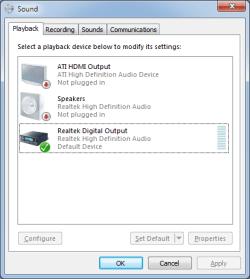
(Note that I do indeed have speakers/headphones plugged in.)
I also went into the Realtek HD Audio Manager to see what's going on and it lists only Digital Output. None of the analog jacks appear to be active in the Manager window, unless I disable front panel jack audio detection. Here's what it looks like with front panel detection enabled:
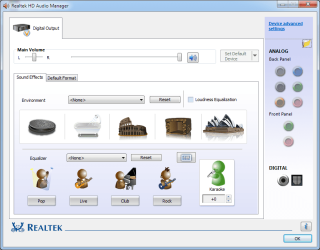
And with front detection disabled:
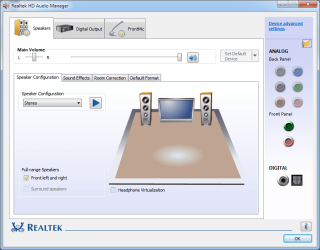
I've done a couple of things so far:
- Tried headphones and speakers in front and rear audio jacks.
- Even tried microphone in front mic-in jack - didn't work. A USB (connected to front panel) mic did work, however.
- Restored BIOS to factory defaults.
- Disabled/re-enabled onboard audio in BIOS.
- Installed/uninstalled/reinstalled audio and video drivers.
I've also messed around with the Realtek HD Audio Manager itself:
- I disabled front panel jack audio detection. This added two additional in/ouputs: Speakers and FrontMic. Neither work.
- Changed default device to speakers. Nada.
- Tried enabling "Make front and rear output devices playback two different audio streams simultaneously."
I even looked at the registry after checking out the Changing Jacks stickied thread in this forum, but not all the jacks are listed (?):
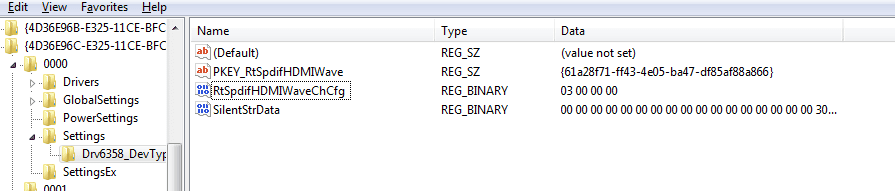
So anyway, I have no clue what the problem is other than maybe it's outputting the sound digitally via SDPIF for some reason and I can't figure out how to get Windows/Realtek to detect the analog output jacks instead.
Help anyone?
I installed the Hyper 212+ this weekend, but after installation, the audio stopped working. Thinking that this was a hardware issue, I went back and replugged some of the cables back into the mobo to make sure they were securely in there. No luck.
My setup (other specs in profile):
- Phenom x4 955
- Radeon 5850
- ASRock 870 Extreme3
Sound appears to work (green bars move, Windows doesn't detect any problems), but there's no output. Here's what the Sound control panel looks like:
(Note that I do indeed have speakers/headphones plugged in.)
I also went into the Realtek HD Audio Manager to see what's going on and it lists only Digital Output. None of the analog jacks appear to be active in the Manager window, unless I disable front panel jack audio detection. Here's what it looks like with front panel detection enabled:
And with front detection disabled:
I've done a couple of things so far:
- Tried headphones and speakers in front and rear audio jacks.
- Even tried microphone in front mic-in jack - didn't work. A USB (connected to front panel) mic did work, however.
- Restored BIOS to factory defaults.
- Disabled/re-enabled onboard audio in BIOS.
- Installed/uninstalled/reinstalled audio and video drivers.
I've also messed around with the Realtek HD Audio Manager itself:
- I disabled front panel jack audio detection. This added two additional in/ouputs: Speakers and FrontMic. Neither work.
- Changed default device to speakers. Nada.
- Tried enabling "Make front and rear output devices playback two different audio streams simultaneously."
I even looked at the registry after checking out the Changing Jacks stickied thread in this forum, but not all the jacks are listed (?):
So anyway, I have no clue what the problem is other than maybe it's outputting the sound digitally via SDPIF for some reason and I can't figure out how to get Windows/Realtek to detect the analog output jacks instead.
Help anyone?
My Computer
At a glance
Windows 7 Home Premium 64 bitAMD Phenom II X4 955G.SKILL Ripjaws Series 4GB (2 x 2GB) 240-Pin ...PowerColor AX5850 Radeon HD 5850 1GB
- OS
- Windows 7 Home Premium 64 bit
- CPU
- AMD Phenom II X4 955
- Motherboard
- ASRock 870 Extreme3
- Memory
- G.SKILL Ripjaws Series 4GB (2 x 2GB) 240-Pin DDR3 SDRAM DDR3
- Graphics Card(s)
- PowerColor AX5850 Radeon HD 5850 1GB
- Sound Card
- onboard
- Monitor(s) Displays
- ASUS VH236H Black 23" Full HD Widescreen LCD Monitor
- Hard Drives
- SAMSUNG Spinpoint F3 1TB 7200 RPM SATA 3.0Gb/s
- Case
- Rosewill Challenger
- Cooling
- COOLER MASTER Hyper 212 Plus


